Meeting notes capture screenshots of presentations
1 featureThis release1 featureNew capabilitiesAI-tallied from the release notes
From the original release noteView original ↗
We’re improving the ‘Take notes for me’ feature in Google Meet by giving you the ability to automatically capture and include screenshots of presented content directly in the meeting notes document.
While meeting transcripts capture what is said, they often miss critical visual context, like content that was presented. Without these visuals, notes can lack necessary detail or even be confusing if a speaker refers to a chart or diagram without describing it out loud.

Getting started
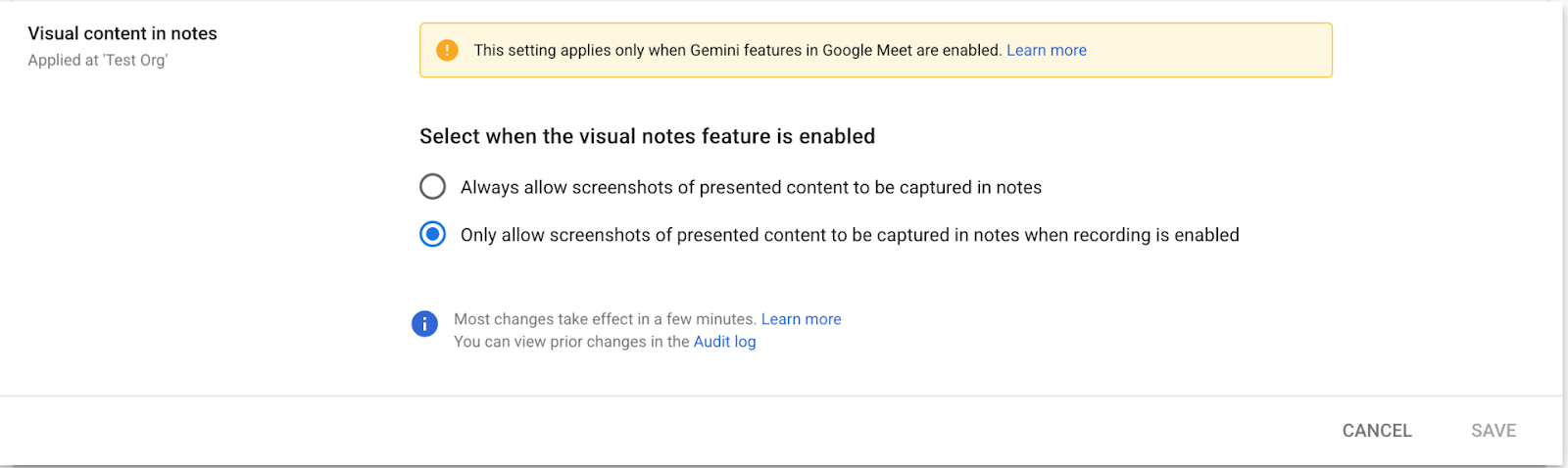
- Admins: You can configure this feature in the Admin console to either always allow screenshots of presented content or only allow them when a recording is enabled. Visit the Help Center to learn more.
- End users: When you begin presenting in a meeting where notes are being taken, you will see a notification alerting you that Gemini may capture screenshots of your presentation to add to the notes. This feature can be disabled from the notes panel.
Rollout pace
- Rapid Release and Scheduled Release domains: Gradual rollout (up to 15 days for feature visibility) starting on August 3, 2026
Availability
- Business: Business Standard and Plus
- Enterprise: Enterprise Standard and Plus
- Education: Google AI Pro for Education
Resources
- Google Workspace Admin Help: Let Google Meet AI take notes for my users
- Google Meet Help: Take notes for me in Google Meet (Optional customizable settings)
Fetched August 3, 2026