2025 recap: What's new in Zendesk
Rollup
Click Follow in the What's New section to be notified each month when the What's New is published.
In case you missed it, here's a recap of what was new in Zendesk in 2025:
- Support
- Copilot
- AI agents - Essential
- AI agents - Advanced
- Admin Center
- Accounts and billing
- Security
- Objects and business rules
- Messaging
- Knowledge
- Voice
- Analytics
- Quality assurance
- Workforce management
- Apps and integrations
Support
Key updates
-
Agents can pick between dark mode or light mode in the Support ticketing system. When activated in Admin Center, dark mode in Support provides agents with the flexibility to choose the interface that best suits their needs. See Using dark mode.

-
Approval requests for tickets is now available. With approvals, your team can send approval requests to other team members or registered end users directly from the Agent Workspace. Approvals is designed to work well for customer service and employee service scenarios. See Understanding approvals and how they work.

-
Agents can identify when outbound email delivery failures have occurred. Warning messages provide information about which recipient didn't receive the email and why, including SMTP error codes to help troubleshoot the problem. See Understanding email delivery failures in the Zendesk Agent Workspace.

-
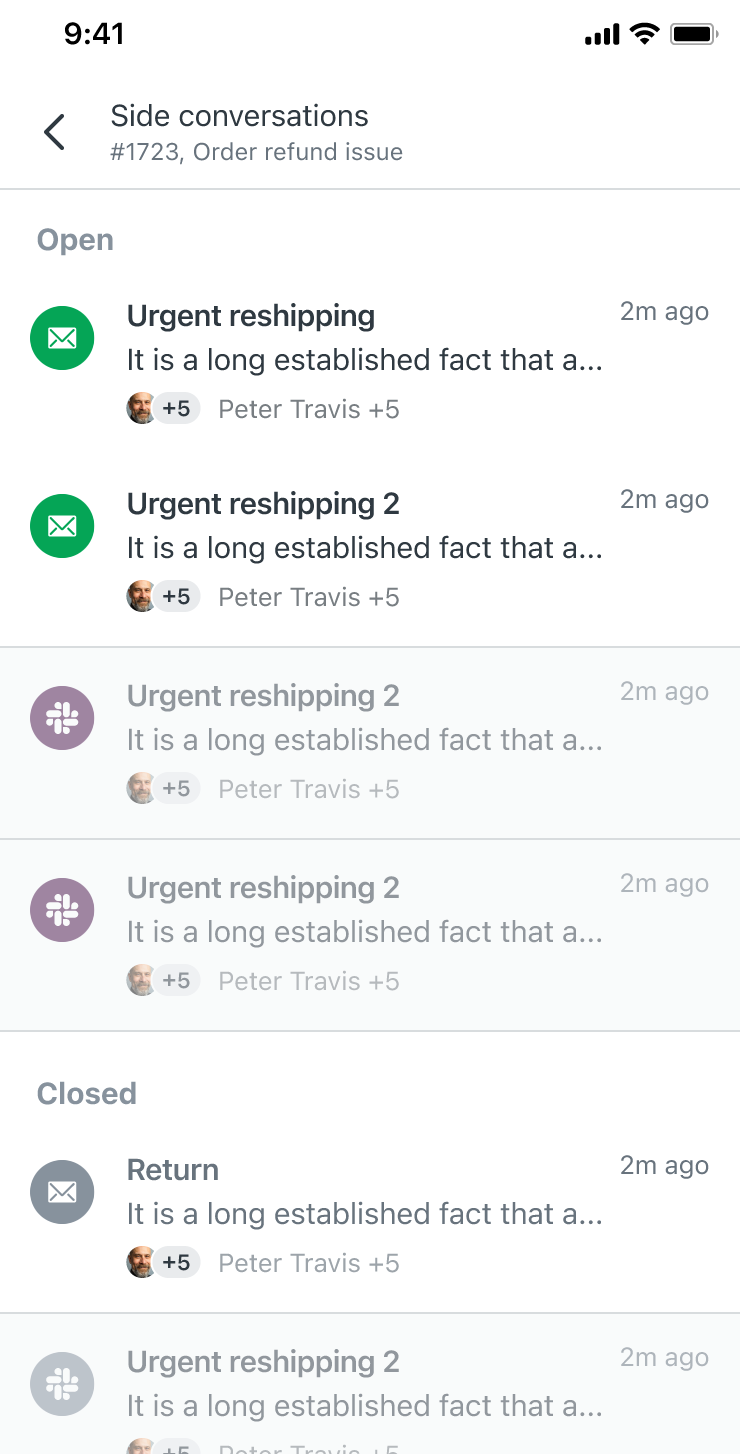
Side conversations are now available in the Support mobile app. Agents can view and reply to email-based side conversations on a ticket in the iOS and Android mobile apps, helping your team collaborate with anyone - teammates, other departments or external partners - without ever leaving the ticket. See Working with tickets in the Support mobile app.
Additional enhancements
- Zendesk generates ticket events when ticket CCs are modified during a user merge. This change provides greater visibility into user merge-related activity. See Viewing all events for ticket updates.
- The Advanced Data Privacy and Protection add-on can now detect PII in 20 additional languages. See Zendesk language support by product.
- New configuration settings for side conversations give admins greater control over ticket conversation performance. New settings include: Only show agent email addresses, Allow dynamic subdomain detection, and Use signature in side conversations. Previously, these options were available only with assistance from Zendesk Customer Support. See Activating and configuring side conversations.
- A new granular permission allows agents in custom roles to create and edit end users without the ability to delete them, enhancing security and operational control by decoupling these actions. See Creating custom roles and assigning agents.
- Enhanced dynamic filtering for lookup relationship fields makes it possible to build filter data availability in all lookup relationship fields, across all objects. Additionally, filtering lookup relationship fields now supports the operators matches and does not match, making it easier to include and exclude data. See Using lookup relationship fields.
- You can import up to 300 recent emails when adding support addresses using the Microsoft Exchange connector or Gmail connector, simplifying the onboarding process. Previously, import was not available on the Exchange connector.
- Sender authentication has been enhanced, allowing you to select the level of protection you need for different inbound email pathways. See Turning on sender authentication.
- Rich text formatting (RTF) options are available for web and mobile messaging channels. Previously, RTF options were limited to email channels and internal notes. See Rich text formatting options reference.
- Agent and end-user approvers can now add and view comments on approval requests assigned to them. Approval request comments allow the approval requests to be a single-source of information related to the request, preventing the need to fracture conversations about pending approval requests across other channels. See Responding to approval requests as an agent and Responding to approval requests as an end user.
- Approval requests can be assigned to a group of agents instead of a single individual, enabling any agent in the group to respond and complete the request. See Creating approval requests.
- Admins can control the visibility of requests across brands. See Configuring the visibility of user requests across brands in the help center Customer Portal.
- AI-powered conditions are available in contextual workspaces, enabling admins to create more dynamic and personalized workspaces. The new conditions include AI fields, along with custom ticket fields. See Setting up contextual workspaces.
- Admins can deactivate Agent Home if desired. Previously, accounts that were automatically upgraded to Agent Home as the default could not deactivate it. See Using Agent Home to manage your work efficiently.
- You can now print a printer-friendly version of any side conversation from any channel, including email, Microsoft Teams, Slack, and child tickets. See Printing tickets.
- Channel switching logic for inactive messages has been improved. Default privacy settings now apply to inactive messages and email replies. See About channel switching logic in the ticket composer.
- Improvements to the Custom object records page make it easier for agents and admins to use the record lists and see more information about the records with fewer clicks. See About the Custom object records page.
- You can now search dynamic content by title and placeholder. Previously, admins could only search by the content in variants. Providing multiple language support with dynamic content.
- Side conversations are available exclusively in the context panel. See Using the context panel.
- A new setting is available to turn on draft mode for comments by default. Instead of requiring each agent to turn on draft mode for themselves, admins can set draft mode to be on by default for all agents in all tickets. See Automatically activating and deactivating draft mode.
- If Agent as requester settings hide internal notes, agents lose access to their tickets if they don’t belong to the ticket's group or brand. This allows agents to submit tickets on behalf of others while controlling ticket access and visibility. See Restricting agent access on tickets where they're the requester.
- Slovak and Ukrainian language support has been officially added across Zendesk products. See Zendesk language support by product. See Zendesk product language support by product.
- Department spaces now works seamlessly with omnichannel routing. Previously, using these features together required special configuration to avoid routing issues. Now, tickets are only assigned to agents who are members of the ticket's brand. See Restricting agent ticket access by brand (department spaces).
- Brand memberships can now be managed directly from the agent's profile. See Restricting agent ticket access by brand.
- Assigning brands to new team members has been streamlined. Instead of manually assigning brands every time you add a team member, you can now assign team members to all brands by default. See Configuring brand membership settings for new team members.
- A No brand filter has been added to the Team members page, allowing you to quickly identify agents who are missing a brand assignment. See Filtering team members by brand.
- Admins can manage team members' group membership in bulk, instead of managing each individually on the Team members page, and admins can view and filter team members by their group membership. See Viewing and managing team member group membership.
Copilot AI
Key updates
-
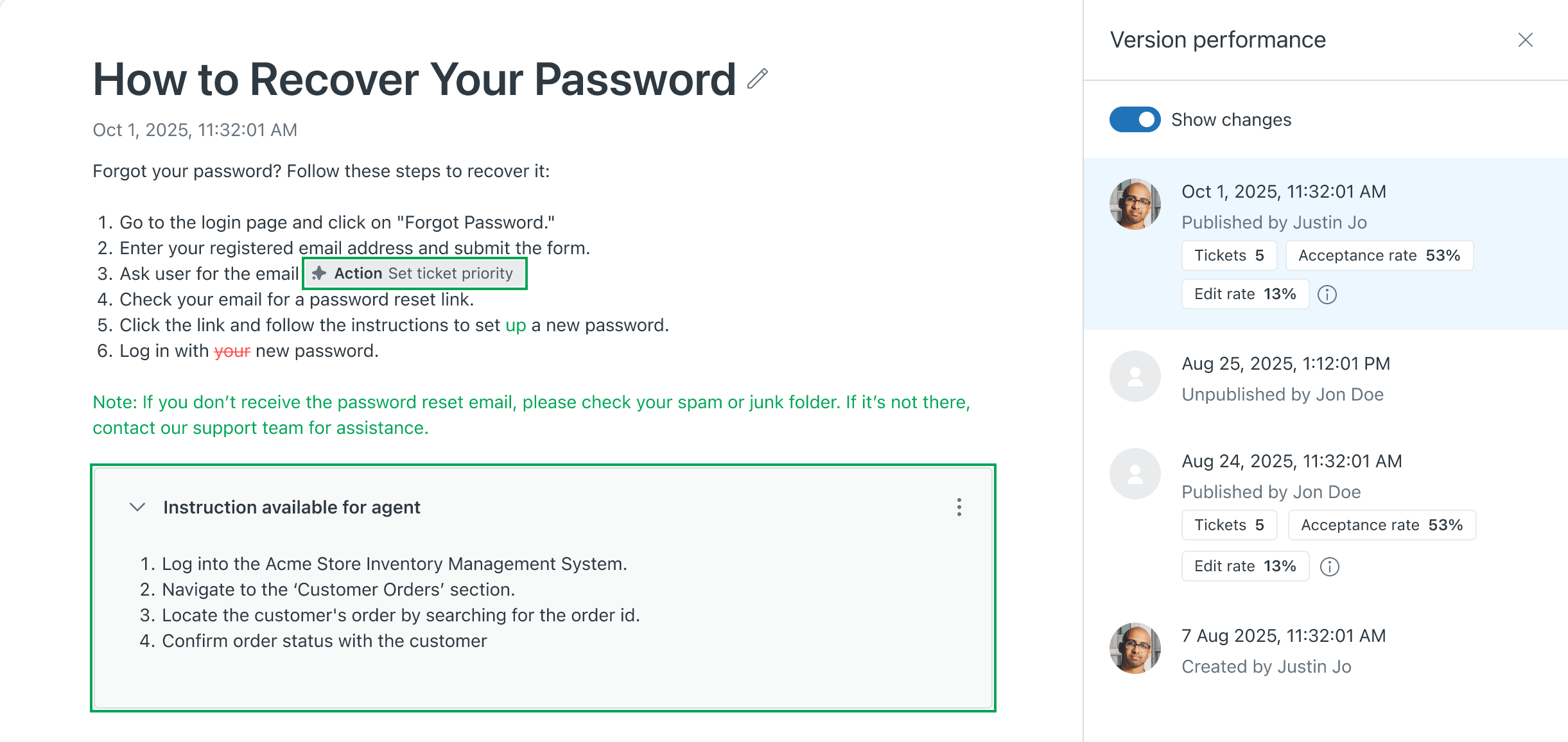
For auto assist procedures, you can view how each published version of the procedure performed and restore past versions as needed. Every time you update and publish an auto assist procedure, a new version is saved along with detailed revision tracking and performance metrics. See Viewing published procedure revisions and restoring a previous version.
-
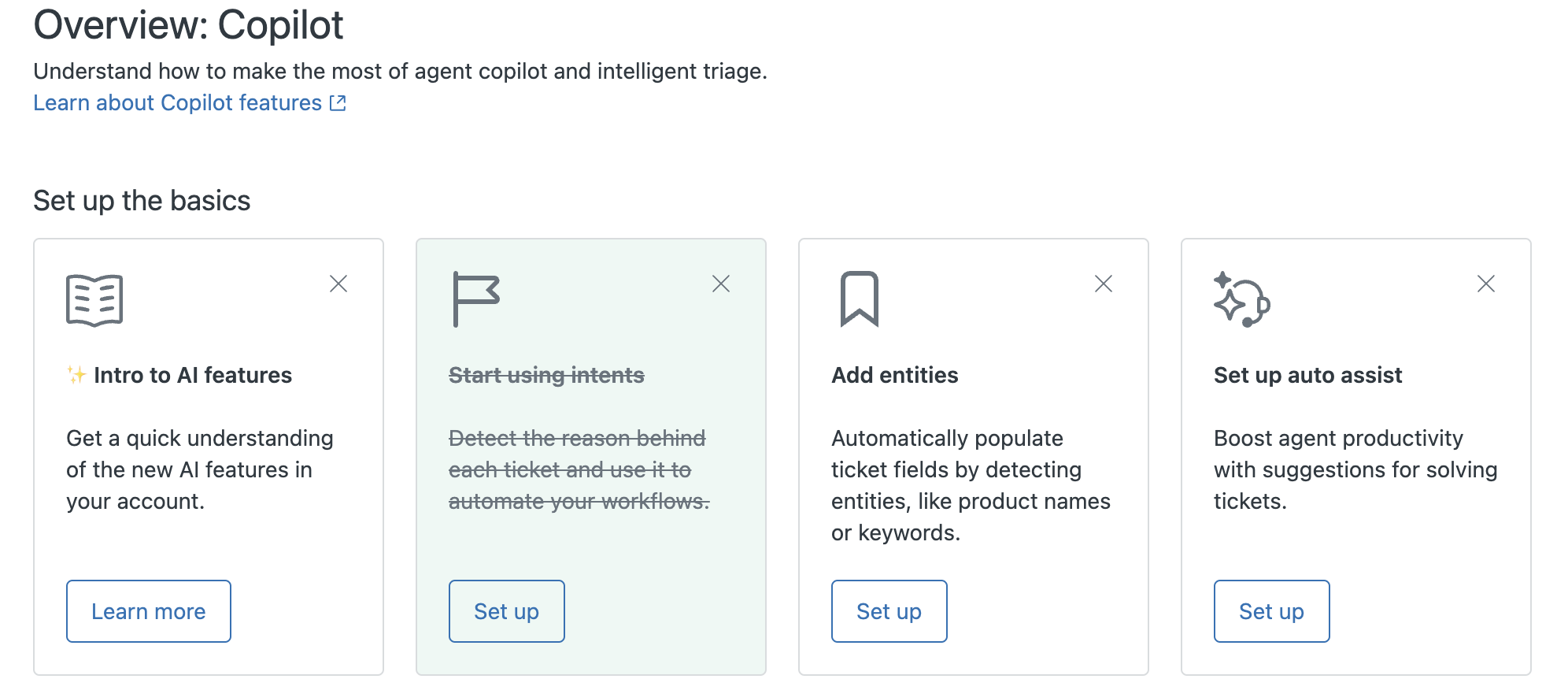
There is a new Overview: Copilot page and a new Recommendations page in Admin Center.
- The Overview: Copilot page page provides a centralized AI hub to manage all Copilot features and monitor performance. See Monitoring and optimizing effective AI setup.
- The Recommendations page provides AI-powered recommendations you can review and implement. See Reviewing and implementing AI recommendations to automate tasks.
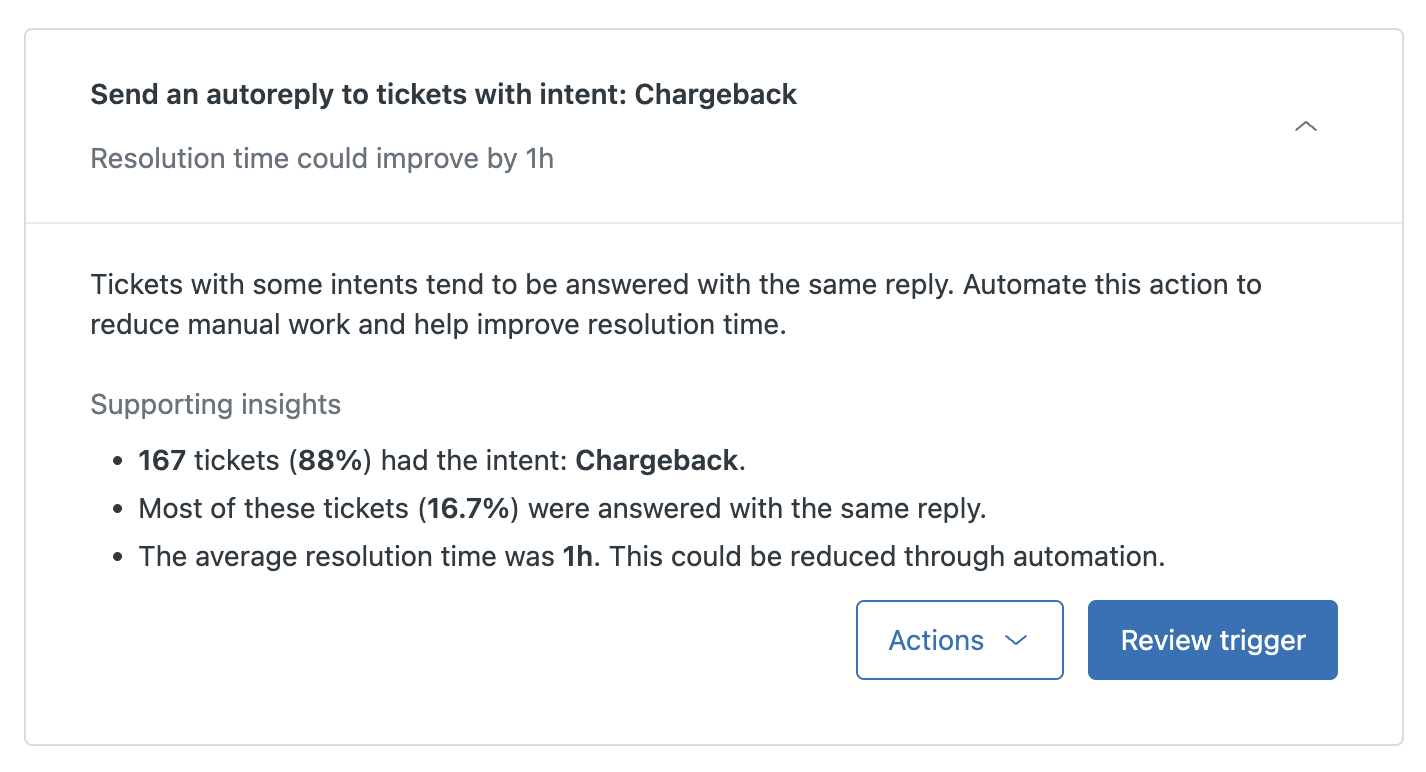
- The Overview: Copilot page page provides a centralized AI hub to manage all Copilot features and monitor performance. See Monitoring and optimizing effective AI setup.
-
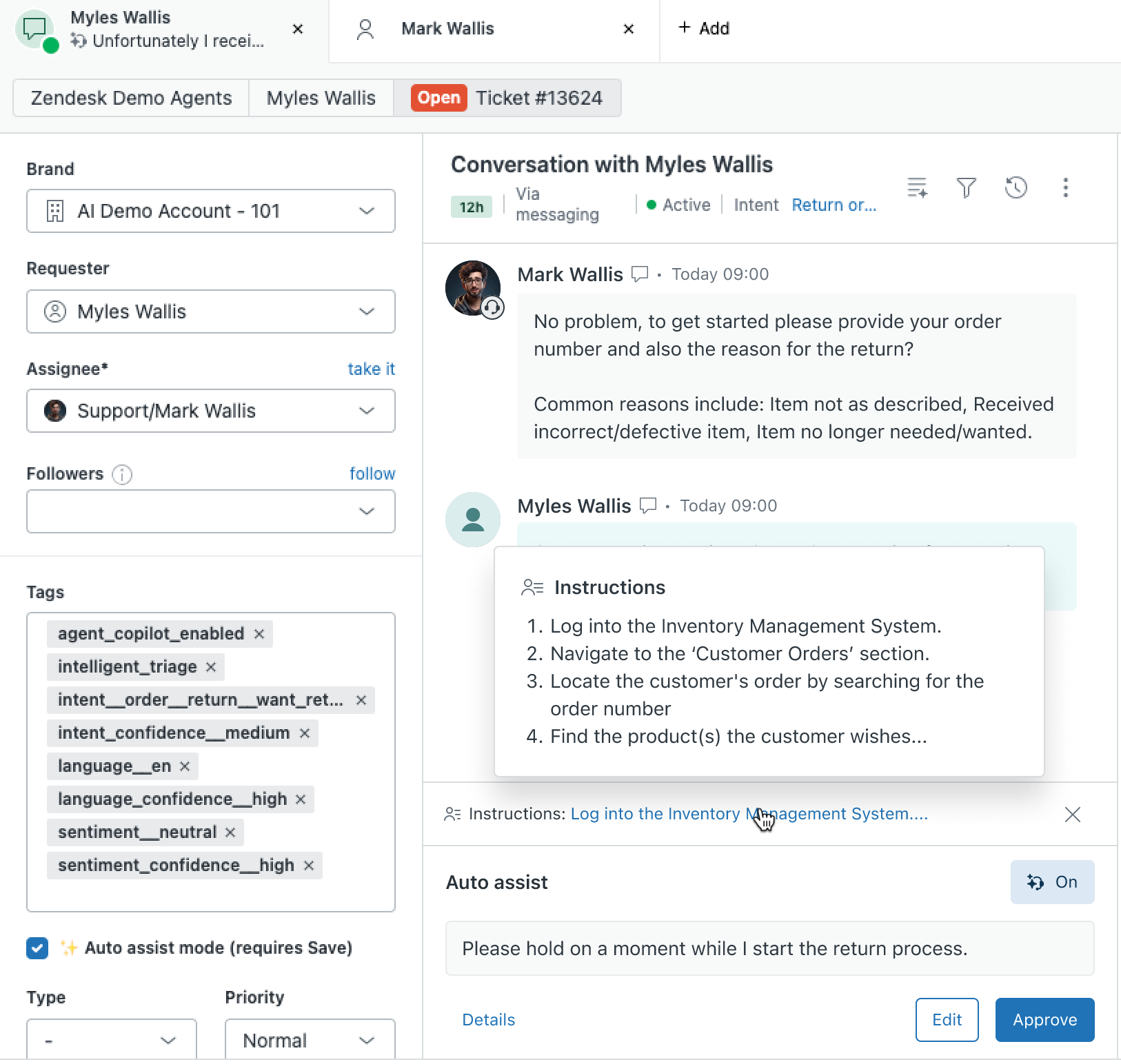
Auto assist can now provide direct instructions for agents in the Agent Workspace. With this enhancement, you can define auto assist procedures with direct instructions that will be presented to agents at a specific point of the ticket lifecycle. See Creating instructions for agents in auto assist procedures.
-
You can now create custom intents for intelligent triage and add intent categories and sub-categories. Creating custom intents gives you greater flexibility over your available intents and allows you to address specific business needs. Adding intent categories and sub-categories allows you to group and organize custom intents, making it easier to reflect your business structure, improve visibility, and manage intents at scale. See Personalizing intelligent triage by creating custom intents.

-
Three new generative AI writing tools - Tone of voice, Simplify, and Custom prompt - are now included as part of agent copilot. Agents can use these new writing tools to improve the content of their ticket comments in different ways. See Enhancing ticket comments using generative AI.

Additional enhancements
- The ticket summarization feature has been enhanced to have an expanded word limit and capture more context. Additionally, you can now include a ticket's internal comments. See Turning on AI-generated ticket summaries.
- Ticket summaries are now stored in a new ticket field so that you can use ticket summary fields in your reports, views, as placeholders, and via the API. See About ticket summarization.
- The writing tools menu is available for both shared and personal macros when the enhance writing generative AI feature is turned on. See Enhancing macro content using generative AI.
- Agents can now view similar tickets and merge suggestions. Viewing similar past tickets and their resolutions, as well as merge suggestions, can help agents resolve tickets faster. See Finding tickets similar to the current ticket.
- AI Expert coverage is now available for the Copilot add-on. The AI Expert recurring subscription service can help you with ongoing access to expertise. See Announcing AI Expert coverage for the Copilot add-on.
- With communication guidelines, you can define brand-specific guidelines that tell auto assist and tone tool how to write. When these tools make suggestions, the suggestions match the guidelines you defined. See Using communication guidelines to improve AI assistance for agent comments.
- Auto assist procedures have been improved so that you can insert existing macros, actions, and actions flows into procedures. Additionally, auto assist can now read certain ticket fields, which means you can write procedures to reference these ticket fields. With these improvements, auto assist can better recommend suggestions and actions to resolve issues. See Creating procedures for auto assist and About actions for auto assist and action flows.
- Auto assist procedures can be replicated in premium sandboxes. When creating a new premium sandbox, accounts with the Agent Copilot add-on now have the option to replicate their default brand and auto assist procedures. See Creating a premium sandbox.
- Auto assist suggestions can be edited by agents with rich text formatting tools and agents can also upload images and attachments. See Using auto assist to help agents solve tickets.
- Auto assist suggestions will now show the procedures and articles used to generate the suggestion as part of the rationale. This helps agents understand which sources were used by auto assist when generating suggestions. See Using auto assist to solve tickets.
- Auto assist suggestions now have a “Leave feedback” feature so that agents and admins can provide direct feedback on each suggestion. See Using auto assist to solve tickets.
- Auto assist suggestions are based on similar solved tickets when no relevant procedures or public help center articles are available. See Turning on and configuring auto assist.
- Auto assist has been improved to help agents manage suggested replies. When an agent is editing an auto assist suggestion and a new suggestion is available, the agent is notified. See Using auto assist to solve tickets.
- Auto assist suggestions now use tone of voice. See Turning on and configuring auto assist.
- Auto assist performance metrics display on the Procedures page. This helps you understand how frequently auto assist follows your procedures and how agents benefit from them. See Viewing and managing procedures for auto assist.
- Auto assist now includes brand segmentation and action linking capabilities. Adding brands to procedures ensures that auto assist uses brand-specific procedures for brand-specific issues. Directly linking actions in procedures ensures that auto assist performs the correct action for ticket resolution. See Creating procedures for auto assist.
- Auto assist now has access to your public help center articles and can use these articles to generate replies when no relevant procedures are found. See Using auto assist to help agents solve tickets.
- Auto assist can now read tags and certain standard and custom ticket fields. Auto assist can also suggest and execute updates of the fields in Zendesk Support. See Creating procedures for auto assist.
- Intelligent triage now allows admins to define synonyms for entity values. This enhances the accuracy of entity detection. See Editing and managing entities.
- Intelligent triage now suggests new intents weekly in the Intent page, making it easier to maintain and improve your setup. See Reviewing personalized intelligent triage intent suggestions.
- Intelligent triage has recommendations based on entities, sentiment, and language. Previously, only intent-based recommendations were available. See Reviewing and implementing AI recommendations to automate tasks.
- Intelligent triage provides AI-powered insights that help customers scale their operations at affordable costs. All customers with the Copilot add-on can now utilize the intelligent triage intent feature. See Automatically detecting customer intent, sentiment, and language.
- Intelligent triage can predict the sentiment of a conversation based on the latest message from the end user. This allows you to track the sentiment throughout the ticket lifecycle, which can prevent escalations. See Automatically detecting customer intent, sentiment, and language.
- Intelligent triage now includes entity detection to automatically detect and extract important details in tickets by creating your own entities. See Automatically detecting unique information in tickets.
- Intelligent triage entity detection can now reuse your existing custom ticket fields. This means that you can capture and extract key details from tickets without creating new fields or rebuilding workflows. See Detecting unique information in tickets with entities.
- Intelligent triage allows you to deactivate intents directly from the list to ensure that unwanted intents are no longer detected on tickets. See Viewing and managing intelligent triage predictions
- Intelligent triage is now available for voice calls, giving you structured insights on intent, entity, sentiment, and language that power smarter post-call automations, richer reporting, and workflow improvements. See Automatically detecting customer intent, sentiment, and language.
AI agents - Essential
Key updates
-
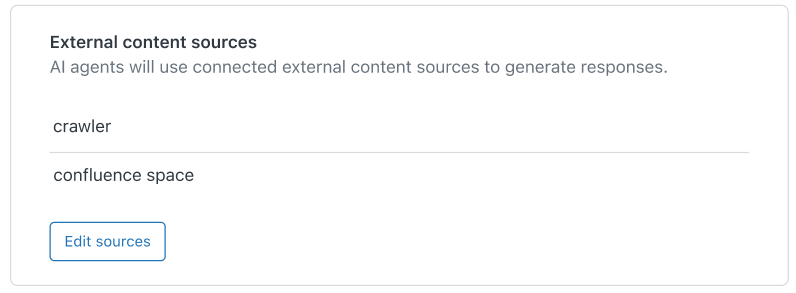
AI agents can now create AI-generated answers based on external content sources. This lets you leverage the content you've already created outside your Zendesk help center to deliver consistent, high-quality responses to customers in AI agent conversations. See Connecting external content sources to an AI agent to power AI-generated answers.
These external content sources include:-
Confluence sites and spaces
-
Web-crawled content from public or authenticated websites
-
Other external records ingested through the Federated Search API
-
-
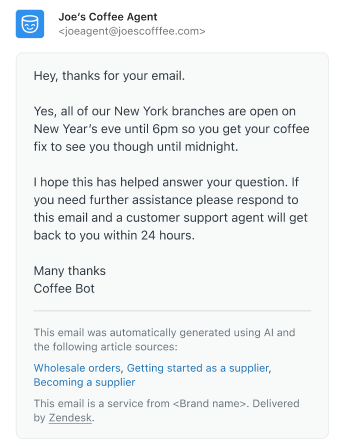
AI agents are now available on email and web form channels. These AI agents send generative replies to customer questions based on relevant help center content, including direct links to the articles for more context. This means fewer follow-ups, more automated resolutions, and less work on your teams. See Creating an AI agent to automatically resolve customer issues.
Additional enhancements
- Settings for AI agents and proactive messages in Admin Center have moved. AI agent settings are under AI > AI agents. Proactive messages settings are under Channels > Messaging and social. See Admin Center settings.
- Instructions are now available for email AI agents - Essential. Instructions let you control AI agent responses in ways beyond customizing their default persona options. See Using instructions to influence AI agent responses.
- You can now use instructions to tailor your AI agent’s generative responses in AI agents - Essential. This feature was previously available only in AI agents - Advanced. See Using instructions to influence AI agent responses.
- Generative AI features are now available to existing customers. Existing AI agent customers (defined as those who had any drafted or published AI agents as of February 2, 2025) now have access to the generative AI features included in AI agents - Essential. See About AI agents.
AI agents - Advanced
Key updates
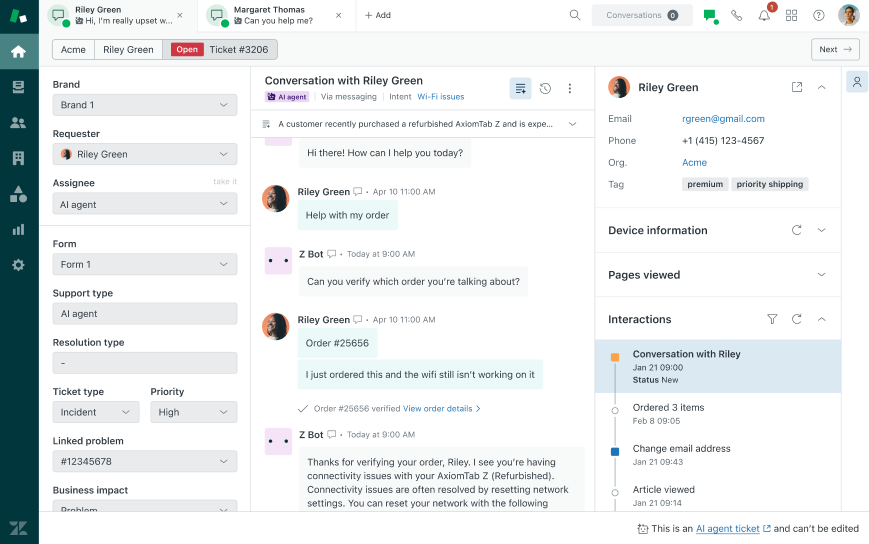
- Conversations between your AI agents and end users can be viewed as tickets in Support and Agent Workspace. These AI agent tickets are read-only and don’t execute triggers or other automated workflows, which means there’s no impact to your existing setup. Once these conversations are escalated to a human agent, your existing workflows for handling tickets come into effect as they do today. See Using the dashboard to monitor and manage advanced AI agents.
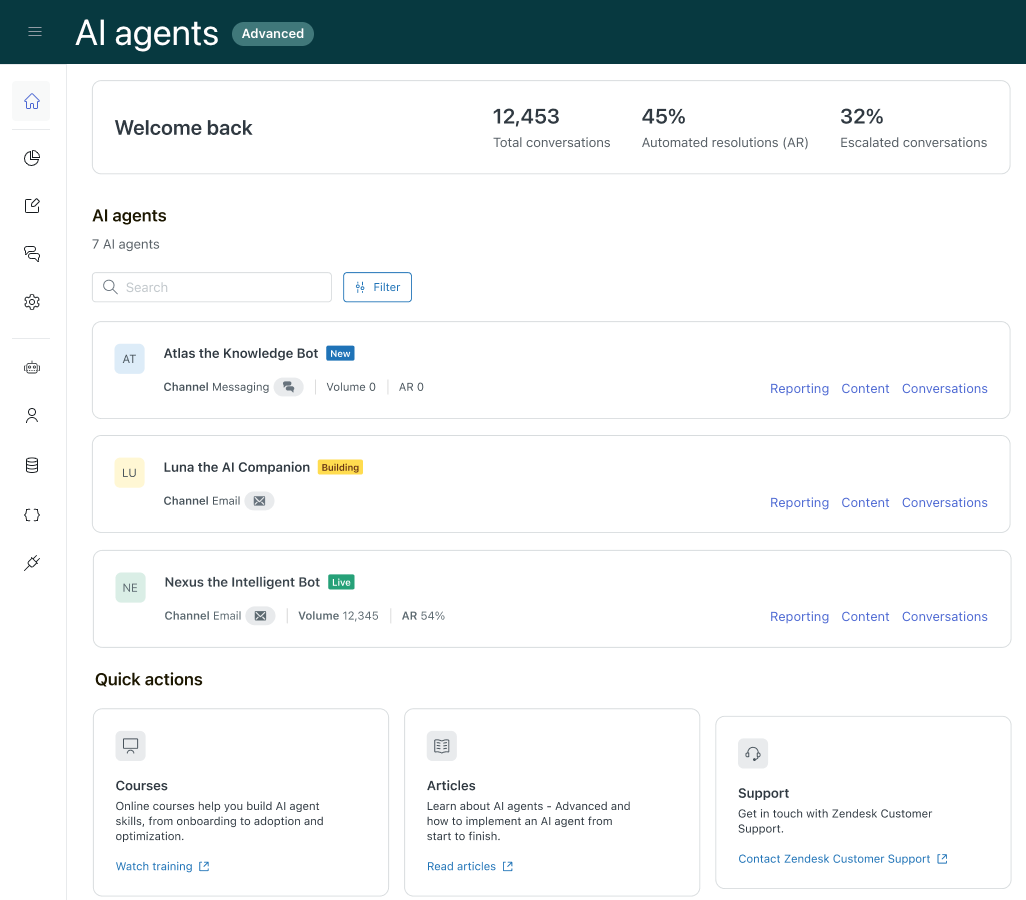
- A new default landing page provides quick access to overall performance metrics, relevant actions, and resources. This page makes it easier to build, launch, and monitor advanced AI agents. See Using the dashboard to monitor and manage advanced AI agents.
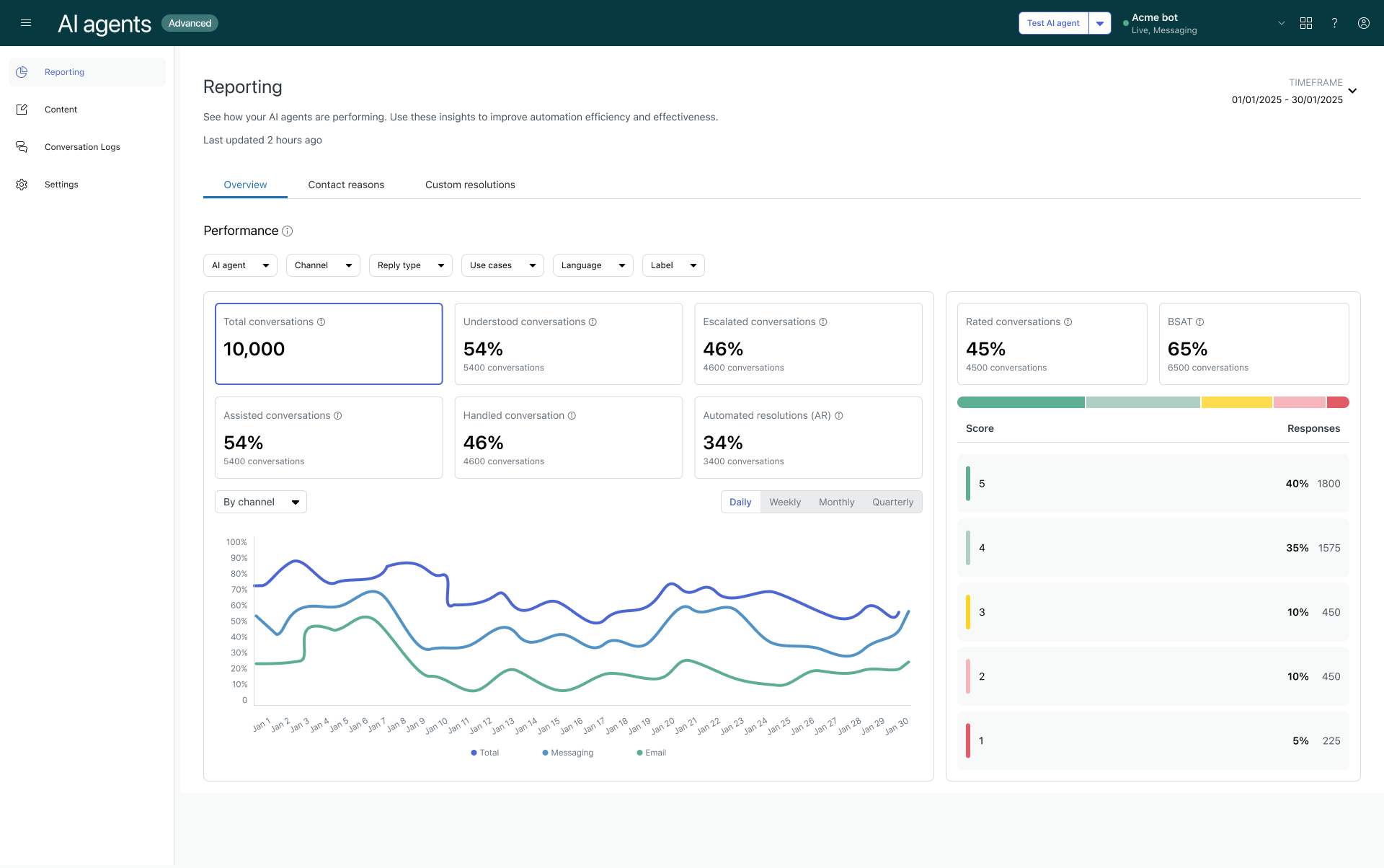
- A new analytics dashboard provides a comprehensive, at-a-glance view of your organization’s advanced AI agent performance. This dashboard simplifies reporting for AI agents - Advanced so you can focus on the metrics that matter most. See Analyzing advanced AI agent performance with the reporting dashboard.
Additional enhancements
- The navigation experience has been streamlined across advanced AI agent types (expression-based, zero-training, and agentic AI), making it easier to manage different types of AI agents. See Navigating the AI agents - Advanced add-on.
- Confluence is available as a knowledge source for advanced AI agents. Admins can use this feature to leverage your existing information in Confluence sites and spaces to power generative answers in advanced AI agents. See Importing a Confluence site or space.
- Accessing and managing user permissions in AI agents - Advanced is now easier. You can access AI agents - Advanced directly from the Zendesk product tray, you can manage user access to the add-on through Admin Center. See Accessing the AI agents - Advanced add-on and Managing user access to advanced AI agents.
- You can choose which messaging channels an advanced AI agent should be the default responder for. When you assign the default responder role to an advanced AI agent, it becomes the first responder in a customer conversation. See Setting an advanced AI agent as the default responder for a messaging channel.
- For AI agents with agentic AI, a version history is maintained for each generative procedure. This means you can quickly restore a previous version of a procedure if a newer version includes changes you don’t want to keep. See Viewing and restoring previous versions of generative procedures.
- You can use segments to create more targeted conversation flows for customers with similar traits in AI agents - Advanced. You can create segments based on locale, language, customer type, or any other custom session parameter, then use it in a dialogue or in a search rule for AI agents that use agentic AI. See Creating segments to target specific customers in advanced AI agent conversations.
- Generative replies are available for email AI agents - Advanced. You can connect your AI agent to knowledge sources—including Zendesk help centers and other supported help centers, websites, and CSV files—to automatically resolve factual email queries end-to-end. See About the Generative replies block in conversation flows for advanced AI agents.
- Use case suggestions are now available for AI agents - Advanced. Use case suggestions allow you to leverage AI to analyze previously not-understood messages. See Creating use cases from suggestions.
- Markdown now works on advanced AI agent message blocks. You must have activated rich messaging. See Using the dialogue builder to create conversation flows for advanced AI agents.
- You can now request that Zendesk restrict the advanced AI agents that a client admin has access to. Client admins with restricted AI agent access can give other users access only to the AI agents they themselves have access to. If a client admin with restricted AI agent access is downgraded to a client editor or client user, they continue to have the same restricted AI agent access. See Managing user access to AI agents - Advanced.
- Instructions and custom tone of voice for advanced AI agents are now available. Instructions allow you to refine an AI agent's responses. Custom tone of voice allows you to define the type of language the AI agent uses when responding. See Using instructions to influence AI agent responses and Customizing the persona and tone of voice for your AI agent.
- The dialogue builder in AI agents - Advanced now supports versioning. This means you can quickly revert to a previous version of a dialogue if a newer version includes changes you don’t want to keep. See Reverting a dialogue to a previous version.
- A new report shows details about use case performance over time for advanced AI agents, helping you understand how a specific use case has contributed to your organization’s overall automation success. See Analyzing advanced AI agent performance with the reporting dashboard.
- A new setting gives you greater flexibility in handling customer-spoken languages in advanced AI agent conversations. If you support a limited number of languages, but still want to allow customers to communicate in any language, you can prevent the system reply from triggering when the active_language parameter is already set. See Preventing the unsupported language reply from triggering.
- New UI language support includes five additional languages for AI agents - Advanced: Brazilian Portuguese, French, German, Japanese, and Spanish. See About the AI agents - Advanced add-on.
Admin Center
Key updates
-
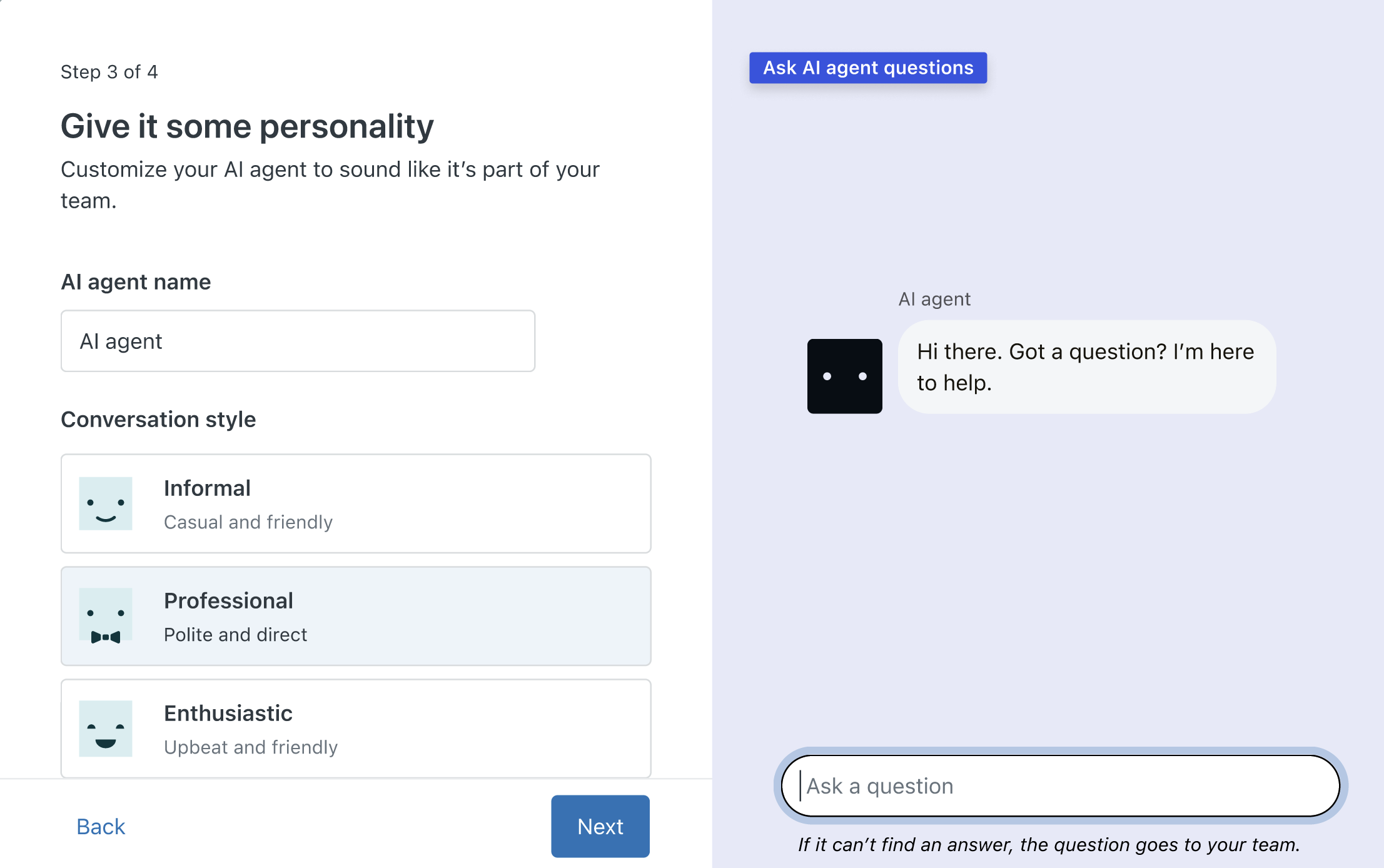
A simple setup wizard for AI agents is available to help Zendesk Suite trial customers learn how AI agents work. The wizard provides admins with the opportunity to create and customize a sample AI agent that can automatically resolve customer questions. See Add AI agents to automatically resolve questions.
-
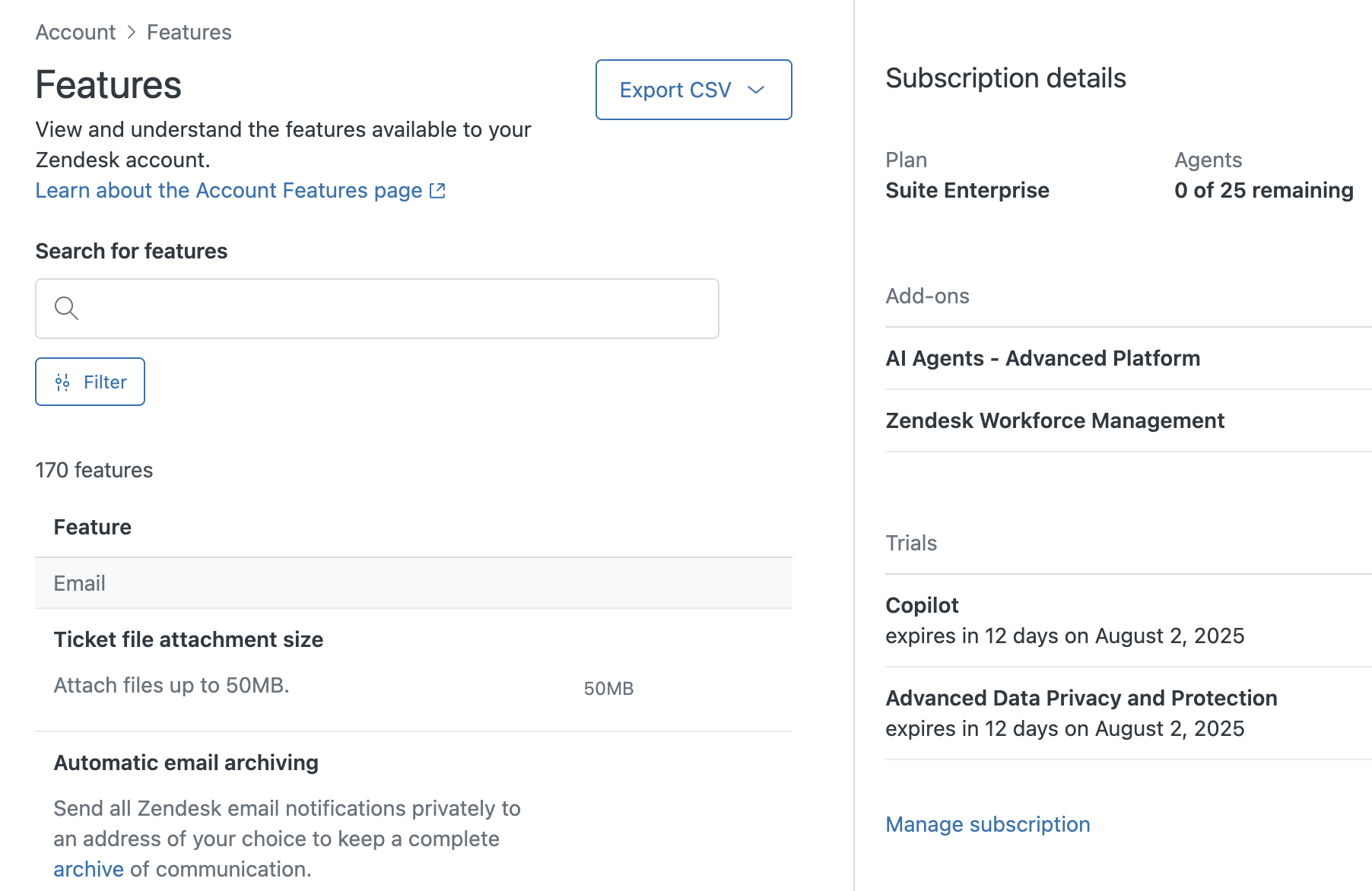
The Features page in Admin Center gives Zendesk Suite customers greater transparency and control over their accounts. You can now easily view your current plan capabilities, active trials, and key add-ons — all in one place. See Viewing and managing features.
-
Zendesk Launchpad provides you with step-by-step instructions to set up your Zendesk account. Use Launchpad to set up Zendesk basics and to discover new features to try out. Use it as your one-stop location for getting the most out of your Zendesk account. See Using Launchpad to unlock the full potential of Zendesk.

Additional enhancements
- The Email, Views, and Ticket settings pages in Admin Center have been modernized.
- The Email page layout groups related email settings together.
- The Views page has unified filters, drag-and-drop reordering, a higher column limit, and configurable Status column.
- The Ticket settings page update separates key ticket settings into clearer, expandable sections, and provides new features and controls.
- Navigation for AI-related pages in Admin Center has been consolidated into a single section, making it easier to access. See Admin Center settings.
- Zendesk Suite trials include a Microsoft Exchange connector to connect your non-Zendesk email servers that are based on Microsoft Exchange directly to your Zendesk Support instance. See Connect with Microsoft Exchange.
- In Zendesk Suite trials, admins can use Agent Home to track their progress on completing trial tasks. When you set up a new trial account, Agent Home provides links to the basic setup tasks. See About the Zendesk trial tasks.
- Zendesk Suite trials have a streamlined adoption wizard to get new customers up and running as soon as possible. The wizard guides you quickly through basic setup tasks. See Welcome to your Zendesk Suite trial.
- You can customize ticket information as part of a Zendesk Suite trial. Zendesk provides a setup wizard that shows you how to add custom fields to your ticket. With custom ticket fields your agents can capture the exact information they need to quickly solve tickets. See Zendesk Suite trial: Customizing your ticket information.
- A simple setup wizard for views is available to help Zendesk customers learn how to create custom views. See Zendesk Suite trial: Creating ticket views.
- A simple setup wizard for triggers and automations is available to help Zendesk trial customers get started with workflow automation. The wizard provides customers with some example tasks and automations they can activate in their account. See Zendesk Suite trial: Streamlining your workflows.
- A simple setup wizard for macros is available to help Zendesk Suite trial customers get started creating macros. The wizard provides admins with some example macros they can activate. See Saving time with macros.
Accounts and billing
Key updates
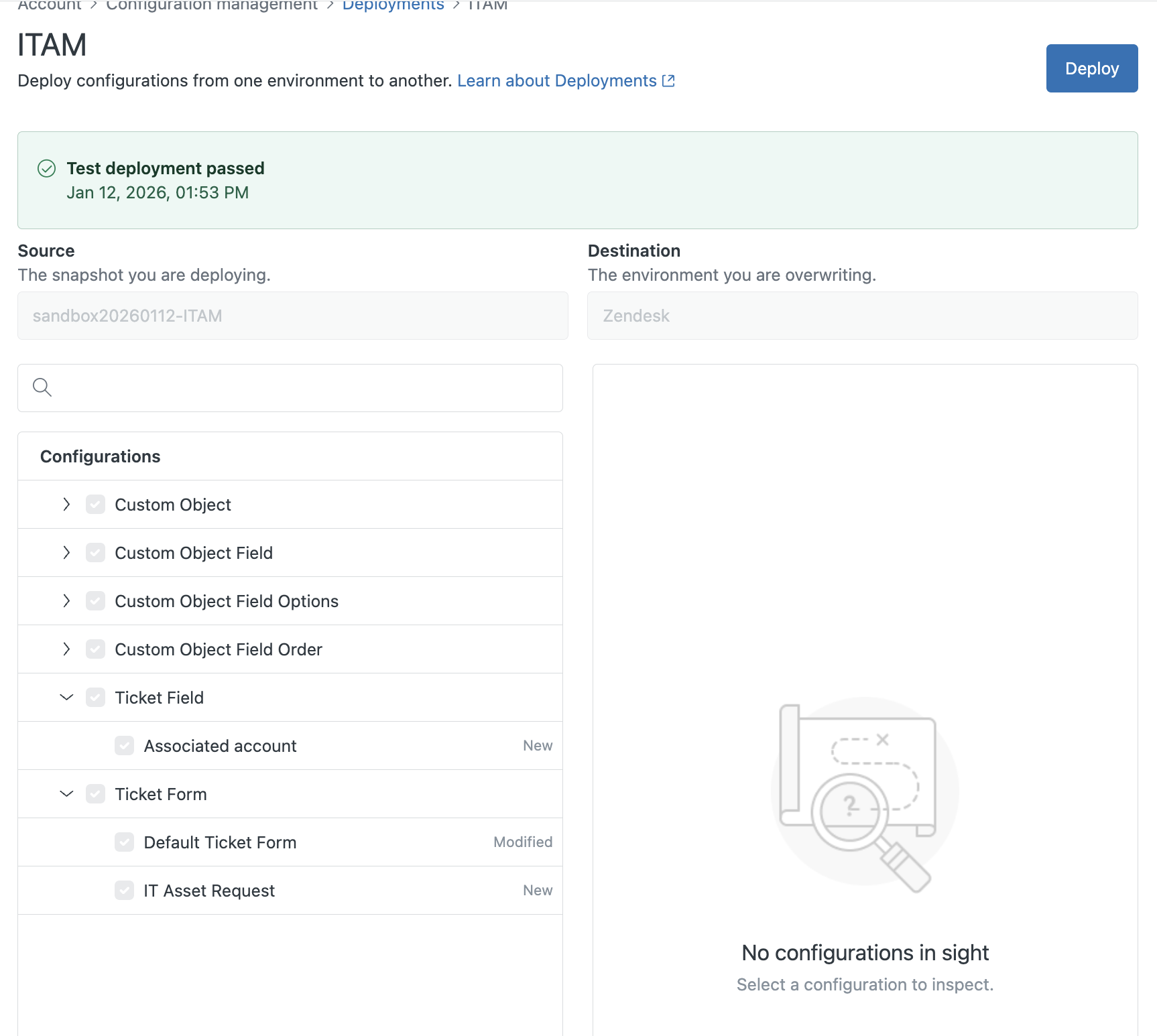
- With account configuration management, you can inspect your production and sandbox environment's configuration, save snapshots of environment configurations, compare configurations between snapshots, and deploy configuration items from one environment to another. See Deploying account configurations from one environment to another.
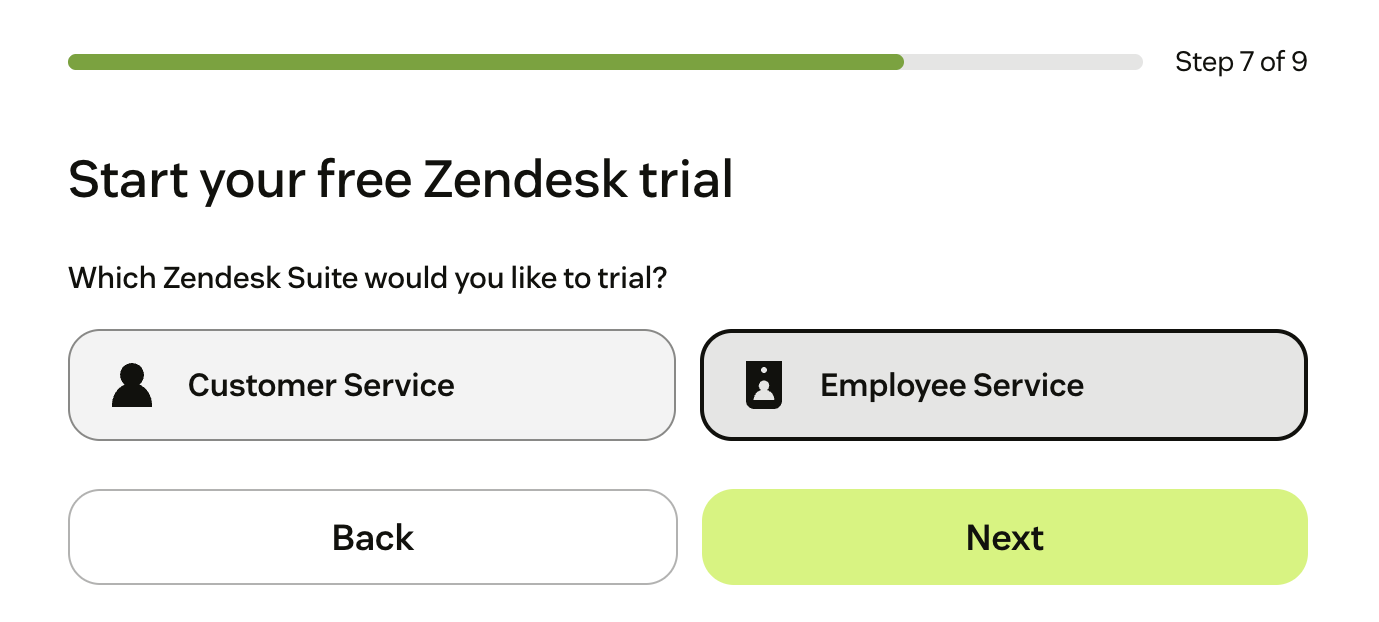
- Customers who want to exclusively use Zendesk products for internal employee services, such as Human Resources (HR), Finance, Legal, and Information Technology (IT), can trial and purchase Zendesk Employee Service Suite plans designed specifically for that purpose. See Buying Zendesk Employee Service Suite (ES).
- Sandboxes have been simplified and made available to more plans. On Support Enterprise plans, one sandbox is included. On Suite Enterprise plans and above, two sandboxes are included. Additionally, Support Professional plans and above and Suite Growth plans and above can purchase sandboxes as an add-on. See About Zendesk sandbox environments.
Additional enhancements
- Try out products and add-ons in a temporary sandbox environment that reflects your production account's configuration and data. Trial sandbox environments can be requested through Zendesk Customer Support or Zendesk Sales. See About Zendesk sandbox environments.
- Direct debit payment accounts (via ACH) are available as a payment method for self-service customers in the USA. Previously, only eligible sales-assisted accounts could use this payment method. See Managing payments.
- You can increase the number of generative searches per month with an add-on, if you exceed the default of 100,000 generative searches per month. See About Zendesk add-ons.
- Zendesk has updated the product tray to improve usability and make products easier to access. See Switching among products.
- The name of the Advanced AI add-on changed to Copilot to help clarify its usage. This is a name-change only. See About Zendesk add-ons.
Security
Key updates
-
Admins can create end-user deletion schedules and attachment deletion schedules. User deletion schedules delete end users who haven't been active for a period of time. See Creating end-user deletion schedules. With attachment deletion schedules, you can automatically delete attachments in bulk. See Creating attachment deletion schedules. Both features help you manage data storage and comply with global privacy legislation.
-
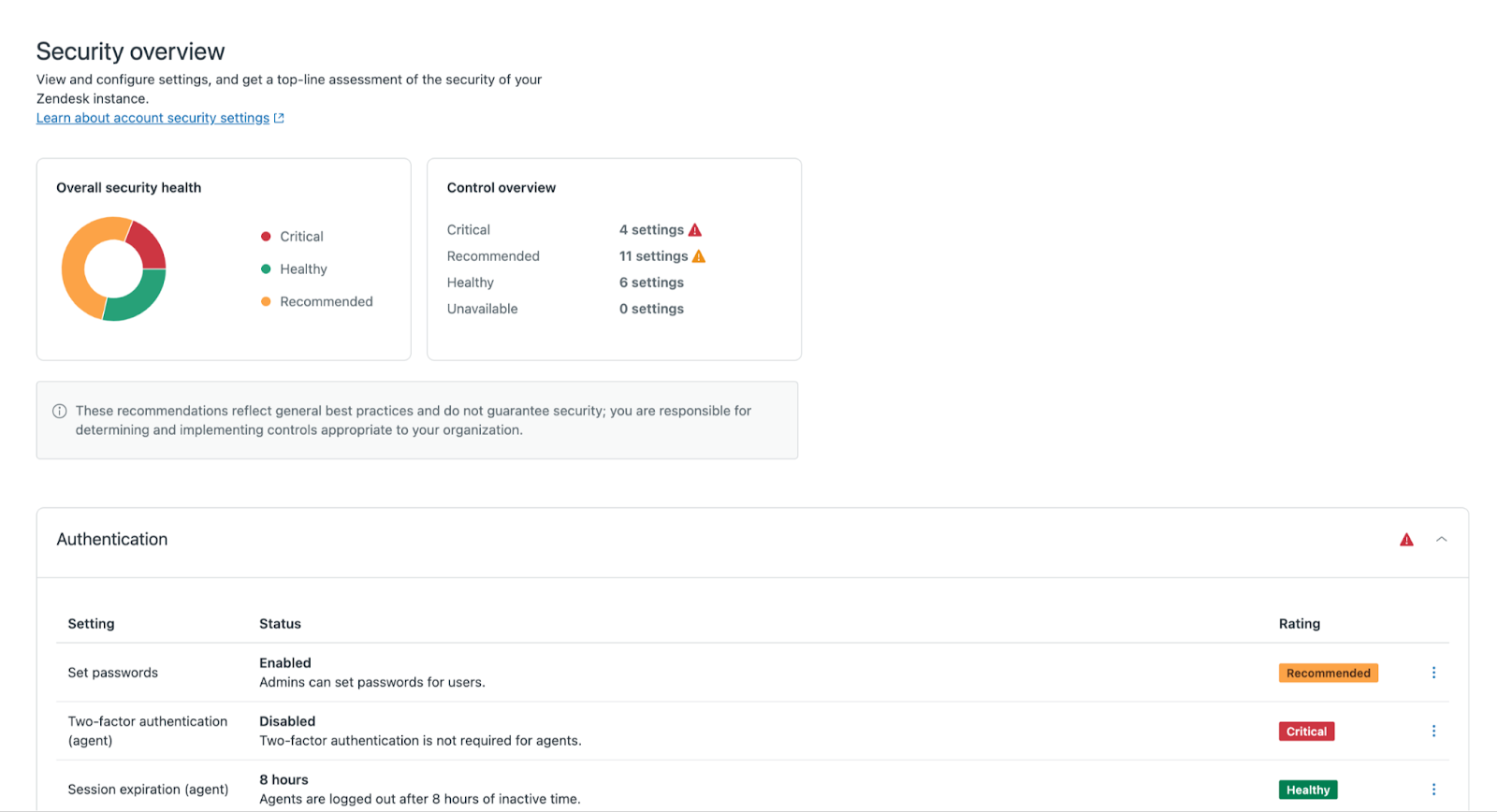
A new security dashboard helps you assess and enhance your account's security posture. The dashboard provides context about potential risks and offers clear recommendations. See Analyzing and improving the security posture of your Zendesk account.
-
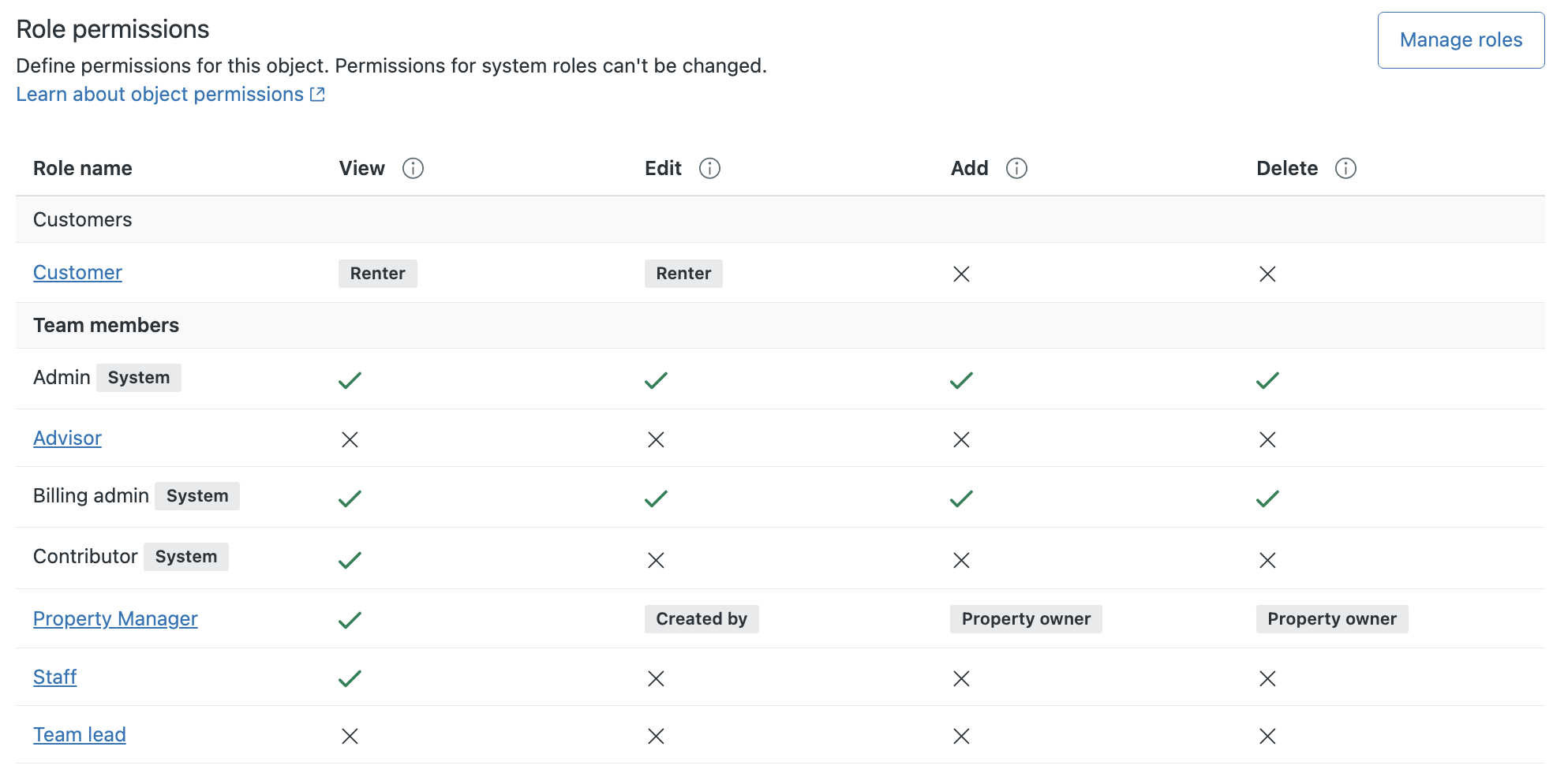
Admins can set permission restrictions on custom object records to control which records are accessible to end users and agents in custom roles to view, add, update, and delete. Admins can define access rules and apply them individually to each permission for each end user and custom role. See Refining custom object record permissions with access rules.
-
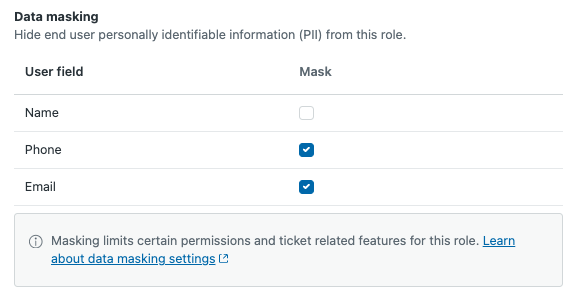
Data masking is available for customers with the Advanced Data Privacy and Protection add-on. Data masking allows you to hide end-user names, phone numbers, and email addresses for agents and light agents in custom roles. See About data masking.
-
Advanced encryption has been added to the Advanced Data Privacy and Protection add-on (ADPP). Advanced encryption is an enhancement to Zendesk's standard encryption and provides an additional layer of security for personally identifiable information (PII) within Zendesk by giving you control over your encryption keys. Specifically, with advanced encryption, you can encrypt user fields, such as name, alias, and signature with keys stored in your key management system. See Setting up advanced encryption (ADPP add-on).
-
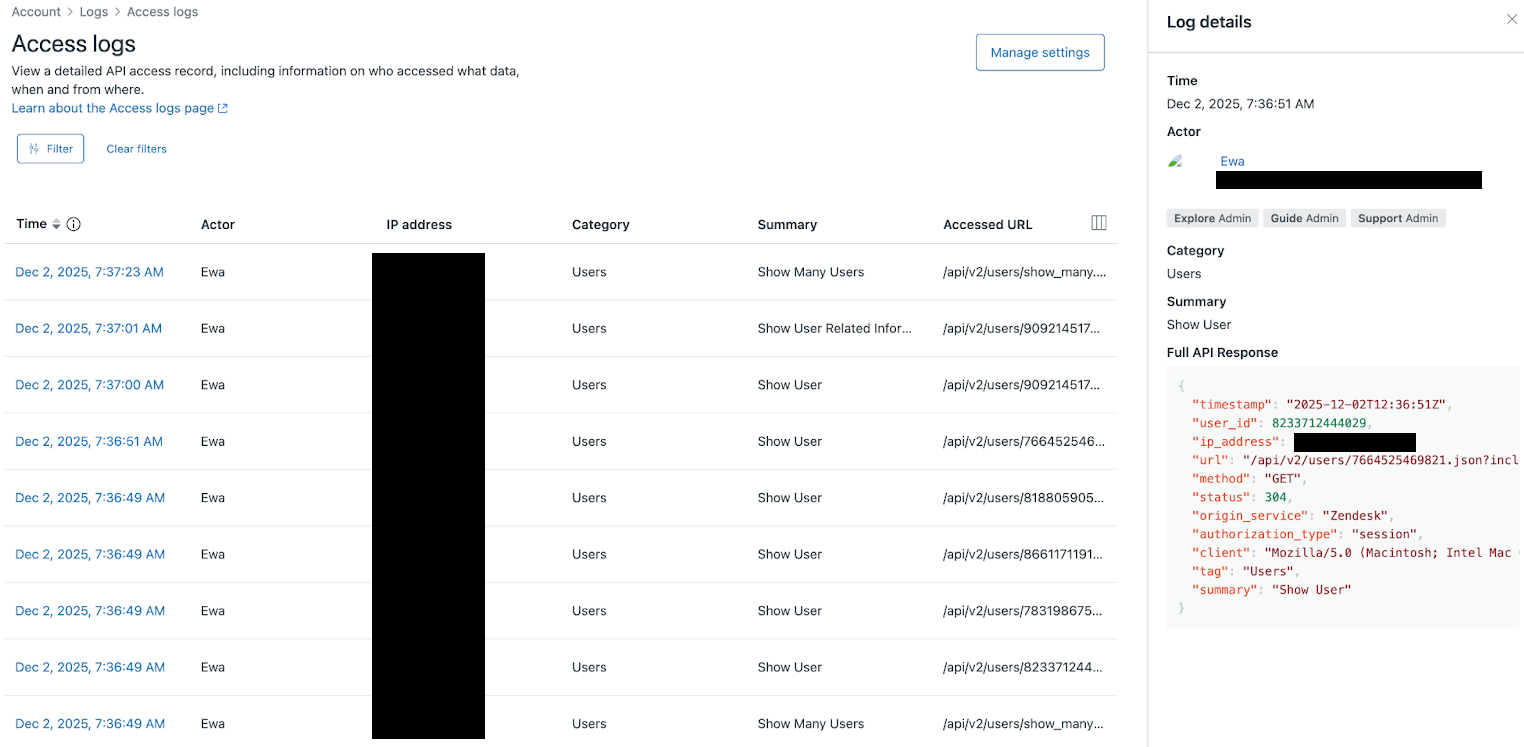
The enhanced access log provides clearer, more actionable insights to the Advanced Data Privacy and Protection (ADPP) add-on. This update adds detailed business context, accurate product categories, and concise summaries to each log entry. See Using the access log to monitor agent activity.
Additional enhancements
- Two-factor authentication (2FA) email delivery is available as an additional method for receiving 2FA passcodes. Additionally, 2FA verification is required on every sign-in for users with 2FA turned on. See Managing two-factor authentication.https://support.zendesk.com/hc/en-us/articles/10050703046810-Announcing-email-as-an-additional-method-for-receiving-two-factor-authentication-2FA-passcodes
- Admins can control whether end users can make authenticated API requests. Zendesk separated end-user API access from team member access. See Turning on and off API password access for end users.
- Admins can turn on an expiration period for public attachments sent to end users or recipients so that attachments remain publicly accessible for a designated period. See Setting an expiration period for public attachments.
- Admins can restrict agents and end users from uploading files that are not an allowed file type. This enhancement improves control and strengthens security. See Setting allowed file types for attachments.
- Admins can require end users to use two-factor authentication when signing into help center. See Managing two-factor authentication.
- Agents in custom roles can be granted permission to manage potentially malicious attachments. Admins and agents with this permission can review flagged attachments and override security measures. See Managing malicious attachments.
- Tickets are automatically created for all comments on Facebook posts that aren't already associated with a ticket when using Zendesk's Facebook channel v2. See Migrating to Facebook channel v2.
- Redaction suggestions can now detect four additional types of personally identifiable information (PII) and work for five additional languages in the Advanced Data Privacy and Protection add-on. See Automatically detecting sensitive information for redaction.
- Customers using advanced encryption with the Advanced Data Privacy and Protection add-on can encrypt email addresses and social identities, such as X handles and Facebook IDs. See About advanced encryption for details.
Objects and business rules
Key updates
-
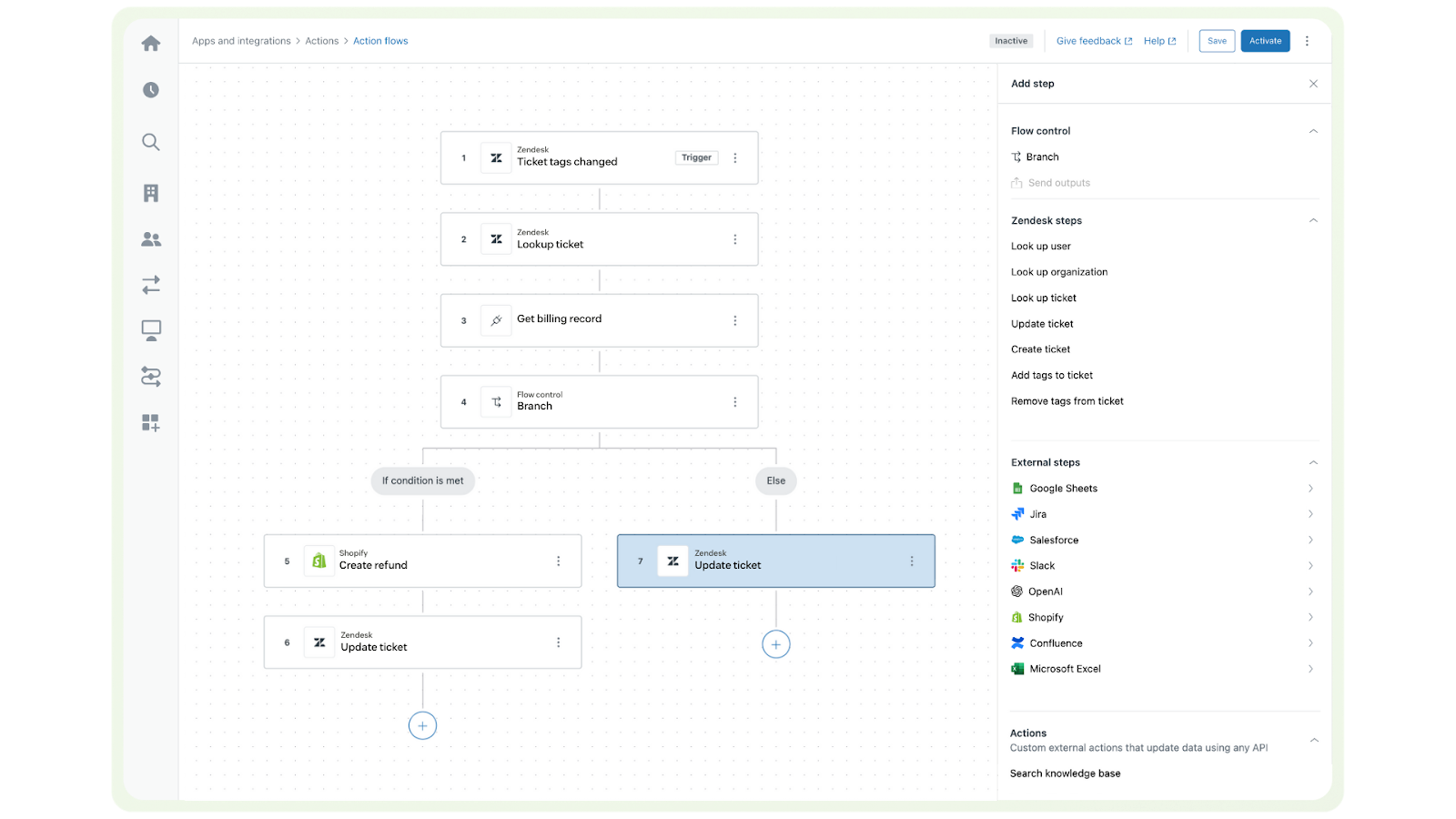
The action builder and action flows are now generally available. The action builder is Zendesk's new, no-code, visual workflow tool that makes it easy to automate processes across multiple systems. Non-technical admins can create custom action flows, integrations, and automations for human and AI agents using the library of prebuilt connectors and actions. See Understanding the action builder and action flows.
-
Customers with the Advanced Data Privacy and Protection (ADPP) add-on can use ticket triggers to automatically redact PII in ticket comments. This feature provides full control over when and how PII is protected in Zendesk, eliminating the need for manual redaction. See Automatically redacting sensitive information in tickets using triggers.

-
Omnichannel routing updates provide more flexibility for calculating capacity, routing based on percentages, prioritizing skills, and more. Updates include the ability to:
- Prioritize skills for an agent, so that they receive work with their high-priority skill first over all other work in the queue.
- Specify skill priorities for calls. All channels, including calls now support optional and required skills. Optional skills timeout in order of priority until an available agent with the matching remaining skills is found.
- Use queues to route percentages of work to different groups, so that percentages of tickets meeting the queue's conditions are routed to different primary and secondary groups.
- Evaluate agents' spare capacity as percentages, which could provide a fairer distribution of work in some cases.
- Automatically reassign open tickets when agents become unavailable.
- Treat all agent-ended messaging sessions as email tickets for routing purposes to help manage agent capacity for messaging channels.
Additional enhancements
- Action flows can now be triggered by updates to custom ticket fields and custom user fields, enabling automation of workflows based on specific field values. See Creating action flows to automate processes across Zendesk and external systems.https://support.zendesk.com/hc/en-us/articles/10052138464666-Announcing-the-ability-to-initiate-action-flows-when-custom-ticket-and-user-fields-are-updated
https://support.zendesk.com/hc/en-us/articles/9961773955738-Announcing-the-option-to-assign-approval-requests-to-a-group - The BambooHR and Workday external actions are available for Zendesk's action builder, enabling secure integration with these HR platforms to automate employee-related processes. See Using BambooHR actions in action flows and Using Workday actions in action flows.
- You can now create deletion schedules for custom object records to automatically manage your account storage devoted to the data stored in custom object records. See Creating deletion schedules for custom object records.
- New ticket trigger actions for accounts using messaging and omnichannel routing. Ticket > Messaging session ends the ticket's messaging session. Ticket > Set routing channel changes the ticket's routing channel from messaging to email. See Ticket trigger conditions and actions reference.
- A new standard trigger and standard SLA were introduced to new accounts. The new trigger changes tickets with no priority to normal priority. The SLA sets a 60 minute First Reply (FRT) to tickets with a normal priority. See About the standard ticket triggers and About SLAs and how they work.
- The autoreply and internal note ticket trigger actions are now available to all accounts. These actions allow triggers to add pre-defined comments or notes to tickets when conditions are met. See Automatically adding comments and notes to tickets using triggers.
- Webhooks can subscribe to ticket and messaging events without relying on triggers.https://support.zendesk.com/hc/en-us/articles/10065261667354-Announcing-BambooHR-and-Workday-external-actions-for-action-flows
- Custom object record attachments. With attachments, you can store more types of custom data, such as receipts or contracts, directly in your custom object record. See Adding custom object records to capture custom data.
- Custom objects support in Marketplace apps allows developers to use and create custom objects and object triggers within Marketplace apps. See Specifying app requirements.
- Custom objects support relationships to help center articles. Admins can now create lookup relationship fields that surface an article related to the custom object record. See Using lookup relationship fields.
- Custom object record events are now logged and visible from the Custom object records page in Support. See Viewing custom object record events.
Messaging
Key updates
-
Share estimated wait time and queue position once your customer’s messaging ticket is added to the queue. The wait time and queue position will be updated as the ticket progresses in the queue. See Displaying wait time estimates in messaging conversations.

-
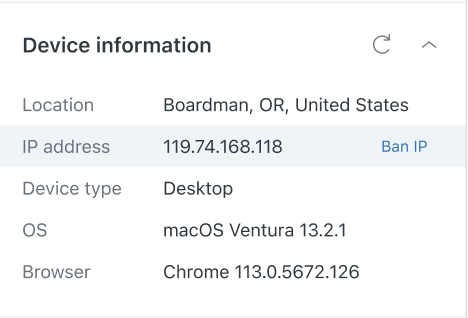
You can restrict end-user access to your Zendesk messaging channels by banning their IP address. When an IP address is banned from your messaging channels, all end users from the banned address are blocked from conducting conversations with your AI or human agents. See About banning IP addresses from messaging channels.
-
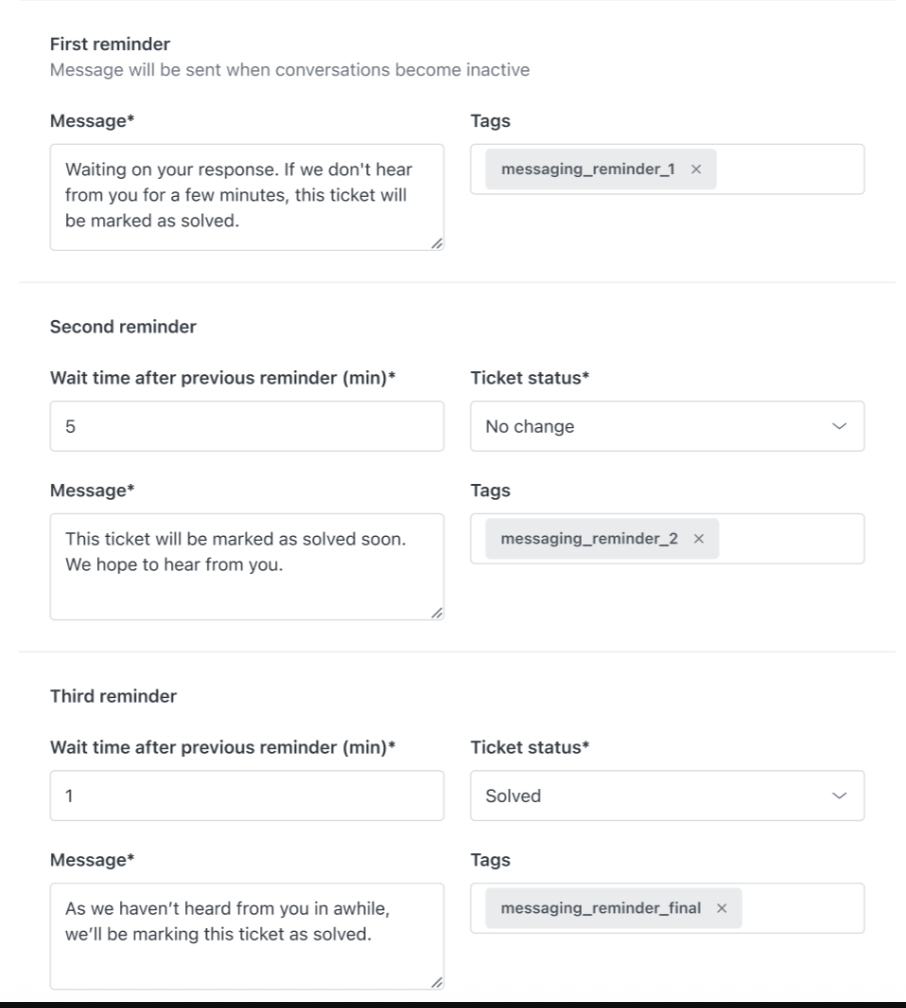
Send automatic reminders to end users when their messaging conversations become inactive. Admins can configure and customize up to three reminders as part of the Capacity release settings in Admin Center. These inactivity reminders are turned on by default for most customers. See Automatically releasing agent capacity for inactive messaging conversations.
-
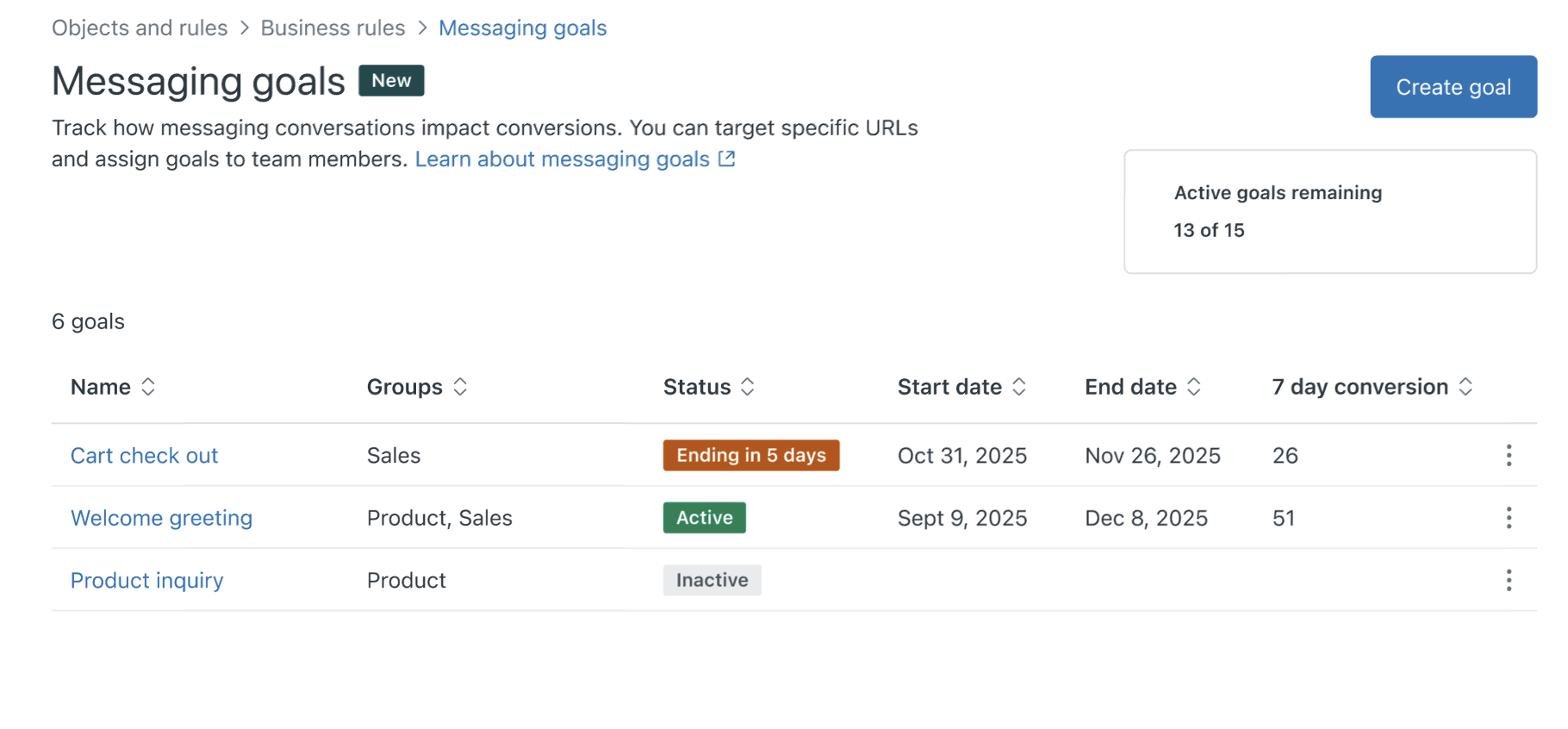
Messaging goals let you track specific customer actions. Goals can be assigned to agent groups, allowing you to track which conversations lead to a completed goal, and see how often each agent is responsible for driving the action. See Tracking customer actions with messaging goals.
Additional enhancements
- Web Widgets can now be configured to use help center authentication for end users. When help center authentication is turned on for the Web Widget, interactions with the Web Widget by end users who are signed into the help center automatically adopt the user's signed-in identity. See Turning help center authentication for messaging on and off.
- You can now end messaging sessions with a ticket trigger, using the Ticket > Messaging session | End Session action. This can be used to manage ticket surges, ticket submissions out of business hours, and reporting when a session is ended. See Ticket trigger conditions and actions reference.
- Expanded list of messaging trigger conditions includes Customer Page URL, Customer Country, Customer IP, and Customer email. These new conditions allow you to incorporate customer location data and browsing context as part of your trigger. See Messaging triggers conditions and actions reference.
- New messaging trigger actions and placeholders allow you to suspend users, use dynamic content to display an AI agent name and avatar, and include Support placeholders in your trigger actions. See Messaging triggers conditions and actions reference.
- Updated omnichannel routing logic for agent-ended messaging sessions means only tickets whose routing channel changes from messaging to email after the session ends are eligible for routing. See Understanding ticket routing for tickets with agent-ended messaging sessions.
- Rich text formatting options for web and mobile messaging channels are now supported in ticket comments. See Rich text formatting options reference.
- Multiple conversations are available for the Unity SDK channel. Multi-conversations let your end users conduct multiple messaging conversations simultaneously. Allowing multiple conversations for your end users.
- Assign a separate AI agent, third-party bot, or custom responder as the default responder for each messaging channel, using Admin Center settings or SunCo switchboard APIs. This means admins can gradually roll out a new responder, set up a VIP channel, and more. See Managing third-party bots in Admin Center.
- Use dynamically-updated placeholders in messaging triggers to update the messaging agent's name, and to localize automatic responses based on the end user's preferred language. See Using dynamic content in messaging triggers.
- Automatically apply rich-text formatting to AI agent-generated responses in messaging conversations. This adds structure to messages displayed to end users and to agents. See About rich text formatting in messaging conversations.
- Threaded comments on a public Facebook channel automatically create a new ticket if the setting is turned on. Additionally, any comment on an existing post automatically creates a ticket, if one does not already exist. See Setting up your public Facebook channel
- Apple Messages for Business is back. Adding it to your Zendesk configuration lets your end users connect with both live agents and advanced AI agents through the Messages app on their Apple devices. See Adding and configuring the Apple Messages for Business channel.
Knowledge
Key updates
-
You can now create one article and place it in up to 10 different sections across all brands in your help center. Updates to the article’s content are automatically reflected across all placements, so you only need to create and maintain content once. See Placing articles in multiple sections.

-
AI translations for articles can quickly generate translations for articles directly within the new article editor for help centers configured to support multiple languages. For example, you can create an article in your default language, then use the AI translation feature to automatically translate the article into any language supported by your help center. See Translating articles in your help center using AI.

-
Generative search is now available in the help center. With generative search, users can enter a question or phrase in the search bar of the help center and within seconds receive a concise answer without having the click through multiple search results or scan related articles for an answer. See Using generative search to provide AI-powered answers to search queries.

-
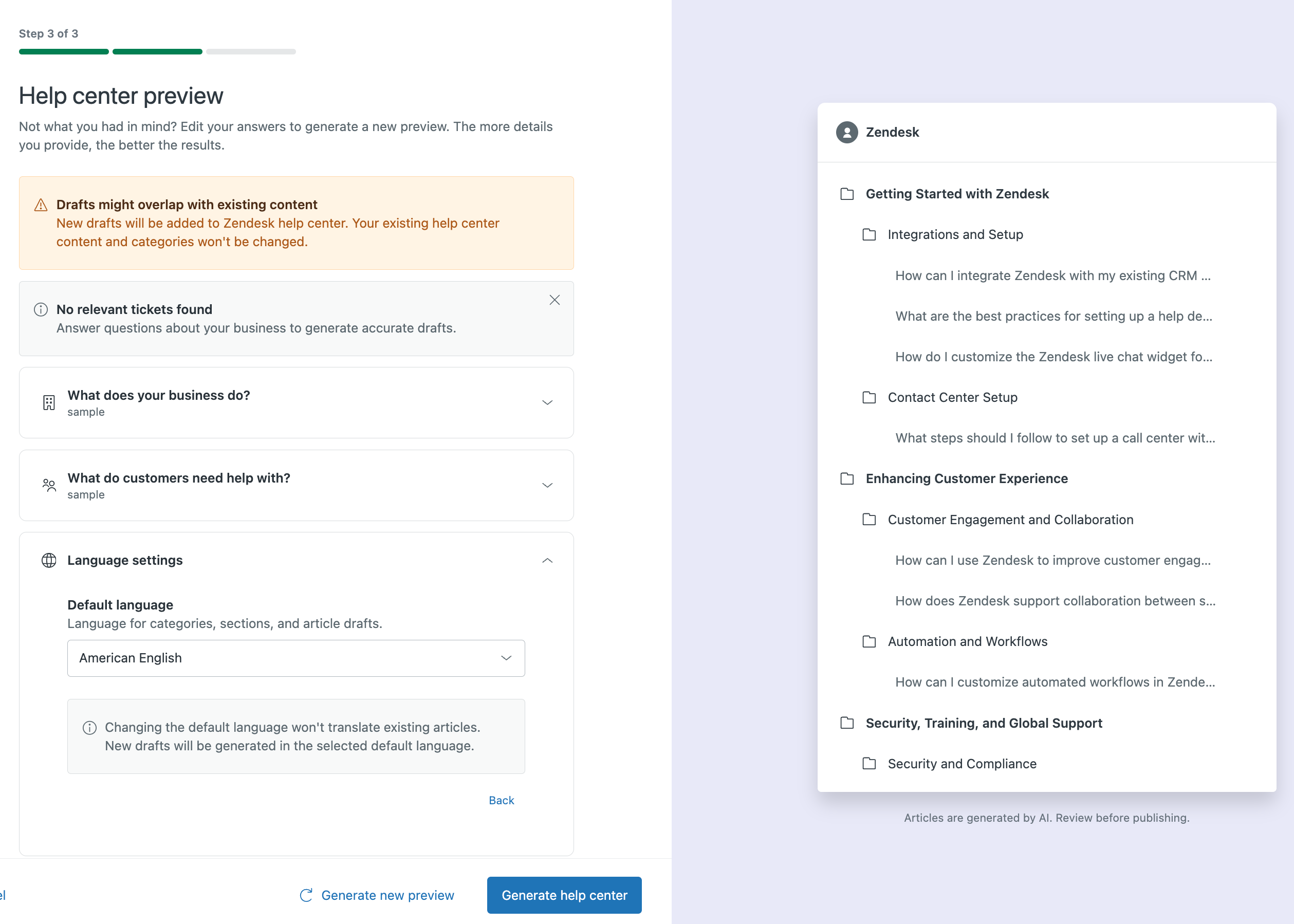
You can now use your ticket data and generative AI to create a help center. If you don’t yet have a help center or if your help center is incomplete or out of date, you can quickly create a new one based on your ticket ticket data from the last 30 days, your most common customer issues, and your key business data. See Creating help center content using ticket data and generative AI.
-
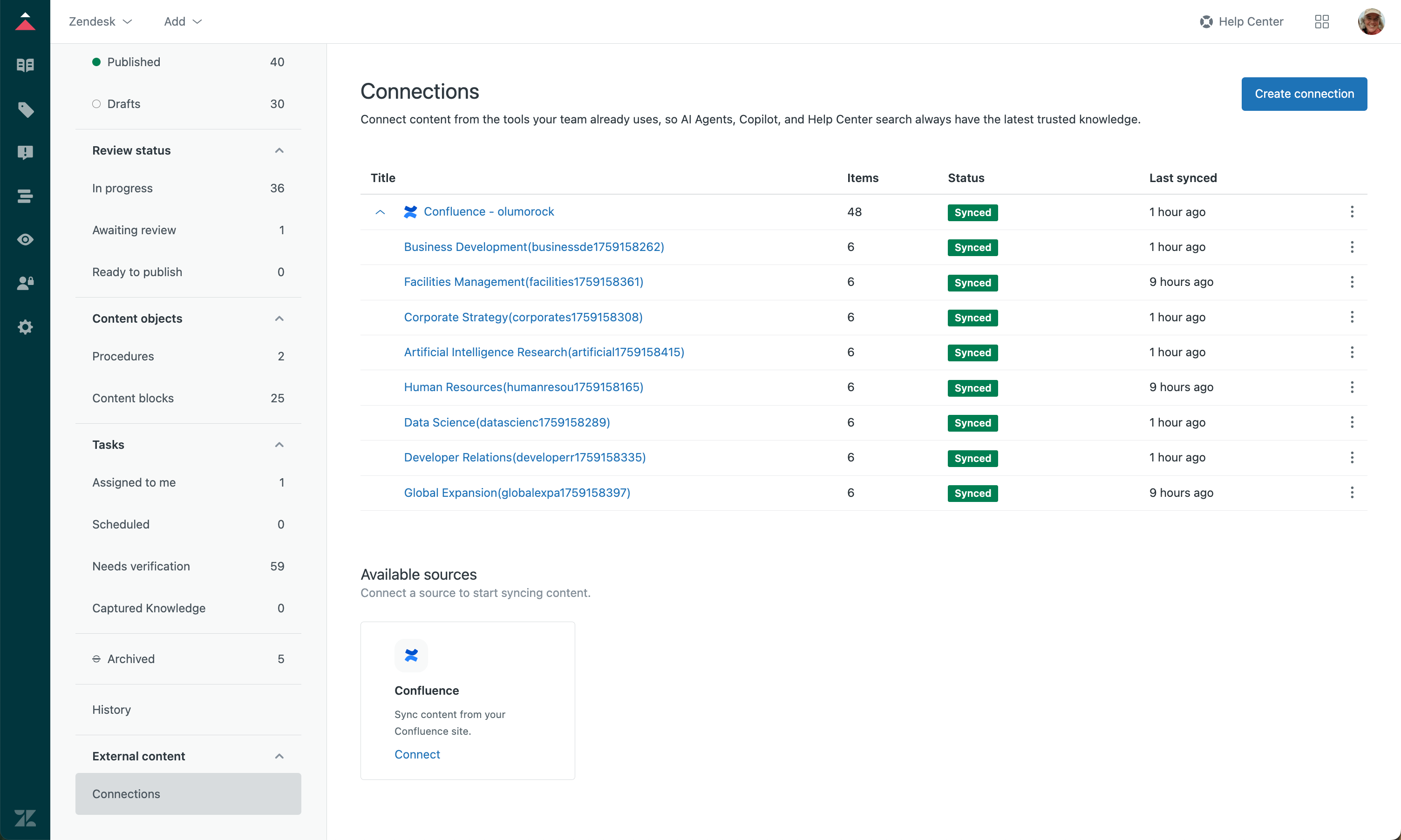
The knowledge connector to Confluence is now available. Connect to Confluence sites and spaces to ingest the external content and make it discoverable in the Agent Workspace search, help center search, and generative search. See Connecting Confluence to your Zendesk account as an external knowledge source.
Additional enhancements
- The web crawler setup process has been simplified. You can now configure a web crawler with the Federated Search API without adding a verification tag in the <head> element of your home page. See Setting up federated search in your help center using a search crawler or the API.
- Quick answers is turned on by default since September 25, 2025**.** See Using quick answers for generative search in tickets.
- You can now define case-sensitive terms and phrases to exclude from AI-generated translations. This lets you keep important terms (for example, brand and product names) consistent in their original language across all translations. See Excluding terms from AI-generated translations.
- The new Knowledge article editor began its phased rollout, which will extend from May 2025 to Q1 2026. See Using the new article editor.
- You can now embed Figma and Figma Jam files directly into your help center articles to provide a more dynamic and interactive content experience. See Inserting videos and embedded files in articles and content blocks.
- You can now use anonymous user tracking to enhance the analytics capabilities of your help center. When you activate user tracking, an anonymous tracking code is added to all pages in your help center, enabling you to associate activities across different sessions from users who are not logged into your help center. See Enabling anonymous user tracking for your help center.
Voice
Key update
-
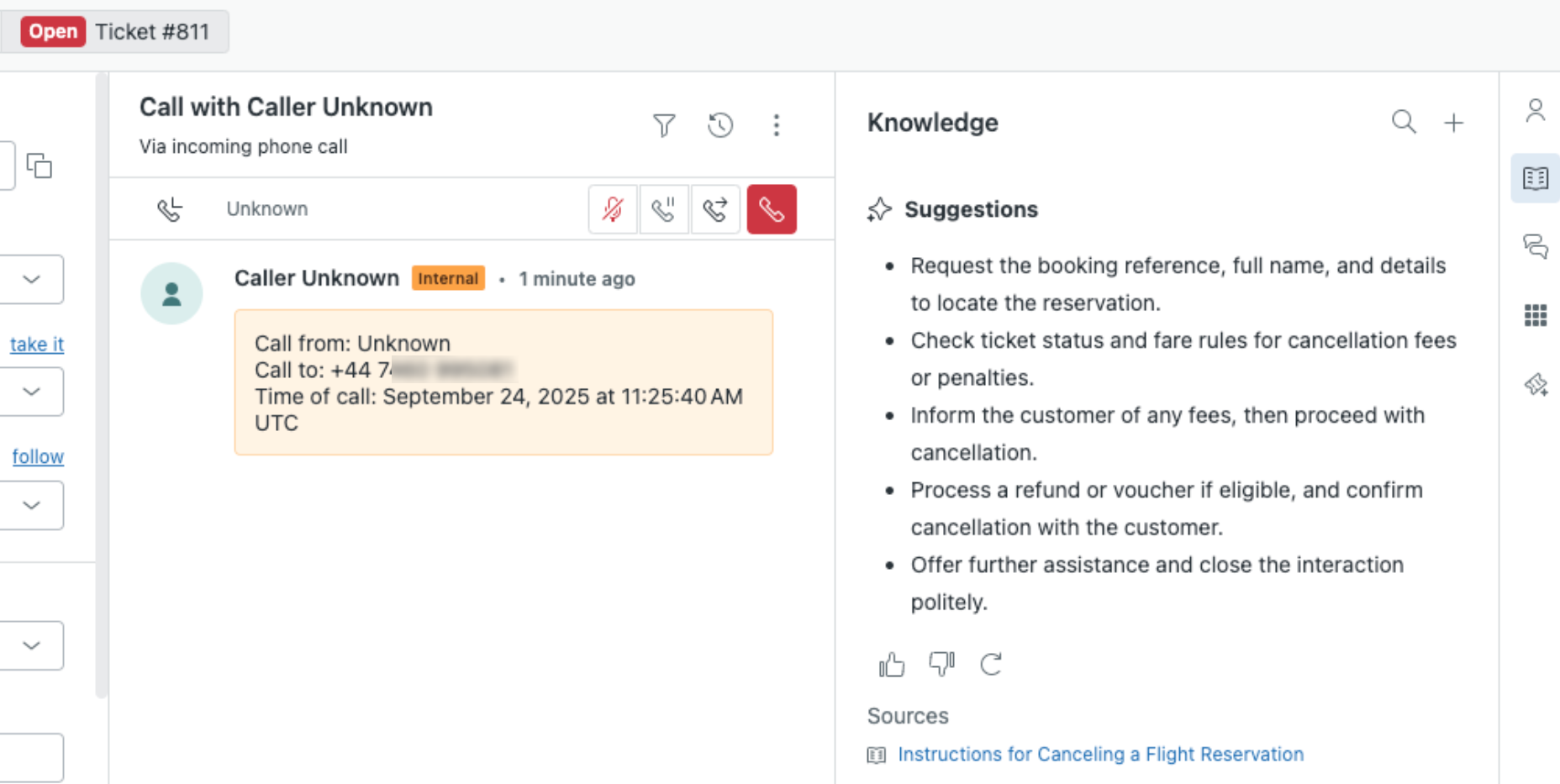
Real-time AI suggestions for voice calls gives your call center agents immediate, context-aware suggestions about how to assist the customer they’re talking to. These suggestions are pulled from your help center, including any support articles, policies, troubleshooting guides, and internal FAQs you might have. See Using real-time AI suggestions for voice calls.
Additional enhancements
- The maximum queue size that admins can configure has been increased from 60 to 1,500. See Configuring voice channel settings.
- Agents can now select the device on which their ringtone plays for incoming calls. This ensures that agents can step away from their computers without missing a call, as the ringtone can be heard through an external device such as a speaker or Bluetooth headset. See Receiving incoming calls.
- The Talk transcription service now includes the following new features:
- Automatic speaker labeling: Transcripts now identify who is speaking (agent or customer) during phone conversations.
- Keyword boosting: Highlight specific words, such as product names or industry terms.
- Automatic redaction: Automatically redact personally identifiable information (PII) and payment card industry (PCI) data from your transcriptions.
See Zendesk Talk call transcription and summarization FAQ.
- Talk SIP-IN lines support IVR. SIP-IN lines can now use phone trees (IVR), enhancing call management beyond group routing. See Routing incoming calls with IVR.
- Secure media (TLS/SRTP) support for SIP-IN lines encrypts SIP signaling with TLS and media with SRTP, enhancing call security by rejecting non-encrypted calls. See Adding a SIP-IN line.
Analytics
Key updates
-
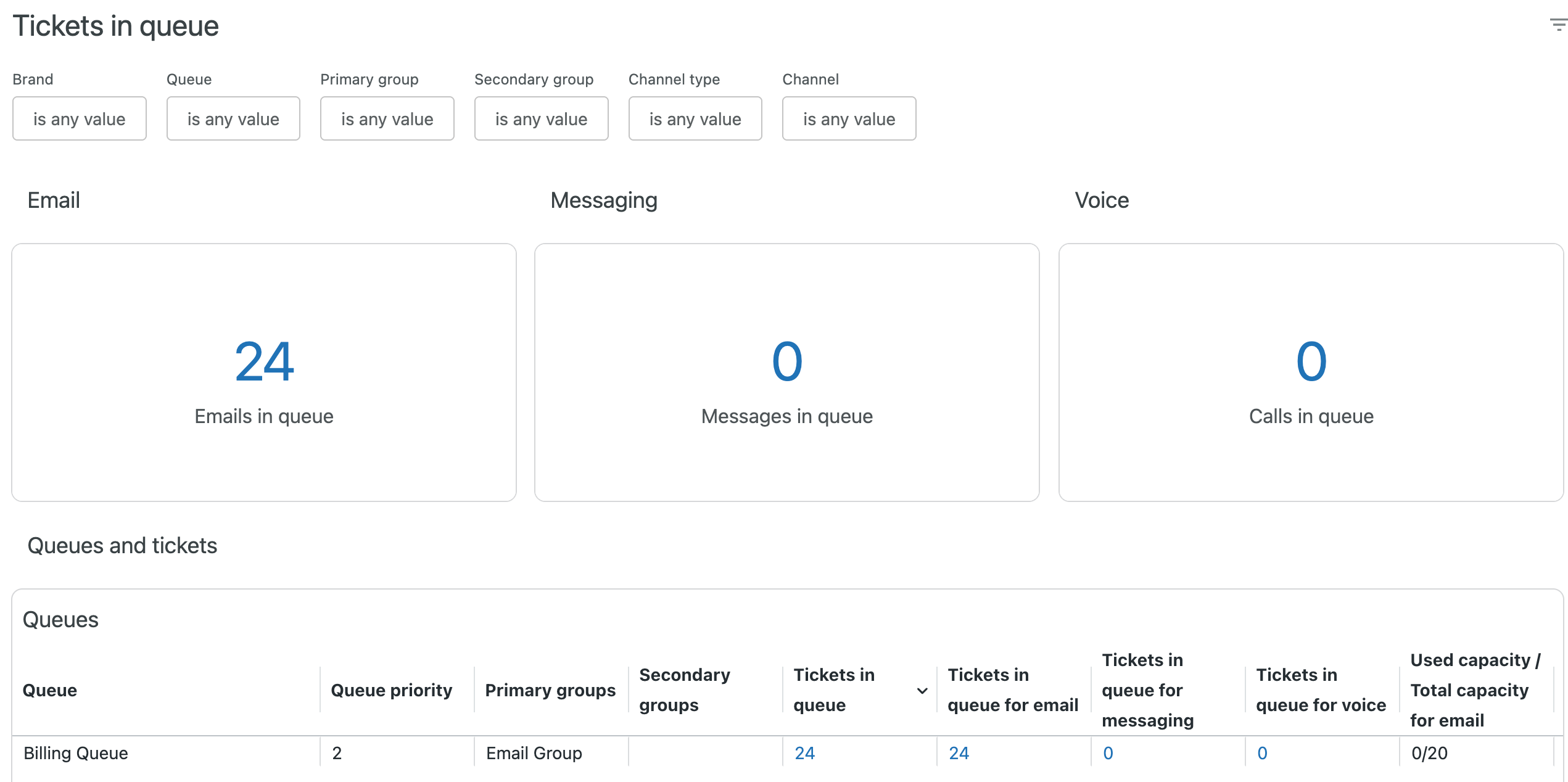
Real time monitoring dashboards combine data from various channels to provide visibility into your business. These new reports combine both real-time and historical views of your data to give you a clearer picture of your business. Real-time monitoring is a new space within Zendesk Analytics. See Working with real time monitoring dashboards.
-
The user sessions and page efficiency reporting dataset, along with the prebuilt dashboard, help identify content that effectively addresses user questions and pinpoint the content responsible for users creating new tickets. The user sessions dataset helps admins to see user session outcomes for specific users and look at trends across different roles. The page efficiency dataset is focused on content performance, which content is most helpful, and which may be responsible for the most tickets submitted. See Analyzing your user session and page efficiency activity.

-
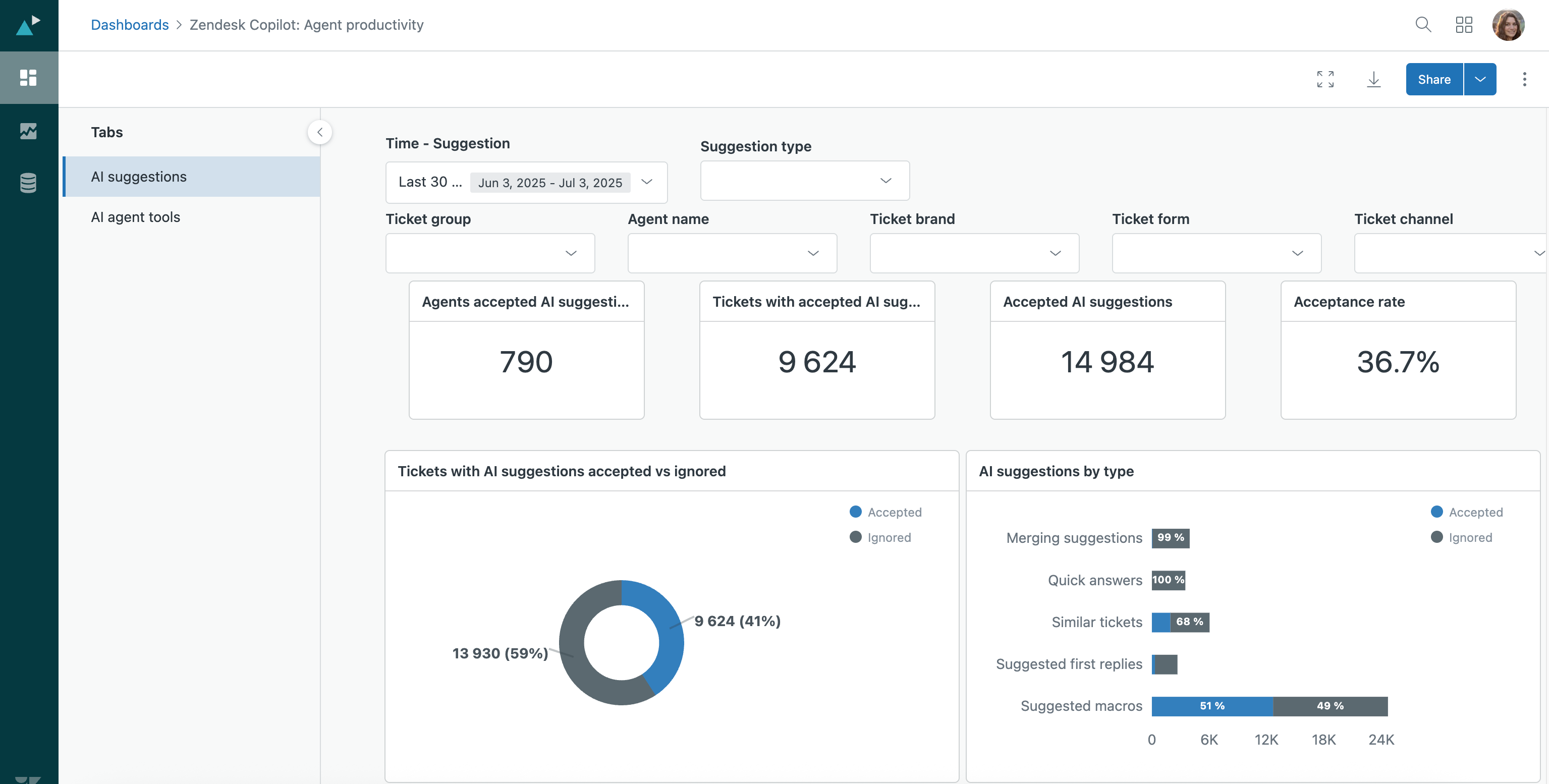
Zendesk Copilot: Agent productivity dashboard is now available. This dashboard allows you to track how agents interact with Copilot AI in Zendesk by providing a clear view of how they adopt and engage with Copilot AI tools. This information helps you track usage, optimize workflows, and boost productivity. See Analyzing your Copilot activity.
Additional enhancements
-
Real-time monitoring dashboards have been enhanced with recent-history metrics for incoming tickets and agent productivity, including a new leaderboard. SLA live reporting now shows ticket-level SLA statuses, new visualizations, and filters by SLA status and policy. Skills and tags filters are added to incoming tickets and ticket progress dashboards. See About real-time monitoring dashboards.https://support.zendesk.com/hc/en-us/articles/10073405631514-Announcing-new-functionality-for-real-time-monitoring-dashboards
-
Quick reports harness the power of AI to empower you to write simple prompts that generate the reports you need in seconds. See Creating AI-powered quick reports.
-
The Zendesk Messaging prebuilt dashboard has been updated with new metrics and reports to better evaluate how your team is handling messaging tickets. See Analyzing your messaging tickets.
-
A new tab with auto assist usage data is available on the Zendesk Copilot: Agent productivity analytics dashboard. See Analyzing Copilot activity.
-
Enhanced reporting for custom objects provides reporting on standard objects and custom object fields that relate to them. If a custom object has a lookup field that points to the Tickets object, for example, you’ll be able to find its fields in datasets such as Support: Tickets and Support: Updates history. See Building reports.
-
The omnichannel routing queues dashboard helps you monitor how well omnichannel routing queues distribute work to agents. Use this dashboard to understand the inbound and outbound volume of queues, as well as the average and longest wait times for any given queue, and drill down to tickets within the queue to understand why the ticket entered or exited the queue.
Additionally, you can access metrics and attributes that enable you to create your own reports. See Analyzing omnichannel routing queues. -
Explore group-based permissions allow you to define data access in Explore based on the groups agents belong to. Previously, group permissions were only available for the Support: Tickets and Support: Updates history datasets. See Giving users access to Explore.
-
The change attribute component is now available in the new Explore dashboard builder. Use this tool to "slice" your dashboard data using different attributes without needing to duplicate reports. See Adding interactive dashboard components.
-
All new custom Explore dashboards must be created using the new dashboard builder. You can continue opening and editing dashboards created using the legacy dashboard builder during this period. In July 2025, legacy dashboards will become view-only. See Creating Explore dashboards.
-
There is a 90-day data retention limit for the Omnichannel: Agent daily state dataset in Explore starting April 21, 2025. This will improve report loading speeds and ensure the dataset's correct functioning. See Metrics and attributes for agent state and activity.
-
There is a 37-month data retention limit for Explore starting July 7, 2025. This is designed to provide a significant performance boost to reports with minimal negative impact on the overall reporting experience.
Workforce management
Key updates
-
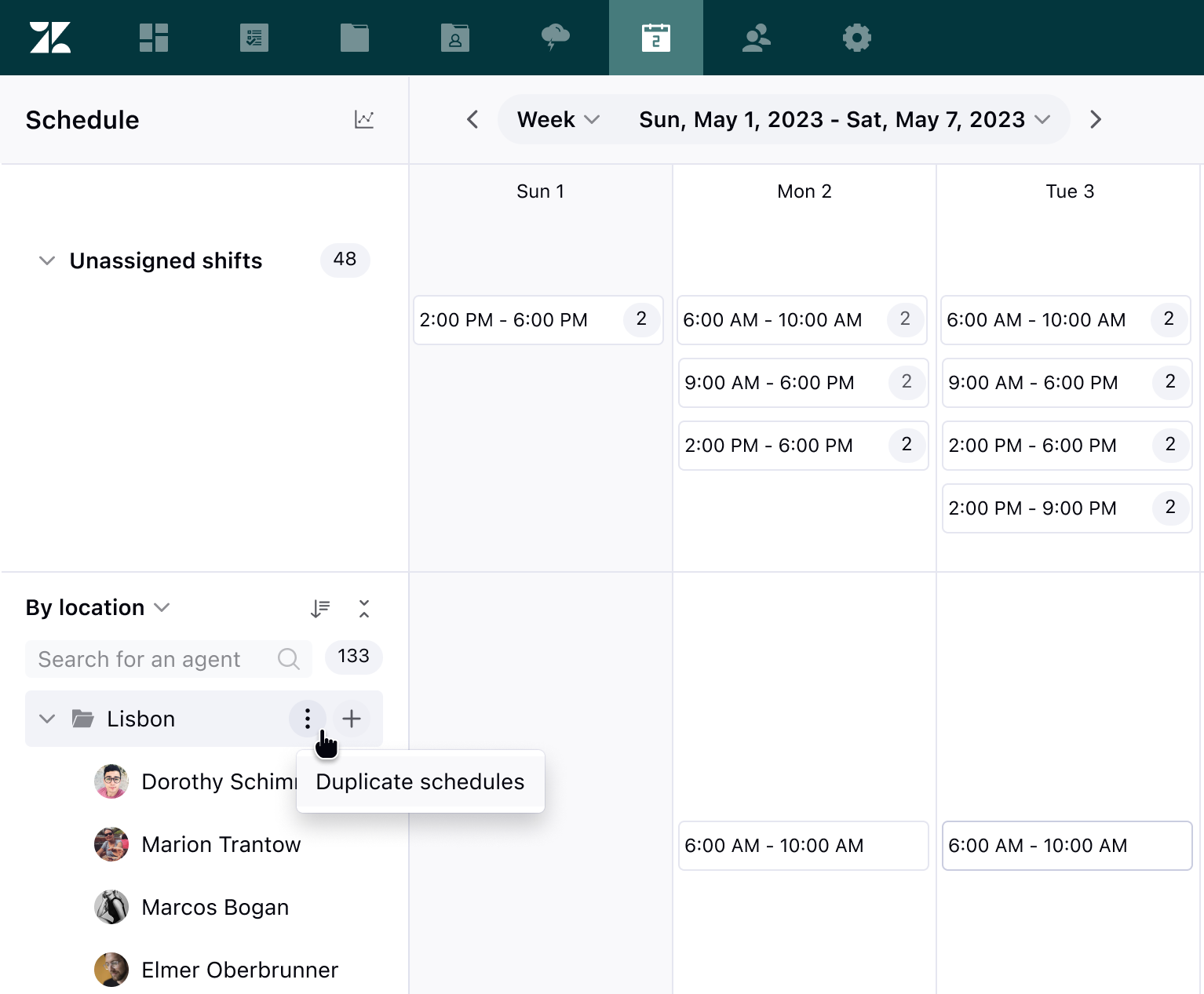
Weekly schedule duplication in WFM. Admins can now duplicate an entire week of shifts for a team, group, location, or even all agents at once. Additionally, they can copy an agent's schedule for future weeks or paste it for another agent to use. See Duplicating agent schedules.
-
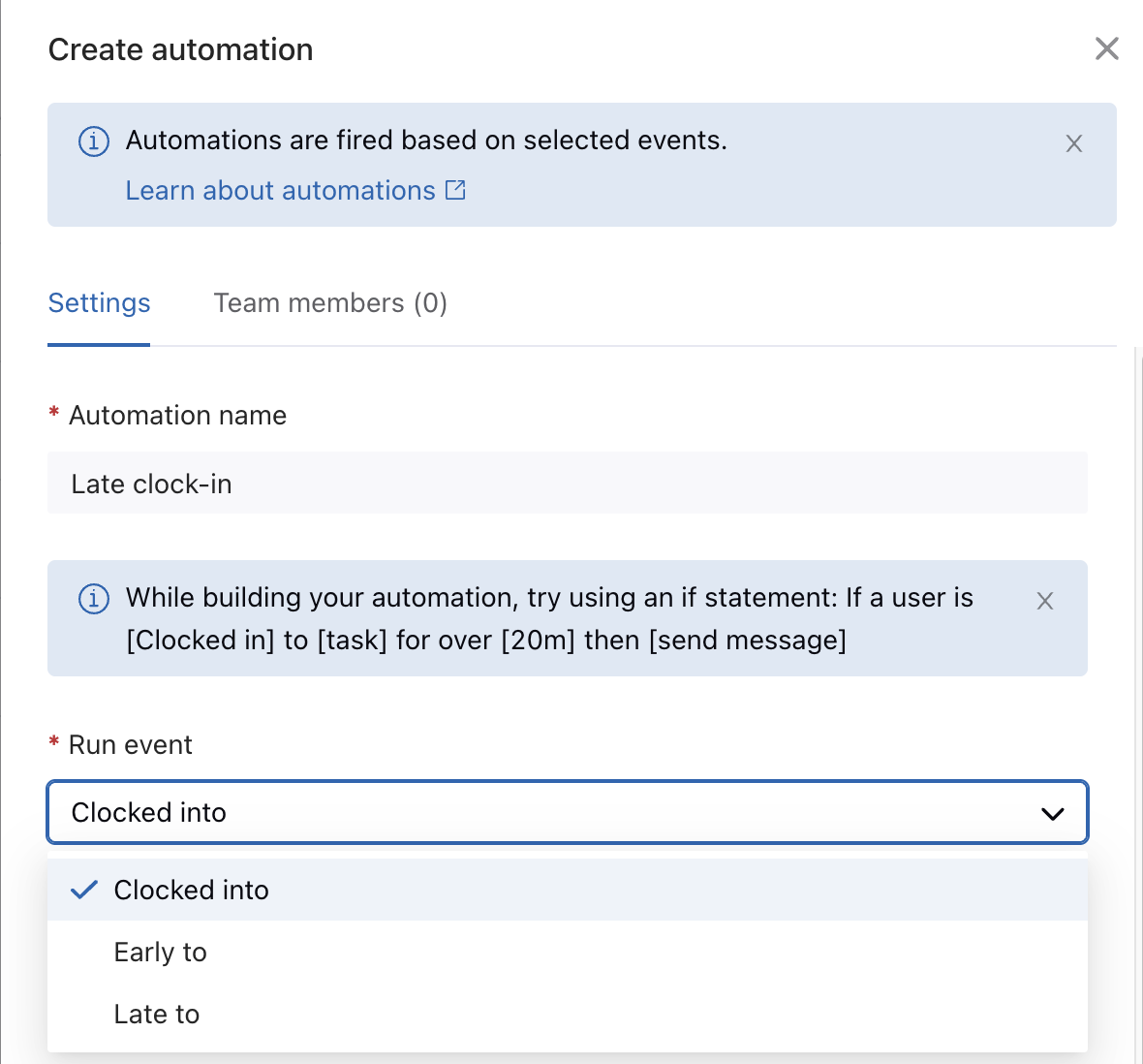
WFM has two new run events for early and late to start and end day automations. These events dynamically identify deviations from planned schedules, allowing users to receive notifications and perform automated actions, such as clocking out users and deleting their timesheets. See Creating WFM automations to manage agent activity.
-
Automatic shifts in WFM now include an option to define a rotation period. Defining a number of days or weeks for a rotation period will make the scheduling algorithm rotate users between different starting times, both flexible and specific. See Rotating automatic shifts.

-
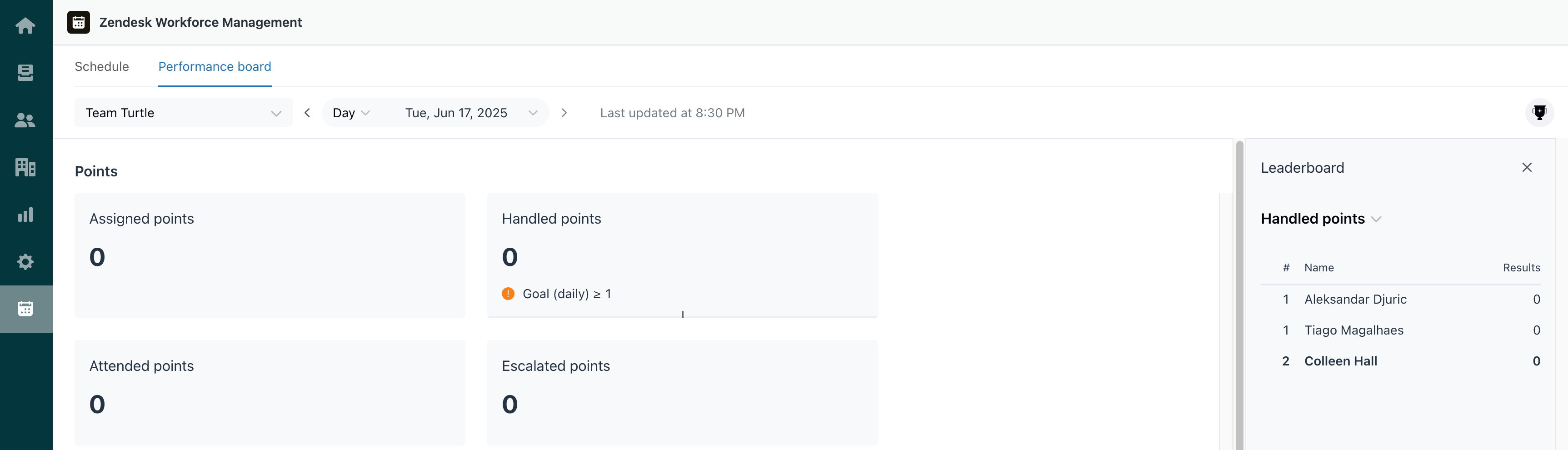
Zendesk WFM performance boards are now available. Performance boards allow you to create sets of reporting metrics, define goals, and share them with your teams. If you'd like to foster some friendly competition, there’s also an option to turn on leaderboards for your performance boards. See Understanding WFM performance and leaderboards.
Additional enhancements
- Audit logs in WFM now include events for account settings, user management, general tasks, schedule editing, workstream, and location. Zendesk Workforce Management (WFM) enhanced WFM audit logs by adding the most relevant events related to account settings, user management, general task, and schedule editing. Workstream actions include creating and editing, adjustments to workstream prioritization, agent assignment and more. Location events include actions, such as creation, updates, and deletions of locations, shifts, and folders. See Viewing the WFM audit log for changes.
- Visibility of agent time off requests has been expanded. The sidebar displays time off requests for a full year ahead, while maintaining the 30-day view for past requests. See Requesting time off.
- The staffing forecast calculation for WFM has been improved. Staffing forecast calculations and results are now rounded to one decimal place. See Understanding required staffing.
- Admins can now bulk replace tasks in the WFM schedule. Easily switch agents’ tasks to different ones in bulk. This can be handy when re-prioritizing workstreams for the day, switching a team’s focus to another channel, or simply replacing a cancelled meeting or event. See replacing tasks in bulk.
- Bulk management for teams, users, and workstreams in WFM. Admins can add and remove users from multiple teams at once. Admins can manage auto tracking and task lock settings for team members in bulk. Additionally, admins can add and remove users from multiple workstreams at once. See Adding and removing users from teams in bulk, Viewing team member profiles and editing tracking settings and Adding and removing users from multiple workstreams in bulk.
- Move of the Google Calendar integration for WFM to Admin Center. Activating and deactivating the Google Calendar for Zendesk WFM integration has moved from the Integrations section of Zendesk WFM into Admin Center. See Activating and deactivating the Google Calendar for Zendesk WFM integration.
- WFM now supports CSV exports of the Agent activity timeline. This functionality allows teams to access, analyze, and report on agent activities outside the WFM interface. See About the Agent activity page.
- Grouping and filtering historical reports by organization. WFM now supports grouping and filtering historical reports by organization. See About custom WFM report templates.
- Manually adding activities in the agent activity timeline in WFM. Admins can now manually add activities, such as general tasks or untracked time, directly into the agent’s activity timeline. See Managing agent activity.
- Revert schedule changes to the last published state in WFM. Admins can now revert a schedule to the last published state and reset all changes made to shifts. See Reverting published changes.
- Agent time tracking outside of Zendesk. Extension tracking allows WFM general tasks to be mapped to specified URLs so that agent activity is tracked when they visit any URLs you specify. See Tracking agent time spent outside of Zendesk.
- Control whether to automatically add new team members when new users are created in Zendesk. See Managing user access in your WFM account.
- Add notes to scheduled tasks in WFM. Leave notes on tasks to describe the meeting agenda, highlight specific chats to focus on, or to indicate which view or queue to monitor. See Creating automatic shifts.
- Agents can now resync their Google calendars with their WFM agent schedule in the Agent Workspace. See Syncing your Zendesk WFM schedule with Google Calendar.
- New auto-tracking setting allows admins to turn automatic tracking on or off. With this update, managers can decide which users can track their activity manually. See Activating and deactivating auto-tracking and task lock.
- Sort by shift start time. By default, your schedule page displays agents sorted by name. You can now also reorder them by their shift start time. See Navigating the schedule.
Quality assurance
Key updates
-
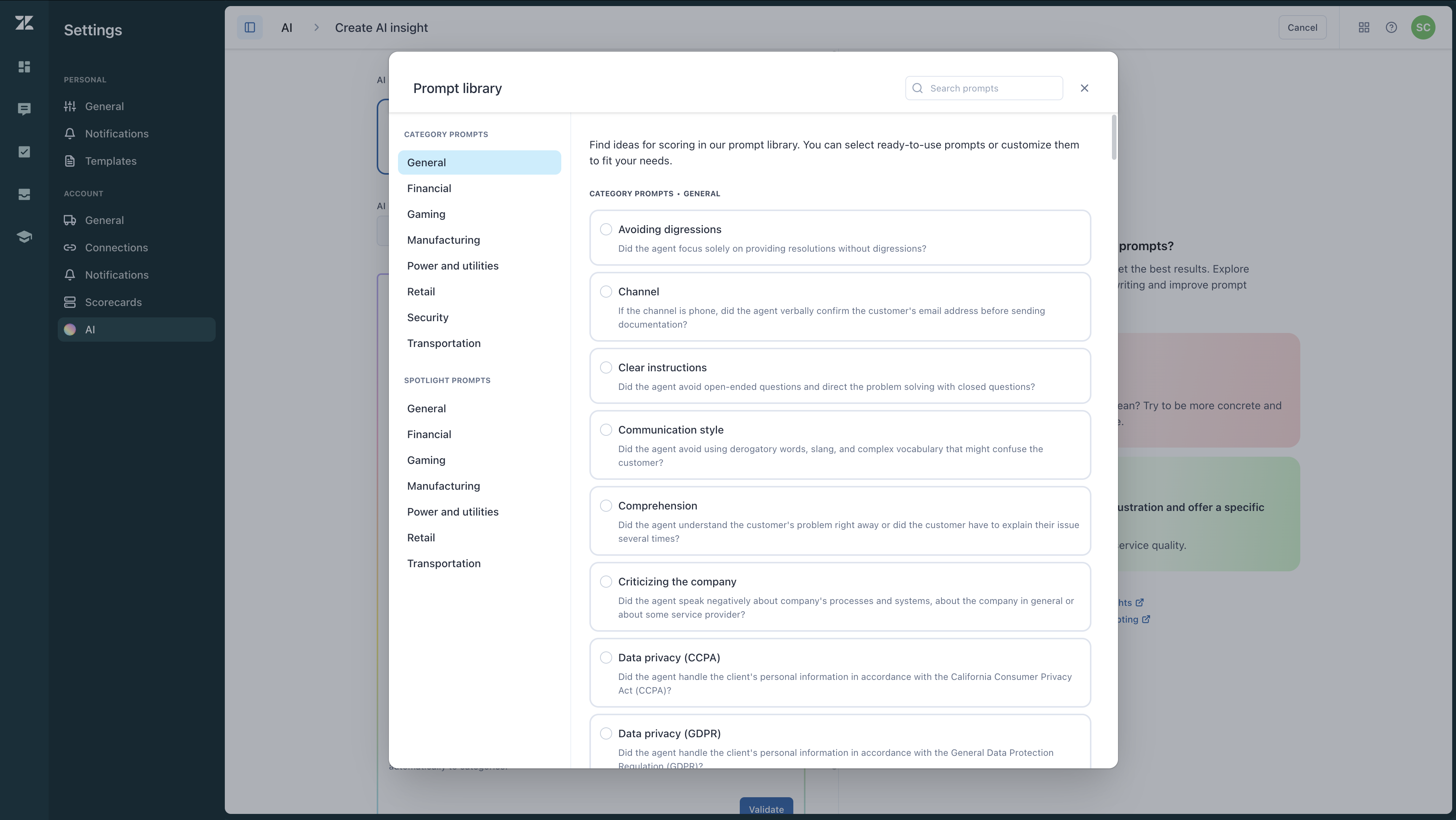
Zendesk QA prompt-based AI insights is now available. By using or modifying our ready-to-use AI prompts or crafting new ones, you can ask targeted questions about conversations using natural language and automatically score or flag them based on your criteria. See About AI insights in Zendesk QA.
-
Zendesk QA Advanced Scorecards updates. Scorecard, category, and root cause creation and management now occur at the account level rather than within a workspace. Here, admins and account managers can seamlessly copy and transfer scorecards and categories, mark them as active or inactive, and use them across multiple workspaces without duplication. See Viewing and managing scorecards and Creating scorecards.

-
Zendesk AutoQA for Voice. In addition to your current text-based interactions (chats and emails), AutoQA now reviews calls. Zendesk QA auto scoring is available for voice calls in five predefined categories: Greeting, Closing, Empathy, Comprehension, and Solution offered. See Using the context panel.

-
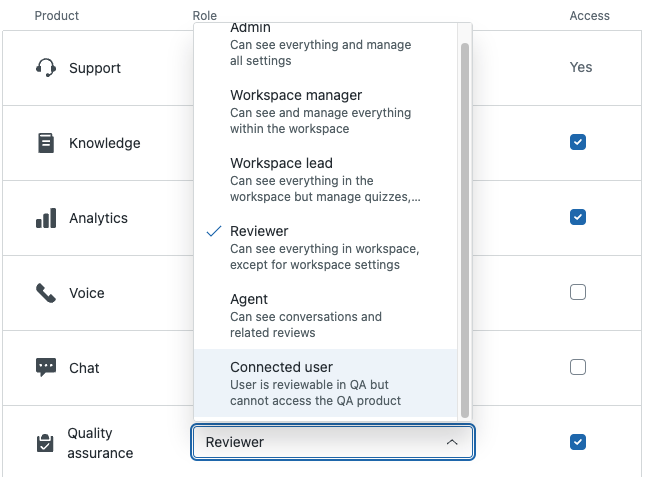
Zendesk QA user and license management has moved to Admin Center. See Understanding roles and permissions in Zendesk QA.
-
Voice for Zendesk TPE. If you’re using a call center solution other than Zendesk Talk, you can now also connect it to Voice QA with Zendesk Talk Partner Edition (TPE).
Additional enhancements
- Intelligent filters are AI-powered conversation filters that automatically detect predefined conditions such as agent escalations, AI agent conversations, and frustrated AI interactions, enabling faster insights and easier data analysis. See Understanding conversation filter types in Zendesk QA.https://support.zendesk.com/hc/en-us/articles/10021355851290-Announcing-Zendesk-QA-intelligent-filters
- New spotlight insight and conversation filter. SLA has been added as a Spotlight insight and conversation filter for conversations in Zendesk QA. This enhancement allows you to quickly identify SLA breached conversations for further analysis and for review based on your Zendesk Support SLA policies. See Understanding spotlight insights.
- Custom phrase-match and improved Zendesk QA filter options for AutoQA categories and Spotlights. See Setting up autoscoring and Using Spotlights.
- Admins and account managers can now hide reviewer names throughout Zendesk QA. When reviewer anonymization is turned on, the reviewer's name is hidden in all areas of Zendesk QA where the reviewer role would be visible. See Hiding reviewer identities from agents.
- Zendesk Talk Partner Edition offers a new pre-built telephony integration with Five9 that plugs directly into Zendesk QA. See Activating Voice QA with Zendesk Talk Partner Edition.
- Update to the number format displayed in all Zendesk QA dashboards. Zendesk QA improved the user experience by offering a localized and familiar number format for users in different regions.
- Migration of Zendesk QA Surveys dashboard to a new platform. Zendesk QA Surveys dashboard has been moved to a new platform offering a more modern look and format. See Accessing and viewing the Surveys dashboard.
- Zendesk QA has a new accuracy metric. A new accuracy metric now measures the consistency and agreement between AutoQA-generated ratings and those provided by human reviewers, replacing the previous acceptance rate metric. See Understanding the AutoQA dashboard in Zendesk QA.
Apps and integrations
Key updates
- The new Microsoft Exchange connector lets you connect your Microsoft Exchange servers directly to your Zendesk Support instance. This feature is ideal for customers looking to send and receive email traffic using their own domain’s email services while ensuring encrypted and secure relays to and from Zendesk. See About the Microsoft Exchange connector.
- A new version of the Jira integration for Zendesk Support is available for all Jira Cloud accounts that are not already connected to Zendesk. This integration brings a new level of flexibility, performance, user experience, and collaboration for Zendesk and Jira users. See Connecting your Jira instance to Zendesk. Information will be available soon for customers who have already installed and configured the legacy integration, including details on migrating to the new integration.
- Admin configuration capabilities are available for the Workday integration in Zendesk Support, allowing admins to customize the Workday data displayed to agents and HR personnel. See Configuring the Workday app for Zendesk Support.
- A new external OAuth clients page displays a list of apps and integrations that use external OAuth (also known as global OAuth) to authenticate and connect to your account. You can now view and manage all authorized third-party integrations that use external OAuth, regardless of which team member set them up. See Managing external OAuth clients.
Additional enhancements
- Zendesk for Contact Center is a product of the Zendesk partnership with Local Measure. This integration brings an advanced Contact Center as a Service (CCaaS) and CX platform powered by Amazon Connect into your workflow. Use this integration to help you deliver an enterprise-grade contact center experience. See Zendesk for Contact Center in the Marketplace.
- The Shopify app for Zendesk Support is compatible with dark mode. Users who prefer the dark mode interface in Zendesk Support will enjoy the same visual experience and reduced eye strain when using the app.
- The Salesforce and Workday apps integrated with Zendesk Support support dark mode. See Using dark mode to increase agent display options for more information on activating dark mode.
- Ticket view in Salesforce displays tickets from all your Zendesk accounts connected to the Salesforce organization. Sales representatives use a drop-down field to switch between Zendesk accounts. To connect additional Zendesk accounts or Salesforce organizations, see Connecting your Salesforce organization to Zendesk.
- A preview feature is available when configuring the Salesforce app for Zendesk Support, making it easier for admins to visualize the agent experience and tailor the app layout to fit their workflow. See Installing and configuring the Salesforce app for Zendesk Support.
- You can connect multiple Salesforce organizations and Zendesk accounts, removing the previous restriction that limited one Salesforce organization to one Zendesk subdomain. This capability allows agents to see Salesforce data for all your organizations in the sidebar of a ticket when using the Salesforce app for Zendesk Support. See Connecting your Salesforce organization to Zendesk.
- An updated API section in Admin Center > Apps & Integrations moves the settings tabs on the API page into separate pages. This change provides new features for managing API access and gives customers better control over their API and OAuth access tokens. See Managing API token access.
- The LMS Conversation Simulator app uses existing tickets and keywords you specify to generate sample tickets that can be used to train your agents. See Installing and using the LMS Conversation Simulator app.
https://support.zendesk.com/hc/en-us/articles/4408843026714-What-is-being-removed-updated-December-2025
Fetched June 4, 2026