What's new in Zendesk: April 2025
Rollup
Click Follow in the What's New section to be notified each month when the What's New is published.
Check out what's new in the last month:
- Support
- Objects and rules
- Admin Center
- Accounts and billing
- Knowledge
- Messaging
- AI agents
- Talk
- Explore
- Zendesk QA
- Zendesk WFM
- Apps and integrations
Also don't miss:
Support
-
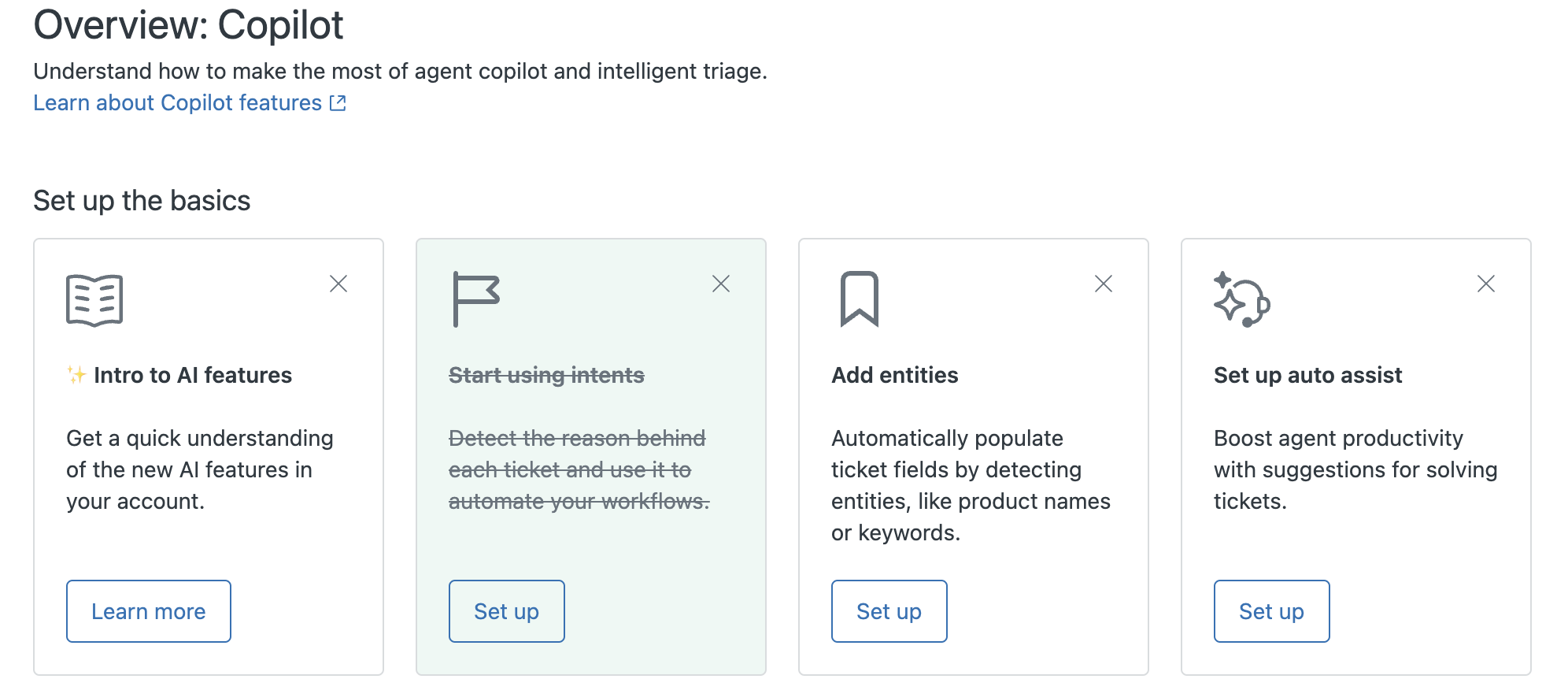
Customers with the Copilot add-on will see a new Overview: Copilot page in Admin Center. This page provides a centralized AI hub to manage all Copilot features, monitor performance, and uncover opportunities to optimize workflows. See Monitoring and optimizing effective AI setup.
-
Admins can deactivate Agent Home if desired. Previously, accounts that were automatically upgraded to Agent Home as the default could not deactivate it. See Using Agent Home to manage your work efficiently.
-
As part of an improvement to Intelligent triage, the ability to create custom intents is now available. Creating custom intents gives you greater flexibility over your available intents and allows you to address your specific business needs. Additionally, the request new intent feature is now retired. See Personalizing intelligent triage by creating custom intents.
-
You can now configure Intelligent triage to predict the sentiment of a conversation based on the latest message from the end user. This allows you to track the sentiment throughout the ticket lifecycle, which can prevent escalations. See Automatically detecting customer intent, sentiment, and language.
-
Entity detection, a way to automatically detect and extract important details in tickets by creating your own entities, is now available as part of the Copilot add-on. Regular expressions (regex) and drop-down and multi-select fields are supported. Additionally, misspelled values can be detected. See Automatically detecting unique information in tickets.
-
Three new generative AI writing tools - Tone of voice, Simplify, and Custom prompt - are now included as part of agent copilot. Agents can use these new writing tools to improve the content of their ticket comments in different ways.
-
Auto assist, which is part of agent copilot, can now read tags and certain standard and custom ticket fields. Auto assist can also suggest and execute updates of the fields in Zendesk Support. See Creating procedures for auto assist.
-
A new standard trigger and standard SLA were introduced to new accounts created on or after March 3, 2025. The new trigger changes tickets with no priority to normal priority so that the new SLA can be applied to tickets. The SLA sets a 60 minute First Reply (FRT) to tickets with a normal priority. See About the standard ticket triggers and About SLAs and how they work.
-
You can now print a printer-friendly version of any side conversation from any channel, including email, Microsoft Teams, Slack, and child tickets. See Printing tickets.

Objects and rules
- New omnichannel routing configuration option to treat all agent-ended messaging sessions as email tickets for the purposes of routing and agent capacity. When this setting is applied to a ticket, it's recorded in the ticket event history. You can also create custom queues for messaging conversations that are routed as email tickets by using the Ticket > Channel and Ticket > Routing channel conditions together. See Managing your omnichannel routing configuration.
- Webhooks can subscribe to ticket and messaging events without relying on triggers.
Admin Center
-
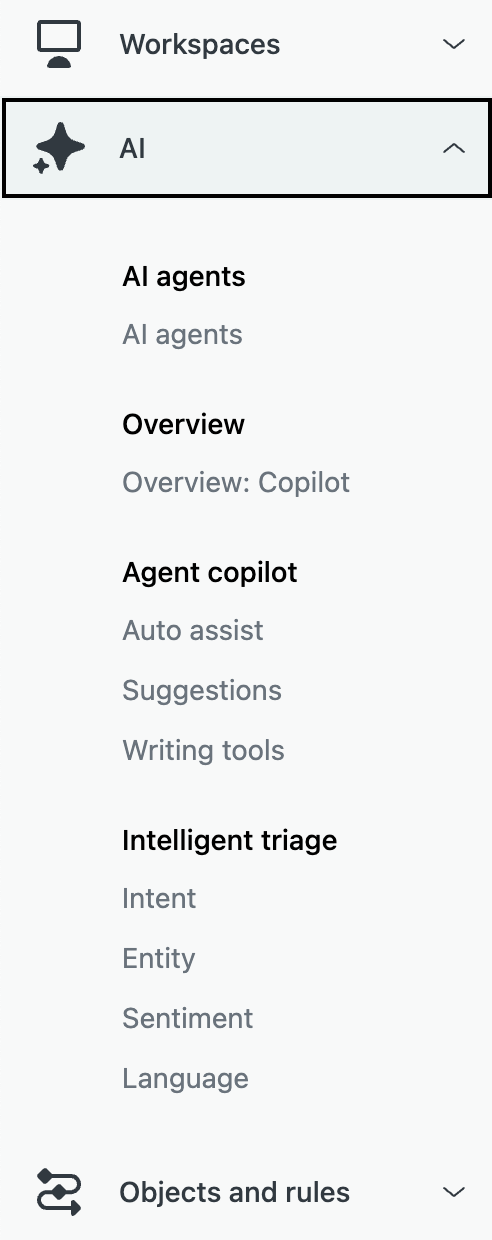
Navigation for AI-related pages in Admin Center have been consolidated into a single section, making it easier to access. Users of the Copilot add-on will see all these AI settings pages. See Admin Center settings.
Accounts and billing
-
Zendesk has updated the product tray to improve usability and make products easier to access. The tray provides more-descriptive product names to better reflect the purpose of each product. See Switching among products.

-
The name of the Advanced AI add-on has changed to Copilot to help clarify its usage. This is a name-change only, no features included in the add-on are impacted. See About Zendesk add-ons.
Knowledge
- You can now use anonymous user tracking to enhance the analytics capabilities of your help center. When you activate user tracking, an anonymous tracking code is automatically added to all pages in your help center. In the coming weeks, Zendesk will launch new session-based knowledge datasets in Explore. If you enable anonymous user tracking, you'll now be able to associate activities across different sessions from users who are not logged into your help center. See Enabling anonymous user tracking for your help center.

Messaging
- Use dynamically-updated placeholders in messaging triggers to update the messaging agent's name, and to localize automatic responses based on the end user's preferred language. See Using dynamic content in messaging triggers.
- Automatically apply rich-text formatting to AI agent-generated responses in messaging conversations. This adds structure to messages displayed to end users in the messaging Web Widget and mobile SDKs, and to agents in the Agent Workspace, which can clarify AI agent messages. See About rich text formatting in messaging conversations.
- Share estimated wait time and queue position once your customer’s messaging ticket is added to the queue. The wait time and queue position will be updated as the ticket progresses in the queue. See Displaying wait time estimates in messaging conversations.
AI agents
AI agents - Essential
- AI agents - Essential generative AI features are now available to existing customers. Existing AI agent customers (defined as those who had any drafted or published AI agents as of February 2, 2025) now have access to the generative AI features included in AI agents - Essential. These features include revamped AI agent settings, enhanced generative replies, upgraded AI agent personas, and an improved onboarding experience. See About AI agents.
- Settings for AI agents and proactive messages in Admin Center have moved. AI agent settings are now available under AI > AI agents. Proactive messages settings are now available under Channels > Messaging and social. See Admin Center settings.
AI agents - Advanced
-
Use case suggestions are now available. Use case suggestions allow you to leverage AI to analyze previously not-understood messages. The AI identifies common topics and generates relevant use case suggestions, saving you time and effort. See Creating use cases from suggestions.

-
New UI language support for AI agents - Advanced is available. The AI agents - Advanced add-on UI is now available in five additional languages: Brazilian Portuguese, French, German, Japanese, and Spanish. See About the AI agents - Advanced add-on.
Talk
- Agents can now select the device on which their ringtone plays for incoming calls. This enhancement ensures that agents can step away from their computers without missing a call, as the ringtone can be heard through an external device such as a speaker or Bluetooth headset. See Receiving incoming calls.
Explore
- All new custom Explore dashboards must be created using the new dashboard builder. You can continue opening and editing dashboards created using the legacy dashboard builder during this period. In July 2025, legacy dashboards will become view-only. See Creating Explore dashboards.
Apps and integrations
- The new Microsoft Exchange connector lets you connect your Microsoft Exchange servers directly to your Zendesk Support instance. This feature is ideal for customers looking to send and receive email traffic using their own domain’s email services while ensuring encrypted and secure relays to and from Zendesk. See About the Microsoft Exchange connector.
- You can connect multiple Salesforce organizations and Zendesk accounts, removing the previous restriction that limited one Salesforce organization to one Zendesk subdomain. This capability allows agents to see Salesforce data for all your organizations in the sidebar of a ticket when using the Salesforce app for Zendesk Support. See Connecting your Salesforce organization to Zendesk.
- Engage Voice for Zendesk is the first product of Zendesk's partnership with Local Measure. This new integration brings an advanced Contact Center as a Service (CCaaS) and CX platform powered by Amazon Connect into your workflow. Use this integration to help you deliver an enterprise-grade contact center experience.
Zendesk QA
-
Zendesk QA Advanced Scorecards updates. Scorecard, category, and root cause creation and management now occur at the account level rather than within a workspace. Here, admins and account managers can seamlessly copy and transfer scorecards and categories, mark them as active or inactive, and use them across multiple workspaces without duplication.

Zendesk WFM
- Zendesk WFM audit logs for account settings, user management, and general tasks. Zendesk Workforce Management (WFM) enhanced WFM audit logs by adding the most relevant events related to account settings, user management, and general task. See Viewing the WFM audit log for changes.

Developer
- New Agent Availability API endpoints make it possible to set and manage agent capacities and skills for many agents at once. This makes it easier for admins to modify these values rapidly when circumstances require it. See Managing capacity rules and skills for many agents.
Fetched June 4, 2026