releases.shpreview
Home/Expo
Expo

Expo

🎉 New features
  • [eas-cli] Add eas update:embedded:view command. (#3810 by @gwdp)
  • [eas-cli] Add eas update:embedded:list command. (#3811 by @gwdp)
  • [eas-cli] Add eas update:embedded:delete command. (#3809 by @gwdp)
  • [build-tools] Auto-upload embedded bundle after build when EAS_UPDATE_EXPERIMENTAL_UPLOAD_EMBEDDED_BUNDLE is set. (#3767 by @gwdp)
🛠 Breaking changes
  • [eas-cli] Rename observe commands: observe:logsobserve:events (events emitted via logEvent), previous observe:eventsobserve:metrics (individual performance metric samples), previous observe:metricsobserve:metrics-summary (aggregated stats by app version). (#3778 by @kadikraman)
🎉 New features
  • [eas-cli] eas go now prompts to select an Expo SDK version interactively when --sdk-version is not provided. (#3768 by @gwdp)
  • [eas-cli] Add eas update:embedded:upload command. (#3720 by @gwdp)
🐛 Bug fixes
  • [build-tools] Fix eas/start_ios_simulator hanging on Xcode 26.4 by writing the readiness screenshot to a temp file instead of /dev/null. (#3794 by @gwdp)

Connect your AI coding assistant to your Expo project from any Expo plan.

The Expo MCP Server is now available on the Free plan, with monthly MCP usage included for Free accounts.

When we first launched the Expo MCP Server, it was available only on paid plans. Now anyone with an Expo account can connect an AI coding assistant to Expo docs and tools.

What you can do with Expo MCP

MCP (Model Context Protocol) is an open standard that lets AI assistants connect to external tools and project context. We introduced the Expo MCP Server in Become an AI-native developer with the Expo MCP Server; this update makes that workflow available to anyone with an Expo account.

Developers are already using Expo MCP for a few common workflows:

  • Finding the right Expo answer faster. Your assistant can pull in official Expo documentation and SDK guidance while you are editing code.
  • Debugging builds and workflows. It can inspect EAS build status, workflow runs, logs, failures, and related TestFlight crashes or feedback.
  • Verifying app behavior locally. With a local dev server and simulator or emulator, it can take screenshots, tap through flows, inspect views, and collect logs.

Included Free-plan usage

Free accounts include monthly MCP usage intended to cover individual development, evaluation, prototypes, and occasional Expo-specific assistant help.

Usage is counted at the billing account level. If your account belongs to an organization, all members share the same included monthly usage. If the account reaches its monthly limit, MCP requests will fail with an error until usage is available again.

For heavier MCP usage, paid plans include higher usage limits and may include access to newer MCP capabilities before they are broadly available.

Get started and feedback

Follow the MCP docs to connect your AI coding assistant to Expo. MCP gives your agent access to Expo tools and project context; Expo Skills give it Expo-specific instructions for building, deploying, and debugging apps.

We'd like to hear what you want MCP and Skills to help with next. Checking whether a release is ready? Understanding update rollout health? Turning build, workflow, or TestFlight signals into concrete fixes? Find us in Discord or on X.

🎉 New features
  • [eas-cli] Add --refresh-ad-hoc-provisioning-profile flag to refresh managed ad-hoc provisioning profiles from App Store Connect before gathering build credentials in non-interactive mode. (#3716 by @sswrk)
  • [eas-build-job] Add optional refreshAdHocProvisioningProfile field to iOS build jobs. (#3717 by @sswrk)
  • [build-tools] Pass refreshAdHocProvisioningProfile through eas build:internal for git-based integration builds. (#3770 by @sswrk)

Today we're announcing the release of Expo SDK 56. SDK 56 includes React Native 0.85 and React 19.2. Thank you to everyone who helped with beta testing.

Expo UI is now ready for production

As of SDK 56, the Jetpack Compose (Android) and SwiftUI (iOS) APIs in Expo UI are stable. We've added Expo UI to the default create-expo-app template, so new Expo apps can use a rich set of native UI primitives right out of the box, and Expo UI is now available in Expo Go.

This milestone release builds on three SDK cycles of iteration across SDK 53, 54, and 55. Thank you to everyone on the Expo team and in the community who helped test, audit, and refine the APIs from the original SwiftUI prototype to the Jetpack Compose implementation.

SDK 56 focuses on three core pieces of Expo UI: a new universal components API for shared interfaces, stable native APIs, and drop-in replacements for popular React Native community libraries.

Universal components

Expo UI now includes universal components that work across Android, iOS, and web. Unlike the Android and iOS APIs, the web APIs are still experimental and likely to change.

The universal components are backed by @expo/ui/jetpack-compose on Android, @expo/ui/swift-ui on iOS, and react-dom or react-native-web on web. You can now build more cross-platform UI with Expo UI without splitting files into .android.tsx and .ios.tsx.

Universal components include layout primitives, text, inputs, controls, and sheets such as Host, Row, Column, ScrollView, Text, TextInput, Button, Switch, Slider, Checkbox, and BottomSheet. Learn more.

Stable native APIs

Expo UI's SwiftUI and Jetpack Compose APIs are now stable after several rounds of breaking changes. These changes align Expo UI more closely with the underlying frameworks, so developers and coding agents can lean on native platform documentation and examples directly when writing Expo UI code.

  • Extend Expo UI with custom views and modifiers: you can now extend Expo UI with your own SwiftUI and Jetpack Compose views and modifiers. Expo UI manages layout synchronization, props, and events for you. See the guides for examples: SwiftUI guide and Compose guide.
  • Material 3 Dynamic Colors and the Material Symbols catalog: the new useMaterialColors hook hands you Material 3 Dynamic Colors that follow the system theme, and the Icon component pairs with @expo/material-symbols to bring the full Material Symbols catalog within import reach.
  • react-native-worklets integration and native state: Expo UI now integrates with react-native-worklets and native state primitives from the underlying UI frameworks: ObservableObject on SwiftUI and MutableState on Jetpack Compose. The new useNativeState hook lets JavaScript control that native state directly, which is useful for native state-driven animations and form controls. Learn more about useNativeState for SwiftUI and Jetpack Compose.
  • Synchronous worklet callbacks: a new WorkletCallback shared object allows synchronous UI worklet callbacks to be passed as props to Expo UI views on both platforms. TextField on iOS and Compose can now use native state for value, and onValueChange accepts WorkletCallback, enabling synchronous, flicker-free controlled text inputs.
  • Components, modifiers, and API changes: SDK 56 lands the bulk of the stabilization work since SDK 55. See the @expo/ui CHANGELOG for the full list.
Drop-in replacements for community components

Expo UI is focused on native primitives, and some of those primitives overlap with popular community libraries. To make migration easier and reduce library fragmentation, SDK 56 introduces drop-in replacements for several common community components.

For example, you can migrate from:

import DateTimePicker from '@react-native-community/datetimepicker';

to:

import DateTimePicker from '@expo/ui/community/datetime-picker';

Drop-in replacements are available for @gorhom/bottom-sheet, @react-native-community/datetimepicker, @react-native-masked-view/masked-view, @react-native-menu/menu, react-native-pager-view, @react-native-picker/picker, @react-native-segmented-control/segmented-control, and @react-native-community/slider APIs. Most migrations only require changing the import, though some props may be unsupported or differ because Expo UI is backed by SwiftUI and Jetpack Compose rather than UIKit and Android Views. Learn more.

Faster native builds

Precompiled Expo packages on iOS

SDK 56 ships prebuilt XCFrameworks for our most complex Expo modules on iOS, to speed up your iOS builds. In our measurements, this cuts median clean iOS build times by around 1 minute (~16%) — both locally and on EAS Build. This is enabled by default both locally and on EAS Build — no configuration required. To opt out, set the EXPO_USE_PRECOMPILED_MODULES environment variable to 0 (for local builds), and also as an EAS environment variable (for EAS Build).

Precompiled headers for Android codegen (experimental)

A new opt-in android.usePrecompiledHeaders option in expo-build-properties applies CMake precompiled headers to the C++ codegen output for every autolinked native module, dramatically cutting CMake compile times on Android. In our benchmarks, the :app:buildCMakeDebug task dropped from 17m 10s to 6m 06s — a 2.81x speedup. In a default new project, builds are about 1.3x faster. Results will vary by project, but the larger your autolinked module graph, the bigger the win.

Enable it in app.json:

{
  "plugins": [
    ["expo-build-properties", { "android": { "usePrecompiledHeaders": true } }]
  ]
}

This feature is experimental in SDK 56 while we gather feedback, and we're working on upstreaming it to React Native so every app benefits from faster Android builds. Learn more in the PR.

Expo Modules: easier to write, faster to run

Inline modules

Starting with SDK 56, you can now define Expo modules directly within your project structure, alongside your JavaScript and TypeScript code. We call these inline modules, and they make experimenting with native code easier than ever.

After setting up your app to use inline modules, you can open Kotlin and Swift files and write your Expo modules with no additional setup. During prebuild, the iOS Xcode project is updated and the necessary options are set in the Android project, which lets us add inline modules to the build and autolink them automatically.

With the newly released type generation tools, which offer a few CLI commands tailored towards inline modules, you will have an even smoother experience. You can just create a Swift inline module and a CLI watcher will automatically generate a TypeScript interface for it right beside the Swift file. The TypeScript interface is separated into a generated and stable part, so that you have control over your stable TS interface and leave the generated part to be regenerated on any changes. If you want more control you can always generate these files manually.

You can develop inline modules from Android Studio, Xcode, or any other IDE as they are part of your project structure.

Check out the inline modules reference and the tutorial for more information!

Type generation tools

In SDK 56 we introduce a powerful new tool for developing Expo Modules. The new expo-type-information package exports functions that parse and retrieve type information from a Swift Expo module and ones that generate TypeScript interface from the retrieved information.

It also includes a CLI with the following key commands:

  • module-interface: takes a Swift Expo module (accepting multiple file paths or a path to the module root) and generates multiple TypeScript files based on our standard interface scheme:
    • [ModuleName]Types.ts: contains all type declarations.
    • [ModuleName]Module.ts: contains the module class.
    • [ModuleName]View.tsx: exports the default view component(s) with typed props.
    • index.ts: re-exports the module alongside every defined type and view.
  • inline-modules-interface: generates a pair of TypeScript files (generated, stable) for each Swift inline module in a project.
  • short-module-interface: works similarly to inline-modules-interface, but targets a specific Swift module instead of all inline modules in the project.

All of these commands can be run in a watch mode to automatically regenerate the TypeScript interfaces.

Learn more in the expo-type-information reference and tutorial.

Revamped create-expo-module

In SDK 56, create-expo-module has been revamped for improved stability and a richer feature-set.

  • New create-expo-module skill: helps agents create Expo modules — coming soon.
  • New addPlatformSupport subcommand: adds support for additional platforms in an existing module — for example, adding Android support to an iOS-only module. The command detects the features currently used in your module and scaffolds the native files for you.
  • Modular template: when creating a module you can pick which features get scaffolded and which platforms it targets.
  • Non-interactive mode support: field defaults have been improved and some fields are no longer required; in non-interactive mode, create-expo-module logs the defaults that were used.
  • No barrel file by default: local modules no longer use index.ts; pass --barrel to opt in.
  • Windows support: create-expo-module now works well on Windows.
Runtime performance improvements in expo-modules-core

Kotlin compiler plugin — A new Kotlin compiler plugin replaces reflection with build-time code generation for Expo Modules on Android. In our benchmarks, we're seeing roughly 40% faster cold starts and 33% faster first render, with no app-side changes required. By collecting module metadata at compile time rather than runtime, we eliminate the reflection-based function-type-to-converter mapping that has historically been a major speed bump for Expo Modules on Android. Results will vary by project, but this is only the beginning — this compiler-driven approach lets us optimize function invocation directly, starting with a noticeable speed boost for Record conversion in SDK 56.

New JSI layer for iOS native modules — Until now, calling into a native module from JavaScript on iOS meant crossing three language boundaries: Swift, Objective-C++, and C++. In SDK 56 we removed the Objective-C++ middle layer entirely by adopting Swift/C++ interop to talk to JSI directly. Fewer hops means less call overhead, and in our benchmarks we're seeing significant performance improvements across native module calls. The codebase is also significantly easier to work with now that it is Swift all the way down. We'll cover the architecture, benchmarks, and what this enables in an in-depth blog post.

React Native 0.85 and React 19.2

Expo SDK 55 included React Native 0.83, so be sure to refer to the full release notes for 0.84 and 0.85 for the complete picture. A few highlights include:

  • Hermes v1 by default: Hermes v1 is now the default JavaScript engine, bringing faster startup times, improved runtime performance, and reduced memory usage. You can opt out with the useHermesV1 configuration in expo-build-properties.
  • New animation backend: React Native 0.85 introduces a new animation backend designed to better align with the New Architecture, improving consistency and performance of animations across platforms.
  • HTTPS dev server: the Metro dev server now supports HTTPS via TLS configuration, enabling secure local development environments and compatibility with APIs that require secure origins.
  • Node.js minimum bump: React Native 0.85 drops support for Node.js versions before v20.19.4.

Hermes bytecode diffing is now enabled by default

In SDK 55 we introduced opt-in Hermes bytecode diffing for expo-updates and EAS Update: instead of downloading a full bundle on every update, the client downloads a binary patch against the previously installed bytecode. In the 24 hours before this post went out, EAS Update served diffed Hermes bundles that were on average 58% smaller than the full bundle they replaced.

Diffing is on by default in SDK 56. To opt out, set "enableBsdiffPatchSupport": false in the updates block of app.json. Learn more in the expo-updates API reference.

We're also working on extending bytecode diffing to patch against the embedded bundle shipped in your native build, not just against the previously installed update. This will give the first update after a fresh install the same size savings that subsequent updates already see. We're planning to ship this as an opt-in feature in an SDK 56 patch release in the coming months.

More capable expo-file-system

SDK 56 fills several parity gaps in the new expo-file-system API that became the default in SDK 54. File.downloadFileAsync() now reports progress and supports AbortSignal, and copy/move operations accept an overwrite option.

The new API also adds task-based upload and download APIs: file.createUploadTask() and File.createDownloadTask(). These bring back support for long-running transfers from the legacy file-system module, including upload progress, cancellation, and resumable downloads. For simpler uploads, File.upload() provides a convenience wrapper when you do not need to manage an upload task directly.

File picking is more capable now too: File.pickFileAsync() supports selecting multiple files and multiple MIME types, bringing it closer to expo-document-picker feature parity. We also fixed several correctness and reliability issues, including large-file md5 hashing memory usage, Android SAF copy/move support, and totalDiskSpace reporting on iOS.

We've also added experimental file-system event watching with File.watch() and Directory.watch(), which will let apps subscribe to file and directory changes without polling.

Status bar and navigation bar APIs are now consistent

Both expo-status-bar and expo-navigation-bar now expose a React component with the same prop surface, where multiple instances merge in mount order. To make that possible, we added a new <NavigationBar> component:

import { StatusBar } from 'expo-status-bar';
import { NavigationBar } from 'expo-navigation-bar';

const App = () => {
  useEffect(() => {
    // Imperative API
    StatusBar.setStyle('auto');
    StatusBar.setHidden(false);

    NavigationBar.setStyle('auto');
    NavigationBar.setHidden(false);
  }, []);

  return (
    <>
      {/* Declarative API: equivalent to the imperative calls above, with multiple instances merging in mount order */}
      <StatusBar style="auto" hidden={false} />
      <NavigationBar style="auto" hidden={false} />
      ...
    </>
  );
};

We also added a config plugin for expo-status-bar, and both packages' plugin options now align:

{
  "plugins": [
    [
      "expo-status-bar",
      {
        "style": "auto",
        "hidden": false
      }
    ],
    [
      "expo-navigation-bar",
      {
        "style": "auto",
        "hidden": false
      }
    ]
  ]
}

New Calendar, Contacts, and MediaLibrary APIs are now stable

With the release of Expo SDK 56, the next versions of the expo-calendar, expo-media-library, and expo-contacts libraries are officially promoted to stable.

The updated APIs have been redesigned with an object-oriented approach. Items like media assets or individual contacts are now represented as classes, which unlocks new features and makes them much easier to work with. Key improvements include granular data fetching (instead of loading entire, heavy objects at once, you can now fetch the specific properties you need) and cleaner querying and filtering using the Builder pattern.

For more technical details and usage examples on the new MediaLibrary and Contacts APIs, check out the blog post.

Widgets for iOS promoted to stable

After introducing an alpha version of Expo Widgets for iOS in SDK 55, we gathered feedback and made many fixes and improvements, and the library is now stable. In SDK 56, Widgets and Live Activities have full access to the environment and no longer need to be pre-rendered. We also improved timeline management, error handling, the config plugin, and the render timeline.

AI-friendly project scaffolding

  • Agent-ready scaffolding: new projects include AGENTS.md, CLAUDE.md, and .claude/settings.json with Expo-specific guidance.
  • Official Expo Skills for AI agents: install in Claude Code with /plugin marketplace add expo/skills followed by /plugin install expo. For Codex, Cursor, or any other agent, run npx skills add expo/skills. See the docs for per-tool setup details.

Convex integration

EAS now provisions and links Convex backends for you. Run eas integrations:convex:connect in your project and we'll install convex, create (or reuse) a Convex team linked to your EAS account, set up a project with a dev deployment, and write CONVEX_DEPLOY_KEY and EXPO_PUBLIC_CONVEX_URL to your .env.local. We also create EXPO_PUBLIC_CONVEX_URL as an EAS environment variable across Production, Preview, and Development so EAS Build picks it up automatically.

Expo CLI

SDK 56 ships the first wave of performance improvements across the whole bundling and run pipeline, with more landing in future releases.

  • Faster CLI: Various performance metrics of the Expo CLI have been improved in SDK 56
  • On-demand Filesystem: eliminates watchFolders as a load-bearing configuration option. Enabled by default; disable it by adding experiment.onDemandFilesystem: false to your app.json. Learn more in the PR.
  • Native Node.js watcher by default: rather than Watchman, we now use a native Node.js watcher and crawler by default. You can switch back to Watchman with resolver.useWatchman in a Metro config, but it's no longer recommended.
  • TypeScript 6 support and TypeScript 7 readiness: we replaced our TypeScript resolution to support TS 6 and prepare for TS 7. This resolves some monorepo bugs with tsconfig.json's paths config (#44791, #45227).
  • import.meta support: now enabled automatically (#44239).
  • Hermes v1 transforms: fewer bundler transforms are enabled for Hermes, which reduces bundling times overall (#45263, #45345).

With the On-demand Filesystem, you can also now try Expo with global virtual stores (such as in Bun and pnpm), which deduplicates installed Node modules across projects (saving ~300 MB per duplicate Expo install) and speeds up installs for agents working across multiple Git worktrees.

Type-safe config plugins

Every Expo package that ships a config plugin now exports it with full TypeScript types. Import the plugin from expo-<name>/plugin into your app.config.ts to get autocomplete, JSDoc, and deprecation hints for plugin options without leaving your editor.

Additionally, config plugins are now loaded with the same module loader that configs themselves use. This means you'll now also be able to reference local .ts files in your plugins list, or write config plugins with .mjs or .cjs extensions.

Expo Router

Expo goes way back with React Navigation: @brentvatne led the project for the 1.0 and 2.0 releases, working together with @ericvicenti and @satya164, and we helped to grow it from an idea, to a conceptual merging of React Native's old NavigationExperimental and ex-navigation, to the standard navigation library in the React Native ecosystem (now one of the standards, alongside Expo Router).

Today, React Navigation is in Satya's great hands, and our focus in the navigation space has shifted towards Expo Router. We spoke with Satya and agreed that the best path forward for both projects was for Expo Router to fork the parts of React Navigation that it builds around. You can, of course, continue to use React Navigation in your Expo projects if you find that you prefer it (try it out: npx create-expo-app@latest --template react-navigation/template). Both libraries build upon react-native-screens and have different takes on the developer experience, with Expo Router preferring file system-based routing. We expect that each library will continue to push the other forward in the future, and that the best ideas will continue to flow between them.

Now that expo-router no longer depends on react-navigation, most code imported directly from @react-navigation/* packages will no longer work out of the box alongside expo-router.

Run the codemod to handle most of the migration automatically (replace [your-source-directory] with your source folder, e.g. src or app):

npx expo@latest codemod react-navigation-to-expo-router [your-source-directory]

See the migration guide for full details, including manual migration steps.

New features
  • On Android, we've added experimental support for a toolbar. You can try it using the same API available on iOS: Stack.Toolbar.
  • In collaboration with react-native-screens, we've also introduced experimental support for a new version of the native stack (Stack v5), including initial support for Material-style headers and predictive back gesture.
  • For Expo on the Web, we now support streaming SSR when using the unstable_useServerRendering flag. As part of this change, we've also introduced a new generateMetadata function for retrieving and setting metadata on initial page load. The existing <Head> component can still be used for updating metadata after hydration. Let us know how it works for you!
  • We've also added two new helpers for data loaders: createStaticLoader and createServerLoader, which narrow the callback signature for each rendering mode. createStaticLoader receives only route params (no request), while createServerLoader always passes a request and throws an actionable error if mistakenly used during static generation.
  • We've also added the ability to customize the default <Suspense> fallbacks in a _layout route, giving you more control over loading states across your app. Following the same convention as ErrorBoundary, you can export a SuspenseFallback that receives route parameters, making it easy to show loading UI:
export function SuspenseFallback() {
  return <Loading />;
}

Brownfield: more flexibility for embedded Expo apps

SDK 56 builds on the brownfield foundation we shipped in SDK 55, with three meaningful additions for teams embedding Expo into existing native apps.

Multiple isolated apps in one host. A new experimental option lets one host app contain multiple inner expo-brownfield apps. Opt in by setting multipleFrameworks: true on the iOS plugin config, and each framework gets a unique Swift module name plus an auto-applied ObjC symbol prefix across its entire pod dependency graph, so two brownfield apps can ship side by side without colliding.

Custom Turbo Modules from the host app. Host apps can now register their own turbo module classes with the inner Expo app's React Native runtime, by passing a turboModuleClasses dictionary into ReactNativeHostManager.initialize. This makes it much easier to expose host-app capabilities (auth, app-specific SDKs, native UI controllers) to JavaScript without modifying the inner app's bundle.

iOS prebuilds by default. expo-brownfield now uses prebuilt React Native frameworks on iOS out of the box, which substantially cuts brownfield build times. If you need to opt back into building React Native from source, use the new buildReactNativeFromSource plugin option.

Expo Application Services (EAS)

Build time statistics for xcodebuild and Gradle

EAS Build now surfaces per-step timing for xcodebuild and Gradle, so you can see exactly where your native build time is spent and decide what to optimize first.

Prebuilt artifacts for major community libraries

Building on the precompiled Expo packages work in SDK 56, EAS Build now precompiles some of the most commonly used community libraries in the React Native ecosystem too — like react-native-reanimated and react-native-screens. In our measurements, this cuts median iOS clean build times on EAS Build by another ~1 minute (~20%) on top of the Expo-modules precompile, with bigger savings for apps that use more of these libraries.

Coming soon: EAS Observe

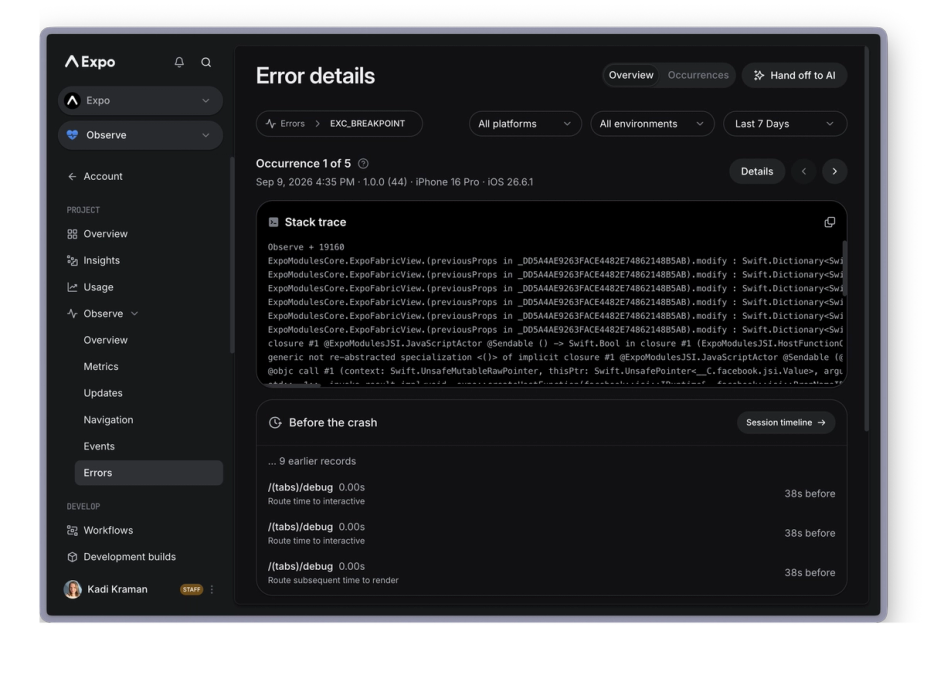
We're working on EAS Observe, a production performance monitoring service for Expo apps that tracks real-world metrics on your users' devices. Compare metrics across releases to catch regressions early, then investigate detailed session data (on your own, or hand it off to an LLM)

🎉 New features
  • [eas-cli] Send the installed expo package version in build metadata. (#3725 by @sjchmiela)
🐛 Bug fixes
  • [eas-cli] Prevent npx invocations that can be unreliable and fail when retrieving entitlements or project configs (#3282 by @kitten)

We've made two changes to how Expo Go loads projects. First, when accessing updates published to EAS Update in Expo Go, you can now only load projects that you own or that are owned by an organization you are a member of. This change applies to all versions of Expo Go and took effect on May 12, 2026. Second, loading Hermes bytecode bundles (HBC) is only supported for EAS Update in Expo Go, and self-hosted updates must serve plain JavaScript bundles. This change applies to the latest versions of Expo Go for SDK 54, 55, and 56.

When distributing your app for review by your team, we recommend using the official store testing tracks, such as Google Play internal testing and TestFlight; internal distribution with EAS Build or any similar service that provides ad-hoc or enterprise provisioning support and archive hosting; or development builds in combination with EAS Update. Learn more in "Overview of distributing apps for review".

Last Checked
53m ago
Domain
expo.dev
Accounts
Tracking since Aug 9, 2023