Claude Opus 4.7 (fast mode) is now available in Windsurf with the full intelligence of Opus 4.7 and ~2.5x higher output speeds.
Blog
As agents generate more code, review and verification are becoming the bottleneck. Engineers can now write PRs faster than ever, but shipping still depends on knowing whether those changes are correct, safe, and ready for production.
Devin Review now checks hundreds of thousands of PRs per day, helping developers understand, review, and merge code faster than ever. With this launch, we're bringing that workflow directly into Windsurf, along with a faster local bug detector powered by our own model, SWE-check.
Devin Review in Windsurf
Devin Review is built for understanding and verifying complex pull requests.
Large PRs are hard to review because the structure of the diff rarely matches the structure of the work. Files are usually shown alphabetically, copied or moved code can appear as noisy deletes and inserts, and the reviewer has to reconstruct the actual change from scattered edits.
Devin Review helps by organizing diffs around the logic of the change. Related edits are grouped together. Copied and moved code is displayed cleanly. And Devin reviews and understands the code in context to identify bugs and flags, which are surfaced with explanations so that you can quickly understand what needs attention.
Now, you can run Devin Review directly in Windsurf.
When Devin reviews a PR, you can see the bugs, comments, and findings it flags without leaving your editor. You can inspect the diff, understand the issue, and make changes in the same place you're already working.
Devin Review is best for deeper review once your PR is ready. It helps you understand large changes, catch bugs, and resolve issues before merge.
From Finding Bugs to Fixing Them
With Devin Review, findings are connected to the rest of the development workflow. You can ask Devin questions about a bug or comment, use codebase-aware chat to understand the surrounding context, and move from a finding to fixing in one seamless UI.
When Autofix is enabled, Devin can generate fixes for review comments and apply them back to the PR branch. That closes the loop: an agent writes code, Devin Review checks the diff, and Devin can help resolve the issues it finds.
You get to own the decisions that require judgment: architecture, product behavior, tradeoffs, and edge cases. But the mechanical loop of finding and fixing bugs can move much faster.
Quick Review for Local Changes
We're also launching Quick Review, a new local review tool in Windsurf.
Before you open a PR, you can run Quick Review to find any potential bugs in your working tree. You can use Quick Review for free with SWE-check, our specialized model for bug detection that's up to 10x faster than a deep review agent while preserving accuracy.
Learn more about Quick Review in the docs.
Two Review Loops, One Workflow
Devin Review and Quick Review are built for different points in the development cycle.
Use Quick Review when you want a fast review of local changes before opening a PR.
Use Devin Review when you want deeper review on a pull request, with smart diff organization, bug findings, explanations, GitHub-compatible review actions, and a path from findings to fixes through Devin.
Together, they make review part of the same flow as writing code.
Windsurf 2.0 already brings local agents, cloud agents, PRs, files, and context into one workspace. With Devin Review and Quick Review, Windsurf now brings verification into that workspace too.
The goal is simple: help you ship faster while keeping quality high.
Available Today
Devin Review in Windsurf and Quick Review are available starting today. Download the latest version of Windsurf 2.0 to try them out.
Windsurf launched as the first agentic IDE — a code editor where you and your agent work side-by-side on the same codebase.
Since then, agents have gotten much more powerful. The best engineers aren't pairing with a single agent anymore. They're running dozens of agents in parallel across cloud and local environments, on different parts of the same project. While the IDE was built for hands-on work, managing a fleet of agents is an entirely different job.
This creates a new problem. The more agents you manage, the faster you hit the limits of your own attention and working memory.
Windsurf 2.0 is designed to raise that ceiling. We built the Agent Command Center and brought Devin, our autonomous cloud agent, directly into Windsurf so you can do the work of a whole team without one.
The Agent Command Center
The Agent Command Center is a new surface inside Windsurf. It shows every agent you're running, local and cloud, in a single Kanban view, organized by status.
The Kanban view is an intentional design choice. As agents become more capable, the engineer's job shifts from writing code to directing work. You need to see what agent is working on what, what is blocked, and what's ready for review. The interface should reflect that.
The command center doesn't replace the IDE. It's deeply integrated with the existing Windsurf editor features, so you can always make last mile edits manually.
Windsurf Spaces
Spaces are how you organize work in the Agent Command Center.
A Space groups everything related to a specific task or project into a single view: agent sessions, PRs, files, and context. An "Onboarding Flow Redesign" space might have one local session prototyping the UI and two cloud sessions handling API changes and writing tests.
Spaces carry context. When you create a new session in a space, it inherits everything the space already knows about the project. When you return to a space, the view is as you left it.
Switching between spaces is switching between tasks, except now each task has a team of agents working inside it.
Devin in Windsurf
Alongside the new Agent Command Center, we're bringing Devin directly into Windsurf.
Devin is an autonomous software engineering agent that runs in the cloud. It handles complex tasks end to end — debugging, deployment, testing — and keeps working after you close your laptop because it has its own VM with a desktop, browser, and computer use.
With Devin in Windsurf, you can delegate work to the cloud without leaving your editor. You can work on a plan with a local agent and with a single click you can send it to Devin for implementation. Devin spins up its own machine and gets to work. You keep coding locally, or you close your laptop and grab a coffee.
When Devin opens a PR, you can review it right in Windsurf. You can check the diff, run tests, or hand it off to your local agent for touch-ups.
Our goal is to bring the whole software engineering cycle — planning, delegating, and reviewing — in one place.
Devin is included with every Windsurf plan.
Access to Devin Cloud is rolling out gradually. If you don't see Devin Cloud in Windsurf, try logging out and logging in again.
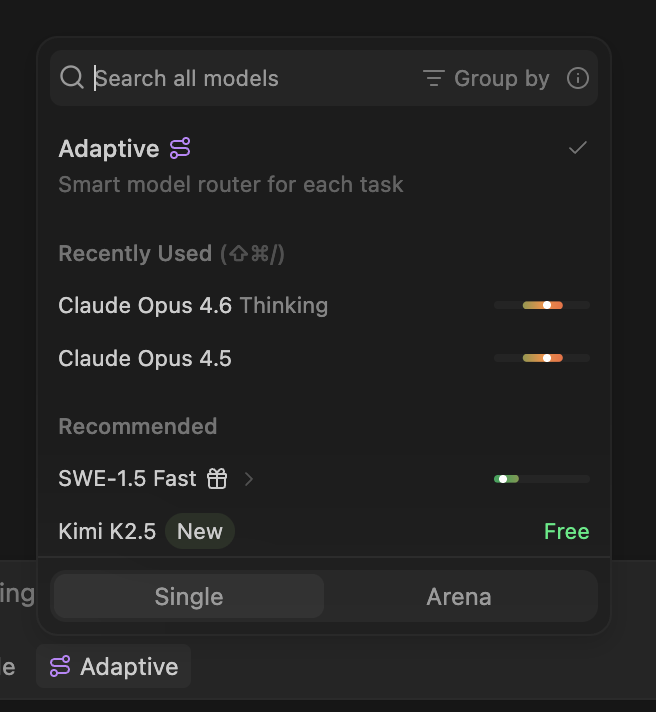
We're launching multiple updates to Windsurf today: an Adaptive model router, a redesigned model picker with pricing context, and the removal of daily limits for Max.
We've heard clear feedback that our new pricing plans were too opaque and, in some cases, too restrictive. With this update, we're aiming to address that directly by giving users better visibility into model costs and making it easier to manage your quota.
Introducing our Adaptive model router
We're rolling out an adaptive model router. Adaptive is designed to intelligently select the best models for your tasks. By automatically choosing the right model for each task and avoiding overuse of premium models, Adaptive will help you make your quota last longer.
You can use our new model router by choosing Adaptive in the model picker.
When you choose the adaptive model, we will dynamically choose the right underlying model for your task—while drawing down your quota at a fixed per-token rate. To start, we are including generous resource limits with your quota and offering extra usage beyond your quota at USD 0.50 per 1M input tokens, USD 2.00 per 1M output tokens, and USD 0.10 per 1M cache read tokens for the next 2 weeks.
We're rolling out the Adaptive model to all self-serve users today, including Pro, Max, and Teams. We expect this to be the best default option for most users who want to stay within the quota limits throughout the month, and we'll continue deploying new updates to improve routing performance.
Updated model picker with pricing context
When we announced new pricing, we should have been clearer that your quota and extra usage will be billed based on how many tokens your requests consume. To address that, we're introducing a new model picker design that shows token pricing information directly, which is the exact rate extra usage is billed at.
As you'll notice from the new model picker design, prompt caching is a critical component to request costs. To make this more obvious, we've integrated a prompt cache timer directly into the context window indicator so you can track it more closely.
Finally, we have updated the response cards after messages to include token counts so you can understand exactly how the message cost was calculated.
No more daily limits for Max users
While the average user hasn't been heavily impacted by the new quotas, we should have been clearer that for the heaviest users—who learned to squeeze the most out of each prompt—the new token-based pricing is a significant change.
The new Max plan is designed for power users who want to drive AI to its fullest, but we've heard your feedback that the daily limits felt too restrictive for bursty work.
Therefore, starting today, Max users will no longer have a daily quota. Your weekly limit remains, but you're free to use it however your workflow demands.
We also considered removing the daily limits for all plans, but after analyzing the data decided it's too easy to exhaust an entire week's quota before you get a hang of prompt caching and model selection. The daily quota gives you a safety net to continue for free the next day—if you want to continue coding immediately once your quota is exhausted, you can always purchase extra usage or upgrade to Max.
What we're working on next
Between Adaptive, the updated model picker, and the removal of daily limits for Max, we think this is a meaningful step toward a more flexible and transparent Windsurf. All updates are live today: download the latest version of Windsurf to try them out.
But we're not stopping there: we want to continue to improve performance and efficiency for all Windsurf users. That's why we're working on a new, more efficient harness that will intelligently incorporate a multi-model architecture and subagents to deliver higher quality outputs at a lower overall cost. We plan to share more soon about this.
We're simplifying Windsurf pricing across Free, Pro, and Teams alongside launching a new Max plan for our power users. The new plans replace the current credit-based system with industry-standard quotas.
GPT-5.4 is now available in Windsurf with multiple reasoning effort levels. For a limited time, self serve users enjoy promotional pricing starting at 1x credits.
Gemini 3.1 Pro is now available in Windsurf with Low and High thinking variants. For a limited time, enjoy promotional pricing on credit usage.
Claude Sonnet 4.6 is now available in Windsurf with limited-time promotional pricing for self serve users: 2x credits without thinking and 3x credits with thinking.
GLM-5 from Zhipu AI and Minimax M2.5 are now available in Windsurf with limited-time promotional pricing. Both models are included in Arena Mode's Frontier Arena and Hybrid Arena battle groups.
OpenAI's GPT-5.3-Codex-Spark, an ultra-fast model optimized for real-time coding, is now available in Windsurf's Arena Mode Fast and Hybrid battle groups.
We are releasing the initial results of the Windsurf Arena Mode leaderboard today — with some surprising upsets.
Claude Opus 4.6 (fast mode) is now available in Windsurf with limited-time promotional pricing for self serve users: 10x credits without thinking and 12x credits with thinking until February 16.
Claude Opus 4.6 is now available in Windsurf with limited-time promotional pricing for self serve users: 2x credits without thinking and 3x credits with thinking. Available in Arena Mode's Frontier Arena.
We've completely rewritten and retrained the old Windsurf Tab, increasing accepted lines by up to 100% and introducing 2 new aggression levels on our new Pareto Frontier tab model.
Arena Mode brings side-by-side model comparison directly into your IDE, plus Plan Mode and Megaplan for smarter task planning.
GPT-5.2-Codex is now available in Windsurf with multiple reasoning effort levels. For a limited time, enjoy discounts on credit usage.
Parallel agents, Git worktrees, multi-pane Cascade, dedicated terminal, and SWE-1.5 Free
GPT-5.2 is now live in Windsurf! Available for 0x credits for a limited time (paid and trial users). The version bump undersells the jump in intelligence: Biggest leap for GPT models in agentic coding since GPT-5, SOTA coding model at its price point, Default in Windsurf
The most capable model in Windsurf yet, now available at Sonnet prices for a limited time
GPT 5.1, GPT 5.1-Codex, and GPT-5.1-Codex Mini deliver a solid upgrade for agentic coding with variable thinking and improved steerability