Account segments bring business context to churn analysis
product analyticsreal user monitoringdigital experience monitoring
Published
Aug 11, 2026
Read time
7m

Sharon Ye
Senior Product Manager

Adam Virani
Product Marketing Manager
An account can show signs of disengagement long before a renewal conversation begins. Users may stop returning to a core workflow, stall during onboarding, or skip a newly released feature. Product teams often see these signals only at the user level, while annual recurring revenue (ARR), plan, renewal date, and ownership data remain in a customer relationship management (CRM) system or data warehouse. That separation makes it difficult to tell whether a few inactive users represent normal variation or a high-value account that needs attention.
Datadog Product Analytics now supports account segments that bring business context and product behavior into the same analysis. You can define a reusable group from account attributes and events performed by users in those accounts, then apply it in funnels, retention, and Datadog Pathways. This workflow helps product and customer success teams investigate possible churn signals while keeping the account (rather than an individual user) as the unit of analysis.
In this post, we’ll explain how to:
-
Identify churn risk at the account level
-
Enrich account profiles with business context
-
Build a segment from attributes and behavior
-
Analyze an at-risk segment across Product Analytics
-
Share account-level findings with customer success teams
Identify churn risk at the account level
Suppose you manage a SaaS product and recently released a collaboration feature that you expect to support long-term engagement. Three months after launch, you want to know which enterprise accounts with more than $50,000 in ARR have not adopted it, and whether those accounts also churn more often. A list of users who skipped the feature cannot answer the full question, since a list on its own doesn’t reveal which users belong to the same account, how valuable that account is, or who manages the relationship.
An account segment changes the unit of analysis from individual users to the organizations they belong to. It can combine account profile attributes, such as plan or ARR, with events generated by any user associated with the account. This makes it possible to define the exact population you want to investigate before comparing its behavior with a healthier cohort.
The same method applies beyond feature adoption. A fintech company could examine enterprise accounts where no user made a deposit in 30 days. A SaaS company could study accounts approaching renewal that have low engagement, while a B2B marketplace could compare conversion among sellers grouped by product category. In each case, the account segment translates a broad business question into a repeatable Product Analytics query.
Enrich account profiles with business context
Account segmentation starts with reliable account identity. When your application sends account context through Real User Monitoring (RUM)—for example, by calling datadogRum.setAccount—Product Analytics groups activity by account_id and creates an account profile. By default, that profile can include the account ID, account name, first-seen timestamp, and last-seen timestamp.
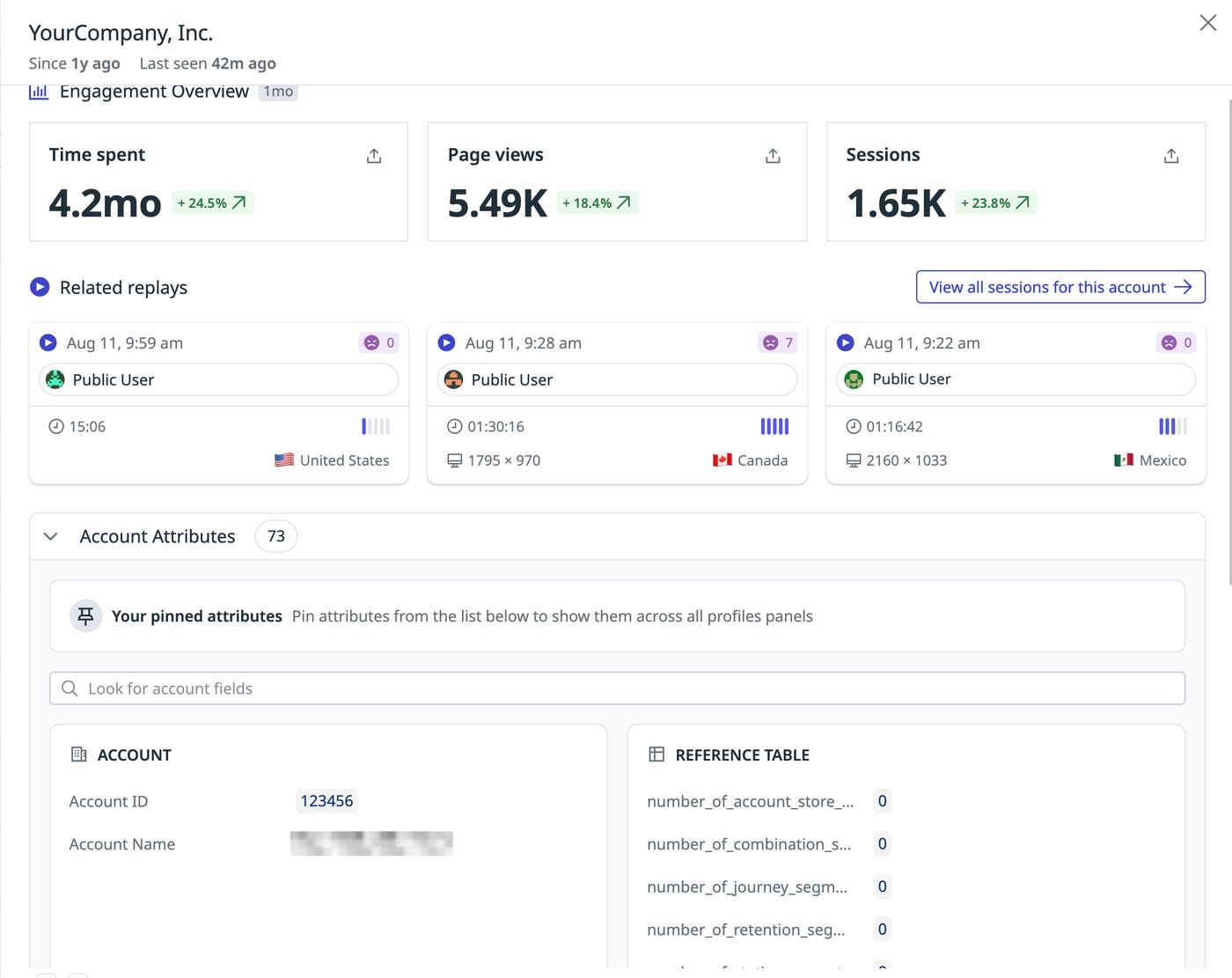
From there, you can enrich that profile with business context from systems such as Salesforce or Snowflake: ARR or contract value, plan, renewal date, onboarding cohort, region, and CSM owner. These attributes are what let you distinguish a high-value account nearing renewal from a trial account that only recently signed up, and they sync on a regular schedule so they stay current without any manual upkeep. And once these attributes are set, they’re available as filters anywhere in Product Analytics.
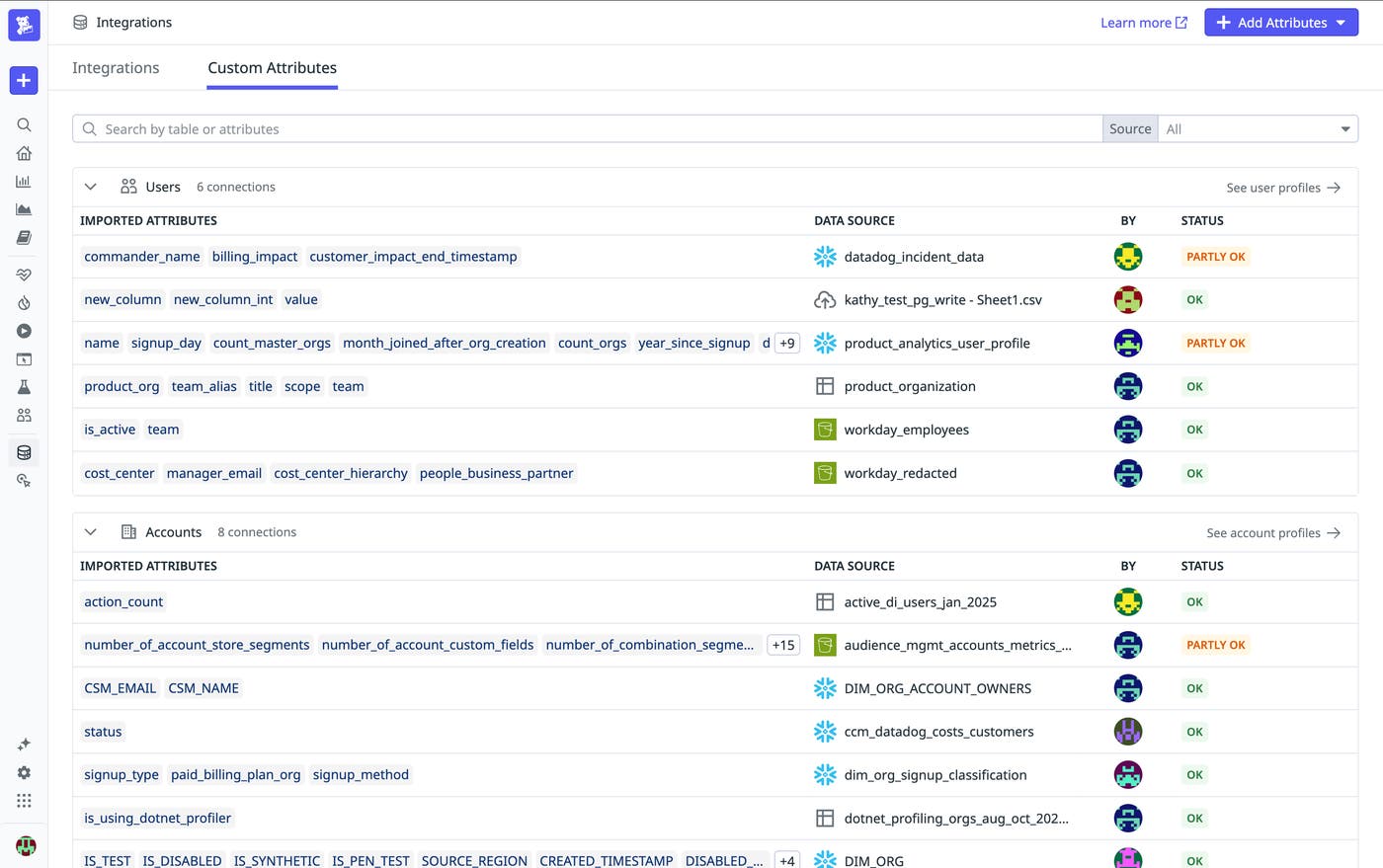
Setup is required only once, after which all analyses are automatically enriched with context. For the full setup steps and required permissions, see the documentation on enriching Product Analytics profiles with custom attributes and the Datadog role-based access control permissions documentation.
Build a segment from attributes and behavior
In Product Analytics, you can create a new segment and set its type to Account rather than User, so the result stays scoped to organizations instead of individual people.
From there, you can layer in the two conditions that define this population. First, a business attribute filter narrows the segment to the accounts your team cares most about from a revenue perspective: ARR above $50,000, or plan tier set to Enterprise. Second, a behavioral filter adds the product signal: accounts where no user performed the core activation event in the past 30 days. Combined, these two filters return exactly the group worth investigating: Enterprise accounts, by ARR or tier, with no activation in the last month.
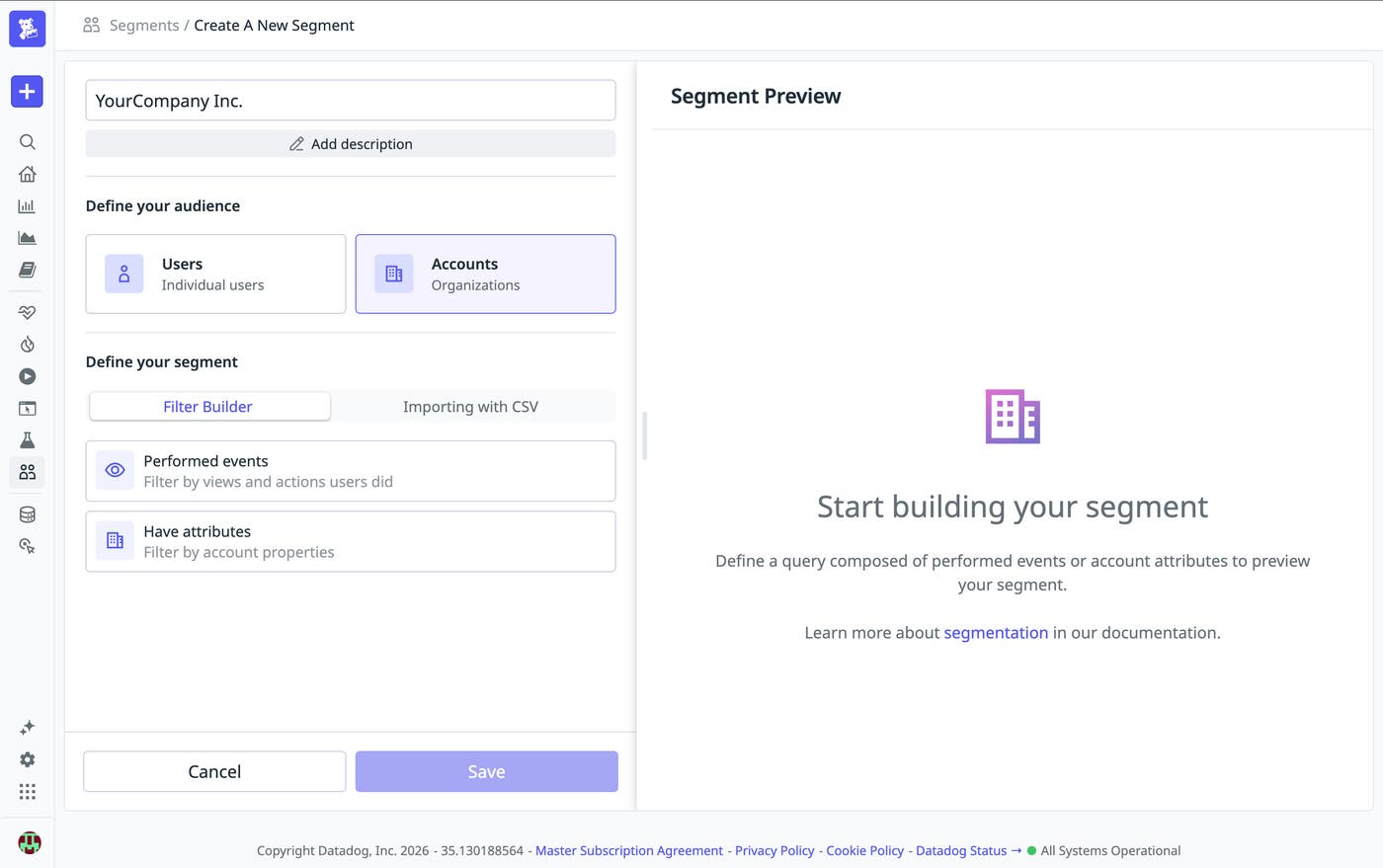
Because the segment is dynamic, it stays accurate without any upkeep, so an account that activates the feature next week drops out on its own. Saving the segment with a descriptive name, such as “Enterprise—No Activation Last 30 Days”, means you can reuse that exact definition across every analysis that follows.
Analyze an at-risk segment across Product Analytics
A saved segment holds the population steady across every analysis, so the three Datadog views below build on each other instead of standing alone. Retention shows whether the segment is disengaging, funnels show where it falls out of the activation flow, and pathways show what those accounts do instead. Because the segment carries account attributes with it, each answer stays attached to the accounts, the ARR, and the owners behind it, so the sequence ends with a finding your team can act on.
Confirm the disengagement in retention
You can apply the at-risk segment to a retention analysis and compare it with a segment of enterprise accounts that did activate the collaboration feature. Let’s say the curves separate after 3 weeks: Adopters return at 65%, while the at-risk segment drops to 30% and keeps declining. That means those accounts are coming back less often overall. Pair that with the fact that, in this example, the segment covers 42 accounts and $3.8 million in combined ARR, and you can begin to understand the full risk and where accounts drop off.
Find the drop-off point with funnels
Next, you can build a funnel that follows each account’s activation flow—first login, workspace setup, teammate invitation, and the first shared collaboration event—and scope it to the same segment. You can then analyze that funnel by account and use the “Unique converted accounts” measure so that each organization counts once, even if multiple users attempted the flow.
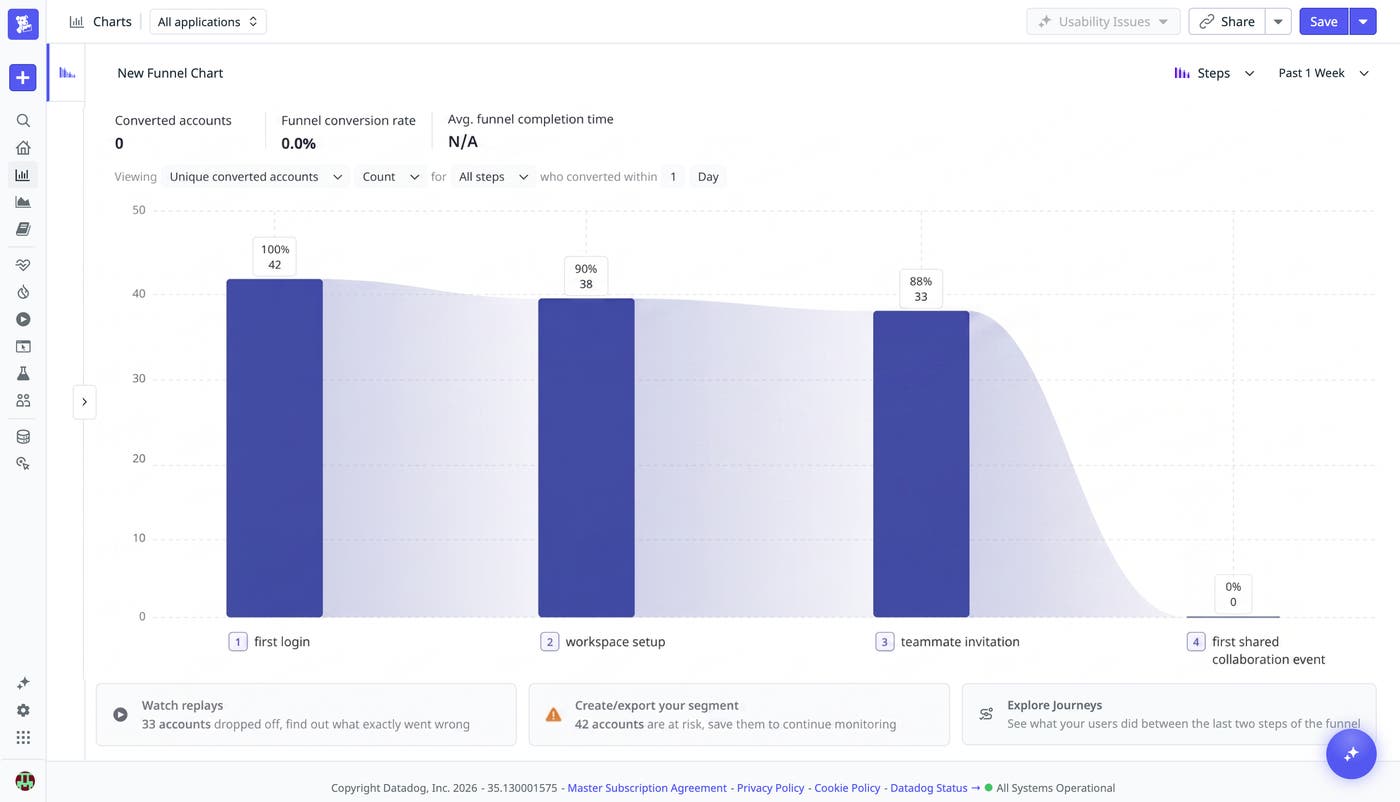
Compared with the activated segment, both groups move through workspace setup at about 90%. Then the at-risk segment collapses at the invitation step, falling from 88% to 0%. This suggests the activation is breaking at the step before the workspace collaboration feature.
Inspect navigation patterns in Pathways
Now, you can use the same segment in Datadog Pathways to find out what those accounts do instead of sending an invitation. Pathways analyzes views instead of action events, which makes it well suited to the navigation question. In this example, the dominant path after workspace setup runs from the permissions page to a help center article on user roles and back to settings, repeating across most of the 42 accounts.
In context alongside the funnel, that pattern points to a specific blocker: Admins can’t invite teammates without a role change, and they can’t find out how to make that change. From here, you can open a session replay for one of those sessions to watch the attempt fail.
Share account-level findings with customer success teams
An account-level finding is most useful when the team responsible for the relationship can identify the affected customers. Because an enriched profile can include CSM owner, region, or renewal date, you can narrow the segment or analysis to each manager’s book of business. This gives customer success teams both the account list and the behavior that led to its inclusion.
The same pattern supports other account-health questions. You can create segments for new accounts that have not completed onboarding in 14 days, accounts nearing renewal with low use of a core workflow, or high-value accounts that stopped generating a key event. Enrich the profiles with the business context that matters, define a behavioral signal, analyze the segment, and route the findings to the team that can investigate.
Get started with account segments
Account segments let Datadog Product Analytics treat the account as the unit of analysis while preserving the user behavior behind it. By enriching account profiles, combining business attributes with product events, and reusing the resulting segment across analyses, teams can identify accounts that merit attention and examine the behavior associated with that risk.
To get started, read the Product Analytics segments documentation and the profile enrichment documentation. If you don’t already have a Datadog account, sign up for a free 14-day trial to start analyzing account behavior.
Fetched August 11, 2026