W logo becomes a dedicated chevron back button; toolbar persists in editor
v7.1
WordPress 7.1 makes navigation more consistent across the whole admin interface, including the editor, where the difference is most noticeable.
In the editor, the top-left “W” logo / site icon served as the back button, and clicking it took you out of the editor. But a “W” logo / site icon doesn’t read as a back button, and using it for navigation was a frequent source of confusion. Three changes are implemented to fix this situation:
- the toolbar now appears in the editor as it does everywhere else (except in the Distraction Free mode),
- the “W” logo / site icon is replaced with a dedicated back button (a chevron), and
- the site icon, when set, is shown in the toolbar.
The result is a navigation model where each icon means one thing everywhere: the “W” logo always opens the About page, the site icon (when set) always opens the site menu in the toolbar, and the chevron always goes back to the previous screen. The site title also stays visible throughout the editor, including on the editing canvas. See the following images:
Before
After
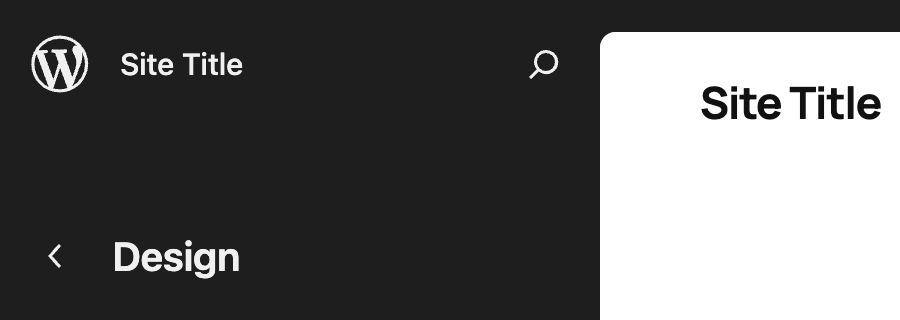


or with site icon:
Before
After


What it means for users
The toolbar will be shown in Post and Site Editors by default, as part of the persistent navigation layer. If you’d rather work without it, turn on the Distraction Free mode, where the toolbar is hidden as it is today in that mode.
What it means for plugin developers
Before WordPress 7.1, the toolbar could already appear in the Post Editor when the fullscreen mode is turned off. The Site Editor has no such mode, so a persistent toolbar in the Site Editor is a new behavior. If your plugin adds a node in the toolbar, it’s worth double-checking if it still works correctly in the Site Editor.
If you’d prefer not to show your plugin’s toolbar node in the editor at all, you can filter it out on editor screens, e.g. by checking $screen->is_block_editor() as follows:
add_action(
    'admin_bar_menu',
    function ( WP_Admin_Bar $wp_admin_bar ) {
        $screen = function_exists( 'get_current_screen' ) ? get_current_screen() : null;

              // use this check to hide the node in the Site Editor
              if ( $screen && 'site-editor' === $screen->id ) {
                      return;
              }
              // ... or use this check to hide the node in any block editor
              if ( $screen && $screen->is_block_editor() ) {
                      return;
              }

        $wp_admin_bar->add_node( ... );
    },
    100
);
Additional resources
- Trac tickets: #65091, #65088
- Iteration issue
Props to @tyxla, @mayanktripathi32, @joen, @lucasmdo, @mamaduka, and @annezazu for reviewing this post.
Fetched July 13, 2026