Guide to identifying AWS data perimeter gaps
In AWS environments, a data perimeter is a set of preventative controls that help ensure that your trusted cloud identities (principals or AWS services acting on your behalf) are accessing trusted resources from authorized networks. You can apply these controls at various levels of your infrastructure, such as per resource or across all resources in your AWS account.
The ability to apply controls at different levels creates an effective defense-in-depth approach to protecting data, but it also makes it hard to know where gaps exist. Datadog's 2025 Cloud Security report found that approximately 40% of organizations use data perimeters, with most applying them per resource. Of that group, [fewer than 1% use recommended organization-level solutions](https://www.datadoghq.com/state-of-cloud-security/#2:~:text=SCPs%20(0.6%25%20of%20organizations), such as resource control policies (RCPs) and service control policies (SCPs).
In this post, we'll walk through examples of data perimeters configured per resource, since that's where most organizations apply them. Then we'll look at the security gaps that resource-level controls can create. In each section, we'll simulate an attack against each gap by using Stratus Red Team, an open source threat emulation tool, and then apply an organization-level policy that closes the gap.
We'll cover four scenarios:
- Visibility: ensuring that you have visibility into data perimeter activity, an important first step before applying any controls
- Identity perimeters: preventing identities outside your AWS account from accessing your data
- Network perimeters**:** validating that identities can only access resources from authorized networks
- Resource perimeters: ensuring that identities are not able to transfer data to unauthorized resources
All of the attack techniques described in this post require Stratus Red Team to be installed and configured with a compromised-role profile. We'll walk through configuring the necessary roles and AWS profiles later.
Ensure that you have visibility into data perimeter activity across your AWS infrastructure
While not strictly a data perimeter objective, AWS security benchmarks require that CloudTrail is enabled and configured to log read and write management events. CloudTrail trails can capture when a particular policy blocked or allowed access as well as any changes to the controls themselves, such as a bucket policy modification. Because cloud logs provide valuable insights into how your data perimeters respond to requests, tampering with logging is a popular defense evasion technique.
The Stratus Red Team techniques for actions such as deleting AWS CloudTrail trails and stopping logging altogether fulfill two purposes for validating account-level cloud logging scenarios that fall outside of established organization trails. First, they confirm if calls are blocked by available policies, and second, if attempts are visible in your account's cloud logs. When attempts are visible, your logs will capture those calls the moment they are made, regardless of whether they succeed or are blocked.
The following commands set up the defense evasion scenario for a compromised role:
export AWS_PROFILE=compromised-role
stratus detonate aws.defense-evasion.cloudtrail-delete
stratus detonate aws.defense-evasion.cloudtrail-stop
The Stratus Red Team techniques for deleting or stopping cloud logging include a warmup step that uses the cloudtrail:CreateTrail permission to create new trails within the profile's associated AWS account before detonating attacks against them. CreateTrail has legitimate uses, such as centralizing logging pipelines and managing audit logs for incident response, so it's not uncommon to find it granted in real environments.
Confirm that calls are blocked by available SCP policies
Most roles, such as those for application services and CI/CD pipelines, have no legitimate reason to modify CloudTrail trails, so those calls are candidates for an SCP policy. You can attach SCPs to an organization, organization unit, or member account, creating the perimeter boundary for control plane actions such as disabling logging. That means that an appropriate SCP will block an identity—in this case, the compromised-role profile—from executing cloudtrail:DeleteTrail and cloudtrail:StopLogging calls.
The following example SCP denies modifications to a member account's CloudTrail trails:
{
   "Version":"2012-10-17",
   "Statement":[
      {
         "Effect":"Deny",
         "Action":[
            "cloudtrail:DeleteTrail",
            "cloudtrail:PutEventSelectors",
            "cloudtrail:StopLogging",
            "cloudtrail:UpdateTrail"
         ],
         "Resource":"*",
         "Condition":{
            "ArnNotLike":{
               "aws:PrincipalARN":"arn:aws:iam::123456789012:role/AWSCloudTrailAdmin"
            }
         }
      }
   ]
}
The cloudtrail:PutEventSelectors action is included in the deny policy because that call would enable an attacker to narrow which events get logged without disabling logging entirely, which minimizes the likelihood of detection. The cloudtrail:UpdateTrail action accounts for an attacker redirecting log delivery to an external S3 bucket, which makes the logs inaccessible to your team. The ArnNotLike condition ensures that a specific privileged role still has access to modify trails. For the account with this SCP attached, the Stratus Red Team techniques for cloudtrail:StopLogging and cloudtrail:DeleteTrail actions would be denied.
Note that SCPs do not apply to your cloud management account, where you create and apply organization-level policies. A compromised principal in that account can call cloudtrail:StopLogging regardless of your SCPs, which is why access to a high-privilege management account needs to be treated as a separate security risk.
Confirm that attempts are visible in CloudTrail logs
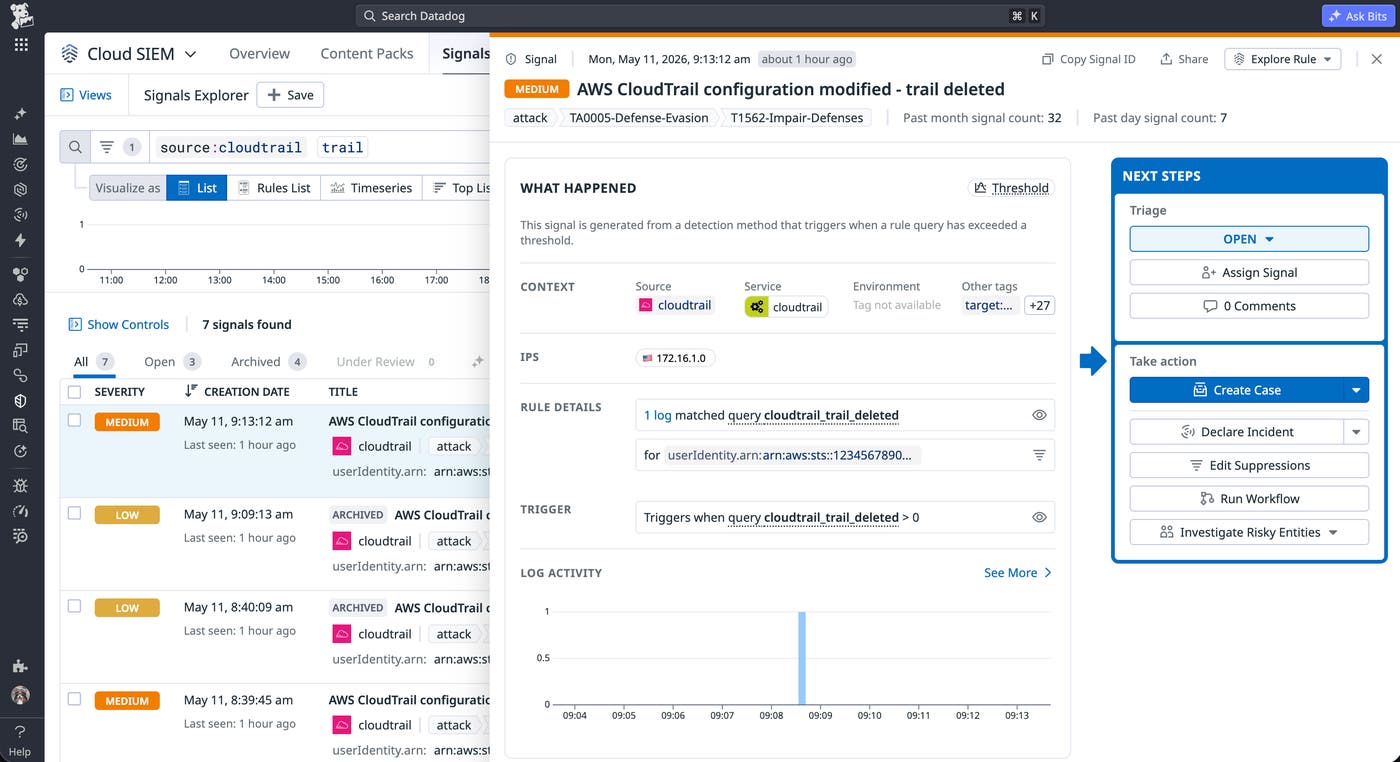
Even if an attempt to modify cloud logging is blocked, you want to confirm that CloudTrail recorded each event. The attempt itself is suspicious since logging is a required security benchmark. Because the Stratus Red Team techniques act on the trails they create within a member account, your organization-level trail should capture the detonation events, whether the attempt succeeds or is blocked by an SCP.
You can read AWS's guide on managing CloudTrail costs and our guide on configuring AWS CloudTrail logs for more information about how to collect them and which events are important to capture.
Enforcing an identity perimeter on your AWS account
One of the control objectives for the identity perimeter is ensuring that only your organization's principals and the AWS services acting on their behalf can access your resources. According to our report, the majority of organizations with data perimeters enforce this control primarily through policies on individual Amazon S3 buckets. Per-resource policies offer granular control, but they introduce gaps in policy coverage as your environment grows. They also create issues with policy durability when one can be modified by any principal with the right permissions.
The following bucket policy illustrates how organizations typically start building per-resource identity controls for a log bucket:
{
   "Version":"2012-10-17",
   "Statement":[
      {
         "Sid":"AllowCloudTrailWrite",
         "Effect":"Allow",
         "Principal":{
            "Service":"cloudtrail.amazonaws.com"
         },
Fetched June 2, 2026