How I hunt for vulnerabilities with AI
This is a guest post from Tsvetan Stoychev, ex-Principal Software Engineer at Akamai Technologies.
TL;DR
I'm an experienced software engineer, but I'm not a seasoned bug bounty hunter. I used GitHub Copilot in combination with Claude Opus and Gemini models to search for vulnerabilities in the ClickHouse codebase (a large C++ codebase), generate hypotheses, and speed up validation in local environments. It worked remarkably well; I found a few real vulnerabilities and reported them to the ClickHouse bug bounty program. This post doesn't focus on real vulnerabilities in the ClickHouse codebase, but it describes how I approach using AI for vulnerability research, and what I've learned so far.
In late 2025, my manager Nic Jansma, asked our team a simple question: "How are you using AI in your day-to-day work?" I had the usual answers - autocomplete, quick prototypes, and documentation lookups - but he encouraged me to explore more.
Around the same time, I was also inspired by a colleague, Rajesh Sharma. For the last two years he's been doing bug bounty and attending CTF competitions for fun, and he's also helped identify and fix security issues in our day job. Conversations with him helped me build intuition for common terminology in the software security space like: path traversal, "null byte", SSRF, XSS, RCE, etc.
We actually poked at ClickHouse together in mid-2025 to see whether there was anything interesting to explore. His take after auditing the code was: this is professional-grade C++ - there's no obvious low-hanging fruit, and anything real would likely be subtle and hard to exploit. Said in simple words: one has to work hard in order to find something in the ClickHouse codebase.
My assumption was, if there's anything interesting, it probably will be hiding in very old but rarely touched code - or in the newest features. ClickHouse ships fast, adds new capabilities constantly, and grows every month. Rapid growth is great, but it also means fresh code paths and integrations that haven't had years of battle testing.
I'm a ClickHouse user (for a personal project), and I'm not an experienced security researcher. In fact, I strongly believe that my naivety as a newcomer helped me explore deeper. Where an expert might spot a mitigation and immediately think "dead end". I often didn't know enough to give up. I kept pushing Copilot to "try harder" or "explain why". This led us down complex paths that a more seasoned researcher might think "nah, waste of time".
My initial experience with AI-assisted vulnerability research was working with GitHub Copilot but after a few months I switched to Claude and ChatGPT subscriptions. To use both ChatGPT and Claude effectively for vulnerability research, I went through their cybersecurity verification / trusted-access processes.
My approach
I follow a few steps single-threaded approach:
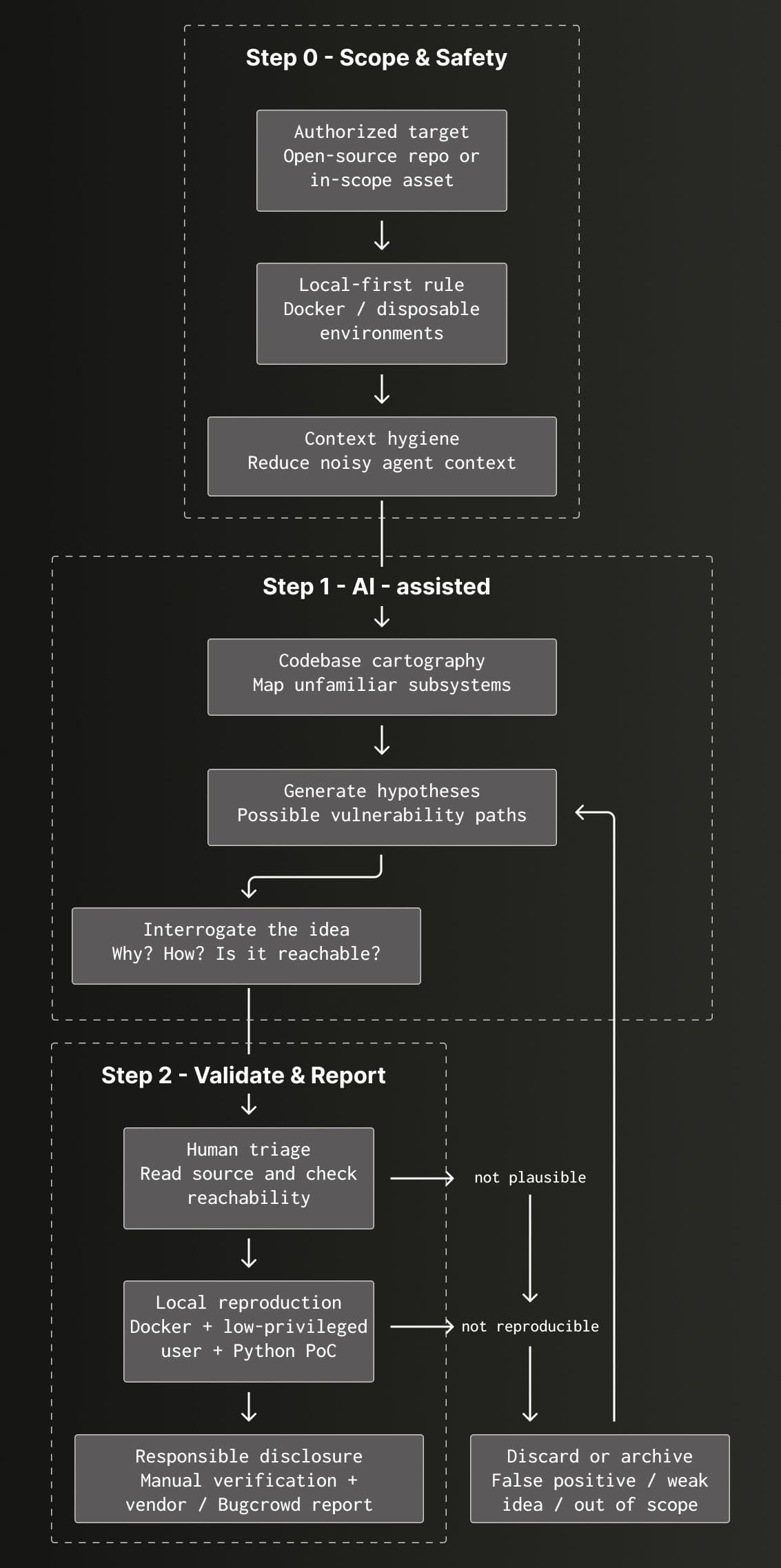
Expand to read the flow as text
- In Visual Studio Code, prompt GitHub Copilot to review the ClickHouse codebase.
- Sometimes the prompt is open-ended: "Check if you see any vulnerability issues in the code introduced in the last 2 weeks."
- Sometimes the prompt is more specific: "Do you see any interesting candidates for memory corruption among the ClickHouse aggregate functions?"
- Observe how GitHub Copilot browses folders, reads file contents, reasons and displays a few paragraphs of intermediate summaries.
- By observing how Copilot works I understand more about the ClickHouse file structure and features. If I see something interesting I look at the ClickHouse source code myself or look at the official documentation.
- When Copilot finishes with the review I carefully read the summary and I select interesting and novel ideas.
- Over time Copilot will start "sharing" the same ideas or will produce complete hallucinations. Example hallucination will be when the model will claim that ClickHouse could be hacked when the default admin user has an empty password set because anyone would be able to login as admin user. Of course this is an unrealistic scenario because this is not a ClickHouse security problem but a misconfiguration introduced by the engineer who provisioned the ClickHouse server.
- When I pick an interesting idea I become curious and I often fall into a short loop where I ask a few more times "Why?" or "How?" where often the questions are related to the current code review session but occasionally ask a question related to something I noticed during previous review sessions.
- "How does idea 1 relate to idea 5?"
- "Do you think that idea 3 is applicable in the Y ClickHouse subsystem?"
- In this case I am asking about "Y ClickHouse subsystem" because I learned something from a previous GitHub Copilot session.
- When I am happy with all the generated ideas I ask the copilot to write a summary of the generated ideas to a markdown file. This allows me to come back later and explore something that I thought wasn't interesting during the time of the Copilot assisted review.
- I pick an idea and explicitly ask Copilot to use Python for any scripts that eventually reproduce the vulnerability on a running local ClickHouse Docker.
- At this point Copilot is on cruise control and autonomously creates Python scripts, runs them against the running ClickHouse Docker container and corrects the Python scripts based on the ClickHouse runtime behaviour.
- When the previous step produces convincing results I review manually the produced Python scripts and I run them manually making sure we didn't get a false positive.
- When I find a real vulnerability I send an email to security@clickhouse.com and I submit a report to https://bugcrowd.com/engagements/clickhouse if the vulnerability is in scope of the bug bounty program.
Example
I am a strong believer of the "learning by doing" approach and if we put enough time on a problem the worst thing that can happen is to learn something new.
Things are changing so dynamically in the LLM space and what we thought is the way to do things today could become obsolete in a few weeks when the frontier labs release a new model. That's why my personal belief is that there is no absolute rule what your first prompt should be, but if you are inexperienced like me, try something open-ended and use it to gain more context about writing your next prompt.
In this example I will be using Visual Studio Code + GitHub Copilot in Agent mode using the Opus 4.6 model.
My assumption is that we are not familiar with the ClickHouse code and subsystems; we would like to explore, gather ideas and later start diving in.
The first prompt
Let's try something like: "In summary, what is the code that the ClickHouse team shipped last month and come with 3 hypotheses: what vulnerability risk could be introduced?"
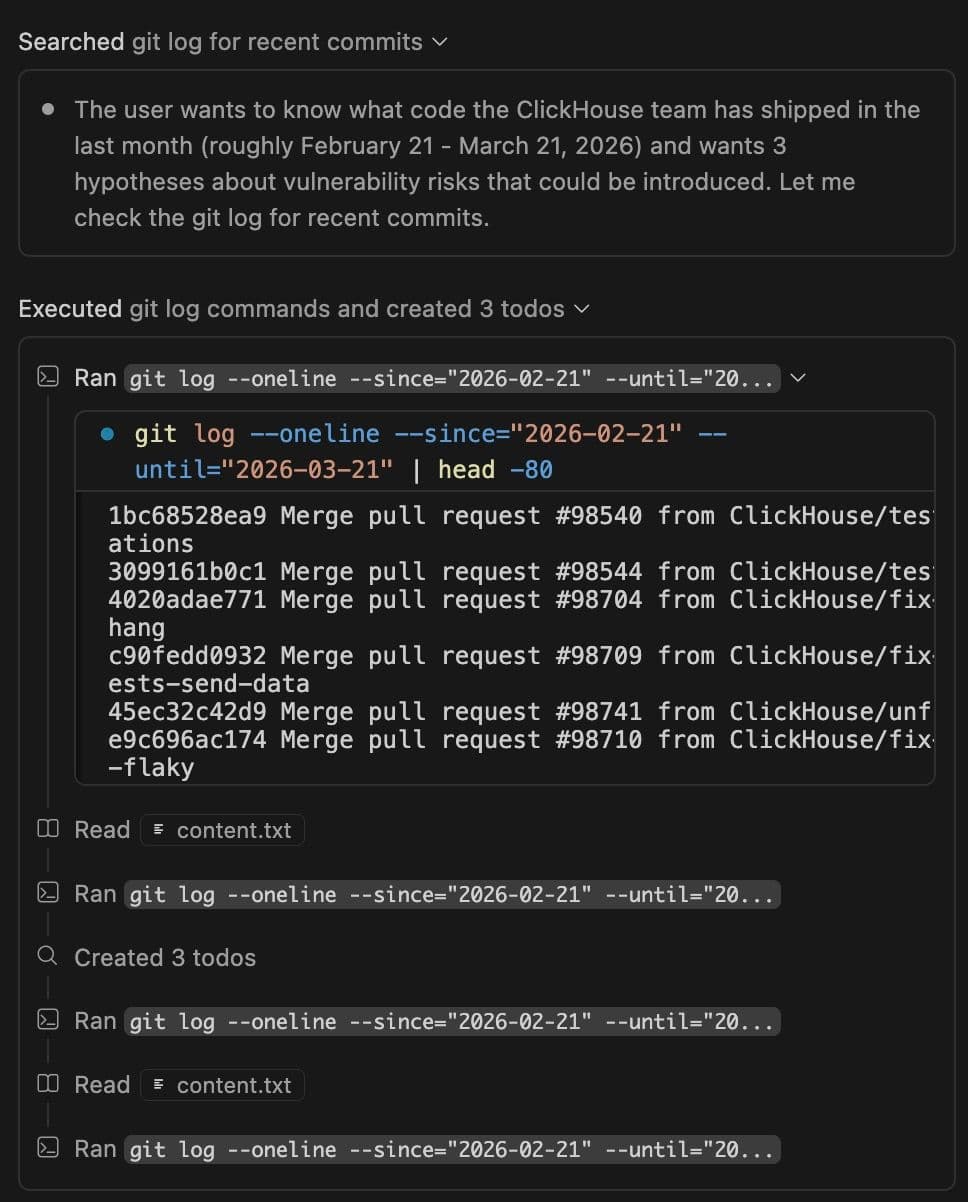
The agent will start running "git log" commands and gathering intelligence:
$ git log --oneline --since="2026-02-21" --until="2026-03-21" | head -80

1bc68528ea9 Merge pull request #98540 from ClickHouse/test-column-alias-set-operations
3099161b0c1 Merge pull request #98544 from ClickHouse/test-lc-null-full-join
4020adae771 Merge pull request #98704 from ClickHouse/fix-minio-restart-timeout-hang
c90fedd0932 Merge pull request #98709 from ClickHouse/fix-flaky-test-hedged-requests-send-data
…
After a few minutes of work the agent will generate a report like:
| Hypothesis | Status | CWE | Severity | Attack Vector |
|---|---|---|---|---|
| 1 | Wire-format decoder trusts caller-controlled field width as source length → OOB read past remaining input buffer | Not confirmed | CWE-125 | CRITICAL |
| 2 | Untrusted module triggers arithmetic wrap in host allocator + logging side-channel | Not confirmed | CWE-190, CWE-117 | HIGH |
| 3 | Shared acceleration layer doesn't incorporate row-filter identity into hash | Not confirmed | CWE-200 | MEDIUM-HIGH |
Note: The hypotheses in the table above were anonymized. All the models I experimented with always returned very convincing findings labeled as high and critical severity but often these were false-positives/hallucinations.
Testing a hypothesis
The hypotheses look convincing, but we need to dig deeper to understand if they are real and reproducible:
Let's explore hypothesis #1 "Wire-format decoder trusts caller-controlled field width as source length → OOB read past remaining input buffer" .

A few hints:
1. We have Docker installed on this computer and in order to test the hypothesis you are allowed to run the ClickHouse in a Docker container from the latest official ClickHouse image.

2. Please write any proof of concept code in Python.

3. Make sure that you explore the hypothesis as a low-privileged ClickHouse user when connecting to our ClickHouse Docker container.
At this point I observe carefully because sometimes the agent decides to take unexpected paths.
A few times I noticed the agent running /proc/[pid]/mem from inside the running ClickHouse Docker container, reading bytes from the heap and declaring victory. Running /proc/[pid]/mem could be used as an exploratory technique but must not be used to trigger the vulnerability we are going to report because it bypasses the actual security boundary. In such cases I stop the agent and ask the agent for a handoff prompt: "What do we need to make it work without /proc/[pid]/mem ? Please, generate a handoff prompt describing our direction, what was already tried and instructions that we must not use /proc/[pid]/mem ." . After that I start a fresh agent session with the handoff prompt.
Sometimes the agent gives up too quickly and I give it a little nudge with one of the following prompts:
- Great progress and I think that we are getting close. What else do you think we could try?
- These findings are marginal. Please expand your approach and try again.
Most of the time we reach a dead end. This doesn't mean that the time was wasted and I ask the agent to write a summary in a markdown file of what was tried and what blocked us.
From time to time I try something unusual in case we reach a dead end or even if a hypothesis happens to be valid: "Do you see similar symptoms or bugs in sibling classes of the classes we've already explored?" - To my surprise a few times this led to a real discovery.
If the original hypothesis is valid I move to the next step.
Preparing to report
Over time I found what works well for the Bugcrowd and the ClickHouse teams when sharing a report of a given vulnerability.
The hypothesis we are exploring is about an "out-of-bounds read" vulnerability which allows an adversary to read memory that doesn't belong to them but to other processes or tenants on a given ClickHouse instance.
A triager would need clear evidence that the vulnerability is not being run as ClickHouse administrator user and that there is clear evidence that "target" and "adversary" authenticate as different ClickHouse users and have different grants.
I prompt with the following template that produces the required files for demonstrating how the "out-of-bounds read" vulnerability works:
# Bug-bounty PoC bundle — prompt template

Produce a self-contained PoC bundle in the current directory. A triager should be able to run the scripts in order against a stock container of the target and watch a low-privileged adversary retrieve a secret it has no legitimate path to.

## Files

- `requirements.txt` — pinned Python deps.
- `01_setup_users.py` — admin-driven setup. Creates target and adversary users/DBs/tables. Writes the usernames and passwords required for the next steps to `poc_config.json`.
- `02_target_activity.py` constantly seeds a synthetic secret (clearly labeled `DEMO_*` / `example-*`) into target storage.
- `03_adversary_exploit.py` — three phases:
  1. **Privilege probe** — runs actual CAN-DO / CANNOT-DO / CROSS-TENANT probes live and prints each result proves the adversary has no direct path to the secret.
  2. **Fire the primitive** — single request using only built-in functions of the target; rotate tunables if they broaden coverage; loop until the secret is recovered or timeout.
  3. **Structured report** — labeled block printing the recovered secret verbatim alongside whatever collateral leaked. Exit non-zero if the secret was never seen.
- `04_crash_trace.py` *(only if a variant cleanly crashes the target)* — fires the crash payload, restarts the container, pulls the fault block from logs, prints resolved frames.
- `README.md` — triager-facing repro: `docker run`, venv, numbered steps, expected output excerpt showing the recovered secret, scope.
- `WRITEUP.md` — engineer-facing RCA: defect `file:line` + excerpt, any guard bypassed and why, worked example if arithmetic, affected-versions list ("verified live" vs "source-verified"), related public state.

## Conventions

- Target the **latest stable `clickhouse/clickhouse-server` image on Docker Hub**, unmodified. Look up the current stable tag at submission time (do not assume the tag baked into an older PoC is still latest); pin the exact tag in `README.md` so the run is reproducible months later. No sanitizer, no debug symbols, no custom build.
- Scripts share state only via `poc_config.json`. No hidden config.
- Synthetic seeded secrets labeled `DEMO_*` / `example-*` so they cannot be mistaken for real credentials.
- README and WRITEUP cite source `file:line` for every defect claim.

## Acceptance

Running the scripts in order on a clean host ends with the adversary printing the seeded secret it had no grant to read; the privilege probe shows every direct path to that secret denied.
This prompt generates a few files:
- 01_setup_users.py
- 02_target_activity.py
- 03_adversary_exploit.py
- README.md
- WRITEUP.md
I read and review the generated README.md and WRITEUP.md and sometimes ask for advice on the current or different model where I need help understanding.
I manually go through all the steps that a Bugcrowd triager would go through. I run all the Python scripts manually and I identify things that need to be fine-tuned. A few times I found out that the 02_target_activity.py script wasn't writing secrets to the database frequently enough and the 03_adversary_exploit.py wasn't able to capture them.
I also record a short screen recording that later I attach to the vulnerability report. This helps the triager to understand the flow and steps to reproduce.
Submitting a vulnerability report
The report template below proved over time to be working well when submitting a report to the Bugcrowd team. It demonstrates clearly an isolation between where ClickHouse runs and how a limited ClickHouse tenant can read heap data used by other tenants.
The template is highly obfuscated and doesn't contain real code from the ClickHouse codebase. It should be read with that in mind that it only demonstrates the structure of a Bugcrowd report.
Expand to see the full example report
=======================================================================
This is an AI assisted report.

The PoC scripts and code analysis of the root cause were AI-generated and assisted. The report was hand-written and a few snippets copied from AI-generated code.

Manually tested and verified before submitting.
=======================================================================

## Summary

We demonstrated in a PoC where we provide tampered content in a simple SQL query that we can read bytes from the heap and demonstrated that we can access cross-tenant data.

Example query:
SELECT x FROM XXXXXXXXXXX
**Video evidence:** xxxxxxxx-video-evidence.mp4

## PoC

For the PoC we will need:

- Docker
- Python 3.9+

Required files:

- requirements.txt
- **01_setup_users.py**
- **02_target_activity.py**
- **03_adversary_exploit.py**

The PoC uses 2 tenants - **regular_tenant** and **limited_adversary**. The **regular_tenant** is sending queries to ClickHouse and the **limited_adversary** is sending queries that read from the leaked heap.

Steps:

(1) - Run the ClickHouse in a Docker container:
docker run -d --name ch-x86-lts
-e CLICKHOUSE_USER=default
-e CLICKHOUSE_PASSWORD=clickhouse
-e CLICKHOUSE_DEFAULT_ACCESS_MANAGEMENT=1
-p 0.0.0.0:8123:8123
--ulimit nofile=262144:262144
clickhouse/clickhouse-server:26.3
(2) - Create Python venv and install the dependencies.python3 -m venv .venv source .venv/bin/activate pip3 install -r requirements.txt
(3) - Create regular_tenant and limited_adversary:python3 01_setup_users.py
This will create 2 ClickHouse users and a poc_config.json file with the user credentials required for the next steps:
target : regular_tenant password: bug_1778537821_pswd_91dc609e adversary : limited_adversary password: att_1778537821_d26ccb0b config : /xxxxxxxxxxxx/poc_config.json
The limited_adversary can do mostly simple SELECT queries but can't read from tables owned by regular_tenant.

(4) - In one terminal simulate regular_tenant activity where the user will be writing secrets:
python3 02_target_activity.py
Example output:[target] regular_tenant active; mix of SELECTs and INSERTs against target_db [target] q# 110 SELECT id, secret FROM target_db.sensitive WHERE id = 2 2 OAUTH=eyJhbGciOiJIUzI1NiJ9.v
(5) - While 02_target_activity.py is running, open another terminal and run the 03_adversary_exploit.py script that will be reading from the heap and it will find data from other tenants data.

Activate the venv in the other terminal:
source .venv/bin/activate
Run the script:python3 03_adversary_exploit.py
Example output:
adversary identity : limited_adversary target tenant : regular_tenant (database: target_db) goal : read target_db data via shared-memory leak
--- privilege probe (run by adversary) ---
✓ WHAT ADVERSARY CAN DO: ✓ Run SELECT queries ✓ Use unhex() to make bytes ✓ Use hex() to read as hex ✓ Use format() table function ✓ Use aggregate functions ✓ Use CAST
✗ WHAT ADVERSARY CANNOT DO: ✗ CREATE USER — Access Denied ✗ DROP USER — Access Denied ✗ Query system.users — Access Denied ✗ SHOW GRANTS for other users — Access Denied ✗ Query system.query_log — Access Denied ✗ Query system.processes — Access Denied ✗ Use file() table function — Access Denied ✗ Use url() table function — Access Denied
✗ CROSS-TENANT ACCESS (RBAC ISOLATION): ✗ Query target_db.sensitive — Access Denied ✗ Access default database — Access Denied (resource hidden) ✗ INSERT into target_db — Access Denied ✗ DROP TABLE in target_db — Access Denied ... ... ...
CROSS-TENANT DATA RECOVERED FROM PROCESS HEAP
[✓] target secret (API_KEY=): 9 distinct value(s) 'API_KEY=sk-target-prod-7d3f9a-row-21API_KEY' 'API_KEY=sk-target-prod-7d3f9a-row-15API_KEY' 'API_KEY=sk-target-prod-7d3f9a-row-33API_KEY' [✓] target secret (OAUTH=): 1 distinct value(s) 'OAUTH=eyJhbGciOiJIUzI1NiJ9.targetDB_PWD' [✓] target secret (DB_PWD=): 1 distinct value(s) 'DB_PWD=target-mysql-2026API_KEY=sk-target-prod-7d3f9a-row-3API_KEY=sk-target-prod-7d3f9' [ ] target INSERT statement: not seen [ ] target table path: not seen [ ] target query WHERE clause: not seen [✓] target username in heap: 1 distinct value(s) 'regular_tenant'
## Root cause

File: drivers/usb/diag/endpoint\_summary.c Function: format\_endpoint\_summary (lines 312–338 in v6.8 / mainline)

```c
static int format_endpoint_summary(
    const struct usb_endpoint_descriptor *ep,
    const char *interface_name,
    char *outbuf, size_t outbuf_size)
{
    char line[80];
    int n;

    n = snprintf(line, sizeof(line), /* (1) */
        "iface=%s ep=0x%02x maxpkt=%u type=%u",
        interface_name,
        ep->bEndpointAddress,
        le16_to_cpu(ep->wMaxPacketSize),
        ep->bmAttributes & USB_ENDPOINT_XFERTYPE_MASK);

    if (n > outbuf_size) /* (2) */
        return -ENOSPC;

    memcpy(outbuf, line, n); /* (3) */
    return n;
}
(1) snprintf itself is bounded against sizeof(line) == 80, so the write into line is safe — at most 79 chars plus a terminator land in the buffer. The trap is its return value: ISO C99 / POSIX specify that snprintf returns the number of bytes that would have been written had the buffer been unbounded, not the number actually emitted. An adversary-supplied interface_name of 300 characters (delivered as a USB string descriptor and surfaced through the diag node) drives n well past sizeof(line) even though line itself was correctly truncated.
(2) The only guards on n are n > outbuf_size (caller's buffer too small). Neither compares n against sizeof(line). The function carries on as if n valid bytes are sitting in the local stack buffer.
(3) memcpy(outbuf, line, n) reads n bytes from an 80-byte stack array. When the formatted-but-truncated length exceeds 80, the copy walks off the end of line and through whatever sits below it in the current stack frame — saved frame pointer, return address, caller-side spills, neighbouring locals from usb_set_configuration further up the call chain. Those bytes are then handed to userspace through outbuf, which the diag node makes readable via a sysfs attribute and an ioctl. The result is a kernel-stack read primitive triggered each time userspace reads the endpoint summary for an adversary-controlled USB device — no privilege required beyond plugging in the device.
Fetched June 26, 2026