Deno desktop ships; startup 2x faster, memory 3x less
v2.9
June 25, 2026
Deno 2.9 is here, headlined by deno desktop, a new way to build native desktop applications from the web stack you already know, with no Electron boilerplate and a single binary at the end. It's also the easiest release yet to bring an existing Node project over: deno install now reads npm, pnpm, yarn, and Bun lockfiles directly, so switching your package manager to Deno takes a couple of commands, not a migration. There's plenty more below, from CSS module imports and a much stronger test runner to faster startup and Node.js 26 compatibility.
To upgrade to Deno 2.9, run the following in your terminal:
deno upgradeIf Deno is not yet installed, run one of the following commands to install or learn how to install it here.
# Using Shell (macOS and Linux):
curl -fsSL https://deno.land/install.sh | sh

# Using PowerShell (Windows):
iwr https://deno.land/install.ps1 -useb | iex
deno desktop
Building a desktop app has usually meant pulling in Electron or Tauri, wiring up a separate toolchain, and shipping a bundle that bears little resemblance to the rest of your project.
Deno 2.9 introduces deno desktop. Point it at a script (or a web framework project) and it produces a native, self-contained desktop application where the UI runs in a webview, your logic runs in Deno, and the whole thing compiles down to a single distributable binary (#33441).
deno desktopis experimental in 2.9. The surface described here is stabilizing and some platform features are still landing.
The simplest app is an entrypoint that serves your UI. Deno.serve() inside a desktop entrypoint automatically binds to the port the webview opens, so there's no port wiring to do:
main.ts
Deno.serve(() =>
  new Response(
    "<!DOCTYPE html><h1>Hello from Deno desktop 👋</h1>",
    { headers: { "content-type": "text/html" } },
  )
);
$ deno desktop main.tsThat opens a native window rendering your page. deno desktop shares the same framework detection as deno compile: run it with no entrypoint (or deno desktop .) and it auto-detects the web framework in the current directory (Next.js, Astro, Fresh, Remix, Nuxt, SvelteKit, SolidStart, TanStack Start, and Vite SSR are all supported), builds it, and wraps the result:
$ deno desktop          # auto-detect the framework in the current directory
$ deno desktop --hmr    # run with Hot Module Replacement during development
Native desktop APIs
Richer apps get a full set of native desktop APIs built right into the runtime under Deno.*, available immediately with no extra dependencies. Deno.BrowserWindow gives you programmatic control over window size, position, visibility, menus, and DevTools, and lets you bridge between the webview and Deno: bind a function in the entrypoint with window.bind() and call it from page JavaScript via the bindings namespace. There's also Deno.Tray for system-tray icons and panels, and Deno.Dock on macOS:
tray.ts
const tray = new Deno.Tray();
tray.setIcon(iconBytes);
const panel = tray.attachPanel({ url: "https://localhost:8000/panel" });
panel.window.bind("doThing", async () => {/* ... */});prompt(), alert(), and confirm() render as native dialogs, and Deno.autoUpdate() wires up a polling auto-updater that applies binary patches in the background.
Webview or CEF
Every desktop app needs a browser engine to draw its UI, and deno desktop ships two, selected with --backend:
webview(the default) renders with the operating system's built-in engine: WebView2 on Windows, WebKit on macOS and Linux. Nothing extra is bundled, so binaries stay small and launch fast. The tradeoff is that rendering follows whatever engine the host ships.cefbundles Chromium through the Chromium Embedded Framework, so every user gets the same modern engine on every platform. That adds tens of megabytes and a download at build time, but guarantees identical rendering and the latest web-platform features everywhere.
$ deno desktop main.ts                  # native webview (default)
$ deno desktop --backend cef main.ts    # bundled Chromium
Most apps are happiest on the default webview; reach for cef when you need a guaranteed-identical engine on every platform.
Distribution
Because deno desktop is built on the same machinery as deno compile, the output is a standalone binary with your code and assets embedded. The format follows the extension you pass to --output: .app and .dmg on macOS, .exe or an .msi installer on Windows, and .AppImage, .deb, or .rpm on Linux.
You don't need a fleet of machines to ship cross-platform, though. --target cross-compiles the app to any supported platform and --all-targets builds them all in one command, so a single Linux CI runner (or your laptop) can turn out binaries for Windows, macOS, and Linux together. The Windows .msi and Linux .deb / .rpm installers are authored in pure Rust, so they're produced from any host with no platform-specific packaging toolchain:
$ deno desktop --output MyApp.dmg main.ts                 # build for the host
$ deno desktop --target x86_64-pc-windows-msvc main.ts    # cross-compile to Windows
$ deno desktop --all-targets main.ts                      # build every supported target
The five supported targets match deno compile: Linux x64/arm64, Windows x64, and macOS x64/arm64. For smaller artifacts, --compress ships the runtime and UI backend as a self-extracting bundle that unpacks on first launch.
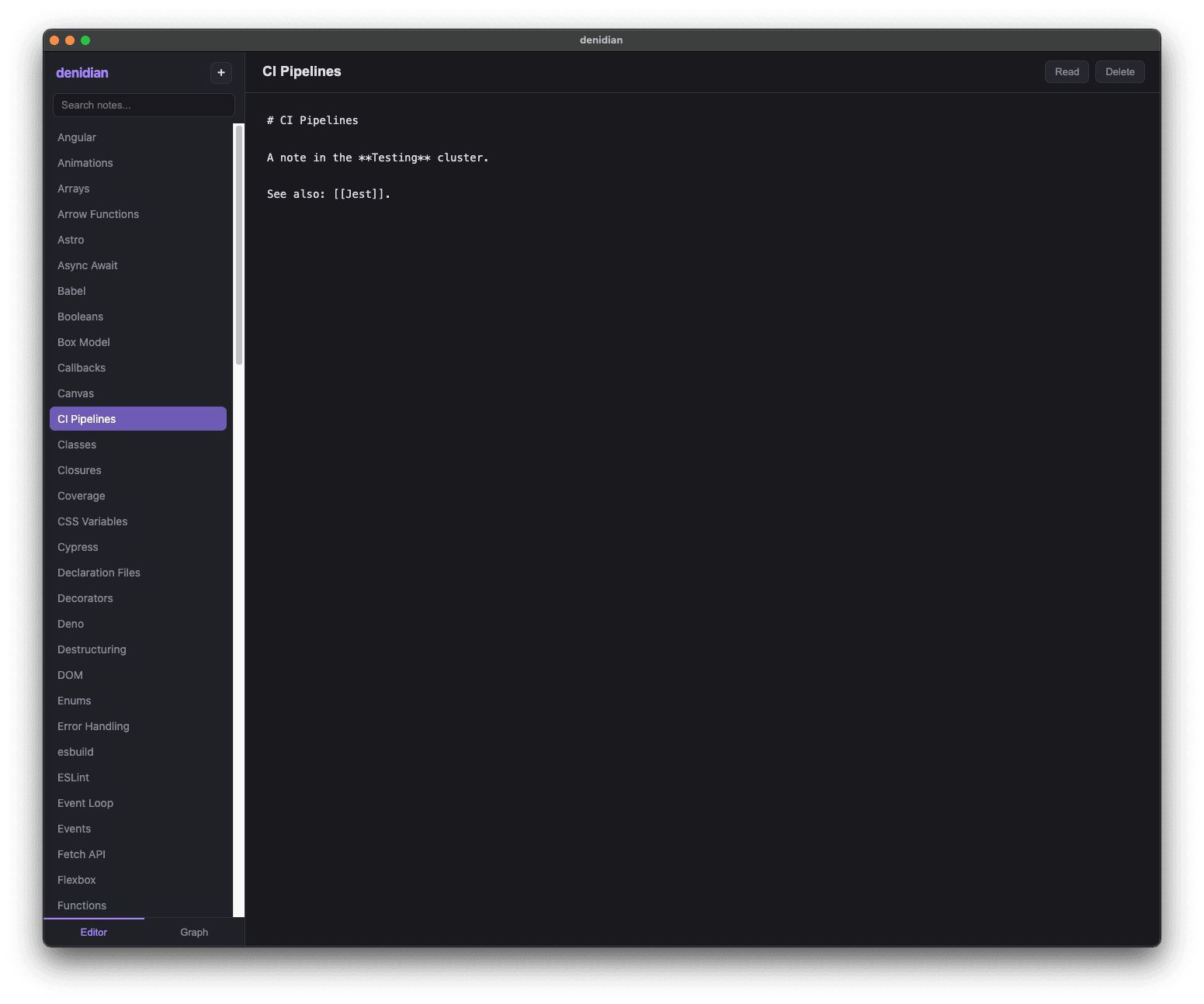
For the full guides, see the deno desktop documentation. And for a complete, real-world example, denidian is a note-taking app built with deno desktop:
Performance
Deno 2.9 ships broad performance gains in startup time, memory use, and HTTP throughput. The Deno.serve benchmarks below run three workloads at concurrency 100: a plaintext Hello, World!, a 1 MiB response body, and a realworld request that POSTs a JSON payload with a Bearer-auth header and echoes it back as JSON. All measured on a dedicated x86_64 Linux box against Deno 2.8.0:
Deno 2.8 (gray) vs 2.9 (blue)
Cold start
lower is better
v2.8
34.2 ms
v2.9
17.3 ms
1.98x faster
Deno.serve realworld
higher is better
v2.8
56.8k req/s
v2.9
72.4k req/s
1.27x faster
Deno.serve plaintext
higher is better
v2.8
77.0k req/s
v2.9
85.6k req/s
1.11x faster
Deno.serve 1 MiB body
higher is better
v2.8
1,617 req/s
v2.9
1,907 req/s
1.18x faster
RSS, realworld
lower is better
v2.8
142 MB
v2.9
64 MB
2.2x less memory
RSS, 1 MiB body
lower is better
v2.8
197 MB
v2.9
63 MB
3.1x less memory
Deno.serve throughput and peak RSS at concurrency 100; cold start is mean of 150 hyperfine runs. Dedicated x86_64 Linux box, server and load generator pinned to disjoint cores, oha median of 3 runs.
Startup. A hello-world program now cold-starts in about half the time it took in 2.8 (34ms down to 17ms). The win comes from lazy-loading node: globals out of the snapshot, gating the eager Node bootstrap to Node workers, a V8 code cache for residual lazy-loaded ESM modules, and a minified snapshot (#34450, #35373, #35338, #35183); on macOS, chained fixups trim additional pre-main time (#35409).
Memory. The standout this cycle is memory under load. In 2.8, resident set size grew with the workload, from roughly 94 MB serving plaintext up to 197 MB streaming 1 MiB bodies. In 2.9 it stays essentially flat, holding around 62 MB no matter what the server is doing. That works out to 2.2x less peak RSS on the realworld workload (142 MB down to 64 MB) and 3.1x less on 1 MiB bodies (197 MB down to 63 MB), so the same machine can run far more concurrent Deno.serve instances before it runs out of headroom.
HTTP throughput. Deno.serve is faster across the board too: the realworld workload gains 1.27x, plaintext 1.11x, and 1 MiB bodies 1.18x, helped by a new Deno-owned HTTP/1.1 serving path (#34446).
Several hot paths also moved from JavaScript into Rust this release: crypto.subtle (#34966) and console / Deno.inspect (#35087).
CSS module imports
Deno 2.9 supports importing CSS files as constructable stylesheets using import attributes, matching the CSS module scripts web standard (#35093):
main.ts
import sheet from "./styles.css" with { type: "css" };

document.adoptedStyleSheets = [sheet];
The import evaluates to a CSSStyleSheet instance, so the same code runs in Deno and in the browser without a bundler step. It's gated behind the --unstable-raw-imports flag in 2.9. A lone CSS import isn't much on its own, but it's the difference between front-end code that runs under Deno and code that trips the module loader: components and modules that import their own stylesheets now load and type-check directly, which makes testing front-end code in Deno considerably easier. Learn more about modules.
Migrating from npm, pnpm, yarn, and Bun
Moving an existing Node project to Deno is about as smooth as it gets: in most cases it's a couple of commands. Run deno install to pull your dependencies and deno task dev to start your app, and you're running on Deno. There's nothing to port and nothing to rewrite. Deno reads the package.json, lockfile, and workspace layout you already have, and 2.9 closes the last rough edges so that even pnpm workspaces and tools that shell out to node work without intervention.
Your lockfile comes with you. The biggest friction in switching package managers is losing a carefully-pinned dependency graph. In 2.9 you don't. Run deno install in a project that has a package-lock.json, pnpm-lock.yaml, yarn.lock, or bun.lock but no deno.lock, and Deno seeds a fresh deno.lock straight from it, carrying over the exact resolved versions and integrity hashes on that first install (#34296, #35394):
$ deno install
Seeded deno.lock from package-lock.json
There's no re-resolution and no surprise upgrades: the versions you were running under npm are the versions you run under Deno. From there deno install writes a node_modules directory Deno can run against, and deno task runs the package.json scripts you already have, so the rest of your team can keep working the way they do.
Workspaces carry over, pnpm's included. Deno already understands the workspaces field that npm, yarn, and Bun keep in package.json, so those monorepos work as-is. pnpm is the odd one out: it stores its workspace configuration in a separate pnpm-workspace.yaml that Deno doesn't read, which used to surface as a confusing resolution error. Now Deno spots that file and migrates its packages, catalog, and catalogs into your package.json (or deno.json) without disturbing your comments or existing fields, then asks you to re-run (#34993). Combined with the catalog: protocol Deno adopted in 2.8, your centralized, shared dependency versions keep working after the move.
Tools that expect node keep working. Plenty of build tooling shells out to a node binary directly, like Next.js's Turbopack worker pool. When no real node is installed, Deno now puts a stand-in on PATH that forwards to itself and translates Node's CLI arguments, so those tools run unmodified. A real node is never shadowed, and DENO_DISABLE_NODE_SHIM=1 opts out (#34969).
Put together, you can drop Deno into a Node project, run your existing scripts against it, and decide how much further to take it on your own schedule. Read the guide to switching your package manager to Deno.
Dependency management
deno link and deno unlink
deno link and deno unlink manage local package links from the CLI instead of hand-editing config, in the spirit of npm link (#34359). Point deno link at a local directory containing a deno.json with a name field, and it's added to the links array and importable by its name everywhere in your project:
$ deno link ../my-lib
Link ../my-lib (my-lib)

$ deno unlink my-lib   # by name, or `deno unlink ../my-lib` by path
deno.json
{
  "imports": {},
  "links": ["../my-lib"]
}
The links field itself is now stable in 2.9: it shipped under that name back in 2.3 and was never gated behind a runtime flag, so 2.9 simply drops the remaining "unstable" labeling (#34996). Learn more about deno link.
deno list
The new deno list subcommand prints the dependencies your project declares in deno.json and package.json and resolves their versions, the equivalent of npm ls / pnpm list, answering "what do I depend on" rather than walking the full module graph the way deno info does (#34972):
$ deno list
┌───────────────────────┬──────────┬──────────┐
│ Package               │ Required │ Resolved │
├───────────────────────┼──────────┼──────────┤
│ jsr:@hono/hono (hono) │ ^4       │ 4.12.23  │
├───────────────────────┼──────────┼──────────┤
│ jsr:@std/assert       │ ^1       │ 1.0.19   │
├───────────────────────┼──────────┼──────────┤
│ npm:express           │ ^5       │ 5.2.1    │
└───────────────────────┴──────────┴──────────┘
Flags narrow or widen the view:
$ deno list --depth 2        # show the tree two levels deep
$ deno list --prod           # production dependencies only
$ deno list -r               # include all workspace members
$ deno list "*eslint*" # filter by name (wildcards supported)Prefer package.json
For projects that keep package.json as their source of truth, the new preferPackageJson setting makes deno add, deno install, and deno remove manage dependencies in package.json instead of deno.json (creating one if it doesn't exist), the equivalent of passing the --package-json flag added in 2.8 on every command (#35392):
deno.json
{
  "preferPackageJson": true
}
deno install also reads the engines field in package.json and warns (never errors, matching npm) when the current Node or Deno version doesn't satisfy a declared constraint (#34225). Learn more about preferPackageJson.
JSR dependencies in node_modules
When a node_modules directory is in use, the new jsrDepsInNodeModules option installs jsr: dependencies into it through JSR's npm compatibility registry (jsr:@david/dax becomes npm:@jsr/david__dax, served from npm.jsr.io). This matches the native JSR support package managers like pnpm and npm already provide, which install JSR packages through the same npm-compat registry (#35029):
deno.json
{
  "jsrDepsInNodeModules": true
}
With it on, JSR packages behave like npm dependencies on disk: the full tarball is materialized (so a package can read its own bundled assets and import.meta.dirname is defined), and each one is symlinked under its original @scope/name so external type checkers and bundlers resolve it like any other npm install. It's opt-in and off by default; left off, jsr: specifiers keep resolving over HTTPS exactly as before. Learn more about jsrDepsInNodeModules.
Workspace node_modules
In a workspace, deno install now creates a node_modules directory inside each member and populates its .bin, so Node tooling run from within a member (eslint, svelte-check, astro, and so on) finds the local dependencies it expects (#34970).
Lockfile merge conflicts
A deno.lock containing git merge conflict markers used to be a hard error. Deno 2.9 resolves them automatically, unioning the additive sections and taking the higher version on genuine specifier conflicts, so a rebase no longer means hand-editing the lockfile (#34726).
Supply chain security
Minimum dependency age, enabled by default
A large class of npm supply-chain attacks is caught simply by waiting: a malicious version is usually detected and unpublished within a day or two of being released. Deno's min-release-age, introduced in 2.6, refuses to install any npm package version younger than a configured age. In 2.9 it is enabled by default with a 24-hour window, so a freshly-published, potentially compromised version never lands in your dependency tree the moment it appears (#35458).
The default sits at the bottom of the min-release-age precedence chain, so anything you set explicitly wins. Tune or disable it in .npmrc:
.npmrc
min-release-age=72h    # wait three days instead of the 24-hour default
min-release-age=0      # opt out entirely
It also fetches the richer npm metadata that the no-downgrade trust policy below relies on, so the two supply-chain guards work well together. Learn more about .npmrc configuration.
no-downgrade trust policy
Deno 2.9 adds an opt-in npm trust policy that defends against stolen-maintainer-token attacks (#34927). Following pnpm's design, Deno ranks how each package version was published: staged publishing (a maintainer approving with a live 2FA challenge) is the strongest signal, then trusted publishing backed by a provenance attestation, then a provenance attestation on its own.
Enable the policy with trust-policy=no-downgrade in .npmrc:
.npmrc
trust-policy=no-downgradeWith it on, Deno refuses to resolve a version whose trust evidence is weaker than the strongest evidence on any earlier-published version of the same package (compared by publish date). If a package has consistently shipped through trusted publishing or with provenance and a later version suddenly appears as a plain token publish (the hallmark of a compromised maintainer token, as in the August 2025 s1ngularity incident), the install becomes a hard error instead of a silent downgrade. Two escape hatches mirror pnpm: trust-policy-ignore-after (in minutes) skips the check for older, genuinely pre-provenance releases, and trust-policy-exclude[]=<package> exempts named packages.
The policy is off by default, since provenance and trusted publishing are still unevenly adopted across the registry. It builds on the min-release-age guard above, which already fetches the metadata the trust check needs. Learn more about .npmrc configuration.
Testing and coverage
Deno's built-in test runner picks up features you used to reach for Vitest or Jest to get.
Snapshot testing
The test context now has a built-in t.assertSnapshot(), using the same format and serializer as @std/testing/snapshot, no import required (#35139):
render_test.ts
Deno.test("renders the header", async (t) => {
  await t.assertSnapshot(renderHeader({ title: "Deno 2.9" }));
});
Snapshots are written to __snapshots__/<test file>.snap next to the test. On a mismatch the runner prints a diff and tells you how to update:
error: AssertionError: Snapshot does not match:

    [Diff] Actual / Expected

    {
+   value: 2,
-   value: 1,
    }

To update snapshots, run
    deno test --update-snapshots [files]...
Default-location snapshots need no read/write permissions (the runner manages them), and stale entries are pruned automatically when a full run updates them. Pass --update-snapshots (or -u) to regenerate. Snapshot testing also works through node:test, via t.assert.fileSnapshot() (#35478). Learn more about snapshot testing.
Change-aware test selection
For fast local iteration, deno test can run only the tests affected by your changes (#35199):
$ deno test --changed              # tests affected by uncommitted changes
$ deno test --changed=origin/main  # tests affected since branching off main
$ deno test --related=src/util.ts  # tests that depend on a specific file
Selection is dependency-aware (it walks the module graph, across workspace members) and conservative: changing your config, lockfile, import map, or package.json disables filtering and runs everything. It pairs naturally with a file watcher for a tight edit-test loop, or with --changed=origin/main in CI to run only the tests a pull request could have affected. Learn more about deno test.
Retries and repeats
Flaky tests can now be retried, and stability-sensitive tests can be repeated, either per-test or across the whole run (#35053):
flaky_test.ts
Deno.test({
  name: "eventually consistent",
  retry: 2,
  fn: async () => {
    // re-run up to 2 more times on failure; passes if any attempt passes
  },
});
$ deno test --retry=2 # retry every failing test up to 2 times
$ deno test --repeats=5 # run each test 5 extra times; all must passA test that only passes after a retry is reported as flaky in the summary, so the signal isn't silently lost. Per-test options take precedence over the CLI flags (including an explicit 0 to opt a test out). Learn more about deno test.
Coverage thresholds
Coverage can now fail a run when it drops below a target, either via a flag or configured per-metric in deno.json (#35056):
$ deno coverage --threshold=90 coverage/
$ deno test --coverage --coverage-threshold=90
deno.json
{
  "coverage": {
    "thresholds": { "lines": 90, "branches": 80, "functions": 90 }
  }
}
When the aggregate falls short, the command exits non-zero and tells you which metric missed:
Coverage threshold not met:
  - Line coverage 85.00% is below the threshold of 90.00%
Learn more about deno coverage.
Sharding with --shard
deno test --shard=<index>/<count> splits the discovered test files into balanced groups and runs only one group, so you can fan a suite out across CI machines (#35057). It drops straight into a GitHub Actions matrix:
.github/workflows/test.yml
jobs:
  test:
    strategy:
      matrix:
        shard: [1, 2, 3]
    steps:
      - uses: denoland/setup-deno@v2
      - run: deno test --shard=${{ matrix.shard }}/3
The index is 1-based, sharding happens before --shuffle, and over-sharding (more shards than files) simply leaves some shards empty and exits cleanly. Learn more about deno test.
Parameterized tests with Deno.test.each
Deno.test.each registers one real, independently-filterable test per case from a table of inputs (#34938):
add_test.ts
import { assertEquals } from "jsr:@std/assert";

Deno.test.each([
  [1, 1, 2],
  [1, 2, 3],
  [2, 1, 3],
])("add(%i, %i) = %i", (a, b, expected) => {
  assertEquals(a + b, expected);
});
Array cases are spread as positional arguments; object cases are passed as a single argument and can be interpolated into the test name with $key:
Deno.test.each([
  { a: 1, b: 1, sum: 2 },
  { a: 2, b: 3, sum: 5 },
])("$a + $b = $sum", ({ a, b, sum }) => {
  assertEquals(a + b, sum);
});
Name templates support printf-style tokens (%s, %i/%d, %f, %j, %o), %# for the case index, and $key.nested for nested object access. Deno.test.only.each and Deno.test.ignore.each compose as you'd expect. Learn more about Deno.test.
deno compile
deno compile gains --include-as-is, which embeds a file or directory into the executable's virtual filesystem without any module resolution or transpilation (#32417). Where --include runs files through the module graph, --include-as-is is for assets and pre-built bundles you just want available via filesystem APIs at runtime:
$ deno compile --include-as-is dist/ --allow-read server.tsconst html = Deno.readTextFileSync(import.meta.dirname + "/dist/index.html");The two flags combine, so you can resolve some modules and embed others verbatim in the same build.
Compiled binaries also get real persistent storage. A default Deno.openKv(), localStorage, and the caches API now persist to a per-app directory under the platform's app-data location instead of falling back to in-memory storage (#34618). The storage identity is the new --app-name flag, which defaults to the output file name, so two binaries built with the same --app-name share a store, and renaming a binary no longer loses its data:
$ deno compile --unstable-kv --app-name notes --output notes main.tsSmaller binaries with --bundle. By default deno compile embeds your entire resolved node_modules tree into the binary. The new experimental --bundle flag instead runs your entrypoint through Deno's bundler first (tree-shaking and emitting a single module), and embeds that, which can dramatically shrink binaries for npm-heavy projects (in the project's own measurements, a lodash hello-world dropped from 11.6
Fetched June 25, 2026