Pull Request reviews (alpha)
Pull Request reviews (alpha)
Your development speed can only be as fast as your code review cycle, yet the tools we use to manage pull request (PR) reviews are complicated and unreliable. It’s hard to know which PRs need attention and easy to miss a request to review a PR.
We are making your PRs visible in Linear to streamline the review process. You’ll receive notifications in your Linear Inbox whenever you are asked to review or need to take action on a PR. Get early access to this feature by joining the public alpha.
Reviews section
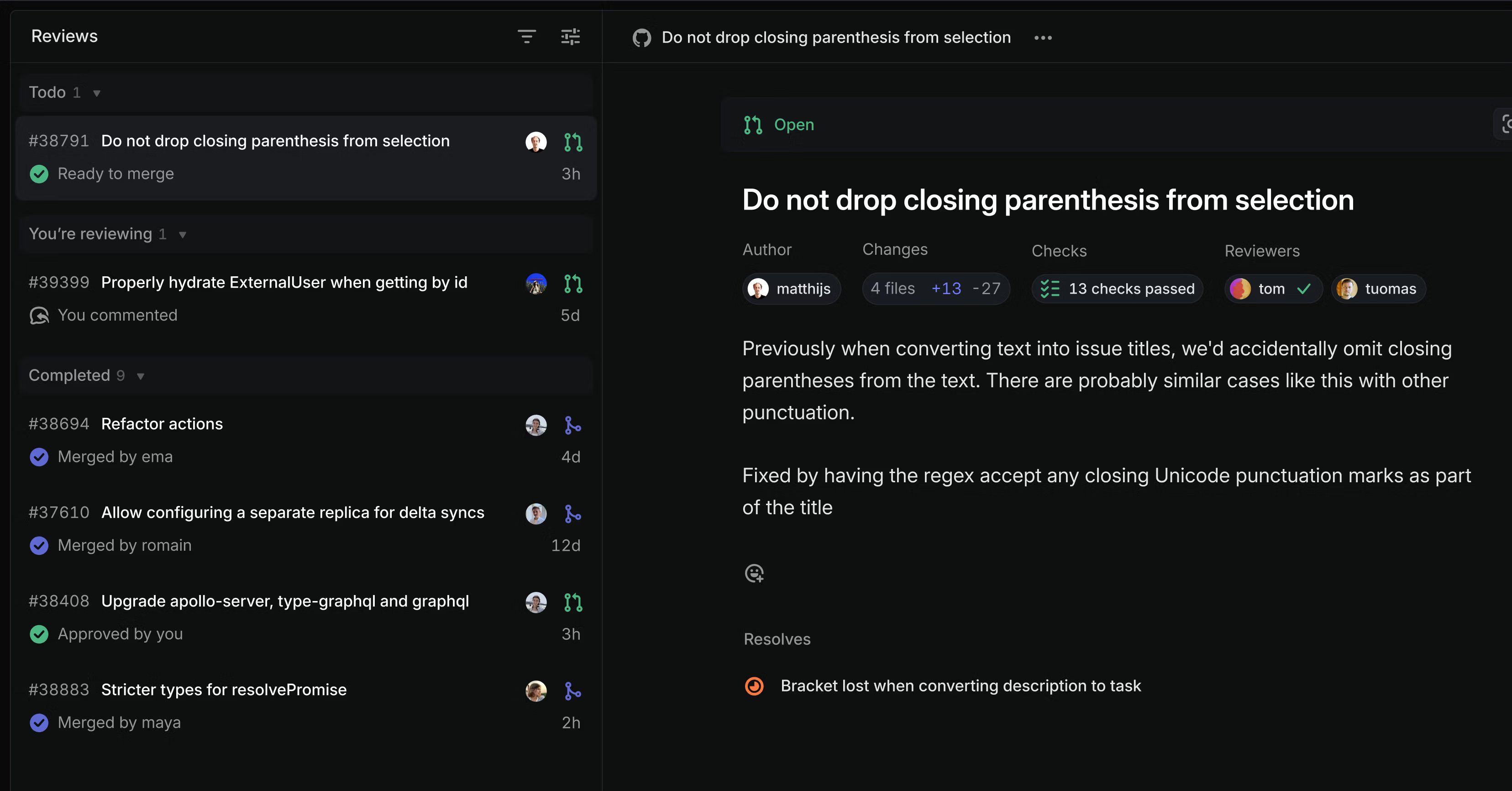
See all of your open PRs and PRs you need to review in a new Reviews section in the sidebar. Flip through the list to read descriptions, check status, see related issues, and add comments—all without leaving Linear. Comments sync bi-directionally, so they’ll appear in both Linear and GitHub no matter where the comment is made.

Notifications
Notifications appear in your Linear Inbox whenever you need to take action on a PR, so you don’t have to juggle multiple notification streams across different tools.
PR authors receive notifications for new comments, when builds fail, and when someone has left a review
- Reviewers receive notifications when someone requests their review and for comments in threads they’re participating in
- Anyone mentioned in a PR comment within Linear will receive a corresponding mention in Github and vice versa
Join the alpha
Go to Settings > Account > Connected accounts to enable Pull Request reviews for your personal account. This is an open alpha release available on all workspaces that have enabled the GitHub integration.
This feature is still in development. We’re seeking feedback early since pull request reviews are such a critical part of engineering workflows. Next, we’re planning to add support for merging PRs from Linear, viewing code diffs, and to add the same functionality to the GitLab integration. Read more in the docs and share feedback in the #pr-reviews-alpha channel in the community Slack.
Sub-grouping in issue lists
Use sub-groups to organize a list of issues across two properties. For example, you can group your current cycle by assignee and then sub-group by status. This sub-grouping configuration allows you to see what everyone is working on and the progress they are making.

Table improvements
Tables in Linear got several upgrades. Here are some new functionalities we added:
- Add lists within table cells by pasting, converting text to a list, or using Markdown
- Rearrange table columns and rows with drag and drop
- Select table cells with
ShiftArrow
Fixes
- Archive: Fixed a bug that showed archived issues from other teams when you opened your team archive
- Archive: Fixed an issue with viewing archived projects with project statuses that had been deleted
- Board: Fixed glitches that happened when manually sorting project boards that were grouped by initiative
- Breadcrumbs: Fixed a problem with incorrect breadcrumbs when navigating between cycle pages of different teams
- Customer requests: You can now associate a customer with an issue when you create issues in Slack using the global shortcut
- Customer requests: Custom views with the customer name filter now properly show only customers from the filter as issue groups
- Customer Requests: Fixed a bug that caused the Customer Requests section on an issue to briefly appear on initial load, even when there were no requests
- Cycle: Fixed incorrect cycle number parsing where quarter references (e.g., “Cycle - Q1/25”) displayed the year instead of the actual cycle number
- Cycles: Fixed cycle success calculation when completed issues were moved back to the cycle after cycle completion
- Cycles: Fixed cycle scope calculation when issues were moved back after completion
- Document subscriptions: Fixed a problem with showing document changes when documents had placeholders
- Editor: It is now possible to insert text above and below tables
- Editor: Fixed indenting lists after moving items with Option/AltUp/Down
- Empty states: Fixed issues with the layout of empty Inbox and Triage pages in Firefox
- Initiative: Fixed an issue where a project created from the initiative page now immediately appears in the list
- Issues: Fixed the incorrect issue ID displayed in the toast when changing teams before accepting a Triage issue
- Issues: Fixed navigation arrows blinking when moving between issues in a list
- Issues: Fixed tooltips in issue history getting cropped in some cases
- Labels: Fixed a bug that prevented users from creating a label in a group when typing the group name in lowercase
- Navigation: Fixed a problem that prevented you from going back to the application after changing a team identifier in settings
- OAuth: Fixed an issue where we allowed guests to install OAuth applications if another user in the workspace has already installed that application
- Project Templates: Fixed a problem that prevented creating projects in some scenarios when using default team templates
- Project Updates: Fixed an issue where we did not remove Slack messages for project updates when the project was archived
- Projects: Fixed an issue where we did not send update reminders for projects belonging to archived teams
- Slack: Fixed an issue where deleting any Slack attachment on an issue would delete the synced Slack comment thread on the issue if present
- Tabs: Fixed incorrect tab navigation when editing comments, templates, and other items while navigating to another tab
- Views: Fixed a bug where the button to create a private view would default the view to be shared instead
- Views: Fixed direct links to create attached views (e.g.,
/projects/view/new) - Views: Fixed potential data-loading errors for large organizations with Views filtering/grouping on Cycles
Improvements
- Audit log: Modified workspace SLA settings are now tracked in the audit-log
- CSV Export: All issue and project views can now be exported as CSV
- Customer Requests: Allowed creating a new issue with a customer request by using the plus button in a list group or a board column
- Customer Requests: Creating a new issue from a customer page will now automatically attach a customer request to that issue
- Editor: A team’s cycles can now be @-mentioned in issues, project updates, and docs associated with that team
- Editor: Tables that are wider than the document automatically scroll when you drag columns out of view
- Editor: Cycle links pasted into the editor will be turned into a mention automaticaly
- Editor: Improved visual experience when rearranging table columns and rows with drag
- Editor: It is now possible to add lists in tables by pasting, converting text to a list, or using Markdown
- Editor: It is now possible to rearrange table columns and rows by dragging and dropping them
- Editor: Table cells can be selected with Shift Arrow and multiple rows or columns can be moved with Alt Arrow.
- Intercom: Improved Intercom attachments to now point to a specific part of a conversation
- Issue views: The last updated date is no longer shown in issue lists by default; you can update Display Options to show it
- Issues: You can now open a link on an issue through a command menu action
- Preview links: Firebase Hosting preview URLs are now supported
- Preview links: Cloudflare Pages preview URLs are now supported
- Projects: Updated the empty state on the project’s issues screen
- Projects: Project property dropdowns now open to the side instead of below, so you can see all properties
- Filters: Allowed filtering on project milestones on more issue views
Keyboard
- You can now use Alt Cmd/Ctrl W to close all but the current tab in the desktop app
- Cmd/Ctrl / now opens the Keyboard Shortcuts overlay
- Changed the Insights panel keyboard shortcut from Ctrl Shift I to Alt Shift I on Windows and Linux to avoid conflicts with browser developer tools
API
- Made the integration managing a customer available through the field
integrationonCustomer - Introduced a new String comparator
containsIgnoreCaseAndAccentthat matches text ignoring both case and accents - Removed
messagefromOrganizationInviteCreateInput - Removed deprecated ProjectLink resolver
- Removed deprecated
Document.contentDataandProjectMilestone.descriptionDataGraphQL fields. - Added
addedLabelIdsandremovedLabelIdsinIssueUpdateInputto atomically add or remove label IDs for an issue
Fetched April 13, 2026