---
name: Release Notes
slug: release-notes
type: feed
source_url: https://new.superhuman.com/
organization: Superhuman
organization_slug: superhuman
total_releases: 20
latest_date: 2026-05-19
last_updated: 2026-06-05
tracking_since: 2025-08-20
canonical: https://releases.sh/superhuman/release-notes
organization_url: https://releases.sh/superhuman
---
## Quick Reply from notifications ⚡
### new
### ios
### android
You can now reply right from mobile notifications.
Just long press a notification, tap Quick Reply All, and then get back to what you were doing.
.videoContHeight-56\_25 { padding-top: 56.25% }
[Video](https://www.youtube.com/watch?v=KAMmdNFGHbU)
Stay focused and maintain flow.
Try it on Superhuman Mail for [iOS](https://apps.apple.com/us/app/superhuman-mail/id1120837655) or [Android](https://play.google.com/store/apps/details?id=com.superhuman.mail&hl=en_US).
## Reminders Split 🕓
### new
You can now turn on a Split Inbox for Reminders. If you prefer to separate new emails from emails to follow up, this is the split for you.
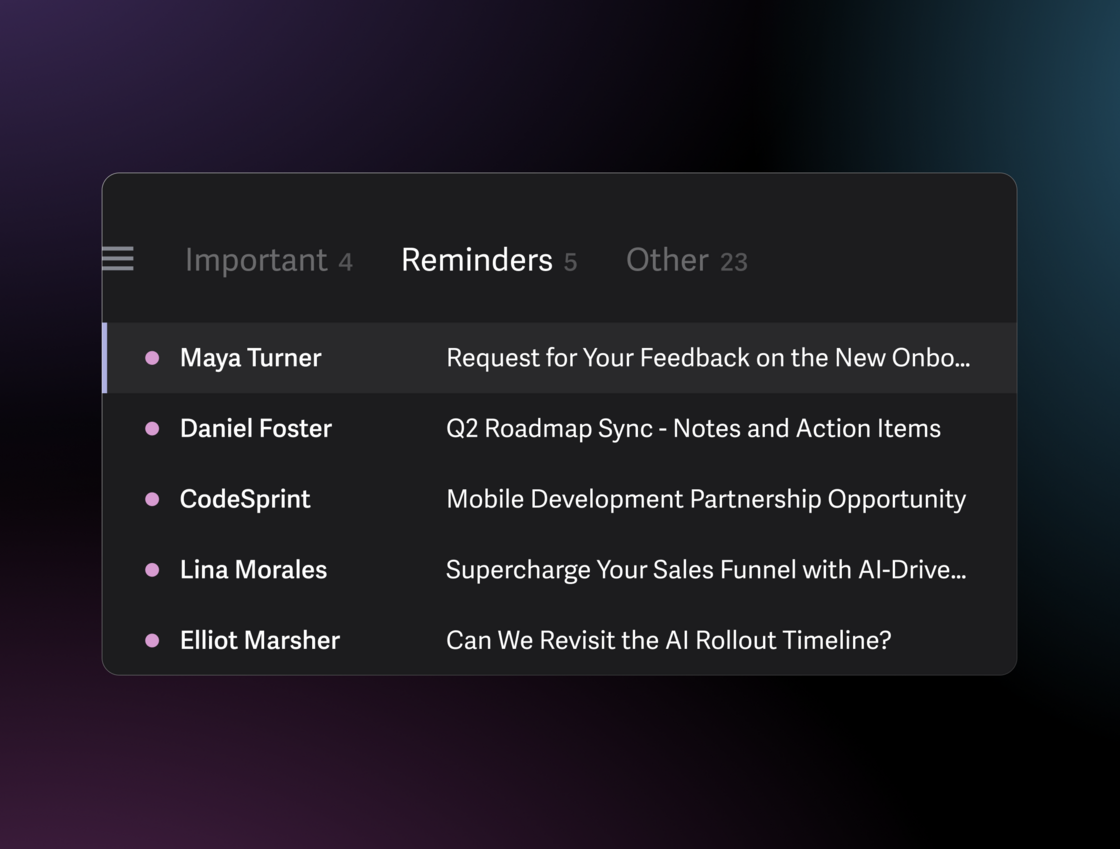
[Turn on the Reminders split](https://mail.superhuman.com/deeplink/split-library)
## Hide empty Split Inboxes 📭
### new
Your inbox now only shows the Split Inboxes that need your attention. When a split becomes empty, it disappears. When a new email arrives, it reappears.
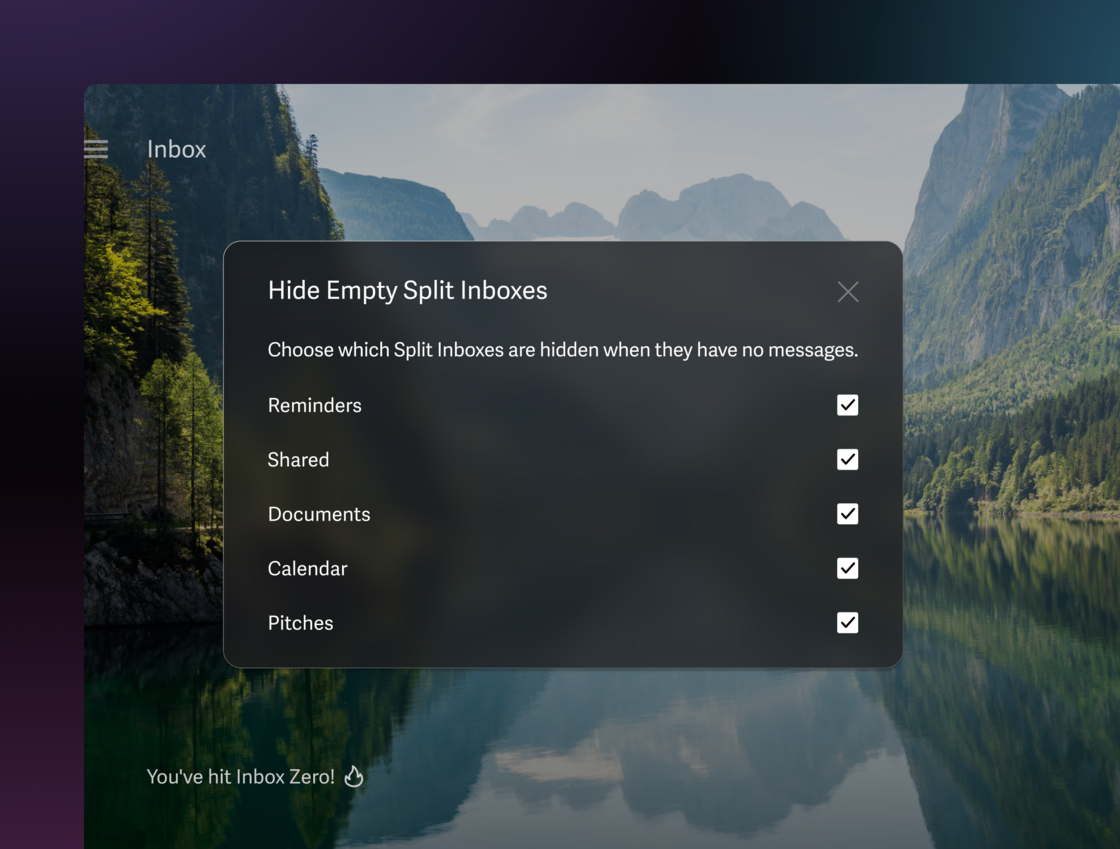
[Hide Empty Split Inboxes](https://mail.superhuman.com/deeplink/hide-empty-split-inboxes)
## Reorder all your Split Inboxes 🗂️
### new
You can reorder all your Split Inboxes, including Inbox, Important, and Other. So even if you prefer to start with something other than Inbox or Important, or finish with something different to Other, you can create the order that is best for you.
[Reorder your splits](https://mail.superhuman.com/deeplink/split-inbox-settings)
## Draft Sync with Gmail & Outlook 🔄
### new
Your executive assistant and AI agents can now draft in Gmail or Outlook, while you review and send in Superhuman Mail.
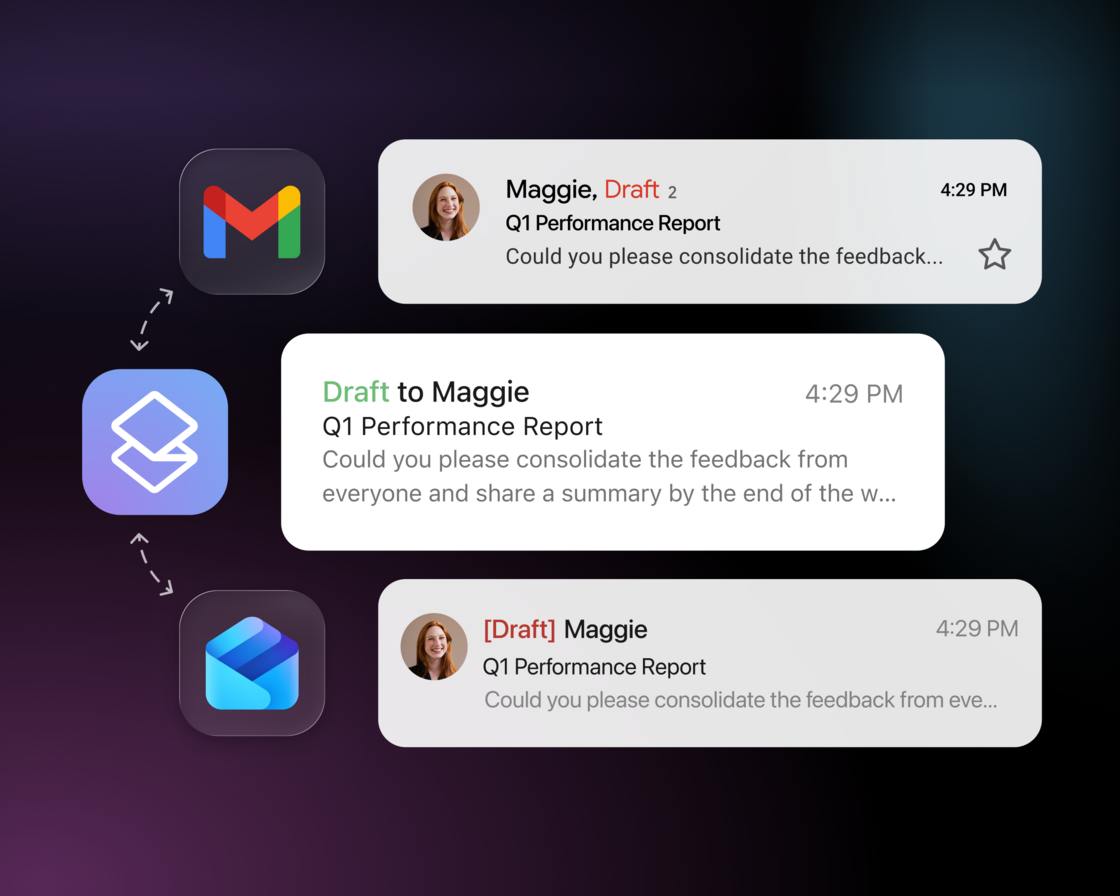
To let your AI agents fully drive Superhuman Mail, check out the [Superhuman Mail MCP](https://new.superhuman.com/superhuman-mail-mcp-336692).
## Superhuman Mail MCP 🤖
### new
You can now drive Superhuman Mail from Claude, ChatGPT, and your favorite AI tools!
We are thrilled to announce the **Superhuman Mail MCP**.
Create powerful workflows that run across your inbox and calendar, with full context from all your other tools.
.videoContHeight-56\_25 { padding-top: 56.25% }
[Video](https://www.youtube.com/watch?v=2Tbfcpx-56Y)
[Add to Claude](https://claude.ai/directory/connectors/c0449015-4acb-47b6-b9ac-e6e98e884328) →
[Add to ChatGPT](https://chatgpt.com/apps/superhuman-mail/asdk_app_69a21e4058dc8191a6220fa911310d7b) →
[Add to other AI tools](https://help.superhuman.com/hc/en-us/articles/49810745762067-Superhuman-Mail-MCP-Server) →
### **How is this different? 💜**
You can search, draft, schedule, send, triage, and more. You can also do things that are uniquely Superhuman: triage by Split Inbox, track sent emails, check Read Statuses, Smart Send, and Ask AI.
Every draft matches your voice and tone, using your unique style for each person. You can review the drafts in Superhuman Mail, or even edit and send directly from Claude and ChatGPT.
### **Ideas to get started** 💡
- **Start the day briefed**: "use Superhuman to scan unread emails in my inbox from the last 24 hours. flag what matters most”
- **Follow up every time**: "analyze my Granola meeting notes and use Superhuman to draft follow-ups for today’s external meetings"
- **Automate tasks**: “use Superhuman to forward today’s invoices to finance@acme.co”
- **Stay on top of newsletters**: “use Superhuman to summarize today’s emails in my News label”
- **Reach out with perfect timing**: "use Superhuman to draft follow-ups for people who didn't open my email from last week with subject 'action required'. Smart Send each at the best time"
In ChatGPT, use “@” to call specific apps (e.g. @SuperhumanMail). Turn these ideas into recurring tasks with ChatGPT, Claude Cowork, and Claude Code — recurring tasks are not yet supported in Claude chat.
For more ideas, see our [use case guide](https://help.superhuman.com/hc/en-us/articles/50661842795539-Superhuman-Mail-MCP-Use-Cases) – which includes downloadable skills files. And, [join us at our virtual MCP event](https://luma.com/jc9vxcfy) on May 21st! We'll show you how to automate workflows and save more hours every week.
Available on Business & Enterprise plans, along with our most intelligent version of Write with AI, Ask AI, Auto Drafts, Custom Auto Labels, and Superhuman for Sales, which includes Smart Send, Recent Opens, and our CRM integrations. To check and manage your plan, [click here](https://superhuman.com/admin/billing).
For Enterprise accounts, MCP may need to be approved by your admin. If that applies to your team, your admin can reach out to your Customer Success Manager (CSM) to get it set up.
## Write with Voice 🎤
### new
### ios
### android
We can all speak 3-4x faster than we can type.
That’s why we built **Write with Voice.**
Just outline your email, and we’ll write a polished draft that sounds like you. What took minutes now takes seconds.
.videoContHeight-56\_25 { padding-top: 56.25% }
[Video](https://www.youtube.com/watch?v=V_AYZASDKYs)
Unlike Gmail and Outlook, this is not just transcription. You can simply give direction.
See what early users have to say:
> "The feature transforms my thoughts into polished drafts seamlessly."
>
> "This is a game-changer for composing emails quickly."
>
> "This is pure genius."
To use it, tap the new voice icon in our mobile app. It’s coming to desktop soon!
If you’re not seeing it, update the mobile app on [iOS](https://apps.apple.com/us/app/superhuman-mail/id1120837655) or [Android](https://play.google.com/store/apps/details?id=com.superhuman.mail&hl=en_US).
Check out our [Help Center](https://help.superhuman.com/hc/en-us/articles/38456855116307-Write-with-AI) to learn more.
## Calendar Widget for iPhone & iPad 📱
### new
### ios
Most software is built for the average person. But you’re most certainly not average.
Consider your calendar. These are the iOS widgets from Apple, Google, and Microsoft:
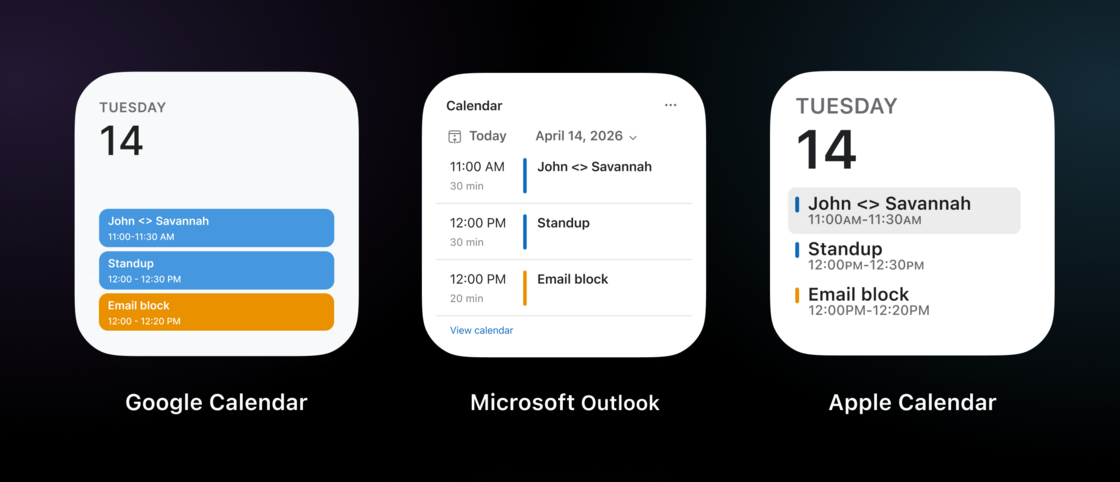
Events with different durations look the same, overlaps aren’t clear, and you can't even tell what's happening right now or when your next break is. They're confusing at best and misleading at worst.
Let’s see the same calendar in our new Superhuman Mail widget:
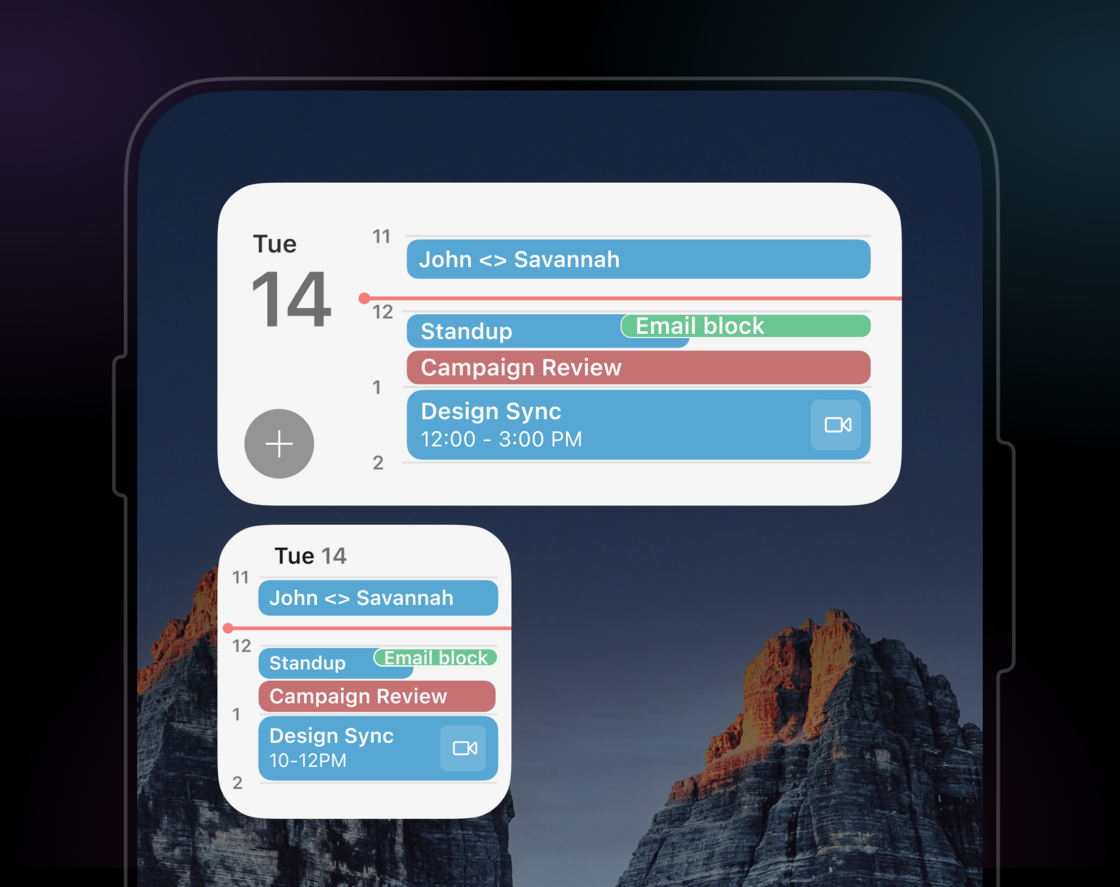
With our timeline view, you can see how long events are, and whether they overlap. You can see what’s happening now, how much time is left, and whether you get a break between meetings. You can see all of this even in the smallest widget.
Unlike the Google and Outlook widgets, it works with *both* your Google and Microsoft calendars.
And if you're lucky enough to have a relaxed calendar, we have an agenda view as well!
To add our widget: touch and hold your Home Screen background until the icons jiggle, tap Edit in the top-left, tap Add Widget, then search for Superhuman.
If you’re not seeing it, [update Superhuman Mail](https://apps.apple.com/us/app/superhuman-mail/id1120837655) — requires iOS 18.1 or newer.
## Personalization ✨
### new
We designed Superhuman AI to write like you. That's why it adapts to your unique style for each person, using the tone, length, and structure from the emails you've sent before.
But what if you have your own specific rules? Now, you can convey exactly how you write, how you manage your calendar, as well as key facts about yourself.
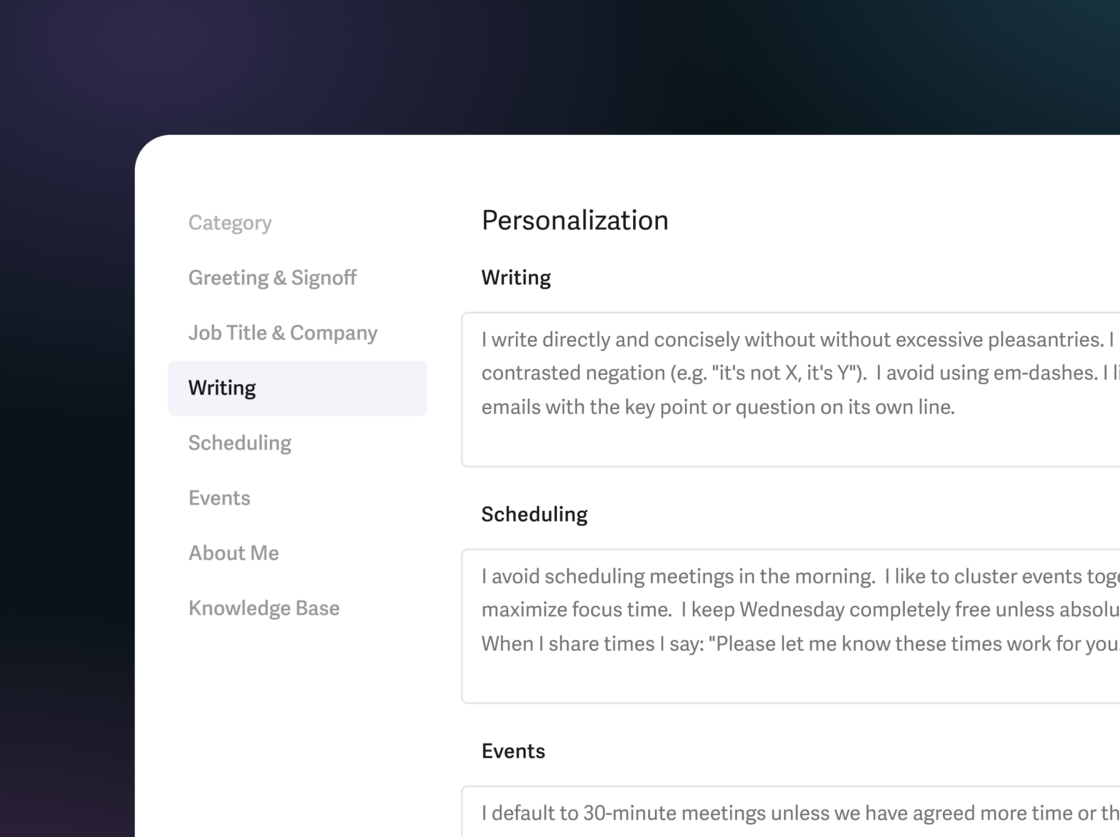
**Writing** ✍️
Guide Superhuman AI to sound even more like you.
- "write directly and concisely"
- "avoid em-dashes ("—") and use commas or short sentences instead"
- "if the email is longer than two paragraphs, include the key point at the start"
**Scheduling** 🤝
Customize how Superhuman AI shares availability and manages your calendar.
- "avoid morning meetings and cluster events together"
- "keep Wednesdays free unless necessary"
- "share at most 3 times and use this booking link: …"
**Events** 📆
Control how Superhuman AI creates and formats events.
- "default to 20 minute meetings"
- "format 1:1s like: Nicole <> {other person’s first name}"
- "if the agenda is clear, include a helpful description"
**About you** 🧠
Add key facts that Superhuman AI should know.
- "our new office address is this: …"
- "my manager is Jenn, my direct reports are Perry, Wen & Gabriela"
- "my parental leave starts May 4th"
To get started, click **Settings** ⚙️ **→ Personalization**.
Personalization is currently in Beta and works with Write with AI, Ask AI, and Instant Event. It will soon work with Auto Drafts and Share Availability too!
Full personalization settings are available on our Business & Enterprise plans, along with our most intelligent version of Write with AI, Ask AI, Auto Drafts, Custom Auto Labels, and Superhuman for Sales, which includes Smart Send, Recent Opens, and our CRM integrations. To check and manage your plan, [click here](https://superhuman.com/admin/billing).
## Booking Pages 📅
### new
We are excited to introduce **Booking Pages** — a powerful new way to share availability without breaking flow.
.videoContHeight-56\_25 { padding-top: 56.25% }
[Video](https://www.youtube.com/watch?v=WqjR3d5SF-c)
**Instantly Send times 📆**
When writing an email, just click the Share Availability icon or hit the shortcut. No need to switch to your calendar or search for times that work.
**No more back-and-forth ⚡️**
Create reusable links for your most common meetings, like intro calls, office hours, or investor pitches. Your guests can pick a time without any back-and-forth.
**Never double-book again 🤝**
As your schedule changes, your links stay up to date. You can even connect multiple calendars, so you never double-book again.
**How is this different? 👀**
Unlike Gmail, Outlook, and Calendly, it works great with your team. It can check when your coworkers are available, so all the right people attend.
And in true Superhuman style, it is blazingly fast.
Just hit **Cmd+Shift+A** (Mac) or **Ctrl+Shift+A** (Windows), then type a few characters of the page title. To go even faster, save the link inside a Snippet!
## Knowledge Base Beta 📂
### new
We are excited to announce one of our most requested features: **Knowledge Base**!
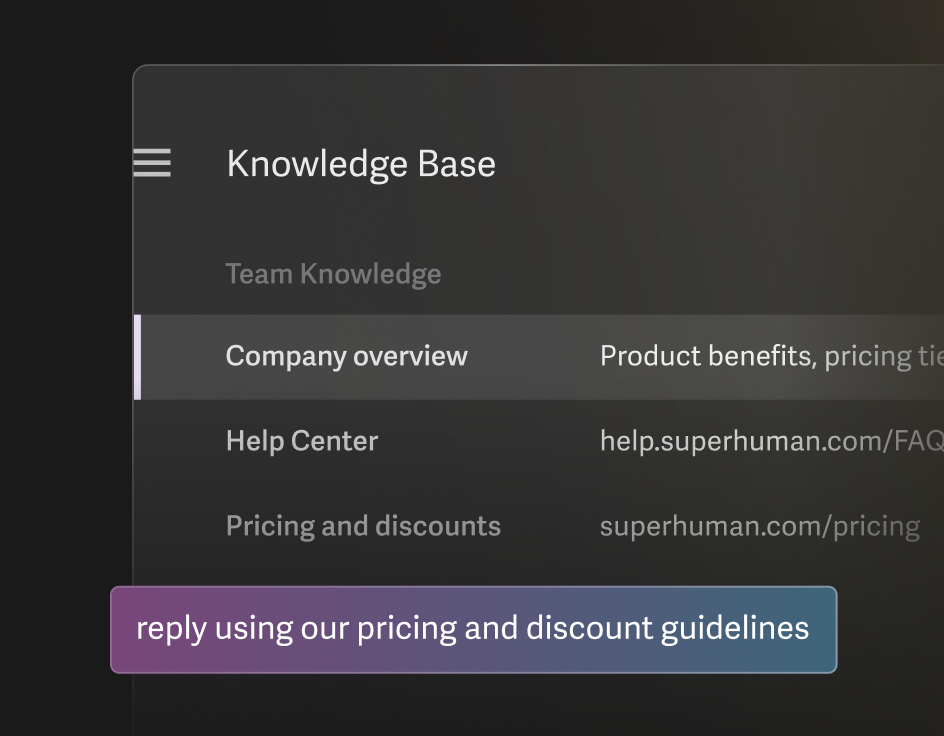
You can now upload files and connect links to Superhuman AI. This makes Write with AI smarter and Ask AI more comprehensive.
You can even share this knowledge across your team. With Team Knowledge, your whole team can move faster with messaging and answers that are grounded, accurate, and consistent.
Examples to add:
- ✍️ Addresses and contacts
- ⚡ Company overviews and pitch decks
- 🏁 Help center links and product info
- 🎁 Pricing and discount sheets
- 🔍 Compliance and security documents
To get started, just click **Settings** ⚙️ **→ Knowledge Base**. It is currently in beta, so please send all your feedback to hello@superhuman.com.
The Knowledge Base is available on our Business & Enterprise plans, along with our most intelligent version of Write with AI, Ask AI, Auto Drafts, Custom Auto Labels, and Superhuman for Sales, which includes Smart Send, Recent Opens, and our CRM integrations. To check and manage your plan, [click here](https://superhuman.com/admin/billing).
## Agentic Writing 🧠
### new
When we first launched Write with AI, it was just a simple prompt.
Today, it is an AI agent that can use multiple tools, resolve ambiguities, and think for as long as it needs to write compelling emails that you would actually send.
.videoContHeight-56\_25 { padding-top: 56.25% }
[Video](https://www.youtube.com/watch?v=Mcxk6Ae46gI)
Write with AI can now use information from other emails, insert availability for you and your team, and conduct research online. It can also resolve ambiguities and think for as long as it needs. If it needs to ask you a clarifying question, it will open Ask AI.
Just hit **Cmd+J** (Mac) or **Ctrl+J** (Windows) to use Write with AI.
The most intelligent version of Write with AI is available on our Business & Enterprise plans, along with Ask AI, Auto Drafts, Custom Auto Labels, and Superhuman for Sales, which includes Smart Send, Recent Opens, and our CRM integrations. To check and manage your plan, [click here](https://superhuman.com/admin/billing).
## Write with AI for Android 🤖
### new
Write with AI is now available on both Android and iOS!
Just jot down some phrases, and we’ll turn them into a full email that sounds like you.
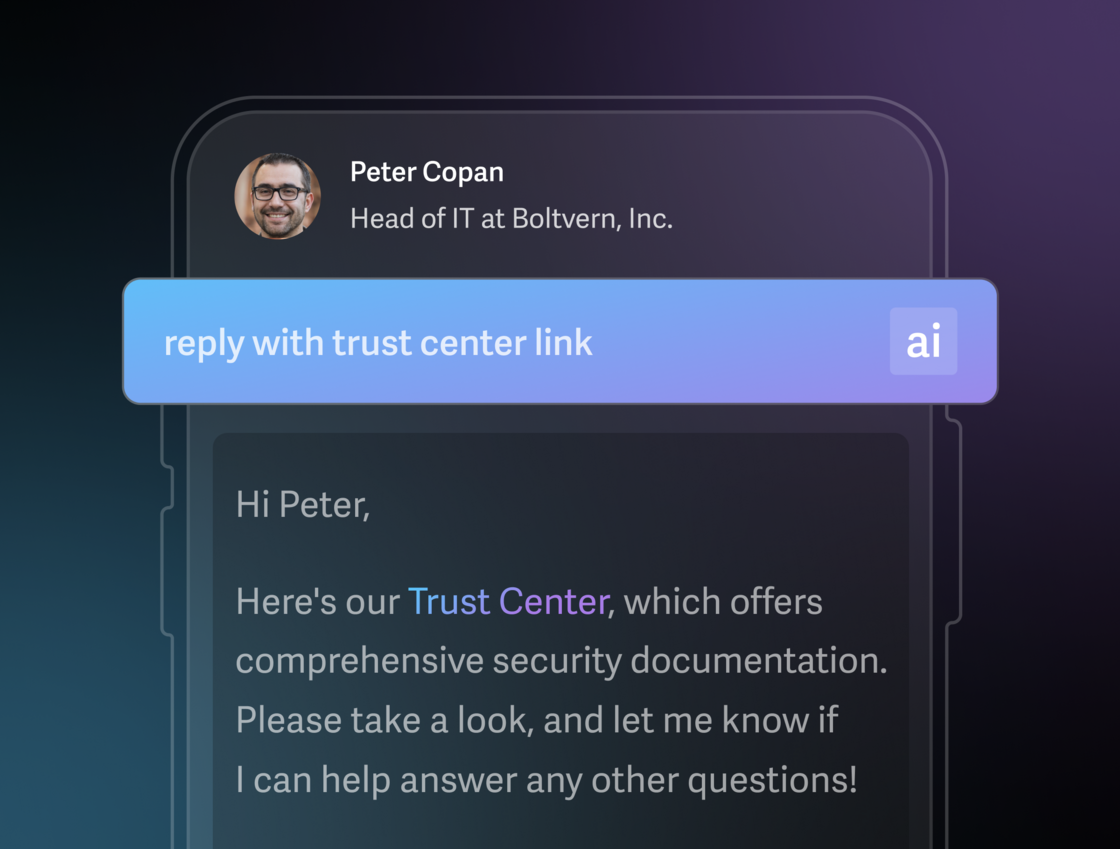
[Get the latest app here](http://sprh.mn/3NCuHdK?r=qr).
When writing an email, just tap the **ai** icon above your keyboard.
You can even tap the mic icon to write with your voice!
## Ask AI: Sidebar & Chat History 💬
### new
Ask AI is now in a new left sidebar on desktop. Here you can find, write, schedule, or ask anything. Just ask "where's the offsite" or say "reply with 3 coffee spots near the office". No need to remember senders, guess keywords, or scan subject lines.
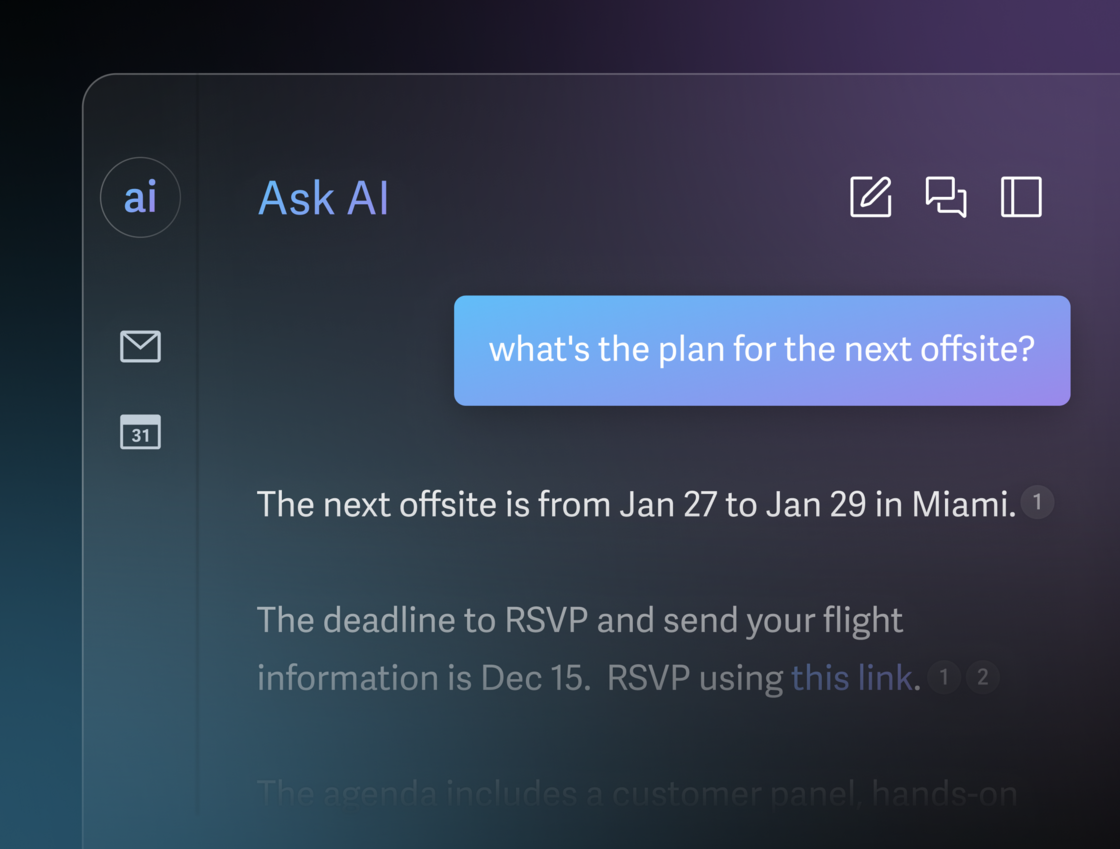
We've found that Ask AI chats often become valuable reference material, so you can now see your chat history on desktop, iOS, and soon Android. Pick up right from where you left off.
To open Ask AI, just hit **?**. Click the history icon in the top right to see previous chats.
Ask AI is available on our Business & Enterprise plans, along with the most intelligent version of Write with AI, Auto Drafts, Custom Auto Labels, and Superhuman for Sales, which includes Smart Send, Recent Opens, and CRM integrations. To check and manage your plan, [click here](https://superhuman.com/admin/billing).
## Auto Drafts for Scheduling ✨
### new
On average, it takes three emails just to schedule one meeting.
We spend so much of our time simply trying to find it!
Introducing our latest feature: **Auto Drafts for Scheduling**…
.videoContHeight-56\_25 { padding-top: 56.25% }
[Video](https://www.youtube.com/watch?v=E1Uy_-24HxU)
**Spend less time managing your time** 📆
When someone asks to meet, we'll automatically draft a reply.
We'll include suggested times, so you don’t have to check your calendar. We'll include a booking link, so nobody has to send an invite. We'll even keep your drafts up to date as your schedule fills up. You can simply edit, then send.
**Work even faster with your EA** 🤝
If you work with an assistant, you're now even faster. Just add them to Auto Drafts, and we'll loop them in for you. You can also customize the prompt, so we do it just like you.
To get started, click **Settings → Auto Drafts**, and turn on **Scheduling**.
Auto Drafts are available on our Business & Enterprise plans, along with Ask AI, our most powerful Write with AI, and Superhuman for Sales, including Smart Send, Recent Opens, and CRM integrations. To check and manage your plan, [click here](https://superhuman.com/admin/billing).
## Share Availability timezones 🌎
### new
We are excited to deliver one of our most requested updates: Share Availability now includes timezones!
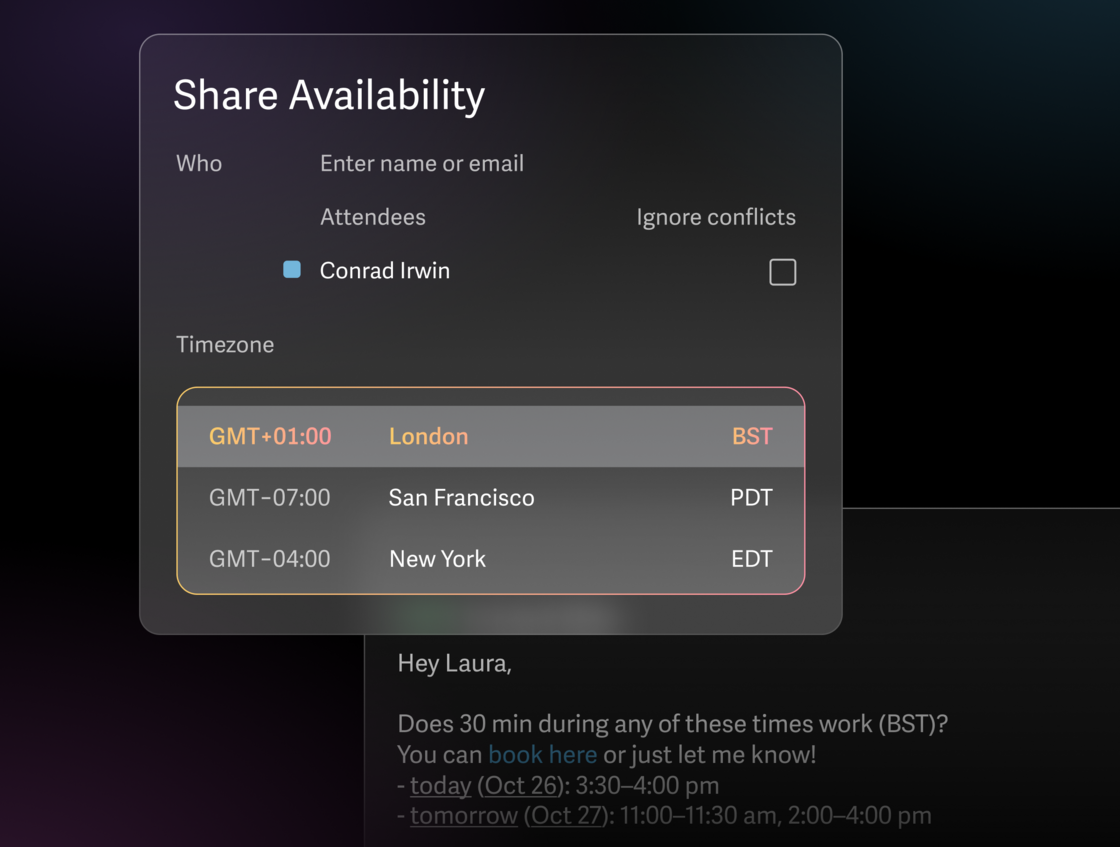
When writing an email, just hit **Cmd+Shift+A** (Mac) or **Ctrl+Shift+A** (Windows), then click the **timezone**.
We'll convert all the times for you, so you're never asking anybody else to think about timezones.
## 100+ new inspiring Inbox Zero photographs 💜
### new
We've curated over 100 new inspiring and gorgeous Inbox Zero photographs.
Celebrate Inbox Zero every day with a fresh, delightful view whenever you hit zero.

## It's Inbox Zero Day! Hit zero & win prizes 🥳
### new
Today's the day when we're all most likely to hit Inbox Zero.
We'll be celebrating all day with [surprises and giveaways](https://blog.superhuman.com/inbox-zero-day-2025/) 🎁

Here's how to join in:
- Hit Inbox Zero today, October 8th. Enjoy the surprise when you do…
- Share your achievements on [X](https://twitter.com/Superhuman), [LinkedIn](https://www.linkedin.com/company/6653417/admin/?feedView=all), or [Instagram](https://www.instagram.com/superhumanco/). Tag us along with #HitZero.
- Every post gives you a chance to win exclusive Superhuman swag!
We've also doubled our referral bonus. Anyone you refer who joins by October 14th will get two months of free Superhuman, and so will you! You can refer as many people as you like — so if six friends join, you'll get a whole year free 💜
To refer, hit **Cmd+K** (Mac) or **Ctrl+K** (Windows) **→ Refer to Superhuman** or **Copy Referral Link**.
ps. the full giveaway terms are [here](https://coda.io/@documentation/inbox-zero-sweepstakes-terms).
## Find Time 🤝
### new
Finding time to meet shouldn't take as long as a meeting. But today's tools make it cumbersome and slow.
That's why we built [Meet With](https://new.superhuman.com/meet-with-319983). And it's why we're making it nearly instant!
We're thrilled to introduce: **Find Time**.
[Video](https://www.youtube.com/watch?v=-0i8pBvfaBA)
To see your calendar, click the calendar icon on the left, or just hit **2**. Hit **M** to meet, enter a name, then hit **Enter** to find time. You'll instantly see when you're both free.
Unlike Google Calendar and Outlook, Superhuman shows available times inline with your calendar. You can then create an event with a single tap.
It's fun, fast, and intuitive!
## Ask AI is getting an upgrade 🧠
### new
We each receive 3 million words of email every single year. How do we find what matters?
Before Ask AI, you had to guess keywords, remember senders, and scan subject lines. With Ask AI, you simply *ask*.
Today, Ask AI is getting its most powerful upgrade yet.
.videoContHeight-56\_25 { padding-top: 56.25% }
[Video](https://www.youtube.com/watch?v=eXPqQBBYhPg)
Ask AI can now combine information from your inbox, your calendar, and the web. You can then draft emails in your own voice and tone, schedule events when you’re free, and send — all in one ask!
For example:
- "schedule a 30 min chat with @Sarah and draft a welcome email"
- "reply with 3 happy hour spots near our office in Soho"
- "how much time did I spend with client X this week?"
- "reply with best practice answers"
Ask AI used to search 1 year of email. Starting over the next few weeks, Ask AI will search 5 years.
And finally, you can now ask about using Superhuman. Try: "how do I make a split inbox" or "how do I find auto archived emails".
Ask AI is available on our Business & Enterprise plans. To upgrade, [click here](https://www.superhuman.com/admin/billing).
Just hit **?** and ask away.