---
name: What's new in Robin
slug: what-s-new-in-robin
type: feed
source_url: https://support.robinpowered.com/hc/en-us/sections/33150744898573-What-s-new-in-Robin
organization: Robin
organization_slug: robin
total_releases: 8
latest_date: 2026-05-20
last_updated: 2026-06-16
tracking_since: 2025-01-02
canonical: https://releases.sh/robin/what-s-new-in-robin
organization_url: https://releases.sh/robin
---
## May 2026 Product Update

## **Space planning at the speed of your workplace**
Managing workplace maps and space planning has traditionally been slow, manual, and difficult to keep up to date. As teams reconfigure offices, manage moves, and adapt layouts more frequently, maintaining accurate workplace maps has become a major operational challenge.
Robin’s latest releases are focused on making map management and space planning faster and easier to maintain — from generating maps directly from CAD files to editing layouts directly inside Robin. These updates are part of a broader investment in helping teams manage workplace changes with less manual work and greater flexibility.
To learn more about Robin’s approach to space planning and move management, [watch this walkthrough](https://robinpowered.com/webinars/space-management-for-the-modern-office).
---
[Video](https://fast.wistia.com/embed/iframe/wh6pjz981z)
## **Upload CAD files to create workplace maps in seconds**
Building workplace maps has historically meant manual work, external software, and a lot of starting over.
Now teams can import .dxf files directly into Robin's CAD uploader and generate maps in seconds. Robin automatically detects relevant layers, so admins can choose what to include, like walls and structural elements, before finalizing the map.
What used to take days takes minutes. It's a fundamental shift in how workplace maps get built, and a much lower barrier to keeping them current.
**Try it out:** Upload a CAD file when creating a new floor to quickly generate a map in Robin.
## **Edit maps directly in Robin with the new map editor**
Keeping a map accurate as your workplace changes has been just as painful as building one.
The new map editor changes that. Admins can adjust walls, refine layouts, and clean up imported files directly in Robin, no external software required. And when bigger changes happen, new CAD files can be uploaded onto existing maps while keeping desks, spaces, and resources in place, so nothing has to be rebuilt from scratch.
**Try it out:** Use the map editor to refine layouts and keep your workplace maps up to date. Contact your CSM or [support@robinpowered.com](mailto:support@robinpowered.com) to learn more.
---
## **Connect Robin's visitor management with your existing workplace systems**
Many workplaces rely on multiple systems to manage visitors, from lobby kiosks to badge access and internal apps. The new Visitor API gives teams more flexibility in how those systems connect with Robin.
Customers can now send guest lists to lobby systems ahead of visits, check visitors in from third-party tools while triggering Robin notifications in real time, and automate temporary badge access through security platforms.
The Visitor API also makes it possible to build custom visitor workflows directly into internal workplace apps, creating a more connected experience for employees, front desk teams, and guests.
**Help center articles:**
[Visitor API Help Center Article](https://support.robinpowered.com/hc/en-us/articles/45838434471949-Robin-s-Visitor-API)
[Visitor API Documentation](https://docs.robinpowered.com/reference/listvisits-1)
**Next steps:** Explore how the Visitor API can connect Robin with your existing workplace and security systems
---
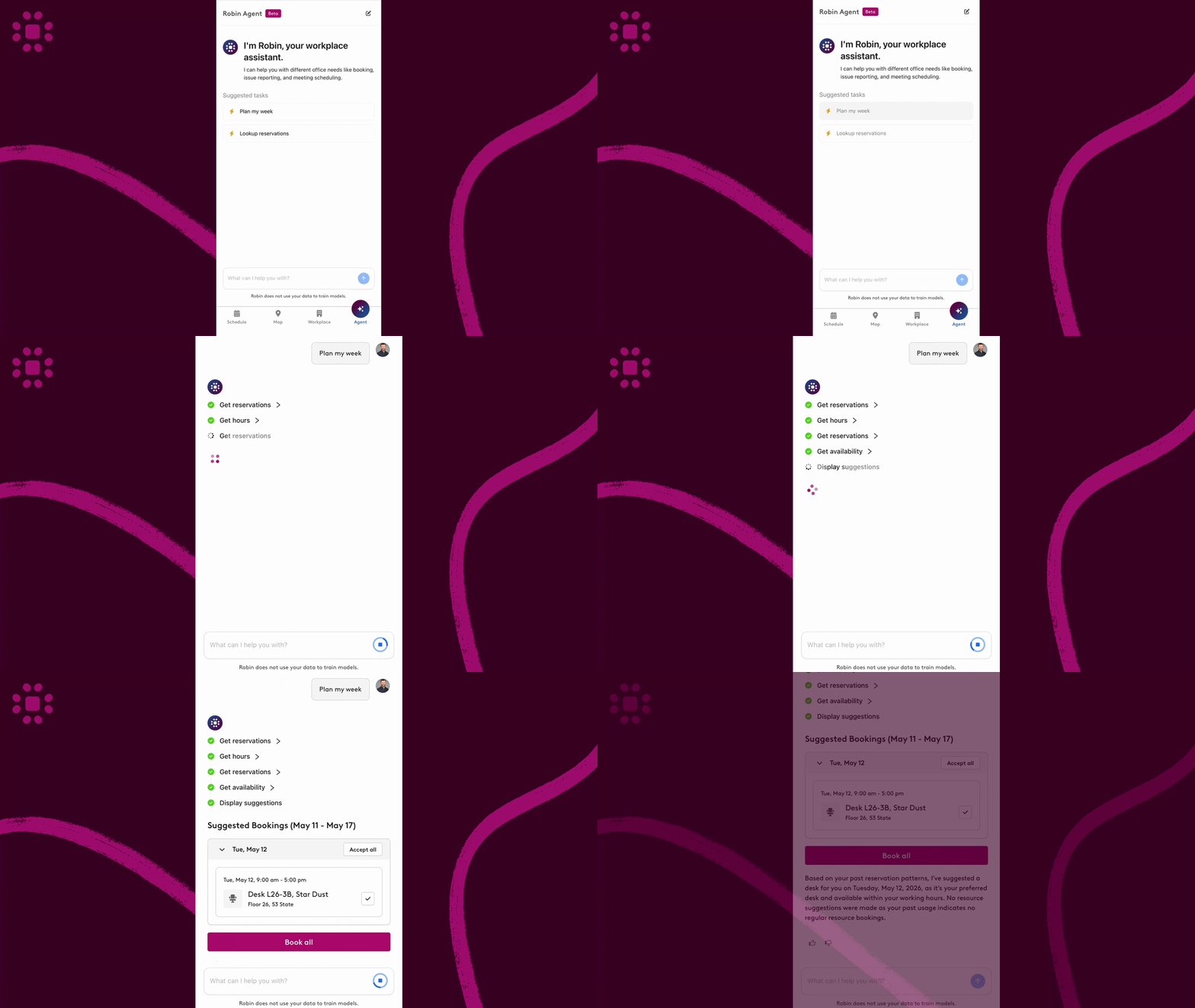
## **Meet Robin’s user agent**
Robin’s user agent is a new, natural language way for employees to plan their week and manage workplace bookings. It will be released to customers throughout May 2026.
From a single prompt, users can book desks and parking, fill in missing reservations, and find space for meetings—reducing the back-and-forth typically required to coordinate time in the office.
The experience will be available first on the Robin mobile app, with broader access coming soon.
**Next steps:** Reach out to your Customer Success Manager or contact [success@robinpowered.com](mailto:success@robinpowered.com) to request early access.
---
## **What else is new in Robin?**
- **More flexible permissions for custom resources:** Parking, lockers, and other resources can now follow desk-level permissions. This makes it easier to control access across buildings, floors, or specific areas without manually configuring each resource.
- **Clearer booking confirmations for delegates:** Confirmation messages now show who made a reservation and who it impacts, helping reduce confusion when booking on behalf of others.
- **Delegate check-in support:** Delegates can now check users in on behalf of others again, making it easier for EAs and admins to manage reservations end-to-end.
## April 2026 Product Update
[Video](https://fast.wistia.com/embed/iframe/9x6o642qad)
# **Mobile visitor management, AI chart summarization & guided admin onboarding**
Every update we ship is designed to help workplace teams move faster and operate with more confidence. As workplace needs evolve, we’re focused on reducing friction across the tools teams rely on every day.
March’s releases focus on making core workflows more accessible, improving platform performance, and helping new admins get up and running faster. Here are three key highlights from this month.
---
## **Turn your mobile app into a fully operational front desk**
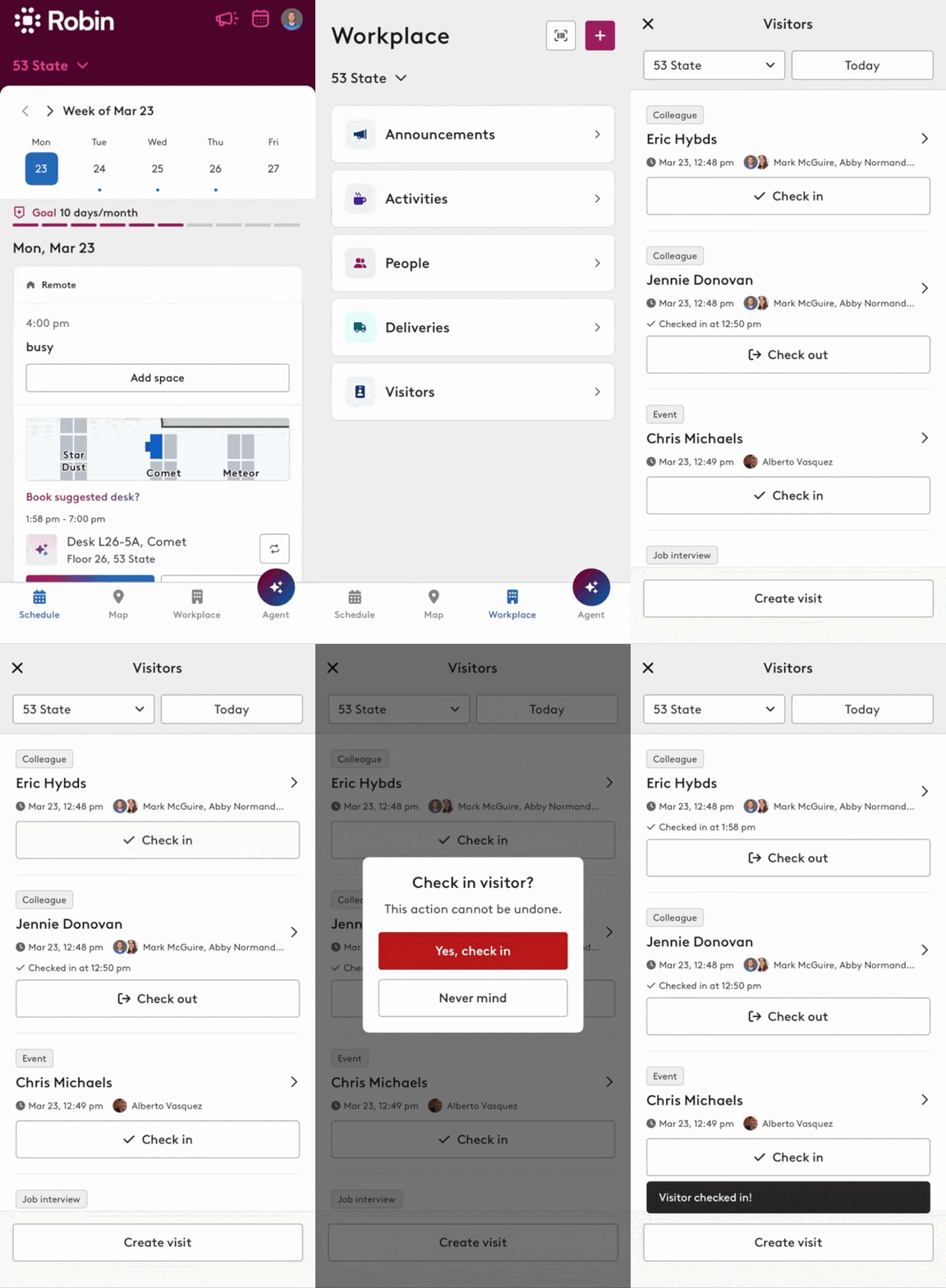
Managing visitors shouldn’t require teams to stay tied to a desk. Workplace teams need flexibility without sacrificing control or compliance.
Visitor Management is now available in the Robin mobile app, enabling teams to add, manage, and check in or out visitors from anywhere. With customizable workflows, flexible registration, and real-time notifications, mobile becomes a fully operational front desk.
For more complex environments, teams can tailor workflows by visitor type, enforce compliance requirements, and integrate visitor activity into their broader systems in real time.
The result is faster check-ins, fewer bottlenecks, and greater confidence in how visitor processes are managed.
[**Read our user guide here**](https://support.robinpowered.com/hc/en-us/articles/44520437383181-Managing-visits-in-the-Robin-mobile-app)
**Next Steps:** Start managing visitors directly from the mobile app to streamline front desk operations.
---
## **Get up and running faster with a guided onboarding experience for admins**
**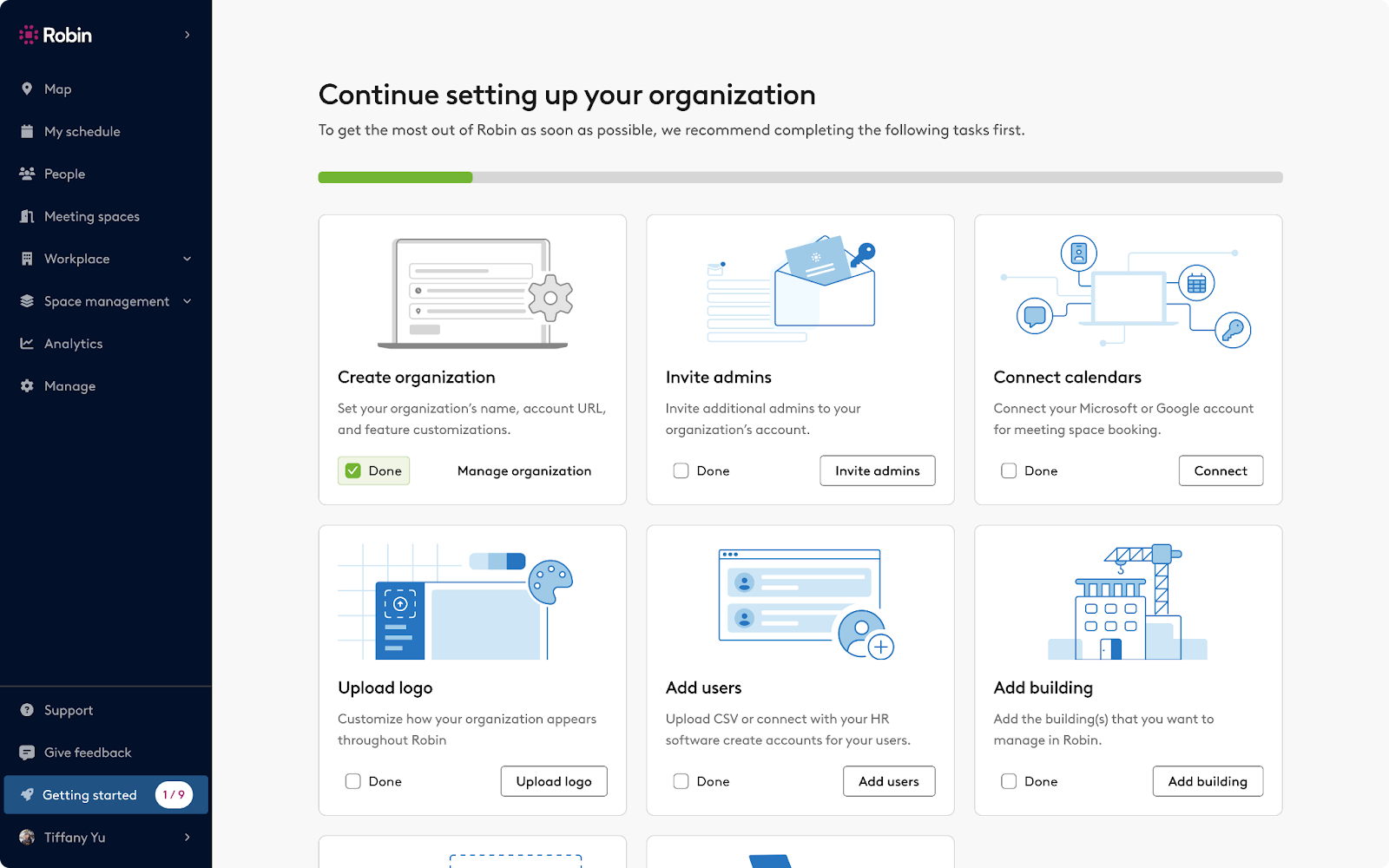**
Getting started with Robin (or optimizing your setup) now follows a clear, guided path with built-in progress tracking.
The new onboarding experience introduces a guided setup workflow that brings key tasks into one place with progress tracking. Admins always know what to do next—and how close they are to being fully set up—whether they’re configuring for the first time or refining an existing workplace.
This helps teams get up and running faster, ensures setups are optimized, and gives both new customers and prospects greater confidence in how easy Robin is to use.
[**Read our support guide here**](https://support.robinpowered.com/hc/en-us/articles/204474124-Get-started-setting-up-your-workplace)
**Next Steps:** Admins can check out the new onboarding flow with the Getting started option on the left hand menu bar.
---
## **Understand your data faster with built-in AI in analytics**
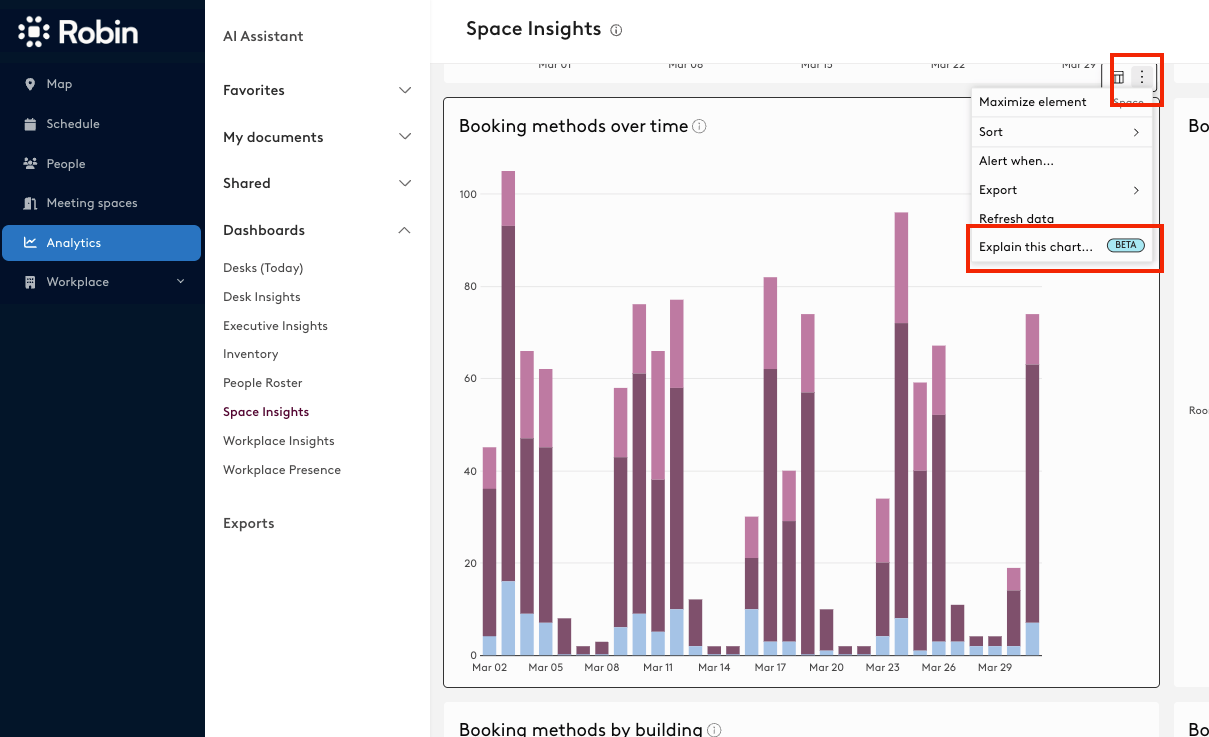
Robin has rolled out two new AI capabilities in Analytics to make it easier to get value from your data.
- With **Explain this Chart**, users can instantly generate a plain-language summary of any visualization, highlighting key trends and insights without manual analysis.
- The **AI Formula Assistant** (available in Advanced Analytics) allows users to write formulas in plain language, fix errors, and understand existing logic directly within the workbook.
These updates make analytics more accessible to a broader range of users, reduce friction when building custom reports, and help teams move from data to decisions faster, without needing deep technical expertise.
**Help Center Articles:**
- [AI Explain this Chart - Analytics](https://support.robinpowered.com/hc/en-us/articles/44268495446285-AI-Explain-this-Chart-Analytics)
- [AI Formula Assistant - Advanced Analytics](https://support.robinpowered.com/hc/en-us/articles/44268589069965-AI-Formula-Assistant-Advanced-Analytics)
---
## **What else is new in Robin?**
- **Redesigned dashboard navigation:** A new side navigation creates a more modern, intuitive experience as you move through the platform. The updated layout feels faster and more organized, making everyday workflows easier to navigate.
- **Smarter desk and room suggestions:** Get recommended desks and meeting rooms based on your preferences and availability. You can quickly accept, dismiss, or explore options without navigating across floors.
- **Improved multi-day booking for delegates:** Dates now persist across reservations, reducing repetitive steps. Delegates can coordinate team schedules more efficiently with full visibility into existing bookings.
- **Clearer navigation across floors and resources:** Easily understand where desks, parking, and resources are located. You’ll have clearer context when moving between bookings across floors in large workplaces.
- **Better visibility into booking policies:** Priority booking alerts highlight restrictions before you reserve. Users can avoid confusion and make more informed booking decisions upfront.
## March 2026 Product Update
# More flexible scenario planning, drag-and-drop meetings & unified resource check-ins
Every update we ship starts with a conversation. As workplace teams head into another busy season, we're building for the leaders planning complex office moves, the admins managing day-to-day space changes, and the employees navigating hybrid schedules
February’s releases focus on giving Workplace Admins greater control over critical workflows while making everyday experiences smoother for employees. Here are four key highlights from this month.
---
## **Bring structure and control to office move planning**
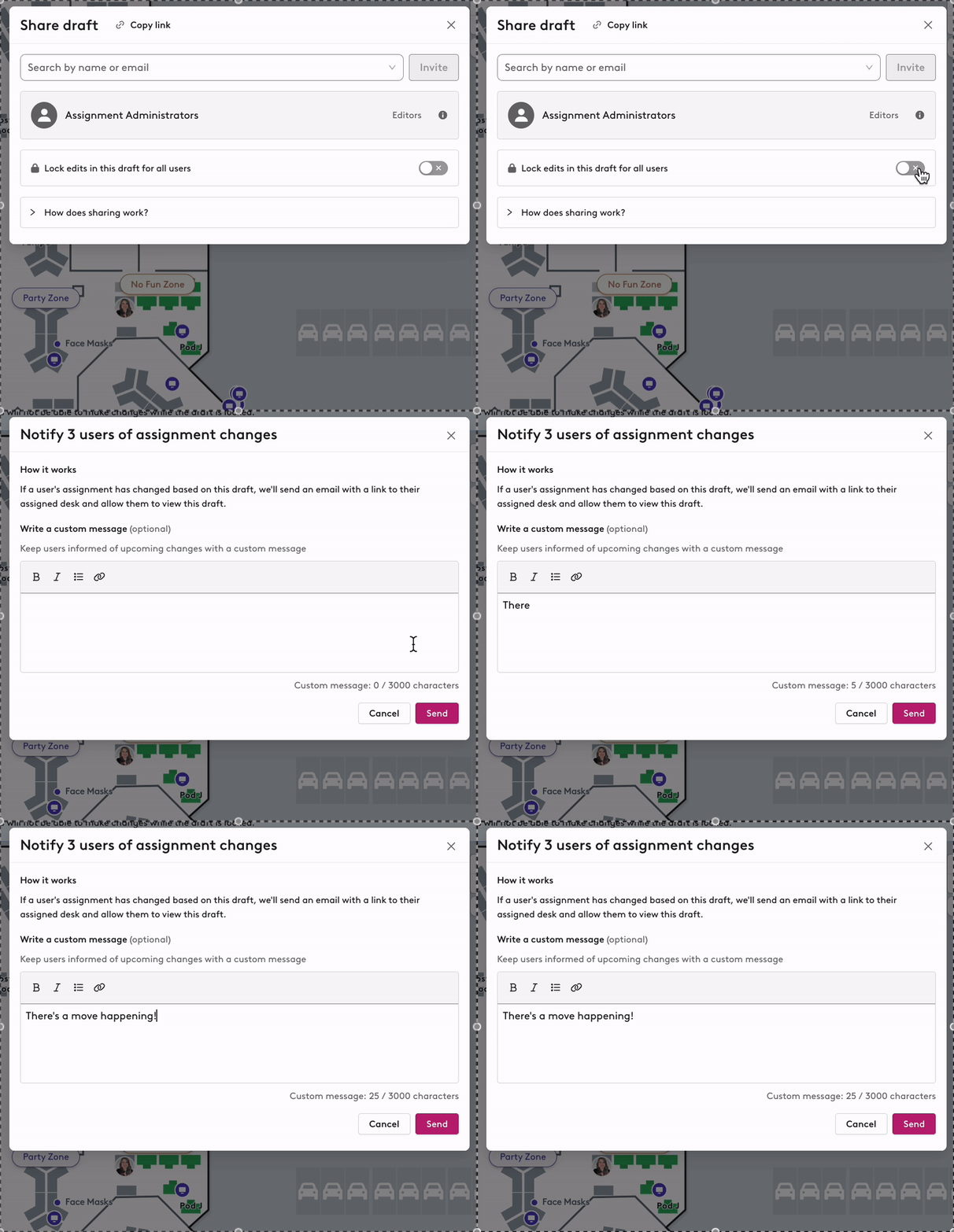
Scenario Planning allows Workplace Admins to create and test office move plans in a safe, draft environment before publishing changes live. It’s designed to reduce risk and improve alignment during workplace transitions.
Because office moves are high-impact projects with many stakeholders involved, we’ve heard how important it is to protect plans while they’re being finalized. Workplace Admins can now lock draft move scenarios to prevent unintended edits during review and approval cycles.
This added layer of control ensures everyone is aligned on the same version of a plan, reduces last-minute confusion, and helps workplace teams execute major transitions with greater confidence and clarity.
**Read our help docs for more information:**
- [**Large scale assignments**](https://support.robinpowered.com/hc/en-us/articles/34340580432909-Large-scale-desk-assignments)
- [**Locking and sharing scenario plans**](https://support.robinpowered.com/hc/en-us/articles/43081347471373-Locking-and-Sharing-Draft-Scenario-Plans)
*Reach out to your Customer Success Manager to enable draft locking for your move planning process.*
---
## **Manage meeting room schedules from one visual view**
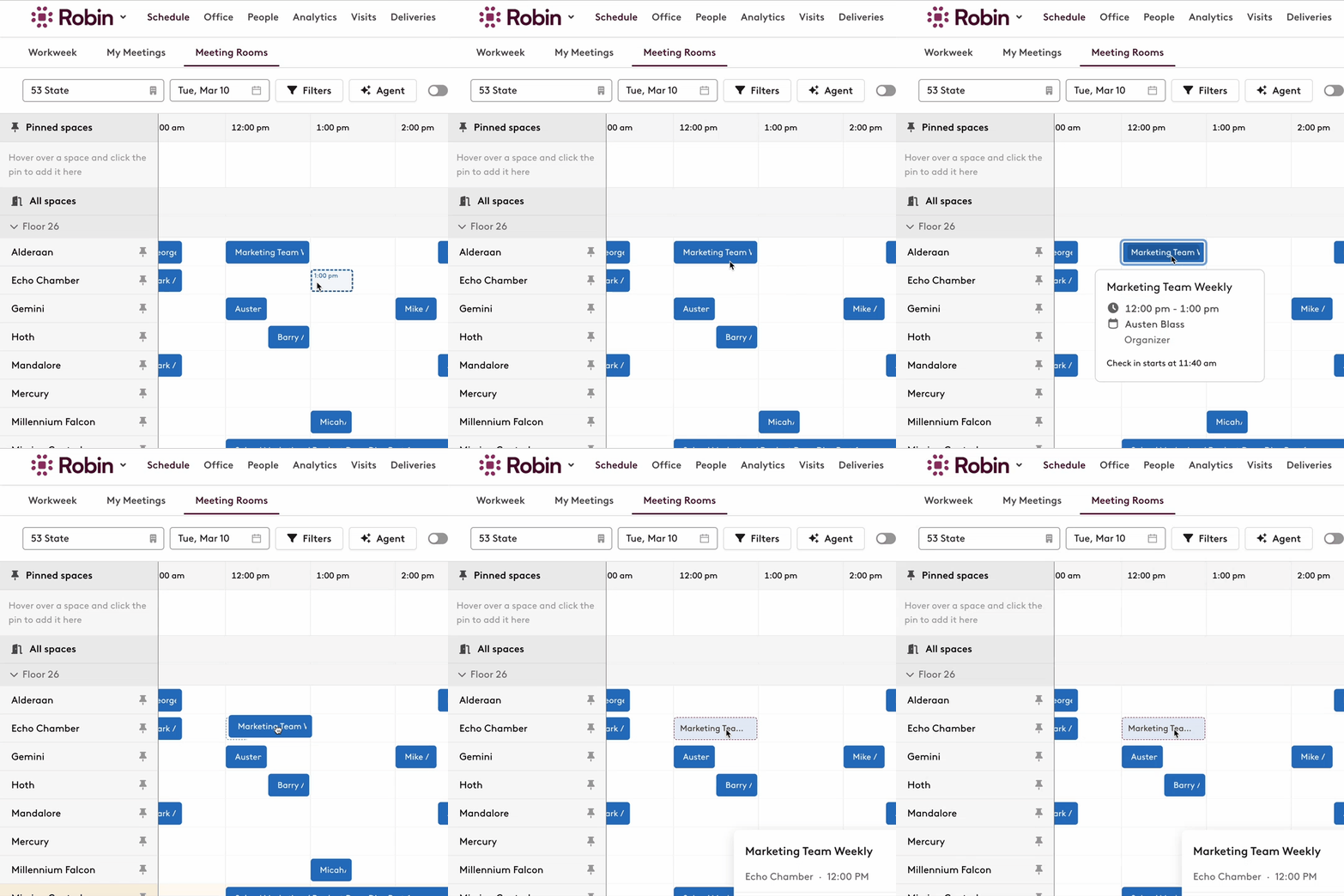
Managing meeting rooms at scale often requires quick adjustments as schedules shift throughout the day. To make this easier, Workplace Admins can now drag and drop meetings directly within the Meeting Rooms interface.
Instead of navigating through multiple steps to make a change, admins can adjust room schedules in real time from a visual control center, making daily operations faster, more intuitive, and far less manual.
**Read our help doc for more information:** [**Drag and drop meetings on the Meeting Rooms page**](https://support.robinpowered.com/hc/en-us/articles/43686023983245-Drag-and-drop-meetings-on-the-Meeting-Rooms-page)
*Start managing meetings directly from the Meeting Rooms view to streamline daily room coordination.*
---
## **Make parking and resource check-ins automatic for employees**
We’ve heard that separate check-in steps can create friction for employees and inconsistencies in utilization data for admins. With automatic local check-in enabled via badge or WiFi for parking and custom resources, employees no longer need to take extra action upon arrival.
For Workplace Admins, this means fewer no-shows, more accurate reporting, and less manual oversight. Admins configure the setting once, and the experience improves seamlessly for everyone onsite.
**Read our help doc for more information:** [**Local check-in for parking & custom resources**](https://support.robinpowered.com/hc/en-us/articles/44129493080717-Local-checkin-methods-for-parking-lockers-and-any-other-resource)
*Reach out to your Customer Success Manager to activate automatic local check-in for your resources.*
---
## **Users can set their preferred working hours**
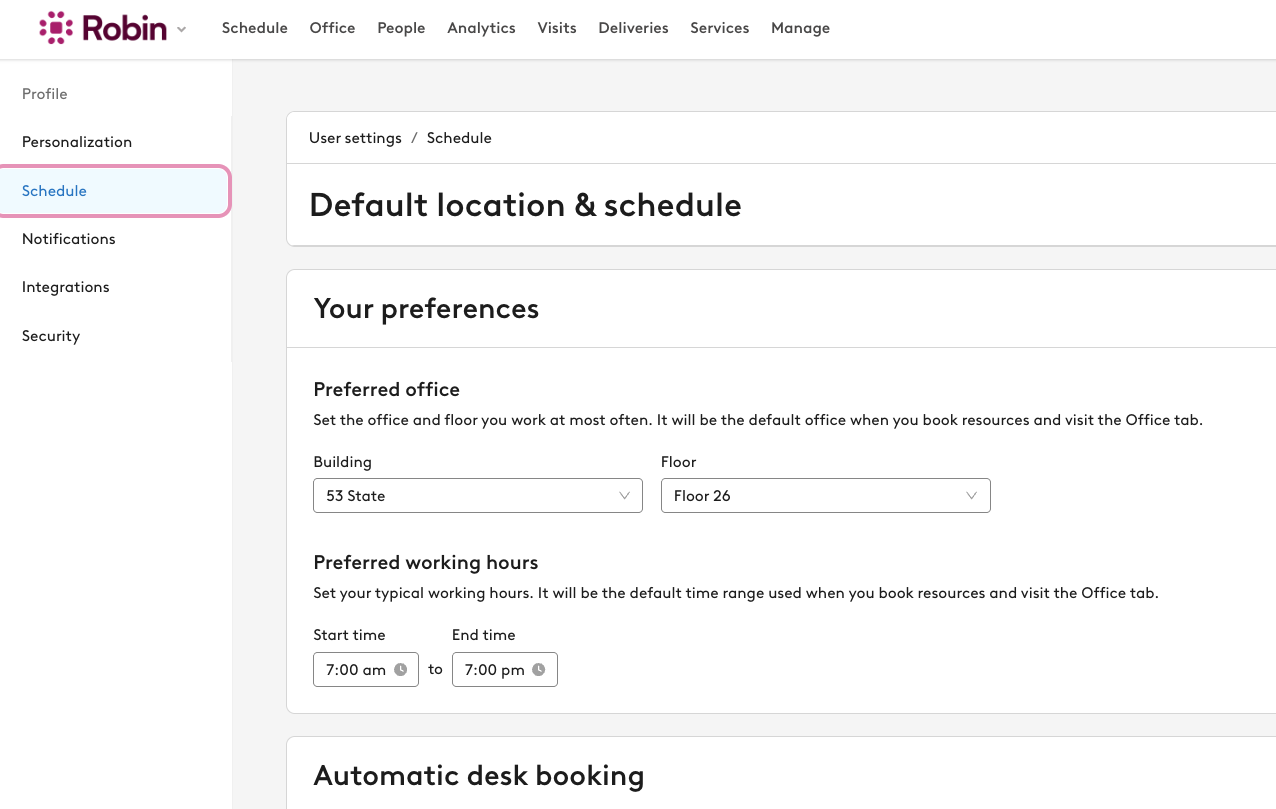
Hybrid schedules evolve and booking should reflect that.
Robin now gives employees control over their preferred working hours, with a new setting to define when their workday starts and ends. For those who prefer a hands-off approach, Robin can also learn from real booking patterns and automatically adapt.
Employees get a more consistent experience, and admins gain clearer usage insights.
**Read our help doc for more information:** [**User Preferred Working Hours**](https://support.robinpowered.com/hc/en-us/articles/43854041171725-User-Preferred-Working-Hours)
*No setup required — continue booking as usual and let Robin adapt to your team’s work patterns automatically.*
## What's new in Robin - January 2026
From granular resource permissions to a Google Calendar extension that actually understands your meeting needs, here's what's new in Robin from the past few months.
[Video](https://fast.wistia.com/embed/iframe/n0nfx421s1)
## **My Bookings brings all your reservations together**
[Video](https://fast.wistia.com/embed/iframe/mpea0wnaz7)
The new Bookings panel gives you a clear view of all upcoming reservations across your organization, directly from the Office sidebar and Robin mobile app. No more hunting through different screens to find your desk, parking spot, or meeting room.
Click or tap the card to see your complete reservation list including:
- Desk bookings
- Parking reservations
- Custom resources
- Your next scheduled event
Find it in the Office dashboard's right-hand sidebar or the Schedule tab in the mobile app. Full booking lists are also available on Teams and Workweek views.
## **Collaborator permissions in Scenario Planning**
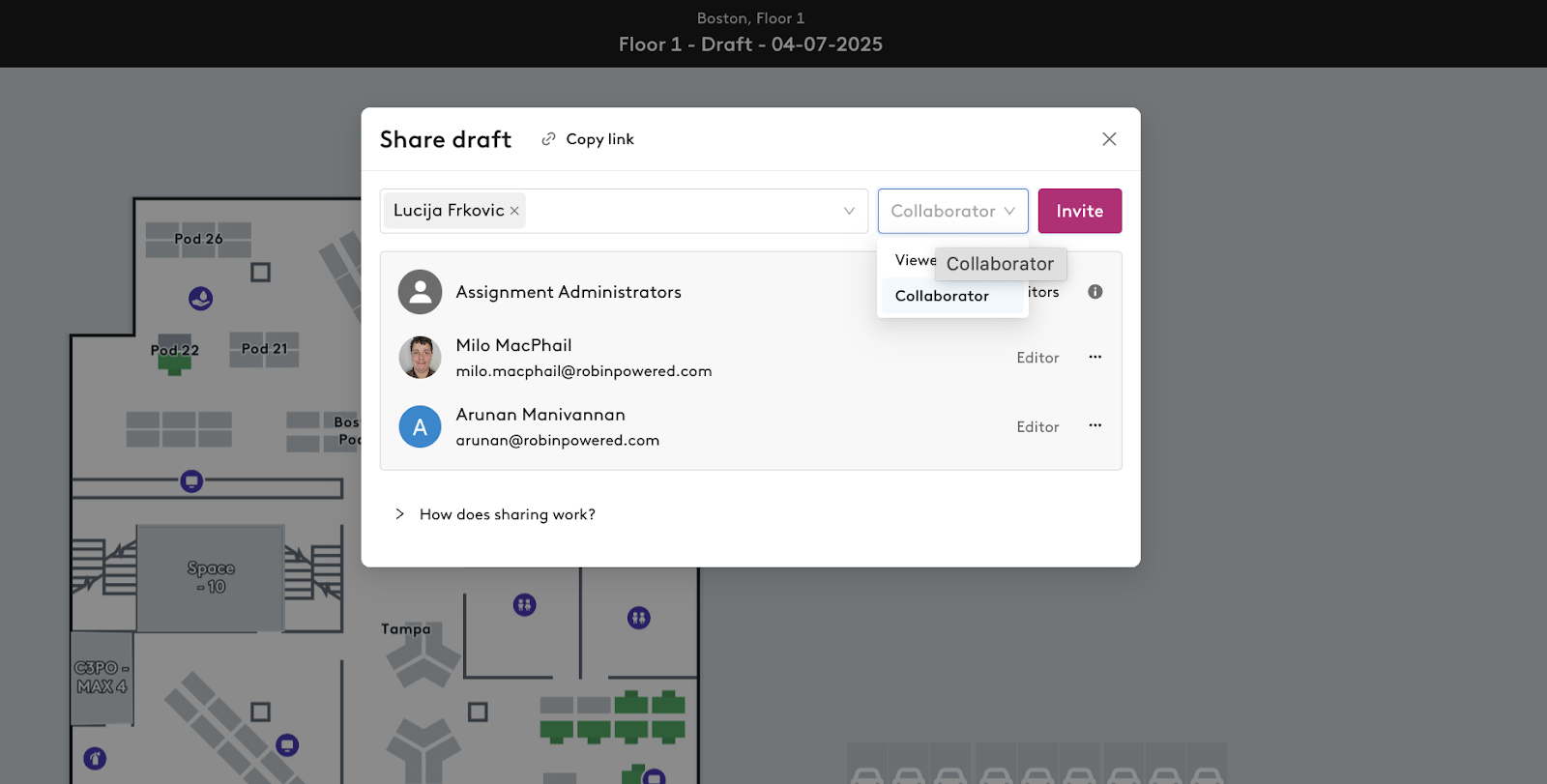
Large floor plans need multiple hands but not always multiple publishers. The [new Collaborator role](https://support.robinpowered.com/hc/en-us/articles/40001091283341-Sharing-scenario-planning-drafts-with-collaborator-access) lets team leaders draft desk assignments without the ability to publish, preventing accidental chaos from premature publishing.
Perfect for organizations where teams pick their own desks but workplace teams control the final publish. Collaborators can edit drafts all they want, but only Editors can make changes live. Any changes made by Collaborators update the draft in real-time, giving full visibility into the planning process.
To add a Collaborator, open the Share panel in Scenario Planning, enter their name or email, set permissions to "Collaborator" and send the invite.
## **Map filtering cuts through the visual noise**
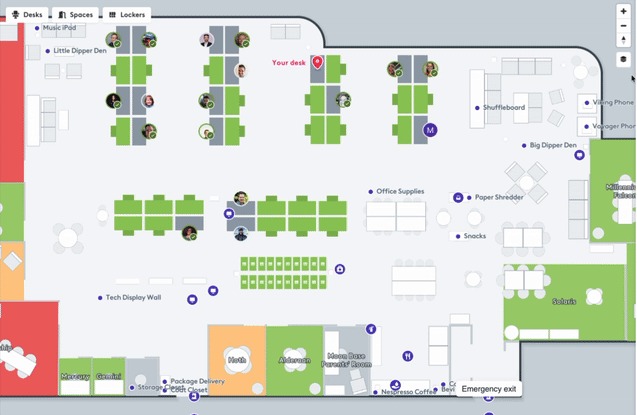
New map layer filters let users display or hide exactly what they need to see:
- Toggle avatars on or off to reduce clutter on busy floors
- Hide or show Points of Interest when focusing on desk availability
- Switch between pod labels and Neighborhoods based on your needs
- Hover over any POI to see its name without clicking
Office admins can now get a bird's eye view of desk reservations without the visual overload. Facilities teams can focus on POIs without the distraction of avatars. Everyone gets the map view that actually helps them work.
Additionally, assignments are now viewable in the People search next to the Who's In list, making it easier to find where teams are sitting.
## **Now you can book desks and spaces in Google Calendar**
[Video](https://fast.wistia.com/embed/iframe/kvhijxdpuc)
Add the right room to your Google Calendar meetings and book your desk without leaving Google Calendar. The new Robin browser extension brings smart suggestions and quick controls directly into Google Calendar's full event view.
The extension suggests rooms based on your activity type, matching spaces to your permissions, availability, and fit. See alternative options or suggested meeting times if your first choice isn't available. Add multiple spaces to coordinate larger meetings, then remove or change rooms with one click. Plus, book your desk for the day right from the same interface.
Simply install the Robin extension from the Chrome Web Store, open any meeting in Google Calendar's full event view, and let Robin handle both your room and desk logistics.
## **Custom resources get granular permissions**
Not everyone needs access to the CEO's parking spot or the EV charging stations. Admins can now [set permissions](https://support.robinpowered.com/hc/en-us/articles/40159736243853-Setting-Permissions-for-your-Workplace-Resources) by individual resource or groups of resources, ensuring the right people have access to the right amenities.
Perfect for:
- Assigning specific parking spots to executives
- Restricting EV charging spots to authorized employees
- Managing access to specialized equipment or premium spaces
Plus, custom resource reservations now appear in Microsoft Teams, giving you one place to see all resource bookings.
## **Neighborhoods expand to kiosks**
Neighborhoods are now fully supported on kiosks. Users can view and navigate to visible Neighborhoods directly from any kiosk device. Interactive kiosks maintain full desk booking capabilities while showing the neighborhood structure, making it easier for visitors and employees to find their teams.
## **Mobile app gets navigation improvements**
We’ve refreshed the Robin mobile app to make it easier to see what’s happening at your workplace and manage your day from one place.
##### **Workplace tab is your new home base**
The Workplace tab is the new hub for everything happening in your office on the Robin mobile app. You’ll now see:
Deliveries card:
- Quickly check if you have any packages waiting for you.
- See new deliveries as they arrive so you know when to stop by the mailroom.
Announcements card:
- Stay up to date on company and office updates.
- Important messages from workplace teams surface here, so you don’t miss anything.
- NEW: Send quick announcements to your building from the mobile app
Activities card:
- See what’s going on in the office: events, social activities, and key happenings.
- Use this to plan the best days to come in and connect with your team.
People directory card:
- Look up coworkers, see where they sit, and understand who’s in the office.
- Use this to find teammates you want to collaborate with when you’re on-site.
##### **Profile & settings, now in one place**
We’ve merged profile settings into user settings to simplify account management:
- View and update your profile (name, photo, etc.) and app settings (notifications, preferences) from a single, streamlined area.
- Fewer menus, clearer navigation, and a more consistent experience across the app.
##### **Navigation update: Office tab → Map tab**
To better reflect what it offers:
- The “Office” tab is now called the “Map” tab.
- Functionality is the same: you can still explore your office layout, find desks, spaces, and navigate around the workplace—now under a clearer name.
- See all available parking spots, lockers, or custom resources in clean, scannable lists instead of hunting on the map
##### **Space suggestions arrive on mobile**
The same intelligent desk & room recommendations from the web now work in your pocket.
##### **Find another desk faster**
Don't like Robin's suggestion? The new "Find another" button in the schedule tab takes you straight to the map for a quicker rebooking path.
## **SCIM accounts get flexible avatar control**
SCIM customers can now choose whether employees can upload or edit their avatars in Robin. The restriction is optional and defaults to allowing user uploads, giving you control without forcing rigidity.
This flexibility recognizes that while some organizations need strict profile control, others want employees to personalize their workspace presence. Full admin settings for this feature coming soon. For now, reach out to your CSM to restrict allowing user uploads.
---
Have questions about any of these updates? Contact your Customer Success Manager or check out the Help Center for detailed guides and tutorials.
## What’s New in Robin - October 2025
The AI-powered workplace is here. Robin’s Scheduling Agent ends calendar chaos. Admin controls remove the noise. Neighborhoods bring structure to your floor plan. The office finally works the way your team deserves. Let’s jump into what’s new.
[Video](https://fast.wistia.com/embed/iframe/3hnzuds16p)
---
## **The First Enterprise-grade AI Agent for Workplace Operations Arrives**
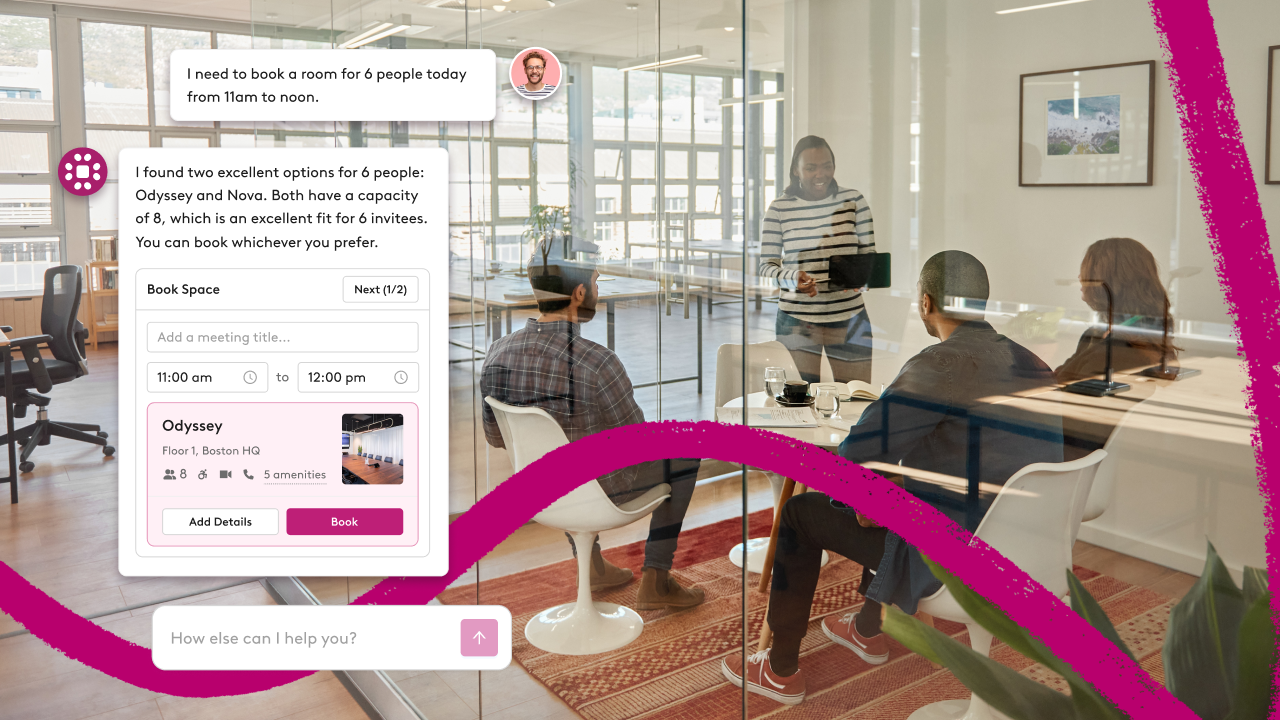
Every workplace team knows this nightmare: VIP meeting in 20 minutes. No available room. The boardroom is double-booked. Your only options are too small, too far, or don't have the right tech.
Now multiply that by hundreds of meetings every week.
We asked workplace teams what they needed. They told us they're manually rescheduling 400+ meetings weekly, burning hours on calendar Tetris. That's not sustainable. It's not scalable. And now, it's not necessary.
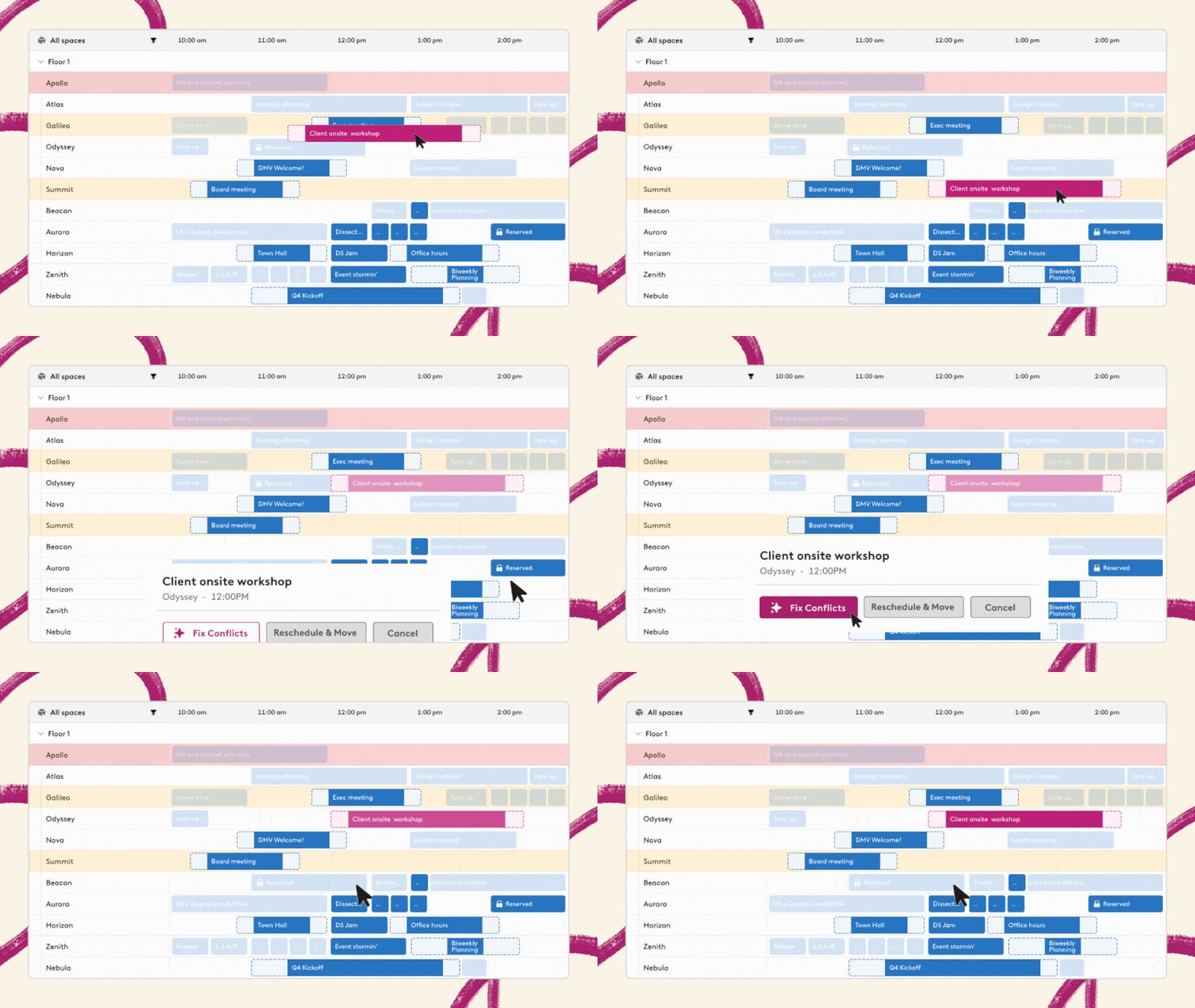
**Meet Robin's Scheduling Agent** - an intelligent system that understands your entire office ecosystem and actively manages meeting complexity. Drag any meeting anywhere. If there's a conflict, the agent instantly:
- Finds optimal alternative spaces for displaced meetings
- Handles all the rescheduling logistics
- Manages notifications to affected attendees
A workflow that used to take 20+ minutes now resolves in under 30 seconds. This is AI working as an operator, not a copilot.
Built for the people who actually keep offices running - workplace managers fixing space problems before anyone notices, executive assistants juggling endless booking changes, IT teams who want fewer tickets and smarter space usage.
The Scheduling Agent is available now in early access. More capabilities coming soon, including meeting creation and enhanced UX that keeps all actions in the sidebar.
**Availability:** Available now in Robin’s Early Access Program. [Click here](https://forms.gle/DR7uiHowC6SpUxzU6) or email your Customer Success Manager to request access.
---
## **Improved Wayfinding with Neighborhoods**
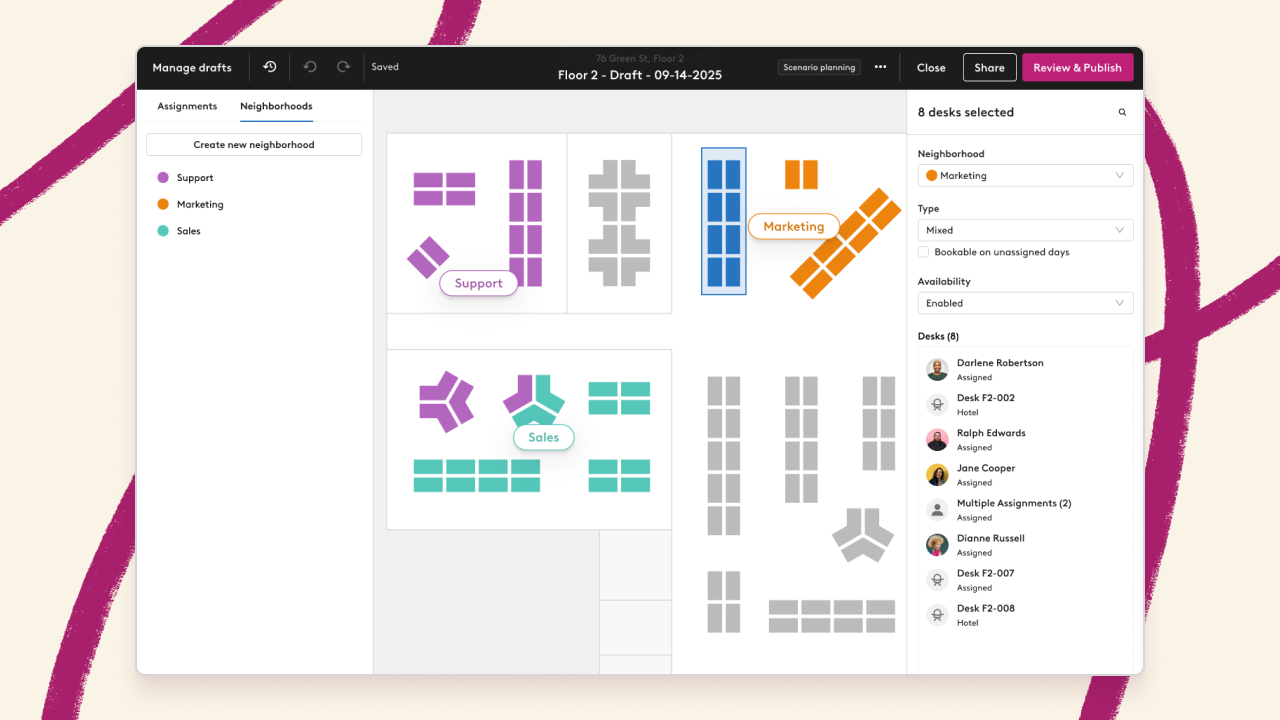
Remember when finding your team meant wandering the office floor? [Neighborhoods](https://support.robinpowered.com/hc/en-us/articles/39315017820557-How-to-Create-and-Manage-Neighborhoods) let admins create color-coded desk groupings that appear directly on the map with labels.
Teams can see exactly where they should sit, making collaboration natural instead of accidental. While neighborhoods don't restrict booking (yet), they're perfect for wayfinding, space planning and understanding how your office is actually being used.
Previously created Work Areas have been automatically converted to Neighborhoods and can now be managed in the Assignments section. Kiosk support arrives soon.
**Availability:** Available now for all customers.
---
## **Major Updates to the Map Experience**
The new map foundation continues to evolve with powerful features that make navigating your office intuitive and efficient.
### **New people list shows who's working where**
The "Who's In" view in the right-hand sidebar shows everyone's status at a glance - confirmed in-office (via badge or check-in), remote confirmed, or scheduled (expected but not checked in). Favorites appear first in each group. Click any name or avatar to fly to their desk location. If someone hasn't booked a desk, you'll see "No desk" instead of wondering where they're hiding.
### **All your reservations in one consolidated view**
The Workweek view now displays every single resource reservation you have. Desks, meeting rooms, parking spots, lockers, custom resources - everything appears in the right-hand sidebar of your Workweek schedule. See resource details, reservation times, and click any resource name to jump straight to the map for updates. Your entire workday in one place.
### **Enhanced custom resource display**
All custom resource icons now respond to zoom levels and format better in tight spaces. New map filters for all custom resource types appear directly on the map (nestled under "More" if you have 3+ types).
### **Additional map improvements**
- Employee experience surveys now supported
- Hide avatars completely from busy floors to reduce visual noise and loading time
- Change dates for multi-day desk reservations without rebooking
- Announcements and hybrid work policies appear in the right sidebar
- On-site check-ins now work before the remote check-in window for early arrivals
- Hover over points of interest to view POI labels
---
## **New Admin Controls Reduce Friction for Everyone**
[New admin controls](https://support.robinpowered.com/hc/en-us/articles/39259180384525-Admin-Controls-Notifications-Integrations-SCIM-Settings-Calendar-Audit-Log) give you centralized command over what users can change, which notifications they see, and which integrations they access. Finally, the governance your workplace needs without the micromanagement nobody wants.
### **Calendar event audit log**
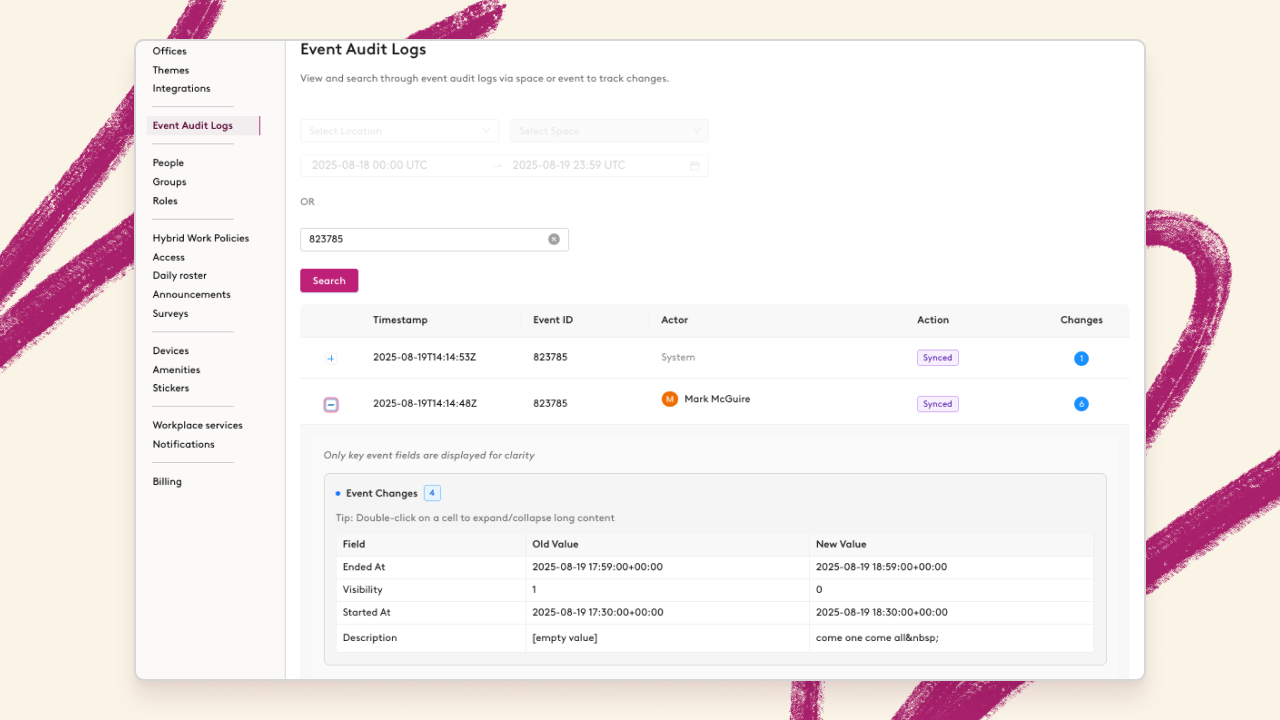
When meeting room conflicts arise or calendar syncs go sideways, you need answers fast. The new [calendar event audit log](https://support.robinpowered.com/hc/en-us/articles/39608803424909-Event-Troubleshooting-with-the-Calendar-Event-Audit-Log) lets you troubleshoot issues by building, floor, time-range or event ID. Expand individual log entries to drill into metadata changes and see exactly what happened, when it happened, and who made the change. No more mystery meeting mishaps.
### **Smarter notification management**
Not every team needs every notification. Admins can now determine which notification types users can control, reducing noise while keeping critical alerts active. Users see only the toggles for notifications you've enabled, creating a cleaner settings experience. Plus, Teams notifications can now be managed directly within Robin - no more jumping between platforms to manage your notification preferences.
### **Profile lockdown for SCIM customers**
Profile inconsistencies waste IT hours and create security gaps. SCIM customers can now lock down critical profile fields - email and password - ensuring Robin profiles stay perfectly synced with your system of record. Users can't accidentally (or intentionally) create discrepancies that break your directory sync. The security pages have also been updated to remove account deactivation options from end users, keeping that control where it belongs.
### **Integration curation that makes sense**
Your Microsoft shop doesn't need Slack integrations cluttering the interface. Google workspace users don't need Microsoft Teams options. Now you can hide irrelevant integrations completely, showing users only the connections that matter for your organization. Toggle off any integration before users even attempt to connect, preventing shadow IT and keeping your tech stack clean.
**Availability**: Available now for all customers.
---
## **Your Office Analytics Just Got an AI Assistant**
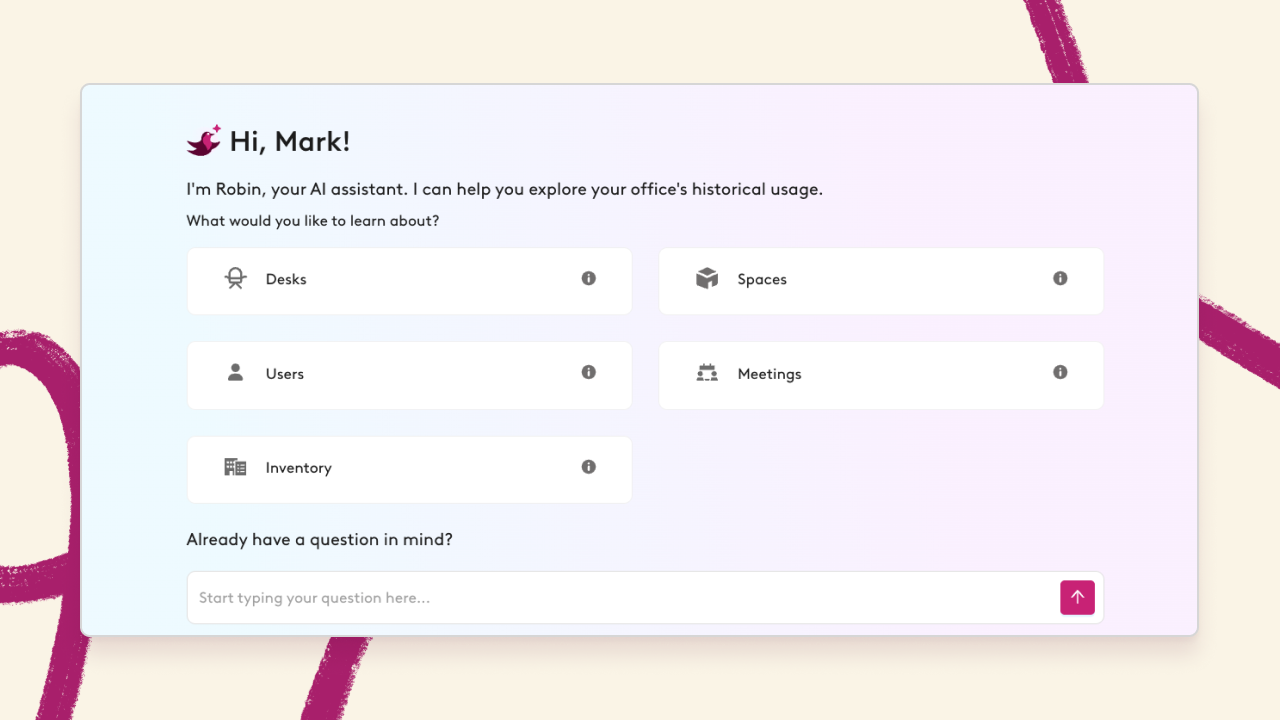
Advanced Analytics customers now have access to our [Analytics AI Assistant](https://support.robinpowered.com/hc/en-us/articles/34513130794509-Analytics-AI-Assistant). Ask questions in plain language and get instant insights about your workplace data. No more digging through dashboards when you need a quick answer about space utilization or attendance trends.
The Assistant understands complex queries and delivers actionable insights that help you make smarter decisions about your workplace. [Read this FAQ](https://support.robinpowered.com/hc/en-us/articles/33753674714253-FAQ-Analytics-AI-Assistant) for more information.
**Availability:** Available now for Advanced Analytics customers supported by Robin’s US data center. EU data center support coming in Q4.
---
## **Same-day Booking from Room Displays is Here**
Sometimes the best meetings are unplanned. Admins can now enable same day ad-hoc booking directly from room displays. Walk up, book, collaborate.
This update works on the following displays:
- iOS (v4.2.1-2)
- Crestron (v4.2.0-7)
- Logitech (v4.2.0-1) displays.
This feature is turned off by default and can be [enabled in room display settings](https://support.robinpowered.com/hc/en-us/articles/206405486-Customize-room-display-scheduling-configurations). Bookings remain anonymous and [work just like existing walk-up functionality](https://support.robinpowered.com/hc/en-us/articles/22601664933261-Booking-rooms-with-the-room-display), but now for same-day needs.
**Availability:** Available now for all customers.
---
## **Visitor Management Lands in Outlook**
[Video](https://fast.wistia.com/embed/iframe/n6so6wwwrp)
Managing visitors is now easier. Our Microsoft 365 Outlook Add-In now includes full [visitor management support](https://support.robinpowered.com/hc/en-us/articles/36938750186253-Add-visitors-to-Robin-from-Outlook), creating one of the cleanest workflows in the industry. Register visitors, send invites, and manage check-ins without leaving Outlook.
**Availability:** Available now for all customers with Visitor Management and Outlook.
---
## **Prevent Calendar Sync Failures with Improved Monitoring**
Nobody likes surprises, especially when they involve broken calendar syncs. New [calendar health notifications](https://support.robinpowered.com/hc/en-us/articles/39969763401741-Calendar-Health-Notifications) keep admins informed when space calendars need attention:
**Personal calendar health**: In-app banners alert users when their personal calendar integration needs reconnecting.
**Space calendar health**: Admins with places:manage permissions get email alerts when meeting room calendars become unhealthy, including failed subscription attempts, sync failures, or 24+ hours without data.
After 30 days of unhealthy status and 10 days without updates, calendars automatically disable to prevent system overload. You'll get a separate notification when this happens.
**Availability**: Available now for all customers.
---
## **Collaborator Permissions in Scenario Planning**
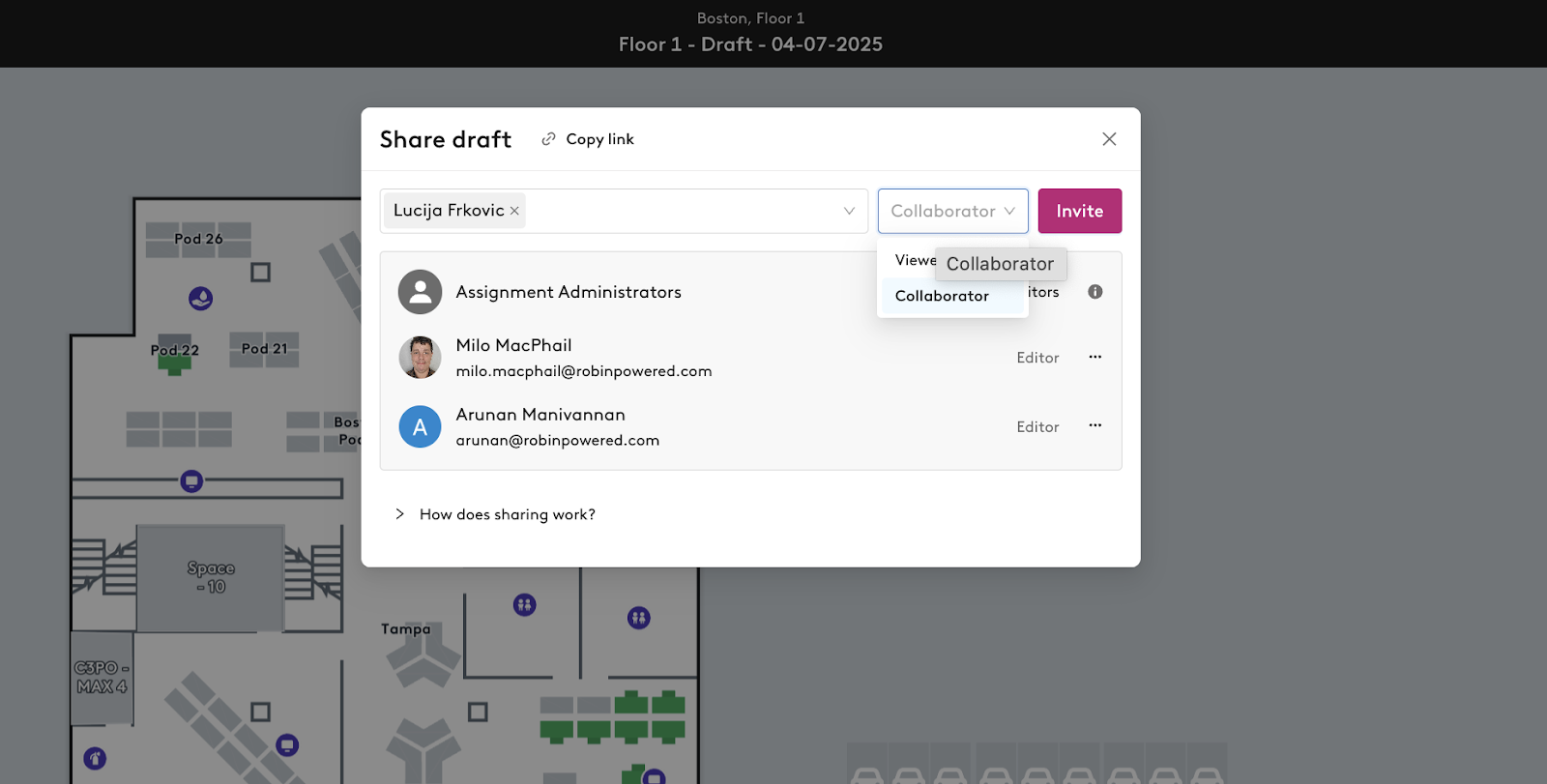
Large floor plans need multiple hands but not multiple publishers. The [new Collaborator role](https://support.robinpowered.com/hc/en-us/articles/40001091283341-Sharing-scenario-planning-drafts-with-collaborator-access) lets team leaders draft desk assignments without the ability to publish.
Perfect for organizations where teams pick their own desks but workplace teams control the final publish. Collaborators can edit drafts all they want, but only Editors can make changes live.
---
## **New Mobile Features for Desk Management**
**Release assigned desks on the go**: Plans change. If a user has an assigned desk they won't need, they can release it directly from mobile so someone else can use it. Available from the map view, reservation card, or schedule modal when Desk Sharing is enabled.
**Map context for reservations**: Upcoming reservations now include map snippets showing exactly where a user needs to be next. No more hunting for room 3B-North.
**Better desk suggestions**: Don't like Robin’s first desk suggestion? Re-roll for new suggestions to find the perfect spot.
---
*Have questions about any of these updates? Contact your Customer Success Manager or check out our Help Center for detailed guides and tutorials.*
## What’s new in Robin - July 2025
We've been busy building new ways to make hybrid work *actually* work. From seamless Outlook integration to smarter space management, here's what's new in Robin from the past quarter:
wistia-player\[media-id='4fyc9yxryl'\]:not(:defined) { background: center / contain no-repeat url('https://fast.wistia.com/embed/medias/4fyc9yxryl/swatch'); display: block; filter: blur(5px); padding-top:56.25%; }
---
## **Outlook Add-in Gains Meeting Services**
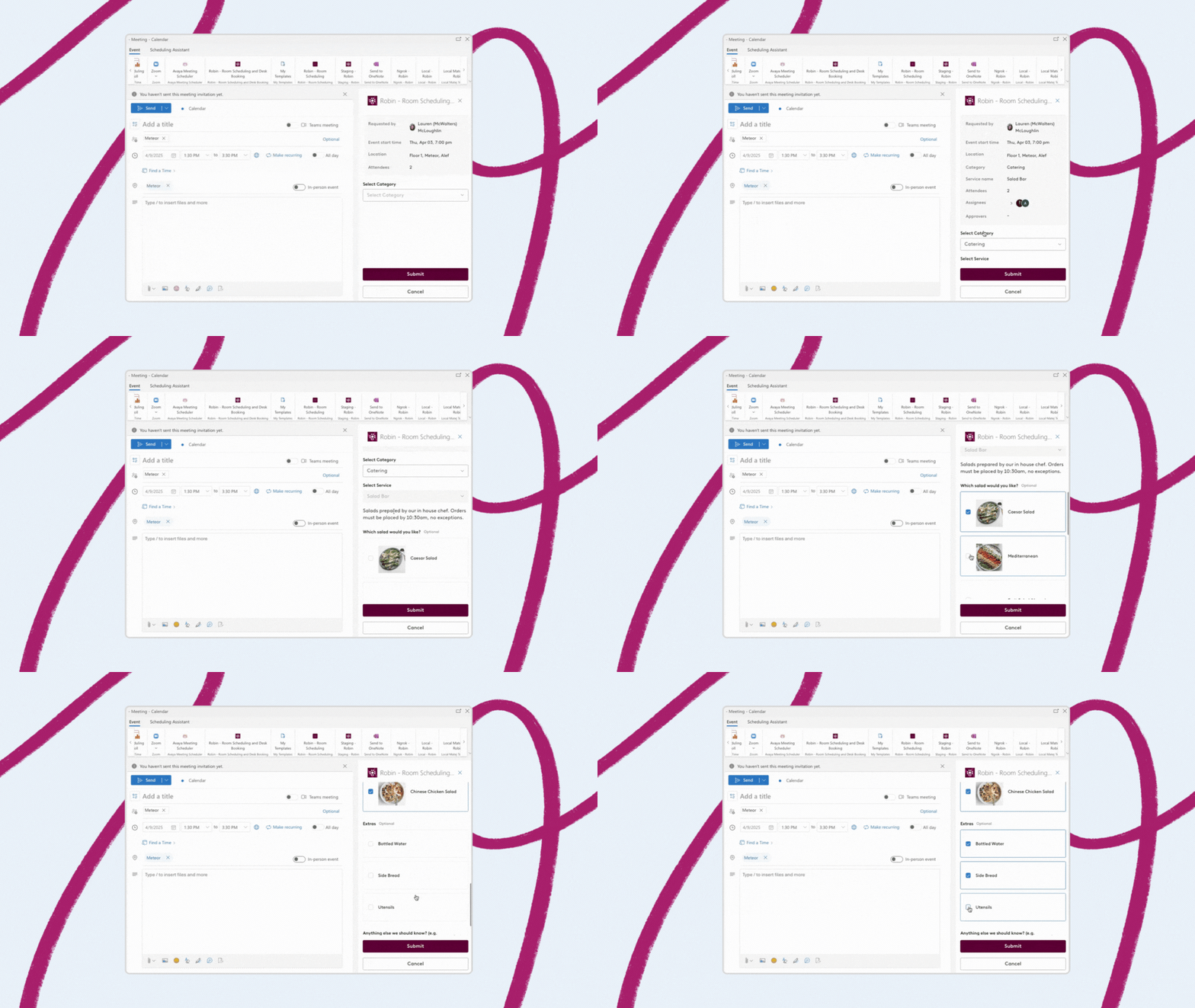
One of our favorite updates this quarter? Robin's Outlook add-in now supports Meeting Services, making it one of the cleanest workflows in our space.
**What's new:**
- **Request services directly in Outlook:** When creating events in spaces with services enabled, users can now add catering, AV support, room setup and more without leaving their calendar
- **Attendee collaboration:** Meeting attendees can propose space changes directly in Outlook, making it easier to coordinate complex meetings
- **Clear status visibility:** Room responses (Busy, Accepted, Declined) now appear directly on space cards - no more hovering or guessing
**Important note for admins:** Outlook admins at your organization will receive a permissions update prompt. Accept this to enable Meeting Services and other new features. Organizations without Meeting Services should still accept the permissions request to receive the general improvements to the add-in.
**Availability:** Available now for all customers.
---
## **Custom Resources: Book Anything Your Office Needs**
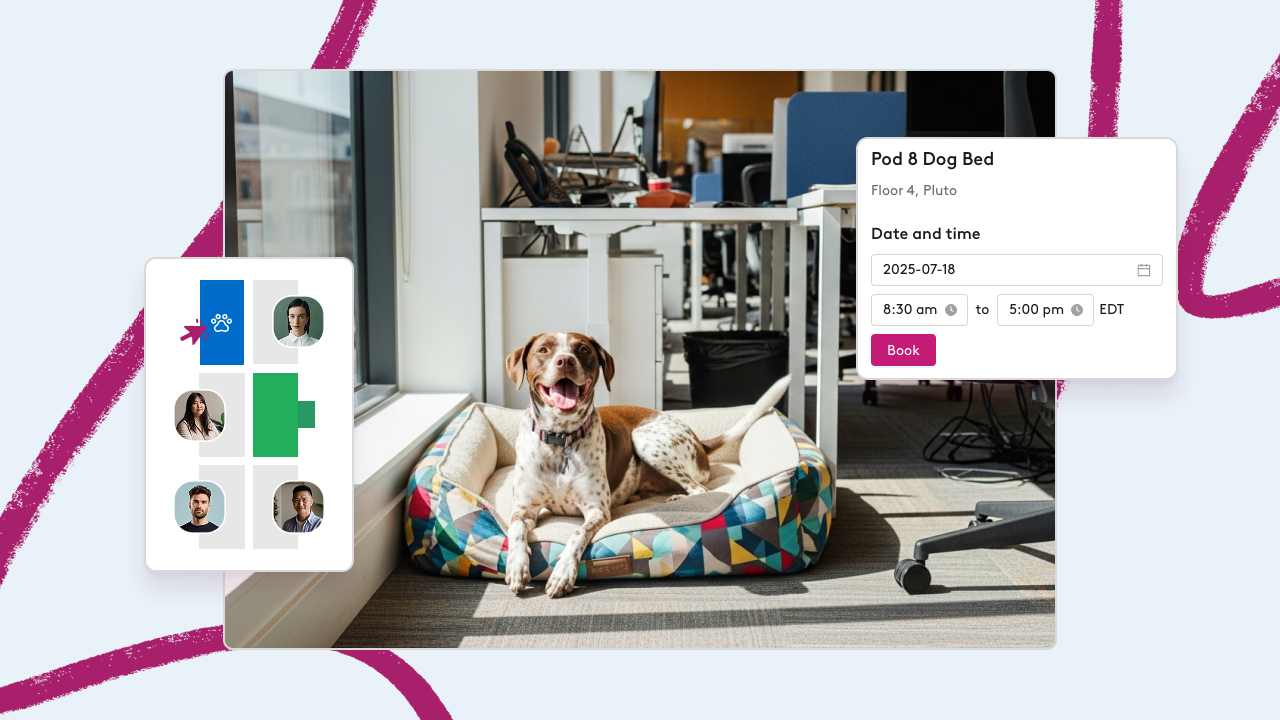
Robin now supports booking any resource your office needs - from parking spots and lockers to lab equipment and beds for your furry pals 🐶 (this was one of the most requested reasons for custom resources).
**Custom resources:**
- **Create any bookable resource** from the layout tool with custom names, details and policies
- **Set booking policies** like maximum reservation lengths and working hours restrictions
- **Admin controls:** Local office admins can book, assign and bypass policies just like with desks and spaces
- **Mobile support:** Book and manage all custom resources from the new Robin Workplace mobile app
**Enhanced parking and lockers support:**
- Multi-day and range bookings are now supported
- Accessibility indicators for handicapped accessible spots
- Improved booking flows with policy warnings
- Edit reservations directly from the Robin Workplace mobile app without canceling and rebooking
**Availability:** Contact your CSM to join the beta.
---
## **Visitor Management Gets Major Updates**
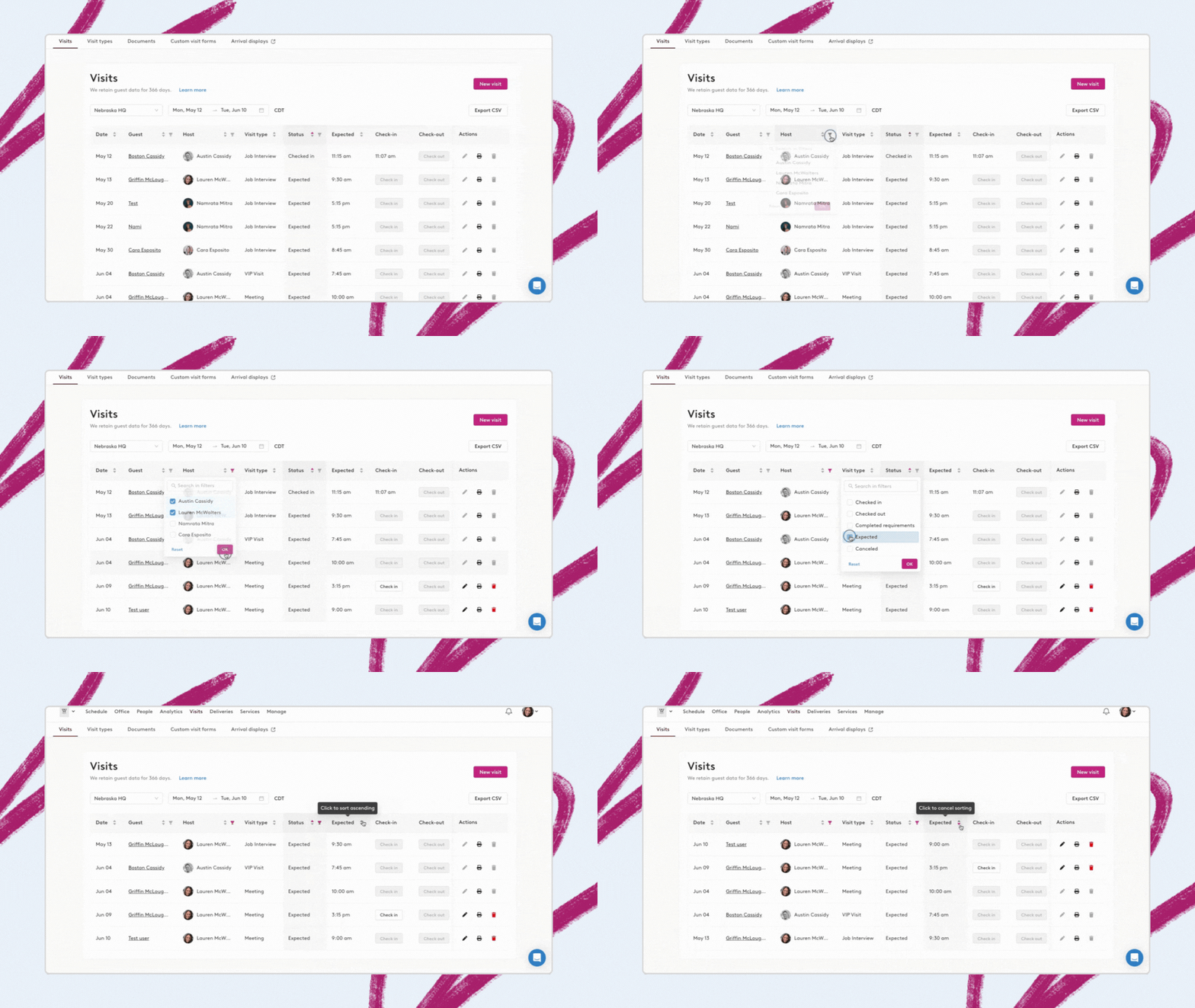
We've made significant improvements to the visitor management experience to support even the largest organizations that manage dozens of locations and hundreds of daily visitors.
- **Enhanced search and filtering:** Find visitors quickly by guest name, host, visit type or status
- **Streamlined check-in:** Check in visitors directly from the dashboard, as well as from the visitor creation screen, without needing to return to the visits table — ideal for walk-ins
- **Improved badge printing:** [Print visitor badges](https://support.robinpowered.com/hc/en-us/articles/36568443082253-Printing-visitor-badges-from-the-web-dashboard) directly from the dashboard with broader printer support
- **Visit editing:** [Update key details](https://support.robinpowered.com/hc/en-us/articles/37110021402893-How-to-edit-or-cancel-a-visitor-registration) like date/time, host and custom fields as plans change
- **Location-specific visit types:** Create visit types tailored to specific locations rather than organization-wide
- **Flexible guest registration:** Visitor Management admins can bypass email requirements when registering guests directly in the dashboard
**Availability:** Available now for all Visitor Management customers.
---
## **Calendar Health Dashboard**
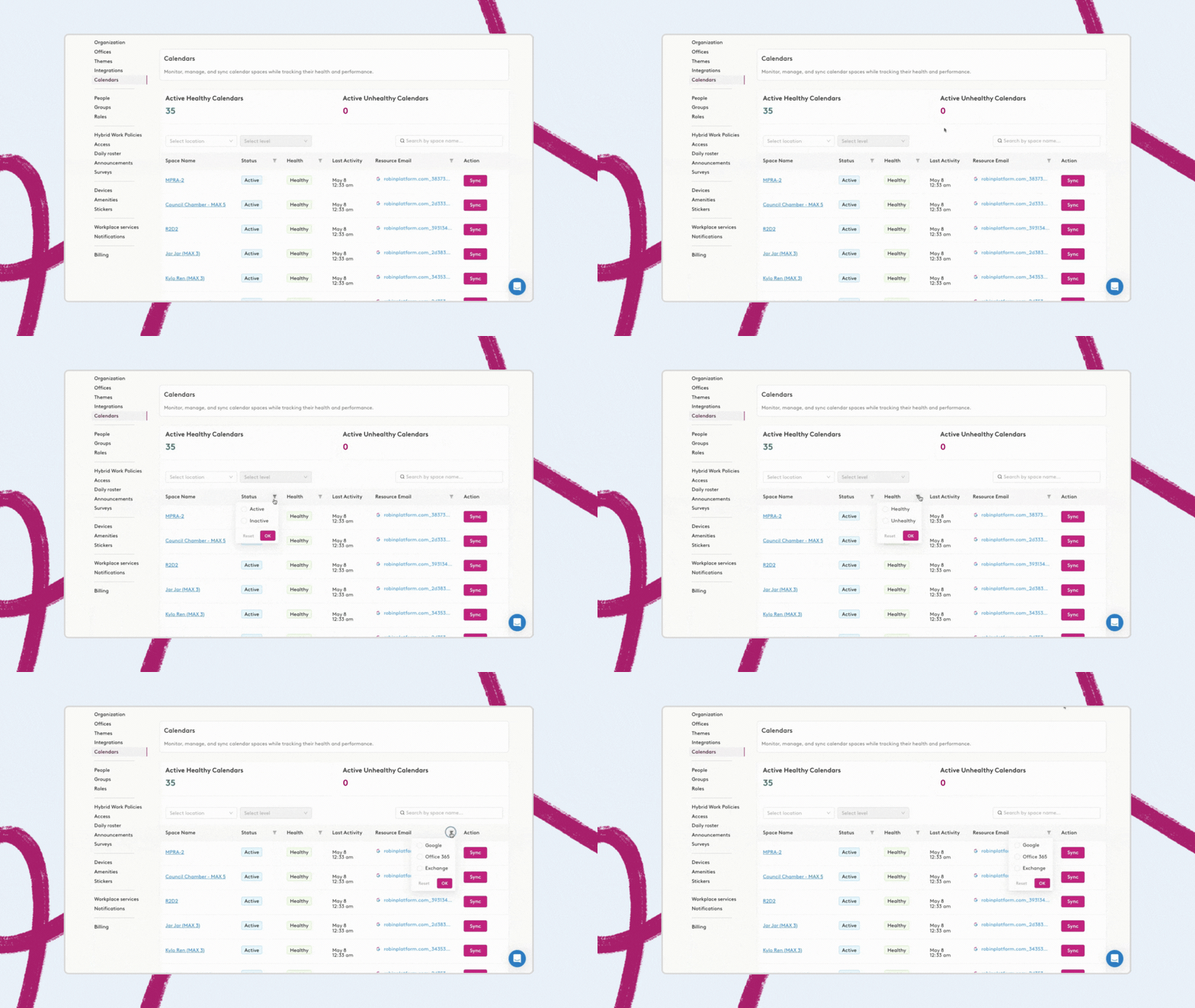
No need to hunt through individual spaces to figure out which calendars need attention. The new Calendar Health Dashboard gives you complete visibility into your calendar system.
**What you can do:**
- **See all calendar statuses** in one centralized view
- **Spot issues quickly** with clear health indicators
- **Trigger manual syncs** with one click when needed
- **Debug problems** before they impact users
Perfect for organizations managing large numbers of spaces that need to maintain a healthy calendar system.
**Availability:** Available now for all customers. Find it under Manage \> Calendars or in the Workplace Dashboard. [Learn more here](https://support.robinpowered.com/hc/en-us/articles/36456667301645-Monitor-all-space-calendars-in-one-dashboard).
---
## **Enhanced Daily Roster and Attendance Tracking**
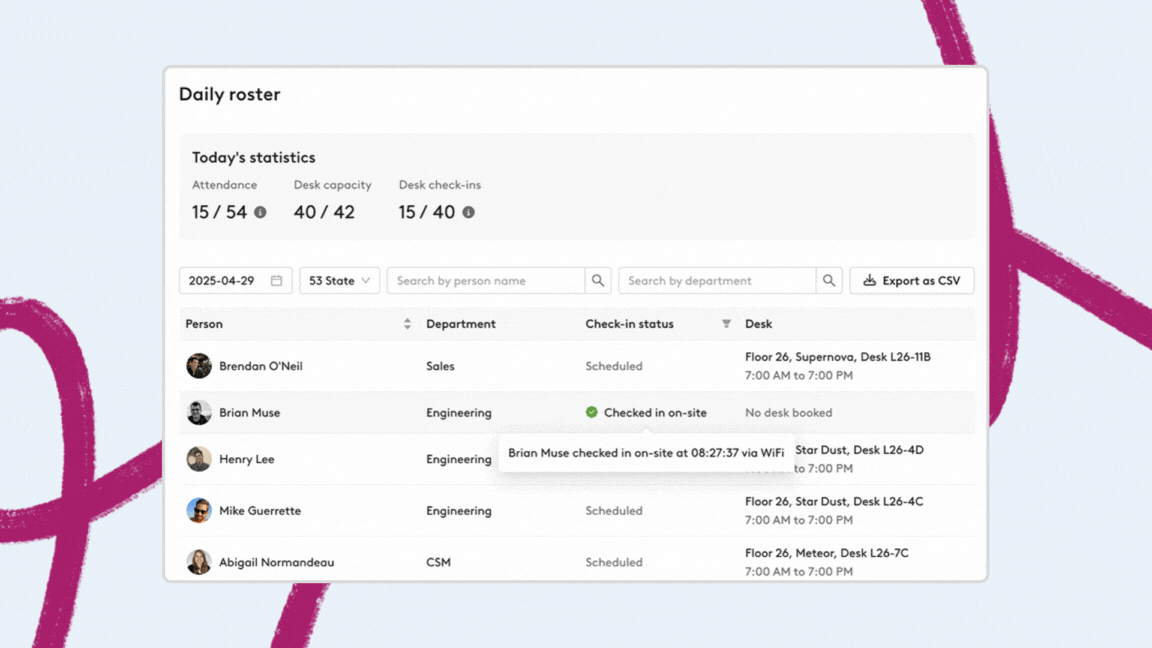
We've improved how attendance is displayed across Robin, starting with a redesigned Daily Roster that's now easier to access and more informative.
**What's new:**
- **Clearer check-in statuses:** Distinguish between remote, on-site and scheduled attendance
- **Department insights:** View and search employees by department
- **Clickable details:** Names and desk assignments now link directly to employee profiles and desk locations
- **Real-time stats:** See planned vs. actual attendance at a glance
- **Faster access:** Find the Daily Roster directly under the Manage tab
**Availability:** Available now for all customers. [Learn more here](https://support.robinpowered.com/hc/en-us/articles/36249936613005--4-30-25-Daily-roster-just-got-a-major-upgrade).
---
## **What Else is New**
**Meeting Services improvements:**
- **Service category management:** Edit and delete top-level service categories to keep service menus organized and up-to-date, especially valuable for larger organizations
- **Enhanced CSV exports:** Service ticket exports now break out menu items and subtotals into individual cells for better itemized order management and financial tracking
- **Individual ticket exports:** Export single service tickets as both PDFs and CSVs directly from the ticket slider for vendor coordination
**Mobile app updates:**
- **Manual check-in capability:** Employees can now manually check into desks, parking spots, and lockers from the new Robin Workplace mobile app when remote check-in is enabled
- **Complete Microsoft SSO support:** Updated authentication now supports all three Microsoft integration types (Graph, SSO, SAML)
- **Consistent Who's In experience:** Mobile app now uses the same Who's In design as the web app, providing detailed employee check-in status information
**Office experience improvements:**
- **Back-to-back check-ins:** Users are automatically checked into consecutive meetings in the same conference room, eliminating redundant check-in steps
- **Streamlined desk assignments:** Assigning a user to a new desk automatically removes them from their previous desk assignment
- **Custom activity branding:** Activity creators can now upload custom images for events, enabling more personalized company culture and event branding
- **Enhanced campus navigation:** The new map experience organizes buildings by campus with improved search and clearer location context
**Navigation improvements:**
- **Redesigned Manage tab sidebar:** Cleaned up and reorganized the sidebar navigation with better styling and logical grouping of menu items for easier access to key features
**Access control updates:**
We’ve added self-service setup to make connecting Genetec and Gallagher with Robin easier and faster:
- **Genetec:** [Setup details here](https://support.robinpowered.com/hc/en-us/articles/35998818216973-Genetec-access-control-integration)
- **Gallagher:** [Setup details here](https://support.robinpowered.com/hc/en-us/articles/34745797021325-Gallagher-access-control-integration)
Integrating your access control system with Robin enhances data accuracy by reducing manual check-ins while maintaining workplace security. View all [access control integrations here](https://support.robinpowered.com/hc/en-us/articles/27939860829837-Access-Control-integrations).
**New Office Map Beta:** As of May 30, admins have beta access to our completely rebuilt Office Map experience. This faster, more efficient foundation will host all future feature launches, with features like Activities and Space Suggestions rolling out to the new map in the coming months.
---
*Have questions about any of these updates? Contact your Customer Success Manager or check out our Help Center for detailed guides and tutorials.*
## What’s new in Robin - April 2025
We’ve been busy building new ways to simplify the chaos of hybrid work. From smarter planning to smoother operations, here’s what’s new in Robin:
### Bring Order to Chaos with the Workplace Operations Dashboard
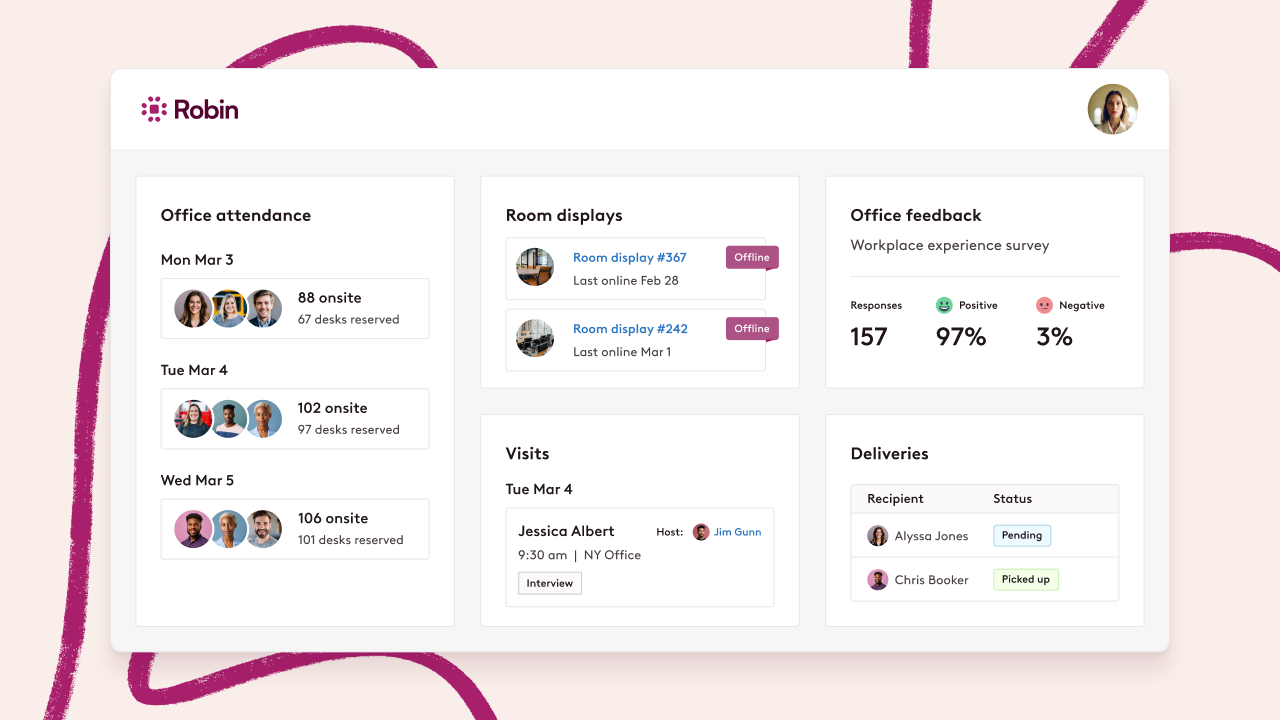
Managing a modern office means juggling a hundred things at once. Robin’s workplace operations dashboard brings it all into one view so nothing slips through the cracks.
Use the dashboard to:
- Monitor the health of your workplace at a glance
- Track devices, visitor activity, meeting services, and delivery volume
- Stay ahead of issues before they become fire drills
No more tab-hopping or tool overload. From employee feedback to AV setup requests, Robin gives workplace teams the visibility and control to keep things running smoothly without the daily scramble. To access the dashboard, click on your user profile image at the top right of your screen and select ‘Workplace Dashboard’ from the dropdown.
[Click here](https://support.robinpowered.com/hc/en-us/articles/34720577423885-Workplace-operations-dashboard) to learn more about the workplace operations dashboard.
**Availability:** Available now for all admins.
*Note that the specific sections and actions available to you may vary depending on your user permissions.*
### Insights on Demand with Robin’s Analytics AI Assistant \[Early Access\]
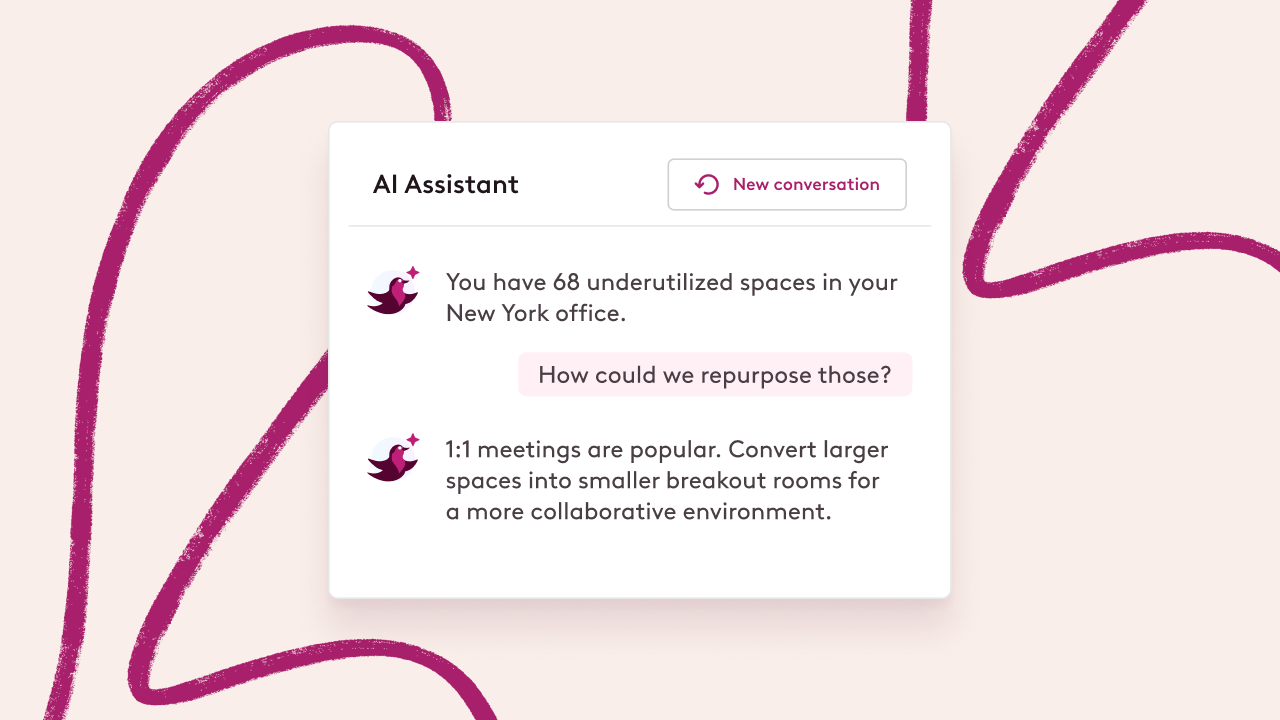
Admins already use Robin to make sense of their office data. Now, the Analytics AI assistant takes it further by giving you answers in seconds, no spreadsheet required.
Whether you're troubleshooting crowded anchor days or planning a move, the AI assistant acts like a workplace analyst on call 24/7. Just ask a question (like “Which rooms had the most cancellations in the past 30 days?”), and it delivers a formatted, filtered response ready to share or act on.
Here’s what you can do:
- Uncover usage trends across buildings, spaces, and teams
- Surface problems like ghost meetings or no-show bookings
- Go from “I think” to “I know” in less time, with less guesswork
**Availability:** Early access for Advanced Analytics customers. Not using Advanced Analytics? Reach out to your CSM to learn more.
More on the Analytics AI Assistant [here](https://support.robinpowered.com/hc/en-us/articles/34513130794509-Early-access-AI-assistant-for-Advanced-Analytics).
### Reserve Parking Spots and Lockers With Ease \[Early Access\]
### **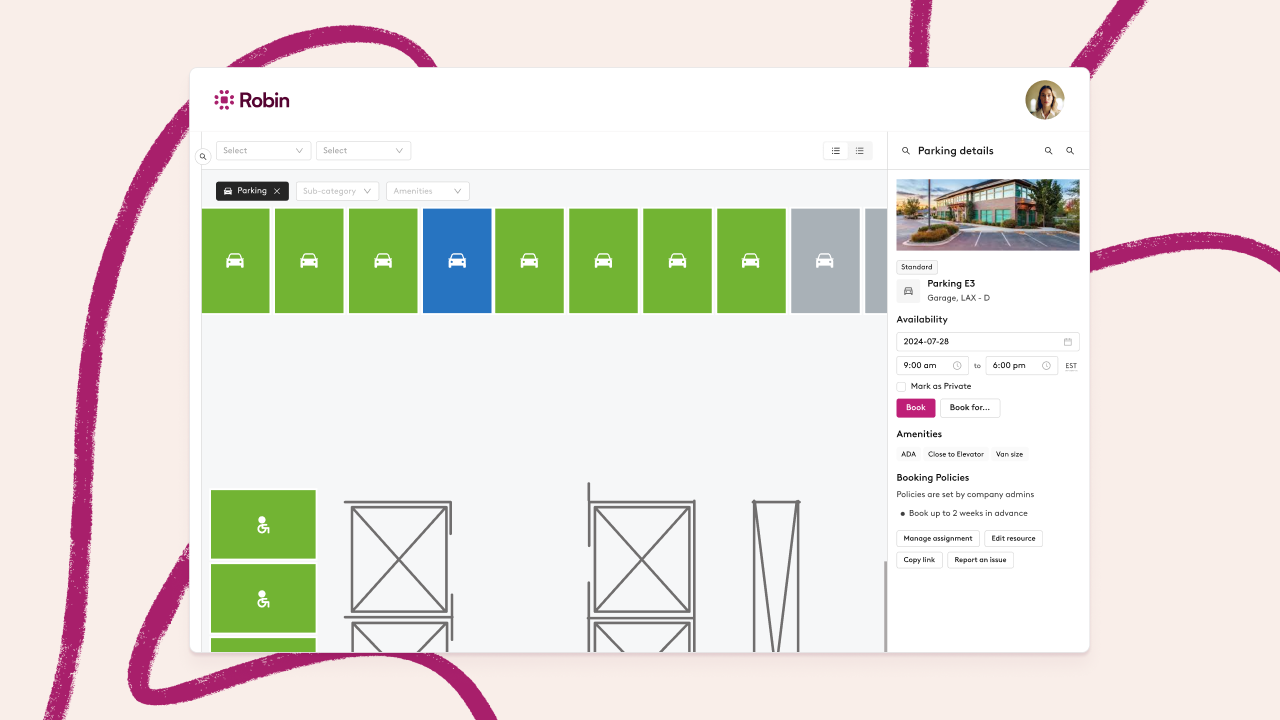**
Robin now supports reservable parking spots and lockers, giving employees access to more of the resources they need, and admins more control over how they’re managed.
This update includes:
- Support for parking lots, garages, and lockers as bookable resources
- Policies to limit one desk and one parking spot per person, per day
- Overlapping booking controls for better space management
- Grouping, sub-categories, and updated UI to help users find what’s available
- Support for booking via mobile and the new interactive map (map beta required)
**Availability**: Reach out to your CSM to gain early access.
## **What Else is New**
### Smarter Meeting Services, in Robin and Outlook
Whether you’re working in Robin or directly in Outlook, managing meeting logistics just got easier.
**New in Outlook:** Robin’s updated Outlook add-in helps simplify room coordination without leaving your calendar.
- Attendees can now propose space changes directly in Outlook. This makes it easier to coordinate shifts for large or complex meetings
- See space responses at a glance. *Busy*, *Accepted*, *Declined*, and more now appear right on the room card, so there's no need to hover or guess
**New in Robin:** We’ve also made it easier to manage meeting services in Robin.
- Attach files and auto-generate PDFs for meeting requests—perfect for sharing orders or creating quick invoices
- Export individual service tickets to send directly to vendors, even if they don’t use Robin
From initial scheduling to setup and support, Robin gives you the tools to coordinate every meeting, wherever you work.
**Availability:** Available now for all customers.
### A Fresh Experience for Robin’s Analytics
We’ve refreshed the Robin analytics experience to make it easier for every customer to find and act on the data that matters most. You’ll now see new dashboards like Desk Insights, Space Insights, and Executive Insights, along with a cleaner layout that makes navigation faster and more intuitive.
We’ve also consolidated some dashboards to reduce duplication and updated the interface for a more focused experience. While things may look a little different, nearly all of your existing data is still right where you need it.
[Click here](https://support.robinpowered.com/hc/en-us/articles/35190030860173-Pre-built-dashboard-changes) to review the updates.
Need more flexibility?
**Advanced Analytics** gives you access to:
- Custom reports tailored to your workplace questions
- Unlimited historical data (compared to the 90-day standard)
- Drill-down functionality to move from trends to specifics in seconds
- Scheduled reports and smart alerts for leadership
- Integration with your existing systems through the Analytics API
Reach out to your CSM to see what’s possible with Advanced Analytics.
### New Access Control Integration: Genea
You can now integrate Genea with Robin to make check-ins even easier. When employees swipe their badge at a Genea-controlled door, they’ll be automatically checked into Robin.
It’s a simple way to improve data accuracy and reduce manual check-ins, all while keeping your workplace secure and efficient.
### Export and Share Move Information
Admins can now export drafted assignment changes from Scenario Planning to simplify coordination with movers and facilities teams. The CSV export includes everything they need—who’s moving, from where, and to where—even if they don’t use Robin.
Exports are delivered in a clean CSV format that will include Building, Floor, Employee name, Previous desk, and New desk.
### Updated Permissions Page for Easier Navigation
The Permissions page now uses a cleaner, tabular format, making it easier to scan and find exactly what you're looking for. No more digging, just quick, organized access to permission settings.
### On-Site Check-In Behavior Now Matches Intent
Now, when someone checks in on-site—like with a badge swipe—they’ll be checked into their desk even if it’s before the remote check-in window. This update ensures early arrivals are recorded properly while still preventing remote check-ins from home.
### Better Attendance Tracking Starts With “Who’s In”
We’re improving how attendance is displayed across Robin, starting with updates to the *Who’s In* view on the home screen. Instead of a basic checked-in status, you’ll now see:
- **Confirmed on-site check-ins** via badge or Wi-Fi
- **Remote check-ins** where presence is unverified
- **Scheduled status** for anyone expected in but not yet checked in
The updated column is live for all users, with more enhancements coming soon, including a revamped Roster page.
## What’s new in Robin - January 2025
In the past few months, we’ve introduced a number of innovative tools and updates designed to help you plan smarter, allocate resources more effectively and streamline operations. Here’s what’s new:
### Meeting Services: Centralized Meeting Management
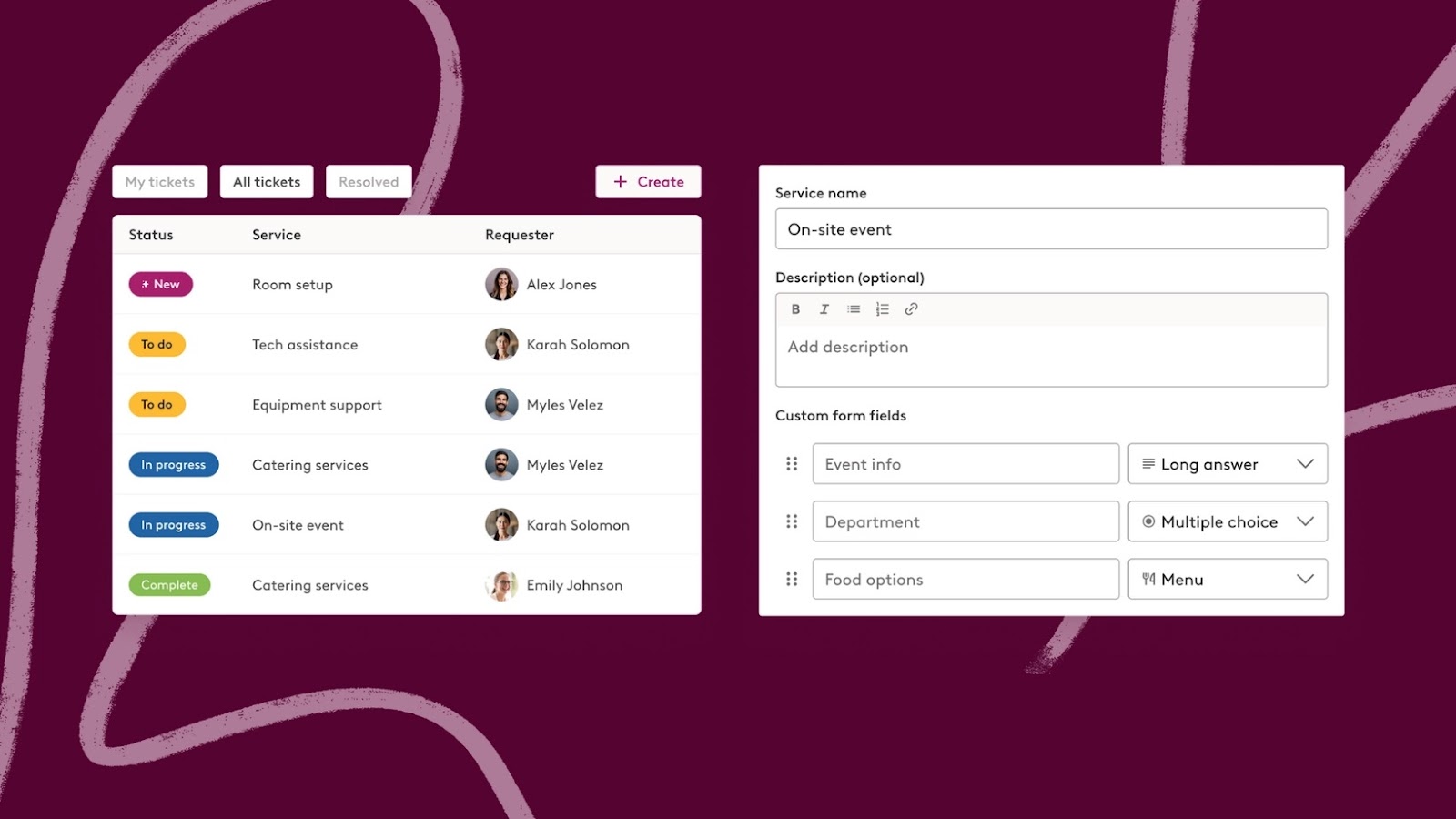
Planning onsite meetings has never been easier. With Robin’s Meeting Services, you can manage every detail in one place, from catering to AV setups, ensuring employees have the support they need to focus on collaboration.
- **Centralized dashboard**: Gain full visibility into all meeting service requests on a single dashboard. Track every detail in real-time, whether it’s catering, room setup or technical support.
- **Customizable services**: Define service categories tailored to your office needs, such as AV support, furniture arrangements or special equipment requests. Create workflows that reflect how your organization works.
- **Notifications**: Keep everyone in the loop. Employees requesting services and admins handling logistics are automatically notified of status updates, ensuring smooth communication and fewer dropped tasks.
- **Approvals for service requests**: Admins can configure approval workflows for specific service types. Approvers receive email notifications to review and approve or reject requests, with updates reflected in real-time on the dashboard. Any changes to a meeting's details trigger follow-up approval requirements.
Learn more about using meeting services [here](https://support.robinpowered.com/hc/en-us/articles/30095118250765-How-to-set-up-Meeting-Services).
### Space Planning Tools: Desk Assignment Scenarios, Quick Drafts and Sharing
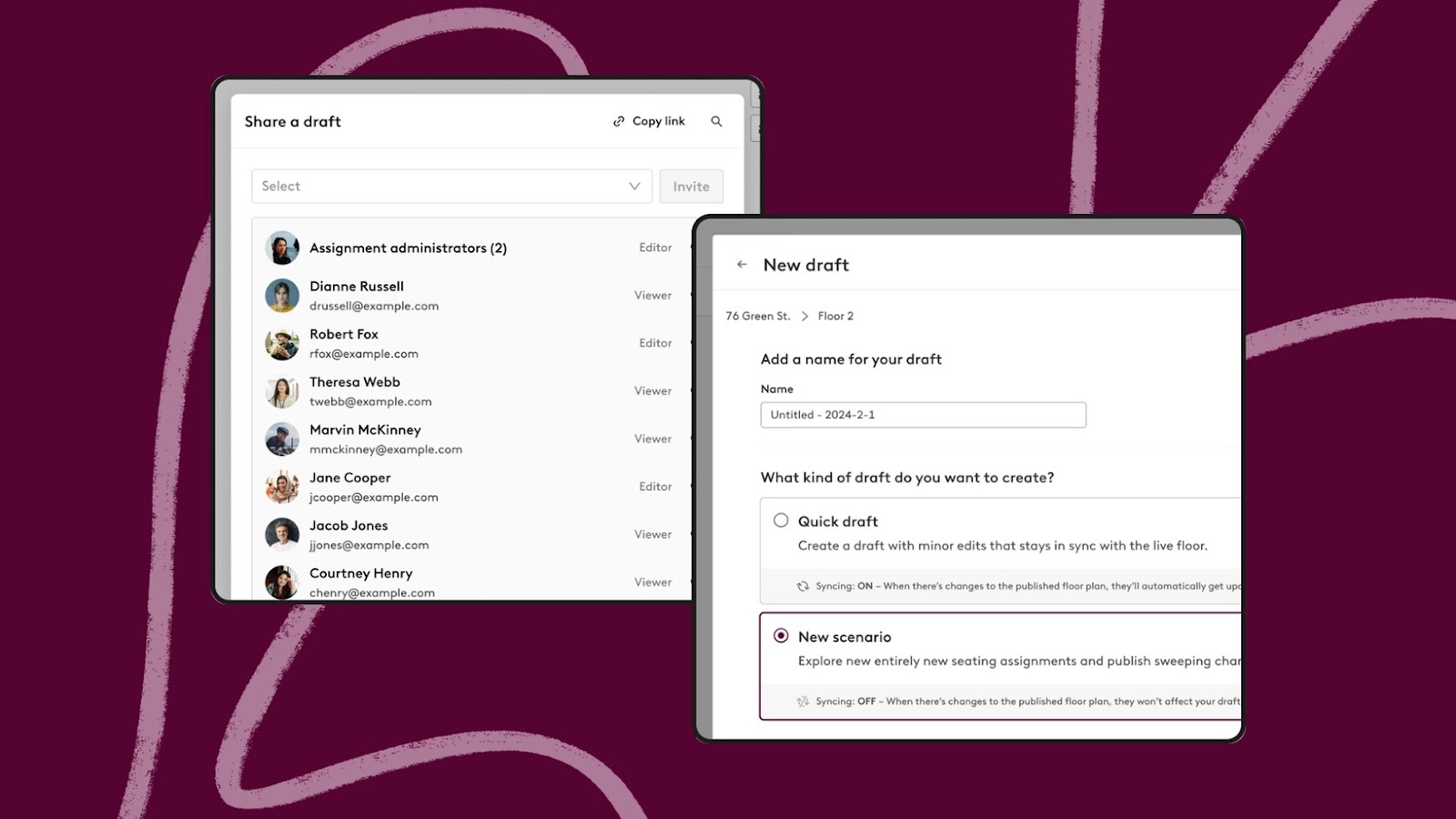
Reimagine office layouts without disrupting day-to-day operations. Robin’s newest space planning tools allow admins to test, adjust and refine seating arrangements with ease.
- **Create desk assignment drafts**: Experiment with new layouts by either clearing all current desk assignments for a fresh start or copying the existing setup to refine as needed. Perfect for major reconfigurations or seasonal updates.
- **Quick drafts**: Simplify small-scale changes directly on active floor plans. This tool is ideal for quick adjustments, such as reallocating desks for a specific project team or accommodating new hires.
- **Share view-only drafts**: Share draft layouts with stakeholders for input and approval before rolling out changes. This collaborative approach reduces back-and-forth and ensures alignment across teams.
**Availability:** Rolling out now automatically to all customers.
Learn more [here](https://support.robinpowered.com/hc/en-us/articles/360040340471-Managing-assigned-seats).
## **What Else is New**
### Visitor Management: Enhanced Security with Visitor Photos on Badges
Say cheese 📸 Robin’s Visitor Management now supports adding visitor photos to printed badges, enhancing office security and meeting compliance requirements for organizations with stricter visitor policies.
- **Visitor photo capture**: When enabled on the arrival display, visitors will have their photo taken during check-in. This photo is included on the printed badge and can also be viewed in the **Visits** tab for reference.
- **Streamlined setup**: Admins can toggle on visitor photo capture within the badge printing configuration. For detailed instructions, check out the updated help doc [here](https://support.robinpowered.com/hc/en-us/articles/19956027138573-Badge-printing-for-Visitor-Management?_gl=1%2A11xkq9d%2A_gcl_au%2AMjEyNzUxOTc3MC4xNzEzODA3Mzc2%2A_ga%2AMTc1MTU5MTAyNC4xNzEyNzgwNDQ2%2A_ga_8FLTTCJZFD%2AMTcxMzgwNzM2OC4xLjEuMTcxMzgwNzQwNi4zMC4wLjA.).
**Availability:** Available to all customers using Visitor Management.
### Smarter Resource Allocation with Priority Desk Booking Policies
Hybrid work demands flexibility, and Robin’s priority booking policies ensure the right people get access to critical resources when they need them most. Whether it’s giving executives first dibs or balancing access across teams, this update simplifies the process.
- **Set priority rules**: Create customized booking windows for specific groups. For example, executives can book desks up to three months in advance, while the rest of the company gets access one month ahead. This ensures high-priority employees never lose access to key resources.
- **Layered access**: Manage overlapping rules so multiple teams can share desk access without confusion, keeping everyone productive and spaces optimized.
- **Time-based releases**: Automatically release desks for general booking if the priority group doesn’t reserve them within a defined timeframe. This ensures no resource goes unused.
More on priority desk booking [here](https://support.robinpowered.com/hc/en-us/articles/30135255820557-Priority-desk-booking-feature).
**Availability:** Available now for all customers.
### Delivery Management: Track Packages and Notify Recipients
You asked, we delivered 🥁. Robin now includes delivery tracking tools to simplify package management for your office.
- **Create delivery zones**: Define specific areas for package pickups.
- **Log deliveries**: Add recipient details and delivery locations for each package.
- **Email notifications**: Automatically notify recipients and track pickups in your admin dashboard.
More on delivery management [here](https://support.robinpowered.com/hc/en-us/sections/30656138435341-Delivery-management).
**Availability:** Available now to all customers using Visitor Management.
### Brivo Integration for Improved Check-Ins and Data Accuracy
Take the guesswork out of attendance tracking with Robin’s Brivo integration. This feature streamlines employee check-ins while providing admins with the data they need to optimize office operations.
- **Seamless check-ins**: Employees who use Brivo access control systems are automatically checked in when they enter the office.
- **Accurate occupancy data**: Admins can access real-time attendance insights, helping them better understand how spaces are used and make data-driven decisions about office layouts and resource allocation.
Learn more about Brivo + Robin [here](https://support.robinpowered.com/hc/en-us/articles/31086369815821-Brivo-access-control).
**Availability:** Available now to all customers.