Run Experiments on Versioned Datasets
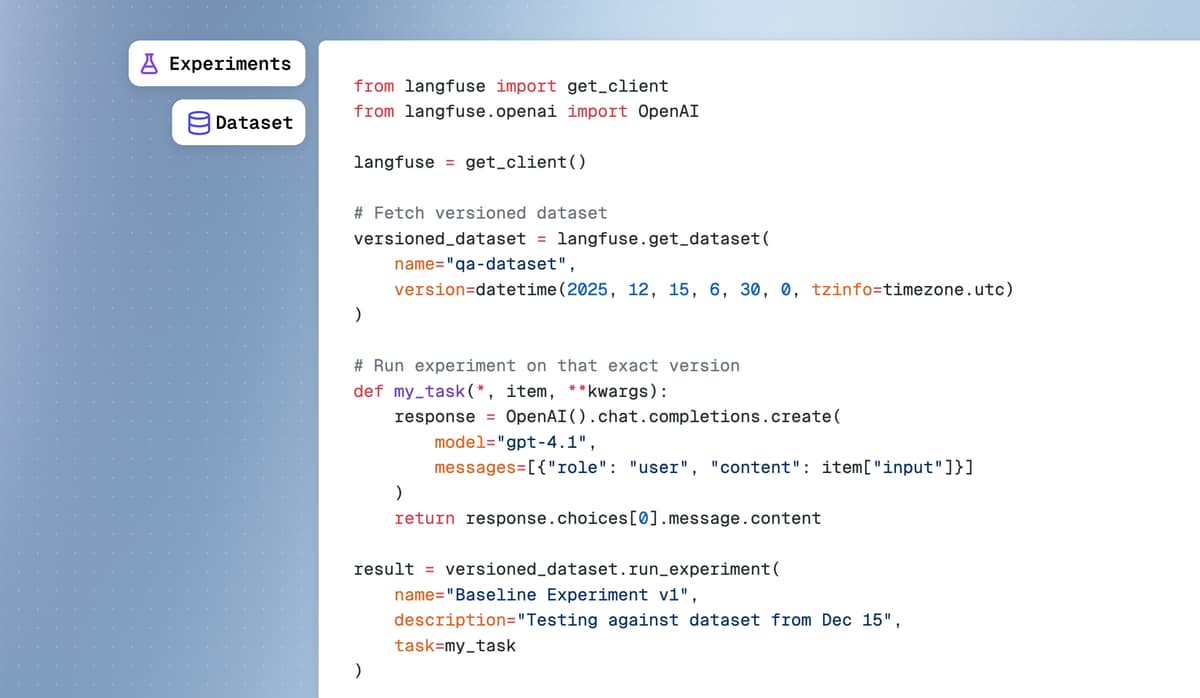
Fetch datasets at specific version timestamps and run experiments directly on versioned datasets across UI, API, and SDKs for full reproducibility.
Why versioned experiments matter
- Full reproducibility: Re-run experiments on the exact dataset state from any point in time, even after items are updated or deleted. Reproduce results from weeks or months ago with complete confidence.
- A/B testing with confidence: Compare model performance before and after dataset refinements. Test new prompts against the same baseline dataset version that your production model was evaluated on.
- Regression testing: Run experiments on a specific dataset version while your team continues improving the dataset. Ensure new model versions don't regress on established benchmarks.
Fetch datasets at specific versions
Retrieve datasets as they existed at any timestamp via Python SDK, JS/TS SDK, or Langfuse UI. By default, APIs return the latest version. Navigate to Datasets → Select dataset → Items Tab → Toggle Version view to browse all historical versions.
Run experiments on versioned datasets
Execute experiments against specific dataset versions using the experiment runner or via UI. When running experiments in the UI: (1) Navigate to Run Prompt Experiment, (2) Select your dataset, (3) Choose a version from the Dataset Version dropdown, (4) The experiment runs against that specific dataset state, (5) If no version is selected, runs against latest version.
This completes the dataset versioning feature released in December.
Fetched April 13, 2026