Baseline Support in Experiment Compare View
$npx -y @buildinternet/releases show rel_MBhRC1ibN3YfIdvtzRNVi
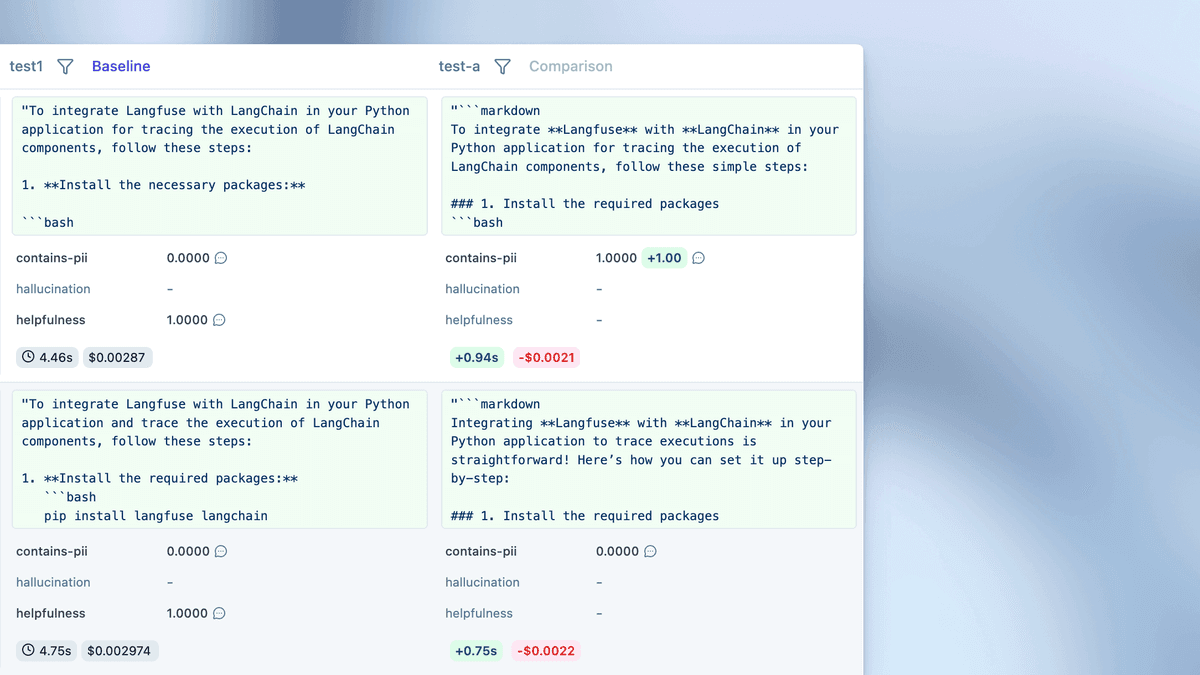
Experiment compare view now supports baseline designation. Select two experiment runs, click Compare, and set one as baseline to enable side-by-side analysis of baseline versus candidate performance.
Key Features:
- Matched rows: Each row displays baseline and candidate outputs for the same dataset item using stable identifiers for direct comparison
- Visual indicators: Green/red deltas for scores, cost, and latency highlight item-level changes
- Column headers: Summary stats show aggregate performance differences between baseline and candidate
- Trace access: Click any row to open execution traces and debug behavioral changes
- Regression hunting: Use column filters to build regression worklists (e.g., filter by score thresholds or performance deltas)
- Aggregate metrics: Charts tab shows high-level metric summaries comparing quality scores, cost, and latency distributions
- Annotation support: Classify failures with structured scores using annotation mode
Getting Started: Run two experiment versions using the same dataset, select both runs and click Compare, designate the production version as baseline, and review metrics in Charts tab or drill into item-level differences in Outputs tab.
Fetched April 13, 2026