v0.20.0
v0.20.0: SDXL ControlNets with MultiControlNet, GLIGEN, Tiny Autoencoder, SDXL DreamBooth LoRA in free-tier Colab, and more
SDXL ControlNets 🚀
The 🧨 diffusers team has trained two ControlNets on Stable Diffusion XL (SDXL):
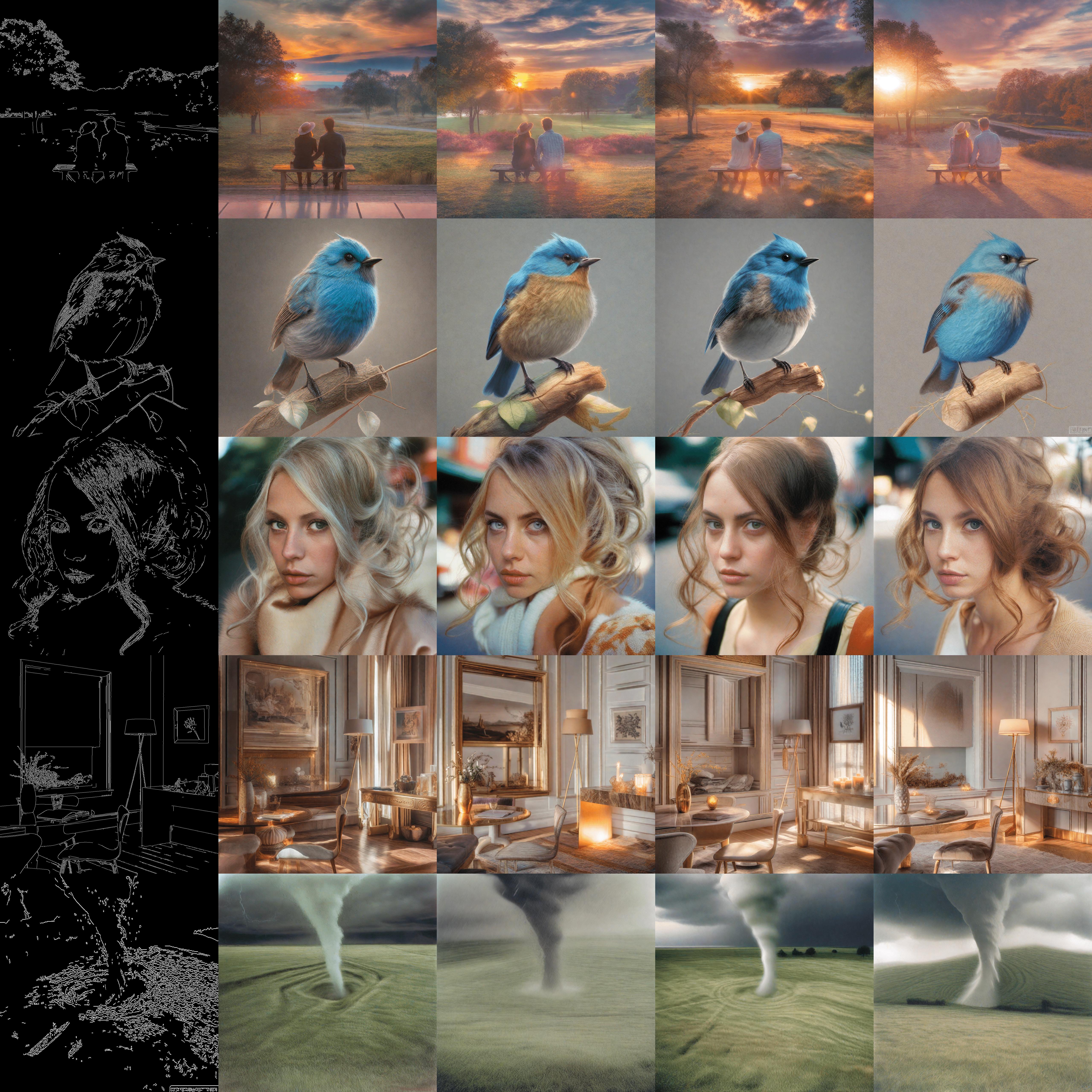
You can find all the SDXL ControlNet checkpoints here, including some smaller ones (5 to 7x smaller).
To know more about how to use these ControlNets to perform inference, check out the respective model cards and the documentation. To train custom SDXL ControlNets, you can try out our training script.
MultiControlNet for SDXL
This release also introduces support for combining multiple ControlNets trained on SDXL and performing inference with them. Refer to the documentation to learn more.
GLIGEN
The GLIGEN model was developed by researchers and engineers from University of Wisconsin-Madison, Columbia University, and Microsoft. The StableDiffusionGLIGENPipeline can generate photorealistic images conditioned on grounding inputs. Along with text and bounding boxes, if input images are given, this pipeline can insert objects described by text at the region defined by bounding boxes. Otherwise, it’ll generate an image described by the caption/prompt and insert objects described by text at the region defined by bounding boxes. It’s trained on COCO2014D and COCO2014CD datasets, and the model uses a frozen CLIP ViT-L/14 text encoder to condition itself on grounding inputs.
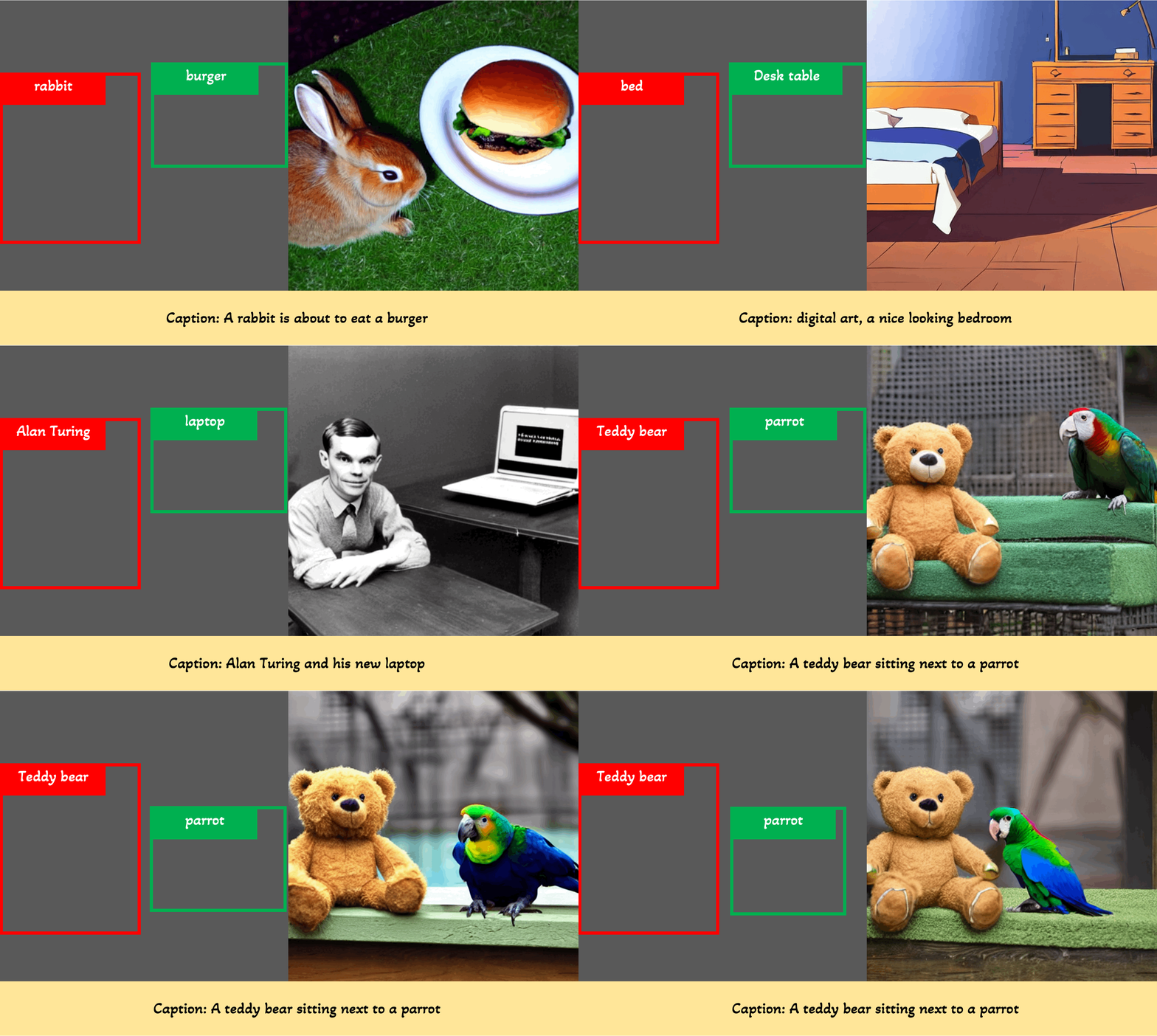
(GIF from the official website)
Grounded inpainting
import torch
from diffusers import StableDiffusionGLIGENPipeline
from diffusers.utils import load_image

# Insert objects described by text at the region defined by bounding boxes
pipe = StableDiffusionGLIGENPipeline.from_pretrained(
    "masterful/gligen-1-4-inpainting-text-box", variant="fp16", torch_dtype=torch.float16
)
pipe = pipe.to("cuda")

input_image = load_image(
    "https://hf.co/datasets/huggingface/documentation-images/resolve/main/diffusers/gligen/livingroom_modern.png"
)
prompt = "a birthday cake"
boxes = [[0.2676, 0.6088, 0.4773, 0.7183]]
phrases = ["a birthday cake"]

images = pipe(
    prompt=prompt,
    gligen_phrases=phrases,
    gligen_inpaint_image=input_image,
    gligen_boxes=boxes,
    gligen_scheduled_sampling_beta=1,
    output_type="pil",
    num_inference_steps=50,
).images
images[0].save("./gligen-1-4-inpainting-text-box.jpg")
Grounded generation
import torch
from diffusers import StableDiffusionGLIGENPipeline
from diffusers.utils import load_image

# Generate an image described by the prompt and
# insert objects described by text at the region defined by bounding boxes
pipe = StableDiffusionGLIGENPipeline.from_pretrained(
    "masterful/gligen-1-4-generation-text-box", variant="fp16", torch_dtype=torch.float16
)
pipe = pipe.to("cuda")

prompt = "a waterfall and a modern high speed train running through the tunnel in a beautiful forest with fall foliage"
boxes = [[0.1387, 0.2051, 0.4277, 0.7090], [0.4980, 0.4355, 0.8516, 0.7266]]
phrases = ["a waterfall", "a modern high speed train running through the tunnel"]

images = pipe(
    prompt=prompt,
    gligen_phrases=phrases,
    gligen_boxes=boxes,
    gligen_scheduled_sampling_beta=1,
    output_type="pil",
    num_inference_steps=50,
).images
images[0].save("./gligen-1-4-generation-text-box.jpg")
Refer to the documentation to learn more.
Thanks to @nikhil-masterful for contributing GLIGEN in #4441.
Tiny Autoencoder
@madebyollin trained two Autoencoders (on Stable Diffusion and Stable Diffusion XL, respectively) to dramatically cut down the image decoding time. The effects are especially pronounced when working with larger-resolution images. You can use AutoencoderTiny to take advantage of it.
Here’s the example usage for Stable Diffusion:
import torch
from diffusers import DiffusionPipeline, AutoencoderTiny

pipe = DiffusionPipeline.from_pretrained(
    "stabilityai/stable-diffusion-2-1-base", torch_dtype=torch.float16
)
pipe.vae = AutoencoderTiny.from_pretrained("madebyollin/taesd", torch_dtype=torch.float16)
pipe = pipe.to("cuda")

prompt = "slice of delicious New York-style berry cheesecake"
image = pipe(prompt, num_inference_steps=25).images[0]
image.save("cheesecake.png")
Refer to the documentation to learn more. Refer to this material to understand the implications of using this Autoencoder in terms of inference latency and memory footprint.
Fine-tuning Stable Diffusion XL with DreamBooth and LoRA on a free-tier Colab Notebook
Stable Diffusion XL’s (SDXL) high memory requirements often seem restrictive when it comes to using it for downstream applications. Even if one uses parameter-efficient fine-tuning techniques like LoRA, fine-tuning just the UNet component of SDXL can be quite memory-intensive. So, running it on a free-tier Colab Notebook (that usually has a 16 GB T4 GPU attached) seems impossible.
Now, with better support for gradient checkpointing and other recipes like 8 Bit Adam (via bitsandbytes), it is possible to fine-tune the UNet of SDXL with DreamBooth and LoRA on a free-tier Colab Notebook.
Check out the Colab Notebook to learn more.
Thanks to @ethansmith2000 for improving the gradient checkpointing support in #4474.
Support of push_to_hub for models, schedulers, and pipelines
Our models, schedulers, and pipelines now support an option of push_to_hub via the save_pretrained() and also come with a push_to_hub() method. Below are some examples of usage.
Models
from diffusers import ControlNetModel

controlnet = ControlNetModel(
    block_out_channels=(32, 64),
    layers_per_block=2,
    in_channels=4,
    down_block_types=("DownBlock2D", "CrossAttnDownBlock2D"),
    cross_attention_dim=32,
    conditioning_embedding_out_channels=(16, 32),
)
controlnet.push_to_hub("my-controlnet-model")
# or controlnet.save_pretrained("my-controlnet-model", push_to_hub=True)
Schedulers
from diffusers import DDIMScheduler

scheduler = DDIMScheduler(
    beta_start=0.00085,
    beta_end=0.012,
    beta_schedule="scaled_linear",
    clip_sample=False,
    set_alpha_to_one=False,
)
scheduler.push_to_hub("my-controlnet-scheduler")
Pipelines
from diffusers import (
    UNet2DConditionModel,
    AutoencoderKL,
    DDIMScheduler,
    StableDiffusionPipeline,
)
from transformers import CLIPTextModel, CLIPTextConfig, CLIPTokenizer

unet = UNet2DConditionModel(
    block_out_channels=(32, 64),
    layers_per_block=2,
    sample_size=32,
    in_channels=4,
    out_channels=4,
    down_block_types=("DownBlock2D", "CrossAttnDownBlock2D"),
    up_block_types=("CrossAttnUpBlock2D", "UpBlock2D"),
    cross_attention_dim=32,
)

scheduler = DDIMScheduler(
    beta_start=0.00085,
    beta_end=0.012,
    beta_schedule="scaled_linear",
    clip_sample=False,
    set_alpha_to_one=False,
)

vae = AutoencoderKL(
    block_out_channels=[32, 64],
    in_channels=3,
    out_channels=3,
    down_block_types=["DownEncoderBlock2D", "DownEncoderBlock2D"],
    up_block_types=["UpDecoderBlock2D", "UpDecoderBlock2D"],
    latent_channels=4,
)

text_encoder_config = CLIPTextConfig(
    bos_token_id=0,
    eos_token_id=2,
    hidden_size=32,
    intermediate_size=37,
    layer_norm_eps=1e-05,
    num_attention_heads=4,
    num_hidden_layers=5,
    pad_token_id=1,
    vocab_size=1000,
)
text_encoder = CLIPTextModel(text_encoder_config)
tokenizer = CLIPTokenizer.from_pretrained("hf-internal-testing/tiny-random-clip")

components = {
    "unet": unet,
    "scheduler": scheduler,
    "vae": vae,
    "text_encoder": text_encoder,
    "tokenizer": tokenizer,
    "safety_checker": None,
    "feature_extractor": None,
}
pipeline = StableDiffusionPipeline(**components)
pipeline.push_to_hub("my-pipeline")
Refer to the documentation to know more.
Thanks to @Wauplin for his generous and constructive feedback (refer to this #4218) on this feature.
Better support for loading Kohya-trained LoRA checkpoints
Providing seamless support for loading Kohya-trained LoRA checkpoints from diffusers is important for us. This is why we continue to improve our load_lora_weights() method. Check out the documentation to know more about what’s currently supported and the current limitations.
Thanks to @isidentical for extending their help in improving this support.
Better documentation for prompt weighting
Prompt weighting provides a way to emphasize or de-emphasize certain parts of a prompt, allowing for more control over the generated image. compel provides an easy way to do prompt weighting compatible with diffusers. To this end, we have worked on an improved guide. Check it out here.
Defaulting to serialize with .safetensors
Starting with this release, we will default to using .safetensors as our preferred serialization method. This change is reflected in all the training examples that we officially support.
All commits
- 0.20.0dev0 by @patrickvonplaten in #4299
- update Kandinsky doc by @yiyixuxu in #4301
- [Torch.compile] Fixes torch compile graph break by @patrickvonplaten in #4315
- Fix SDXL conversion from original to diffusers by @duongna21 in #4280
- fix a bug in StableDiffusionUpscalePipeline when
promptisNoneby @yiyixuxu in #4278 - [Local loading] Correct bug with local files only by @patrickvonplaten in #4318
- Fix typo documentation by @echarlaix in #4320
- fix validation option for dreambooth training example by @xinyangli in #4317
- [Tests] add test for pipeline import. by @sayakpaul in #4276
- Honor the SDXL 1.0 licensing from the training scripts. by @sayakpaul in #4319
- Update README_sdxl.md to correct the header by @sayakpaul in #4330
- [SDXL Refiner] Fix refiner forward pass for batched input by @patrickvonplaten in #4327
- correct doc string for default value of guidance_scale by @Tanupriya-Singh in #4339
- [ONNX] Don't download ONNX model by default by @patrickvonplaten in #4338
- Fix repeat of negative prompt by @kathath in #4335
- [SDXL] Make watermarker optional under certain circumstances to improve usability of SDXL 1.0 by @patrickvonplaten in #4346
- [Feat] Support SDXL Kohya-style LoRA by @sayakpaul in #4287
- fix fp type in t2i adapter docs by @williamberman in #4350
- Update README.md to have PyPI-friendly path by @sayakpaul in #4351
- [SDXL-IP2P] Add gif for demonstrating training processes by @harutatsuakiyama in #4342
- [SDXL] Fix dummy imports incorrect naming by @patrickvonplaten in #4370
- Clean up duplicate lines in encode_prompt by @avoroshilov in #4369
- minor doc fixes. by @sayakpaul in #4380
- Update docs of unet_1d.py by @nishant42491 in #4394
- [AutoPipeline] Correct naming by @patrickvonplaten in #4420
- [ldm3d] documentation fixing typos by @estelleafl in #4284
- Cleanup pass for flaky Slow Tests for Stable diffusion by @DN6 in #4415
- support from_single_file for SDXL inpainting by @yiyixuxu in #4408
- fix test_float16_inference by @yiyixuxu in #4412
- train dreambooth fix pre encode class prompt by @williamberman in #4395
- [docs] Fix SDXL docstring by @stevhliu in #4397
- Update documentation by @echarlaix in #4422
- remove mentions of textual inversion from sdxl. by @sayakpaul in #4404
- [LoRA] Fix SDXL text encoder LoRAs by @sayakpaul in #4371
- [docs] AutoPipeline tutorial by @stevhliu in #4273
- [Pipelines] Add community pipeline for Zero123 by @kxhit in #4295
- [Feat] add tiny Autoencoder for (almost) instant decoding by @sayakpaul in #4384
- can call encode_prompt with out setting a text encoder instance variable by @williamberman in #4396
- Accept pooled_prompt_embeds in the SDXL Controlnet pipeline. Fixes an error if prompt_embeds are passed. by @cmdr2 in #4309
- Prevent online access when desired when using download_from_original_stable_diffusion_ckpt by @w4ffl35 in #4271
- move tests to nightly by @DN6 in #4451
- auto type conversion by @isNeil in #4270
- Fix typerror in pipeline handling for MultiControlNets which only contain a single ControlNet by @Georgehe4 in #4454
- Add rank argument to train_dreambooth_lora_sdxl.py by @levi in #4343
- [docs] Distilled SD by @stevhliu in #4442
- Allow controlnets to be loaded (from ckpt) in a parallel thread with a SD model (ckpt), and speed it up slightly by @cmdr2 in #4298
- fix typo to ensure
make test-exampleswork correctly by @statelesshz in #4329 - Fix bug caused by typo by @HeliosZhao in #4357
- Delete the duplicate code for the contolnet img 2 img by @VV-A-VV in #4411
- Support different strength for Stable Diffusion TensorRT Inpainting pipeline by @jinwonkim93 in #4216
- add sdxl to prompt weighting by @patrickvonplaten in #4439
- a few fix for kandinsky combined pipeline by @yiyixuxu in #4352
- fix-format by @yiyixuxu in #4458
- Cleanup Pass on flaky slow tests for Stable Diffusion by @DN6 in #4455
- Fixed multi-token textual inversion training by @manosplitsis in #4452
- TensorRT Inpaint pipeline: minor fixes by @asfiyab-nvidia in #4457
- [Tests] Adds integration tests for SDXL LoRAs by @sayakpaul in #4462
- Update README_sdxl.md by @patrickvonplaten in #4472
- [SDXL] Allow SDXL LoRA to be run with less than 16GB of VRAM by @patrickvonplaten in #4470
- Add a data_dir parameter to the load_dataset method. by @AisingioroHao0 in #4482
- [Examples] Support train_text_to_image_lora_sdxl.py by @okotaku in #4365
- Log global_step instead of epoch to tensorboard by @mrlzla in #4493
- Update lora.md to clarify SDXL support by @sayakpaul in #4503
- [SDXL LoRA] fix batch size lora by @patrickvonplaten in #4509
- Make sure fp16-fix is used as default by @patrickvonplaten in #4510
- grad checkpointing by @ethansmith2000 in #4474
- move pipeline only when running validation by @patrickvonplaten in #4515
- Moving certain pipelines slow tests to nightly by @DN6 in #4469
- add pipeline_class_name argument to Stable Diffusion conversion script by @yiyixuxu in #4461
- Fix misc typos by @Georgehe4 in #4479
- fix indexing issue in sd reference pipeline by @DN6 in #4531
- Copy lora functions to XLPipelines by @wooyeolBaek in #4512
- introduce minimalistic reimplementation of SDXL on the SDXL doc by @cloneofsimo in #4532
- Fix push_to_hub in train_text_to_image_lora_sdxl.py example by @ra100 in #4535
- Update README_sdxl.md to include the free-tier Colab Notebook by @sayakpaul in #4540
- Changed code that converts tensors to PIL images in the write_your_own_pipeline notebook by @jere357 in #4489
- Move slow tests to nightly by @DN6 in #4526
- pin ruff version for quality checks by @DN6 in #4539
- [docs] Clean scheduler api by @stevhliu in #4204
- Move controlnet load local tests to nightly by @DN6 in #4543
- Revert "introduce minimalistic reimplementation of SDXL on the SDXL doc" by @patrickvonplaten in #4548
- fix some typo error by @VV-A-VV in #4546
- improve controlnet sdxl docs now that we have a good checkpoint. by @sayakpaul in #4556
- [Doc] update sdxl-controlnet repo name by @yiyixuxu in #4564
- [docs] Expand prompt weighting by @stevhliu in #4516
- [docs] Remove attention slicing by @stevhliu in #4518
- [docs] Add safetensors flag by @stevhliu in #4245
- Convert Stable Diffusion ControlNet to TensorRT by @dotieuthien in #4465
- Remove code snippets containing
is_safetensors_available()by @chiral-carbon in #4521 - Fixing repo_id regex validation error on windows platforms by @Mystfit in #4358
- [Examples] fix: network_alpha -> network_alphas by @sayakpaul in #4572
- [docs] Fix ControlNet SDXL docstring by @stevhliu in #4582
- [Utility] adds an image grid utility by @sayakpaul in #4576
- Fixed invalid pipeline_class_name parameter. by @AisingioroHao0 in #4590
- Fix git-lfs command typo in docs by @clairefro in #4586
- [Examples] Update InstructPix2Pix README_sdxl.md to fix mentions by @sayakpaul in #4574
- [Pipeline utils] feat: implement push_to_hub for standalone models, schedulers as well as pipelines by @sayakpaul in #4128
- An invalid clerical error in sdxl finetune by @XDUWQ in #4608
- [Docs] fix links in the controlling generation doc. by @sayakpaul in #4612
- add: pushtohubmixin to pipelines and schedulers docs overview. by @sayakpaul in #4607
- add: train to text image with sdxl script. by @sayakpaul in #4505
- Add GLIGEN implementation by @nikhil-masterful in #4441
- Update text2image.md to fix the links by @sayakpaul in #4626
- Fix unipc use_karras_sigmas exception - fixes huggingface/diffusers#4580 by @reimager in #4581
- [research_projects] SDXL controlnet script by @patil-suraj in #4633
- [Core] feat: MultiControlNet support for SDXL ControlNet pipeline by @sayakpaul in #4597
- [docs] PushToHubMixin by @stevhliu in #4622
- [docs] MultiControlNet by @stevhliu in #4635
- fix loading custom text encoder when using
from_single_fileby @DN6 in #4571 - make things clear in the controlnet sdxl doc. by @sayakpaul in #4644
- Fix
UnboundLocalErrorduring LoRA loading by @slessans in #4523 - Support higher dimension LoRAs by @isidentical in #4625
- [Safetensors] Make safetensors the default way of saving weights by @patrickvonplaten in #4235
Significant community contributions
The following contributors have made significant changes to the library over the last release:
- @kxhit
- [Pipelines] Add community pipeline for Zero123 (#4295)
- @okotaku
- [Examples] Support train_text_to_image_lora_sdxl.py (#4365)
- @dotieuthien
- Convert Stable Diffusion ControlNet to TensorRT (#4465)
- @nikhil-masterful
- Add GLIGEN implementation (#4441)
Fetched April 7, 2026