Annotation Support in Experiment Compare View
$npx -y @buildinternet/releases show rel_EzrW7J6PigMu2TkKs_xgF
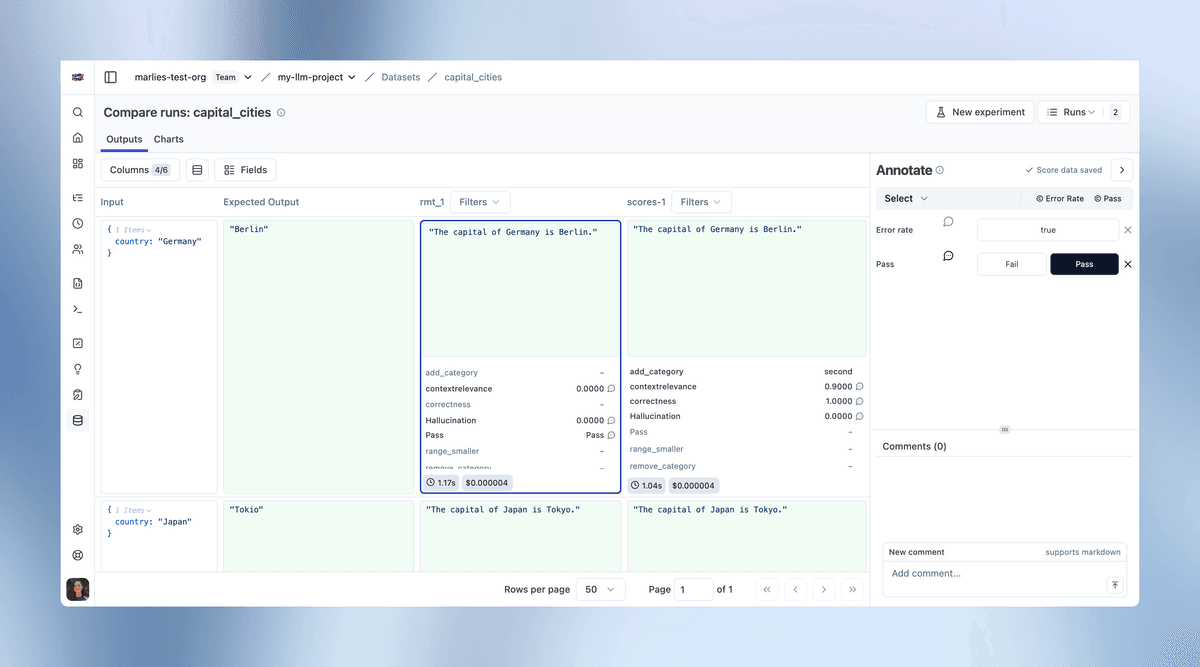
Add human annotations while reviewing experiment results side-by-side. You can now annotate traces directly from the experiment compare view, streamlining the workflow of running experiments and adding human feedback.
Key Features:
- Select any cell in the compare view to open the annotation side panel
- Assign scores and leave comments while maintaining full experiment context
- Use annotation score data to compare experiment results across different prompt versions and model configurations
- Optimistic UI updates provide immediate feedback while data persists in the background
- Summary metrics in the compare view reflect annotations as you work
Score Configurations: Support for numerical scores (with min/max ranges), categorical scores (custom classifications), and binary scores (pass/fail judgments).
Workflow:
- Run an experiment via UI or SDK
- Open the experiment comparison view
- Click any item to open the annotation panel
- Assign scores and add comments
- Move to the next item for review
Standardized score configs ensure consistency across experiments and team members.
Fetched April 13, 2026