---
name: Cloudflare Changelog
slug: cloudflare-what-s-new
type: feed
source_url: https://developers.cloudflare.com/changelog/
organization: Cloudflare
organization_slug: cloudflare
total_releases: 256
latest_date: 2026-04-17
last_updated: 2026-04-18
tracking_since: 2025-12-18
canonical: https://releases.sh/cloudflare/cloudflare-what-s-new
organization_url: https://releases.sh/cloudflare
---
Over 90 days, Cloudflare shipped a major push toward agentic and edge-compute infrastructure, expanding AI capabilities while building out connectivity and security layers that span from the network to application code.
AI Search matured into a production platform with hybrid search, REST APIs, custom metadata filtering, and UI components for embedding search into websites. Workers AI added frontier-scale models (Kimi K2.5, GLM-4.7-Flash, Gemma 4) with extended context windows and multi-turn tool calling—the infrastructure for agents to reason and act at scale. Browser Run (formerly Browser Rendering) shipped Live View, Human in the Loop, session recordings, and WebMCP support, positioning browser automation as a first-class agent interface. Artifacts entered private beta as Git-compatible versioned storage, solving the core problem of how agents exchange and iterate on code.
On the foundational side, Dynamic Workers graduated from beta, enabling Workers to spawn other Workers at runtime for secure code execution—essential for Code Mode and agentic patterns. Agents SDK hit v0.8.0 with readable state, idempotent schedules, and full TypeScript inference. Sandboxes and Containers went GA with Docker-in-Docker, custom egress policies, credential injection, and regional placement constraints. Real-time transcription in RealtimeKit expanded to 10 languages. Workers limits doubled (subrequests, Workflows steps, Browser concurrency).
Security and observability hardened significantly: Audit Logs v2 hit GA with ~95% product coverage and standardized format. Risk Scoring now ingests Gateway DNS to flag users visiting malicious domains. Access gained independent MFA, managed OAuth for CLI and SDK clients, and policies for bookmark applications. WAF released weekly detections for emerging CVEs. Markdown for Agents shipped as automatic content conversion on the edge—AI systems can request text/markdown and get it on-the-fly from any Cloudflare-protected zone.
Networking infrastructure expanded: Cloudflare Mesh entered GA with post-quantum encryption and private IPs for every device. Cloudflare One Appliance added LACP, post-quantum IPsec, and Anycast IP visibility. VPC Networks graduated to public beta, allowing Workers to reach any service on a tunnel or Mesh node without pre-registering ports. Gateway gained OIDC Claims filtering and new protocol detection (IMAP, SMTP, LDAP, MySQL, NTP).
Cross-platform tooling matured: wrangler tunnel brought tunnel lifecycle management to CLI. Wrangler now auto-configures frameworks without a config file. Pywrangler landed on Windows. R2 added Local Uploads (open beta) for 75% latency reduction on global uploads. Pipelines dashboard added dropped event metrics and typed bindings. Logpush expanded to BigQuery and gained millisecond/nanosecond timestamps.
The throughline: Cloudflare moved from scattered point products toward an integrated platform where agents, code, data, and connectivity converge—Workers execute code, Agents SDK orchestrate them, Dynamic Workers sandbox untrusted logic, Mesh connects private infrastructure, and AI models run natively. The ~40 releases reflect a shift in direction: less incremental feature work, more systemic capability for building agentic applications at the edge.
March accelerated deployment of AI and observability infrastructure. Workers, Containers, and Sandbox products expanded their ecosystem integrations — Workers now manages Cloudflare Tunnels via CLI, Containers added Docker Hub image support and SSH access, and Sandboxes connected directly to Workers bindings over HTTP. The Agents SDK matured across three releases with readable state, diagnostics channels, and MCP support. AI Search consolidated management into Wrangler CLI while adding metadata filtering, public endpoints, and OpenAI-compatible REST APIs. Rules and Workers both shipped RFC 9440 mTLS certificate fields to simplify client certificate forwarding. Security expanded across WAF detections for Fortinet, Magento, and Ivanti vulnerabilities, while Access introduced OAuth 2.0 for non-browser clients and Managed OAuth eliminated workarounds like `cloudflared access curl`. Access logs and Gateway activity logs received a UI refresh with field customization and filter-by-value. Workflows raised step limits to 25,000 per instance, and Dynamic Workers entered open beta for code execution on-demand.
## Radar - AI Insights updates on Cloudflare Radar
[**Radar**](https://developers.cloudflare.com/radar/) adds three new features to the [AI Insights](https://radar.cloudflare.com/ai-insights) page, expanding visibility into how AI bots, crawlers, and agents interact with the web.
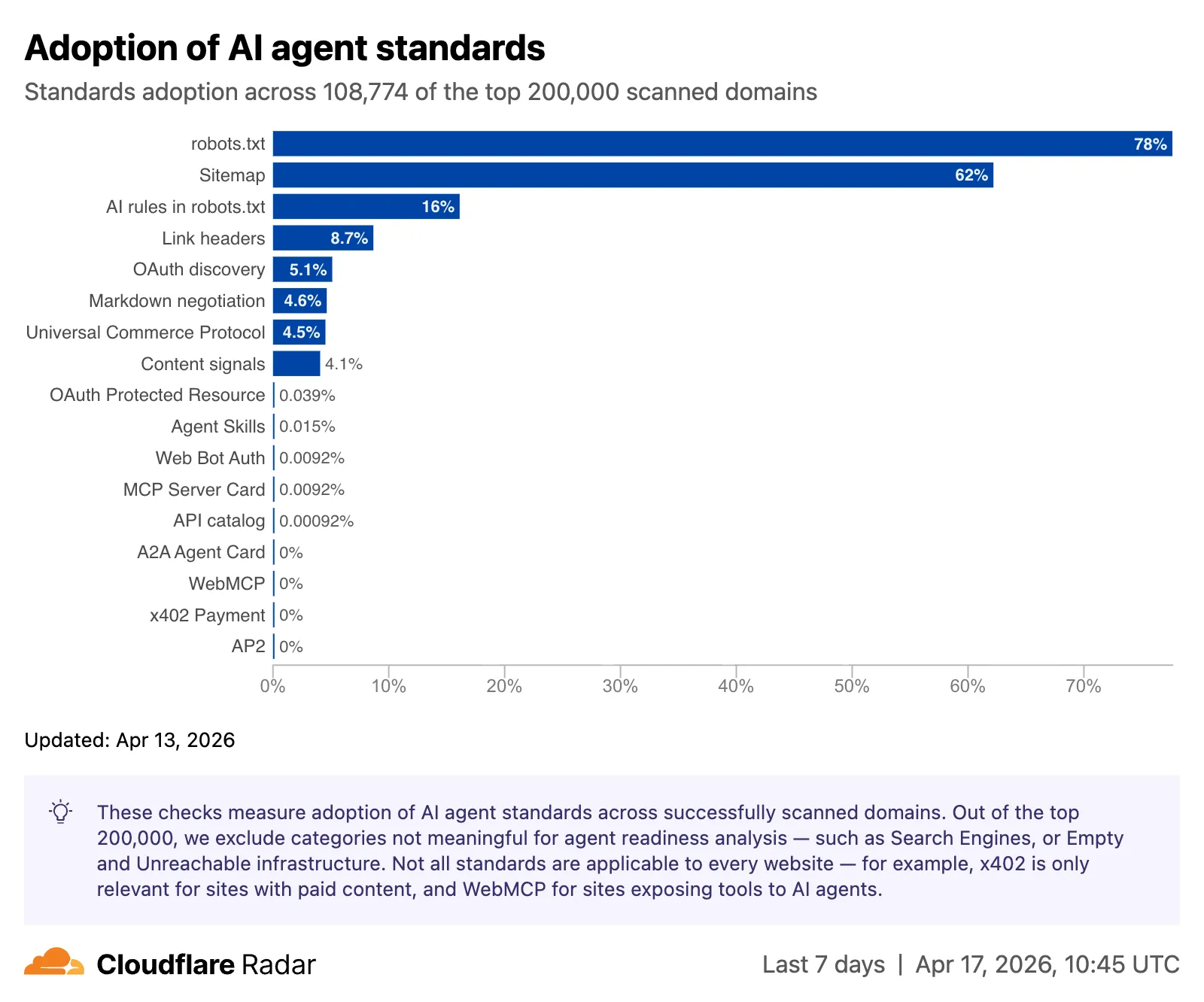
#### Adoption of AI agent standards
The AI Insights page now includes an [adoption of AI agent standards](https://radar.cloudflare.com/ai-insights#adoption-of-ai-agent-standards) widget that tracks how websites adopt agent-facing standards. The data is filterable by domain category and updated weekly on Mondays.
This data is also available through the [Agent Readiness API reference](https://developers.cloudflare.com/api/resources/radar/subresources/agent_readiness/methods/summary/).
[URL Scanner](https://radar.cloudflare.com/scan) reports now include an **Agent readiness** tab that evaluates a scanned URL against the criteria used by the [Agent Readiness score tool](https://isitagentready.com/).
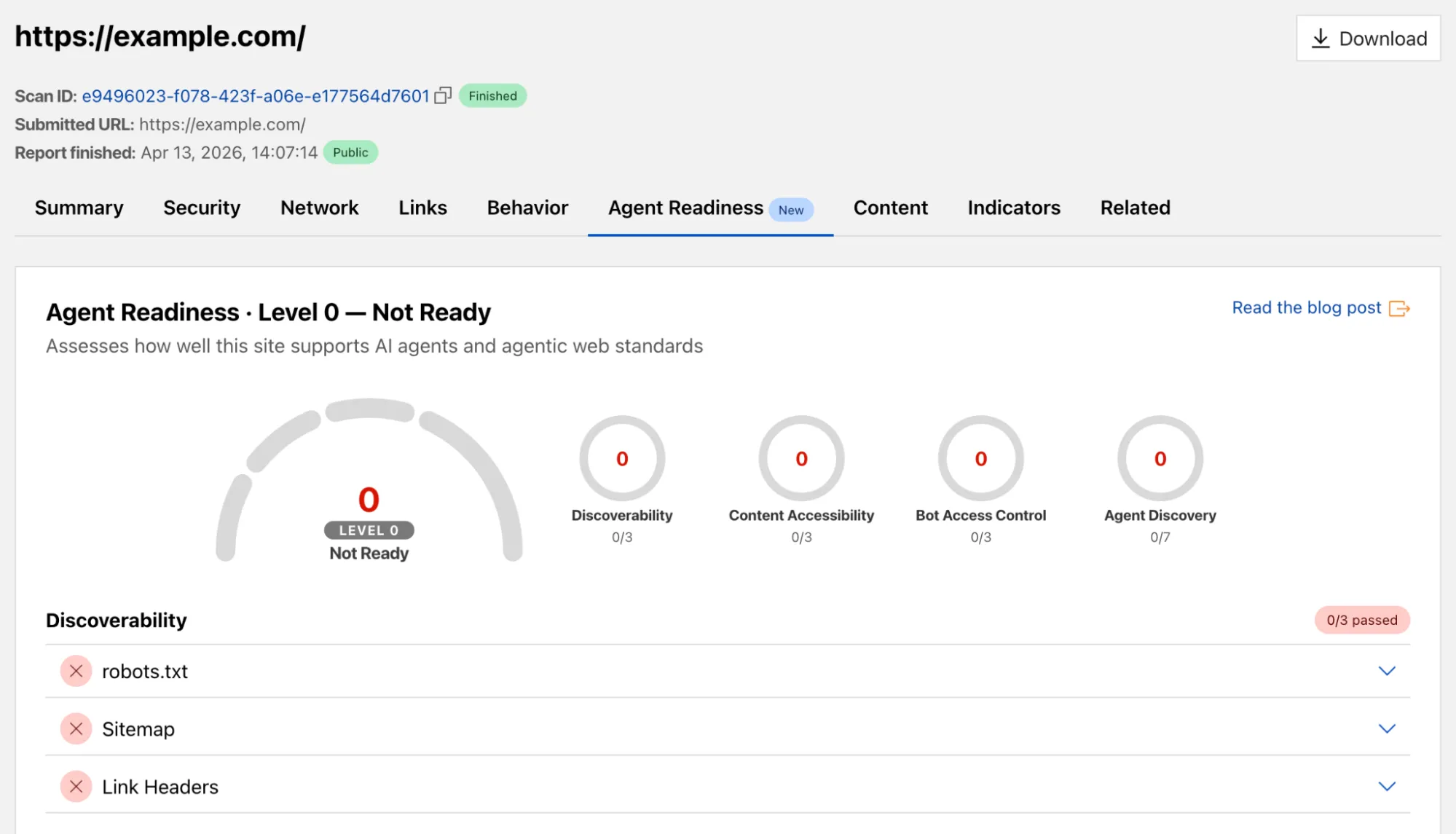
For more details, refer to the [Agent Readiness blog post](https://blog.cloudflare.com/agent-readiness/).
#### Markdown for Agents savings
A new [savings gauge](https://radar.cloudflare.com/ai-insights#markdown-for-agents-savings) shows the median response-size reduction when serving Markdown instead of HTML to AI bots and crawlers. This highlights the bandwidth and token savings that [Markdown for Agents](https://developers.cloudflare.com/fundamentals/reference/markdown-for-agents/) provides.
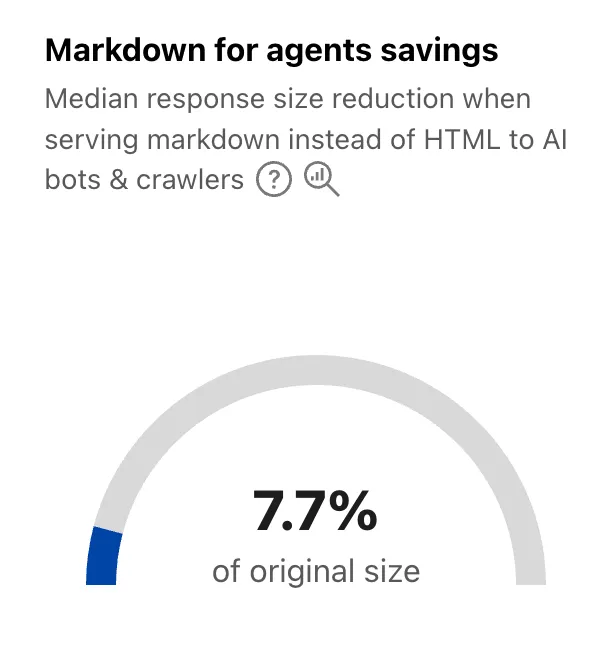
For more details, refer to the [Markdown for Agents API reference](https://developers.cloudflare.com/api/resources/radar/subresources/ai/subresources/markdown_for_agents/methods/summary).
#### Response status
The new [response status widget](https://radar.cloudflare.com/ai-insights#response-status) displays the distribution of HTTP response status codes returned to AI bots and crawlers. Results are groupable by individual status code (200, 403, 404) or by category (2xx, 3xx, 4xx, 5xx).
The same widget is available on each verified bot's detail page (only available for AI bots), for example [Google](https://radar.cloudflare.com/bots/directory/google#response-status).
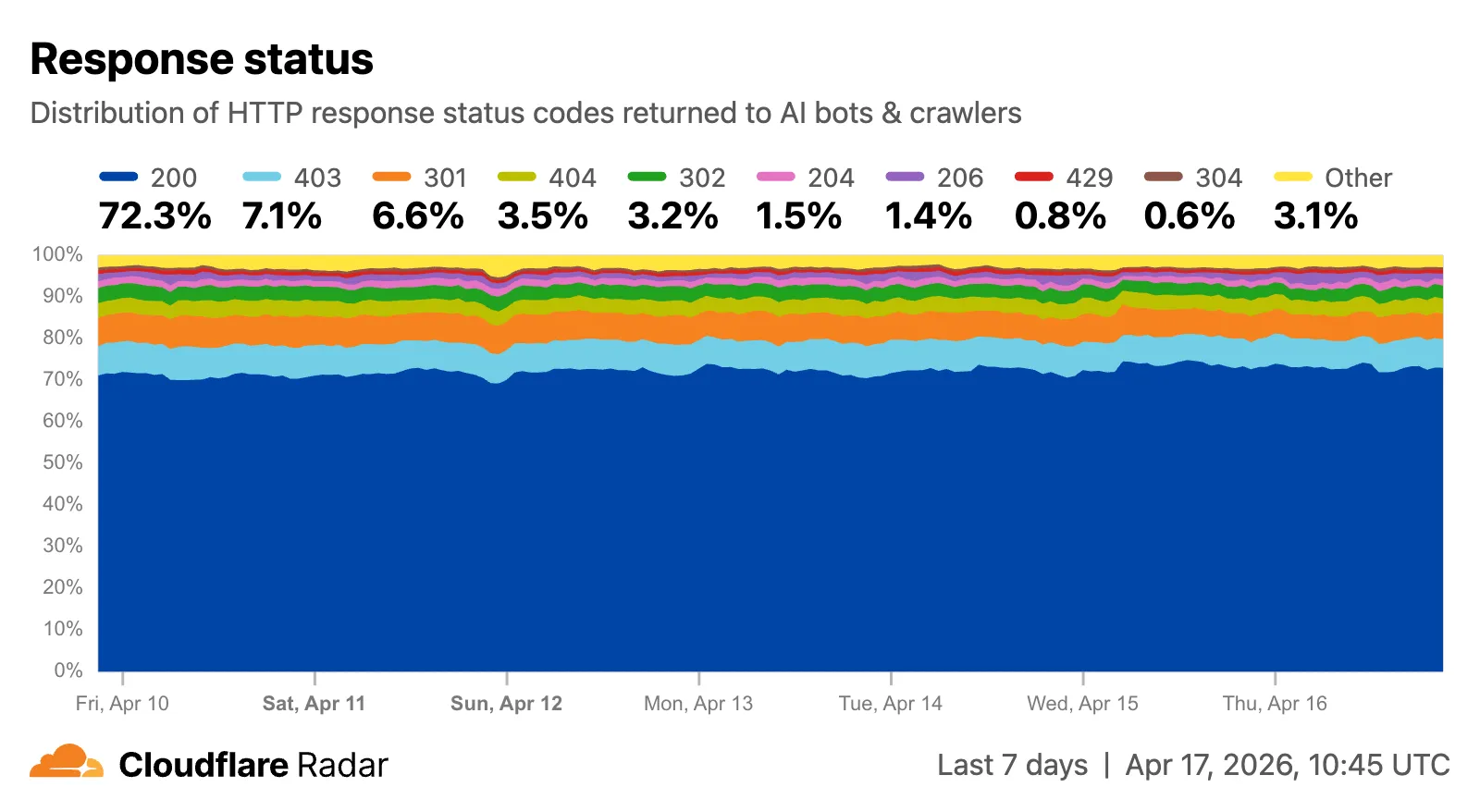
Explore all three features on the [Cloudflare Radar AI Insights](https://radar.cloudflare.com/ai-insights) page.
## AI Crawl Control - Introducing Redirects for AI Training
Cloudflare's network now supports redirecting verified AI training crawlers to canonical URLs when they request deprecated or duplicate pages. When enabled via **AI Crawl Control** > **Quick Actions**, AI training crawlers that request a page with a canonical tag pointing elsewhere receive a 301 redirect to the canonical version. Humans, search engine crawlers, and AI Search agents continue to see the original page normally.
This feature leverages your existing `` tags. No additional configuration required beyond enabling the toggle. Available on Pro, Business, and Enterprise plans at no additional cost.
Refer to the [Redirects for AI Training documentation](https://developers.cloudflare.com/ai-crawl-control/reference/redirects-for-ai-training/) for details.
## AI Crawl Control - Tools to prepare your site for the agentic Internet
AI Crawl Control now includes new tools to help you prepare your site for the agentic Internet—a web where AI agents are first-class citizens that discover and interact with content differently than human visitors.
#### Content Format insights
The **Metrics** tab now includes a **Content Format** chart showing what content types AI systems request versus what your origin serves. Understanding these patterns helps you optimize content delivery for both human and agent consumption.
#### Directives tab (formerly Robots.txt)
The **Robots.txt** tab has been renamed to **Directives** and now includes a link to check your site's [Agent Readiness](https://isitagentready.org) score.
Refer to our [blog post on preparing for the agentic Internet](https://blog.cloudflare.com/welcome-to-agents-week/) for more on why these capabilities matter.
## AI Search - AI Search instances now include built-in storage and namespace Workers Bindings
New [AI Search](https://developers.cloudflare.com/ai-search/) instances created after today will work differently. New instances come with built-in storage and a vector index, so you can upload a file, have it indexed immediately, and search it right away.
Additionally new Workers Bindings are now available to use with AI Search. The new namespace binding lets you create and manage instances at runtime, and cross-instance search API lets you query across multiple instances in one call.
#### Built-in storage and vector index
All new instances now comes with built-in storage which allows you to upload files directly to it using the [Items API](https://developers.cloudflare.com/ai-search/api/items/workers-binding/) or the dashboard. No R2 buckets to set up, no external data sources to connect first.
```
const instance = env.AI_SEARCH.get("my-instance");
// upload and wait for indexing to complete
const item = await instance.items.uploadAndPoll("faq.md", content);
// search immediately after indexing
const results = await instance.search({
messages: [{ role: "user", content: "onboarding guide" }],
});
```
#### Namespace binding
The new `ai_search_namespaces` binding replaces the previous `env.AI.autorag()` API provided through the `AI` binding. It gives your Worker access to all instances within a [namespace](https://developers.cloudflare.com/ai-search/concepts/namespaces/) and lets you create, update, and delete instances at runtime without redeploying.
```
// wrangler.jsonc
{
"ai_search_namespaces": [
{
"binding": "AI_SEARCH",
"namespace": "default",
},
],
}
```
```
// create an instance at runtime
const instance = await env.AI_SEARCH.create({
id: "my-instance",
});
```
For migration details, refer to [Workers binding migration](https://developers.cloudflare.com/ai-search/api/migration/workers-binding/). For more on namespaces, refer to [Namespaces](https://developers.cloudflare.com/ai-search/concepts/namespaces/).
#### Cross-instance search
Within the new AI Search binding, you now have access to a Search and Chat API on the namespace level. Pass an array of instance IDs and get one ranked list of results back.
```
const results = await env.AI_SEARCH.search({
messages: [{ role: "user", content: "What is Cloudflare?" }],
ai_search_options: {
instance_ids: ["product-docs", "customer-abc123"],
},
});
```
Refer to [Namespace-level search](https://developers.cloudflare.com/ai-search/api/search/workers-binding/#namespace-level) for details.
## AI Search - AI Search now has hybrid search and relevance boosting
[AI Search](https://developers.cloudflare.com/ai-search/) now supports hybrid search and relevance boosting, giving you more control over how results are found and ranked.
#### Hybrid search
Hybrid search combines vector (semantic) search with BM25 keyword search in a single query. Vector search finds chunks with similar meaning, even when the exact words differ. Keyword search matches chunks that contain your query terms exactly. When you enable hybrid search, both run in parallel and the results are fused into a single ranked list.
You can configure the tokenizer (`porter` for natural language, `trigram` for code), keyword match mode (`and` for precision, `or` for recall), and fusion method (`rrf` or `max`) per instance:
```
const instance = await env.AI_SEARCH.create({
id: "my-instance",
index_method: { vector: true, keyword: true },
fusion_method: "rrf",
indexing_options: { keyword_tokenizer: "porter" },
retrieval_options: { keyword_match_mode: "and" },
});
```
Refer to [Search modes](https://developers.cloudflare.com/ai-search/concepts/search-modes/) for an overview and [Hybrid search](https://developers.cloudflare.com/ai-search/configuration/indexing/hybrid-search/) for configuration details.
#### Relevance boosting
Relevance boosting lets you nudge search rankings based on document metadata. For example, you can prioritize recent documents by boosting on `timestamp`, or surface high-priority content by boosting on a custom metadata field like `priority`.
Configure up to 3 boost fields per instance or override them per request:
```
const results = await env.AI_SEARCH.get("my-instance").search({
messages: [{ role: "user", content: "deployment guide" }],
ai_search_options: {
retrieval: {
boost_by: [
{ field: "timestamp", direction: "desc" },
{ field: "priority", direction: "desc" },
],
},
},
});
```
Refer to [Relevance boosting](https://developers.cloudflare.com/ai-search/configuration/retrieval/boosting/) for configuration details.
## Artifacts - Artifacts now in beta: versioned filesystem with Git access
[Artifacts](https://developers.cloudflare.com/artifacts/) is now in private beta. Artifacts is Git-compatible storage built for scale: create tens of millions of repos, fork from any remote, and hand off a URL to any Git client. It provides a versioned filesystem for storing and exchanging file trees across Workers, the REST API, and any Git client, running locally or within an agent.
You can [read the announcement blog](https://blog.cloudflare.com/artifacts-git-for-agents-beta/) to learn more about what Artifacts does, how it works, and how to create repositories for your agents to use.
Artifacts has three API surfaces:
- Workers bindings (for creating and managing repositories)
- REST API (for creating and managing repos from any other compute platform)
- Git protocol (for interacting with repos)
As an example: you can use the Workers binding to create a repo and read back its remote URL:
```
# Create a thousand, a million or ten million repos: one for every agent, for every upstream branch, or every user.
const created = await env.PROD_ARTIFACTS.create("agent-007");
const remote = (await created.repo.info())?.remote;
```
Or, use the REST API to create a repo inside a namespace from your agent(s) running on any platform:
```
curl --request POST "https://artifacts.cloudflare.net/v1/api/namespaces/some-namespace/repos" --header "Authorization: Bearer $CLOUDFLARE_API_TOKEN" --header "Content-Type: application/json" --data '{"name":"agent-007"}'
```
Any Git client that speaks smart HTTP can use the returned remote URL:
```
# Agents know git.
# Every repository can act as a git repo, allowing agents to interact with Artifacts the way they know best: using the git CLI.
git clone https://x:${REPO_TOKEN}@artifacts.cloudflare.net/some-namespace/agent-007.git
```
To learn more, refer to [Get started](https://developers.cloudflare.com/artifacts/get-started/), [Workers binding](https://developers.cloudflare.com/artifacts/api/workers-binding/), and [Git protocol](https://developers.cloudflare.com/artifacts/api/git-protocol/).
## Workflows, Workers - Increased concurrency, creation rate, and queued instance limits for Workflows instances
[Workflows](https://developers.cloudflare.com/workflows/) limits have been raised to the following:
LimitPreviousNewConcurrent instances (running in parallel)10,00050,000Instance creation rate (per account)100/second per account300/second per account, 100/second per workflowQueued instances per Workflow 11 million2 million
These increases apply to all users on the [Workers Paid plan](https://developers.cloudflare.com/workers/platform/pricing/). Refer to the [Workflows limits documentation](https://developers.cloudflare.com/workflows/reference/limits/) for more details.
#### Footnotes
-
Queued instances are instances that have been created or awoken and are waiting for a concurrency slot. ↩
## Browser Run - Browser Rendering is now Browser Run
We are renaming Browser Rendering to **[Browser Run](https://developers.cloudflare.com/browser-run/)**. The name Browser Rendering never fully captured what the product does. Browser Run lets you run full browser sessions on Cloudflare's global network, drive them with code or AI, record and replay sessions, crawl pages for content, debug in real time, and let humans intervene when your agent needs help.
Along with the rename, we have increased limits for Workers Paid plans and redesigned the Browser Run dashboard.
We have 4x-ed concurrency limits for Workers Paid plan users:
- **Concurrent browsers per account**: 30 → **120 per account**
- **New browser instances**: 30 per minute → **1 per second**
- **REST API rate limits**: recently increased from [3 to 10 requests per second](https://developers.cloudflare.com/changelog/post/2026-03-04-br-rest-api-limit-increase/)
Rate limits across the [limits page](https://developers.cloudflare.com/browser-run/limits/) are now expressed in per-second terms, matching how they are enforced. No action is needed to benefit from the higher limits.
The [redesigned dashboard](https://dash.cloudflare.com/?to=/:account/workers/browser-run) now shows every request in a single Runs tab, not just browser sessions but also quick actions like screenshots, PDFs, markdown, and crawls. Filter by endpoint, view target URLs, status, and duration, and expand any row for more detail.
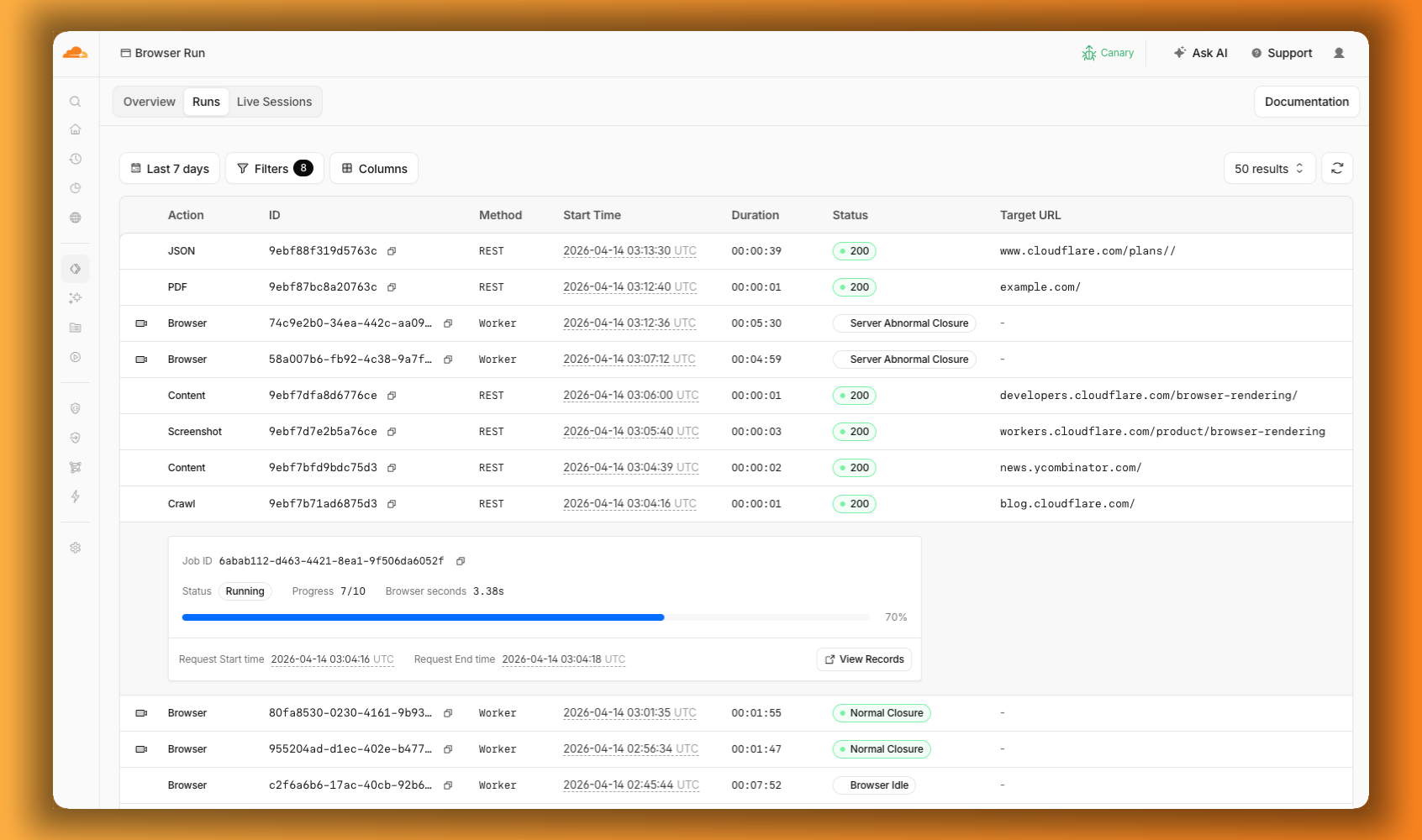
We are also shipping several new features:
- **[Live View, Human in the Loop, and Session Recordings](https://developers.cloudflare.com/changelog/post/2026-04-15-br-observability/)** - See what your agent is doing in real time, let humans step in when automation hits a wall, and replay any session after it ends.
- **[WebMCP](https://developers.cloudflare.com/changelog/post/2026-04-15-br-webmcp/)** - Websites can expose structured tools for AI agents to discover and call directly, replacing slow screenshot-analyze-click loops.
For the full story, read our Agents Week blog [Browser Run: Give your agents a browser](https://blog.cloudflare.com/browser-run-for-ai-agents).
## Browser Run - Browser Run adds Live View, Human in the Loop, and Session Recordings
When browser automation fails or behaves unexpectedly, it can be hard to understand what happened. We are shipping three new features in [Browser Run](https://developers.cloudflare.com/browser-run/) (formerly Browser Rendering) to help:
- **[Live View](https://developers.cloudflare.com/browser-run/features/live-view/)** for real-time visibility
- **[Human in the Loop](https://developers.cloudflare.com/browser-run/features/human-in-the-loop/)** for human intervention
- **[Session Recordings](https://developers.cloudflare.com/browser-run/features/session-recording/)** for replaying sessions after they end
#### Live View
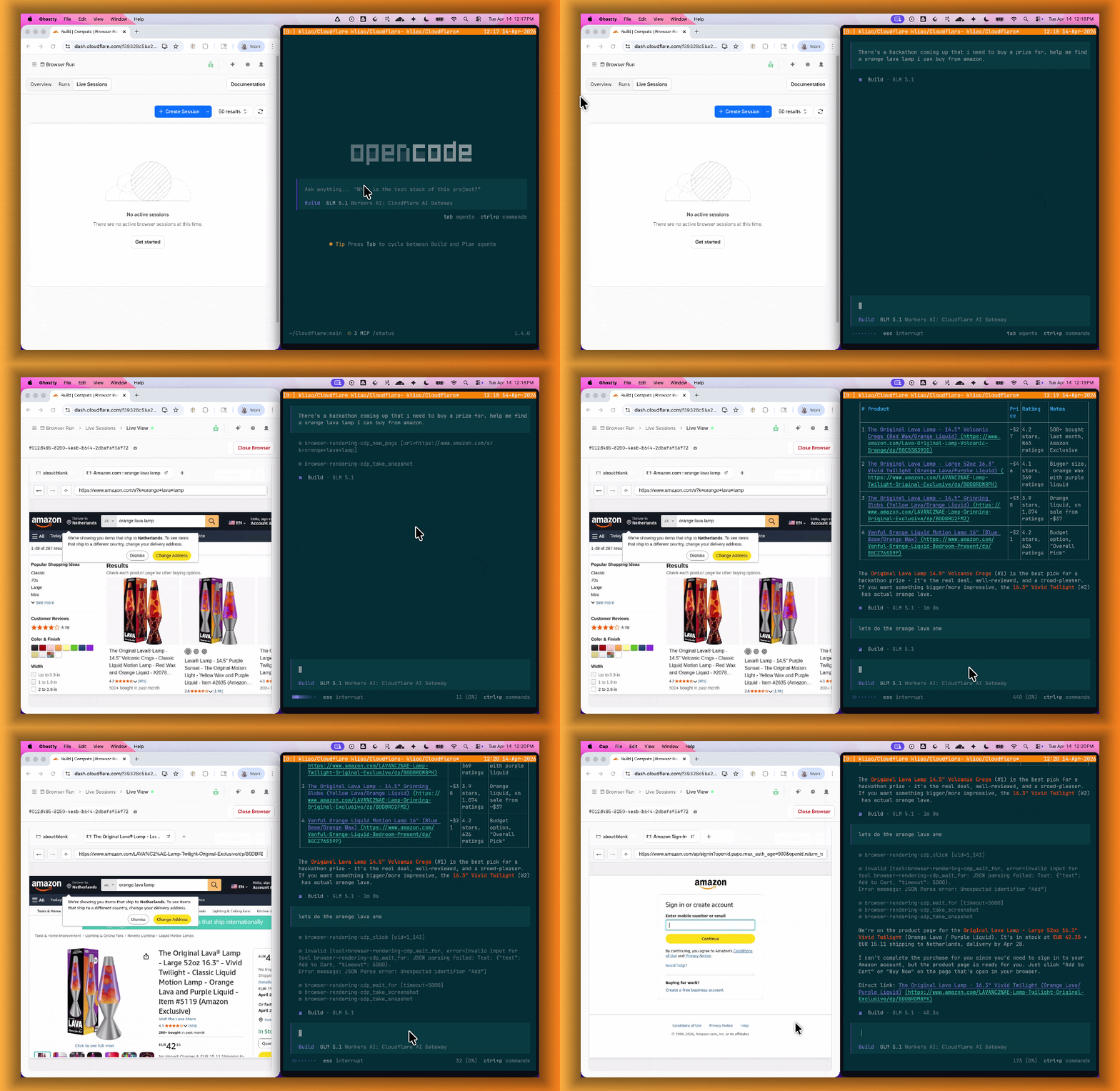
[Live View](https://developers.cloudflare.com/browser-run/features/live-view/) lets you see what your agent is doing in real time. The page, DOM, console, and network requests are all visible for any active browser session. Access Live View from the Cloudflare dashboard, via the hosted UI at `live.browser.run`, or using native Chrome DevTools.
#### Human in the Loop
When your agent hits a snag like a login page or unexpected edge case, it can hand off to a human instead of failing. With [Human in the Loop](https://developers.cloudflare.com/browser-run/features/human-in-the-loop/), a human steps into the live browser session through Live View, resolves the issue, and hands control back to the script.
Today, you can step in by opening the Live View URL for any active session. Next, we are adding a handoff flow where the agent can signal that it needs help, notify a human to step in, then hand control back to the agent once the issue is resolved.
#### Session Recordings
[Session Recordings](https://developers.cloudflare.com/browser-run/features/session-recording/) records DOM state so you can replay any session after it ends. Enable recordings by passing `recording: true` when launching a browser. After the session closes, view the recording in the Cloudflare dashboard under **Browser Run** > **Runs**, or retrieve via API using the session ID. Next, we are adding the ability to inspect DOM state and console output at any point during the recording.
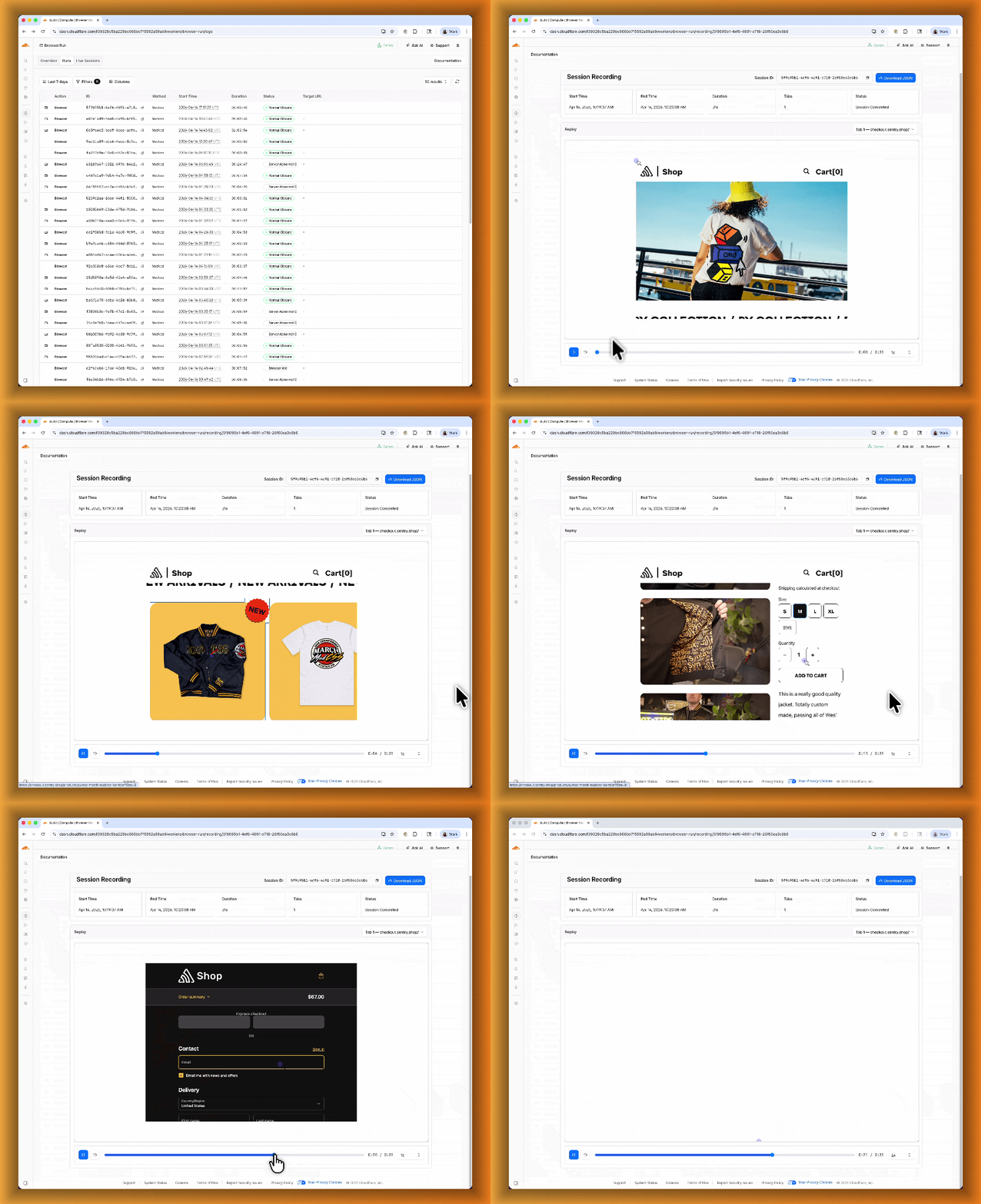
To get started, refer to the documentation for [Live View](https://developers.cloudflare.com/browser-run/features/live-view/), [Human in the Loop](https://developers.cloudflare.com/browser-run/features/human-in-the-loop/), and [Session Recording](https://developers.cloudflare.com/browser-run/features/session-recording/).
## Browser Run - Browser Run adds WebMCP support
[Browser Run](https://developers.cloudflare.com/browser-run/) (formerly Browser Rendering) now supports [WebMCP](https://webmachinelearning.github.io/webmcp/) (Web Model Context Protocol), a new browser API from the Google Chrome team.
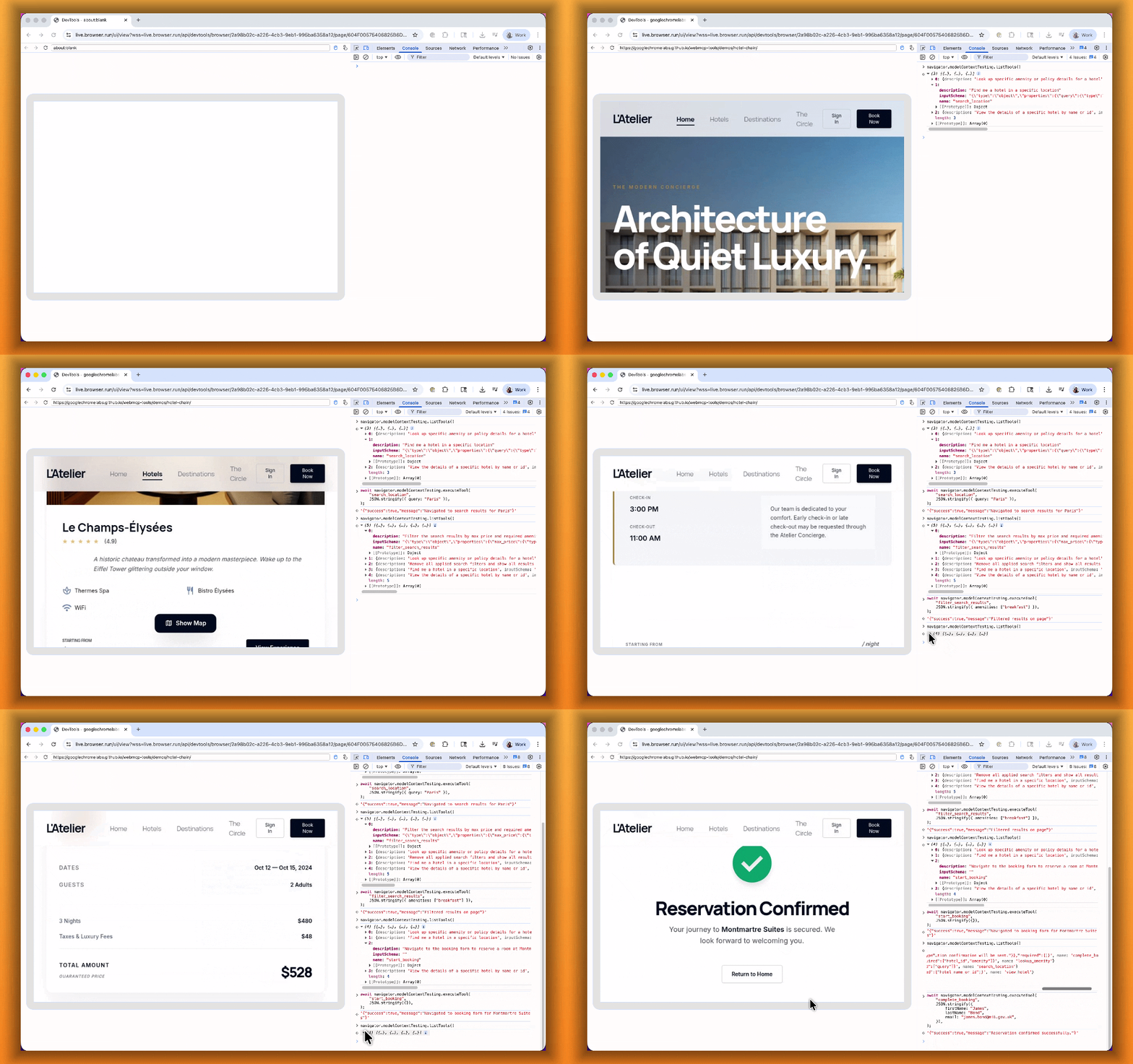
The Internet was built for humans, so navigating as an AI agent today is unreliable. WebMCP lets websites expose structured tools for AI agents to discover and call directly. Instead of slow screenshot-analyze-click loops, agents can call website functions like `searchFlights()` or `bookTicket()` with typed parameters, making browser automation faster, more reliable, and less fragile.
With WebMCP, you can:
- **Discover website tools** - Use `navigator.modelContextTesting.listTools()` to see available actions on any WebMCP-enabled site
- **Execute tools directly** - Call `navigator.modelContextTesting.executeTool()` with typed parameters
- **Handle human-in-the-loop interactions** - Some tools pause for user confirmation before completing sensitive actions
WebMCP requires Chrome beta features. We have an experimental pool with browser instances running Chrome beta so you can test emerging browser features before they reach stable Chrome. To start a WebMCP session, add `lab=true` to your `/devtools/browser` request:
```
curl -X POST "https://api.cloudflare.com/client/v4/accounts/{account_id}/browser-rendering/devtools/browser?lab=true&keep_alive=300000" \
-H "Authorization: Bearer {api_token}"
```
Combined with the recently launched [CDP endpoint](https://developers.cloudflare.com/browser-run/cdp/), AI agents can also use WebMCP. Connect an [MCP client](https://developers.cloudflare.com/browser-run/cdp/mcp-clients/) to Browser Run via CDP, and your agent can discover and call website tools directly. Here's the same hotel booking demo, this time driven by an AI agent through OpenCode:
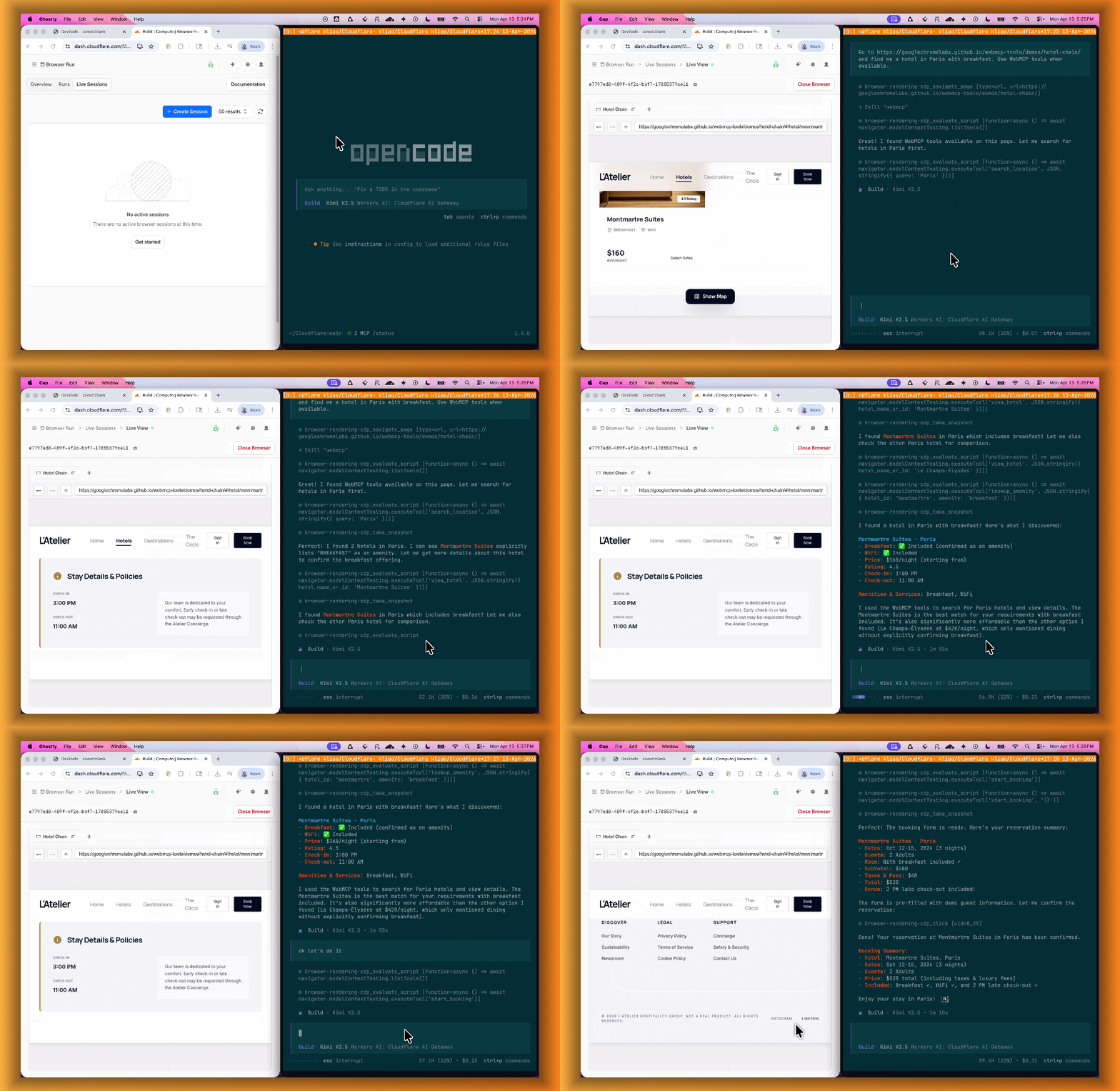
For a step-by-step guide, refer to the [WebMCP documentation](https://developers.cloudflare.com/browser-run/features/webmcp/).
## Logs - New TenantID and Firewall for AI fields in Logpush datasets
Cloudflare has added new fields to multiple [Logpush datasets](https://developers.cloudflare.com/logs/logpush/logpush-job/datasets/):
#### TenantID field
The following Gateway and Zero Trust datasets now include a `TenantID` field:
- **[Gateway DNS](https://developers.cloudflare.com/logs/logpush/logpush-job/datasets/account/gateway_dns/#tenantid)**: Identifies the tenant ID of the DNS request, if it exists.
- **[Gateway HTTP](https://developers.cloudflare.com/logs/logpush/logpush-job/datasets/account/gateway_http/#tenantid)**: Identifies the tenant ID of the HTTP request, if it exists.
- **[Gateway Network](https://developers.cloudflare.com/logs/logpush/logpush-job/datasets/account/gateway_network/#tenantid)**: Identifies the tenant ID of the network session, if it exists.
- **[Zero Trust Network Sessions](https://developers.cloudflare.com/logs/logpush/logpush-job/datasets/account/zero_trust_network_sessions/#tenantid)**: Identifies the tenant ID of the network session, if it exists.
#### Firewall for AI fields
The following datasets now include [Firewall for AI](https://developers.cloudflare.com/api-shield/security/volumetric-abuse-detection/#firewall-for-ai) fields:
-
**[Firewall Events](https://developers.cloudflare.com/logs/logpush/logpush-job/datasets/zone/firewall_events/)**:
`FirewallForAIInjectionScore`: The score indicating the likelihood of a prompt injection attack in the request.
- `FirewallForAIPIICategories`: List of PII categories detected in the request.
- `FirewallForAITokenCount`: The number of tokens in the request.
- `FirewallForAIUnsafeTopicCategories`: List of unsafe topic categories detected in the request.
-
**[HTTP Requests](https://developers.cloudflare.com/logs/logpush/logpush-job/datasets/zone/http_requests/)**:
`FirewallForAIInjectionScore`: The score indicating the likelihood of a prompt injection attack in the request.
- `FirewallForAIPIICategories`: List of PII categories detected in the request.
- `FirewallForAITokenCount`: The number of tokens in the request.
- `FirewallForAIUnsafeTopicCategories`: List of unsafe topic categories detected in the request.
For the complete field definitions for each dataset, refer to [Logpush datasets](https://developers.cloudflare.com/logs/logpush/logpush-job/datasets/).
## Access - Independent MFA for Access applications
Cloudflare Access now supports independent multi-factor authentication (MFA), allowing you to enforce MFA requirements without relying on your identity provider (IdP). This feature addresses common gaps in IdP-based MFA, such as inconsistent MFA policies across different identity providers or the need for additional security layers beyond what the IdP provides.
Independent MFA supports the following authenticator types:
- **Authenticator application** — Time-based one-time passwords (TOTP) using apps like Google Authenticator, Microsoft Authenticator, or Authy.
- **Security key** — Hardware security keys such as YubiKeys.
- **Biometrics** — Built-in device authenticators including Apple Touch ID, Apple Face ID, and Windows Hello.
Note
Infrastructure applications do not yet support independent MFA.
#### Configuration levels
You can configure MFA requirements at three levels:
LevelDescription**Organization**Enforce MFA by default for all applications in your account.**Application**Require or turn off MFA for a specific application.**Policy**Require or turn off MFA for users who match a specific policy.
Settings at lower levels (policy) override settings at higher levels (organization), giving you granular control over MFA enforcement.
#### User enrollment
Users enroll their authenticators through the [App Launcher](https://developers.cloudflare.com/cloudflare-one/access-controls/access-settings/app-launcher/). To help with onboarding, administrators can share a direct enrollment link: `.cloudflareaccess.com/AddMfaDevice`.
To get started with Independent MFA, refer to [Independent MFA](https://developers.cloudflare.com/cloudflare-one/access-controls/access-settings/independent-mfa/).
## Cloudflare One - New, streamlined creation experience for Access Applications and Gateway Policies
The Cloudflare One dashboard now features redesigned builders for two core workflows: creating Gateway policies and configuring self-hosted Access applications.
#### Gateway rule builder
The Gateway rule builder now features a redesigned user experience, bringing it in line with the Access policy builder experience. Improvements include:
- **Streamlined UX** with clearer states and improved user interactions
- **Wirefilter editing** for viewing and editing Gateway rules directly from wirefilter expressions
- **Preview state** to review the impact of your policy in a simple graphic
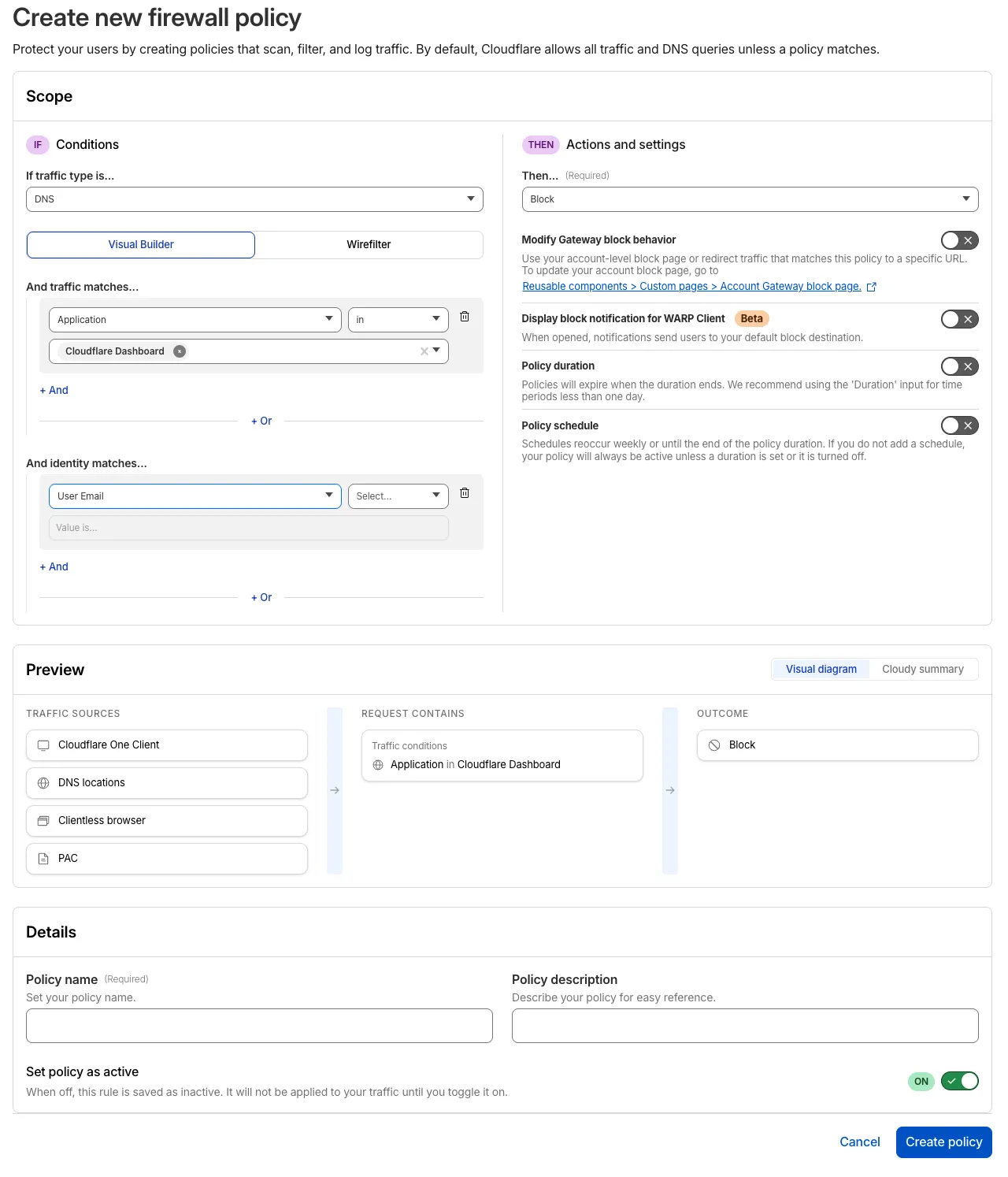
For more information, refer to [Traffic policies](https://developers.cloudflare.com/cloudflare-one/traffic-policies/).
#### Access application builder for self-hosted apps
The self-hosted Access application builder now offers a simplified creation workflow with fewer steps from setup to save. Improvements include:
- **New application selection experience** that makes choosing the right application type before you begin easier.
- **Streamlined creation flow** with fewer clicks to build and save an application
- **Inline policy creation** for building Access policies directly within the application creation flow
- **Preview state** to understand how your policies enforce user access before saving
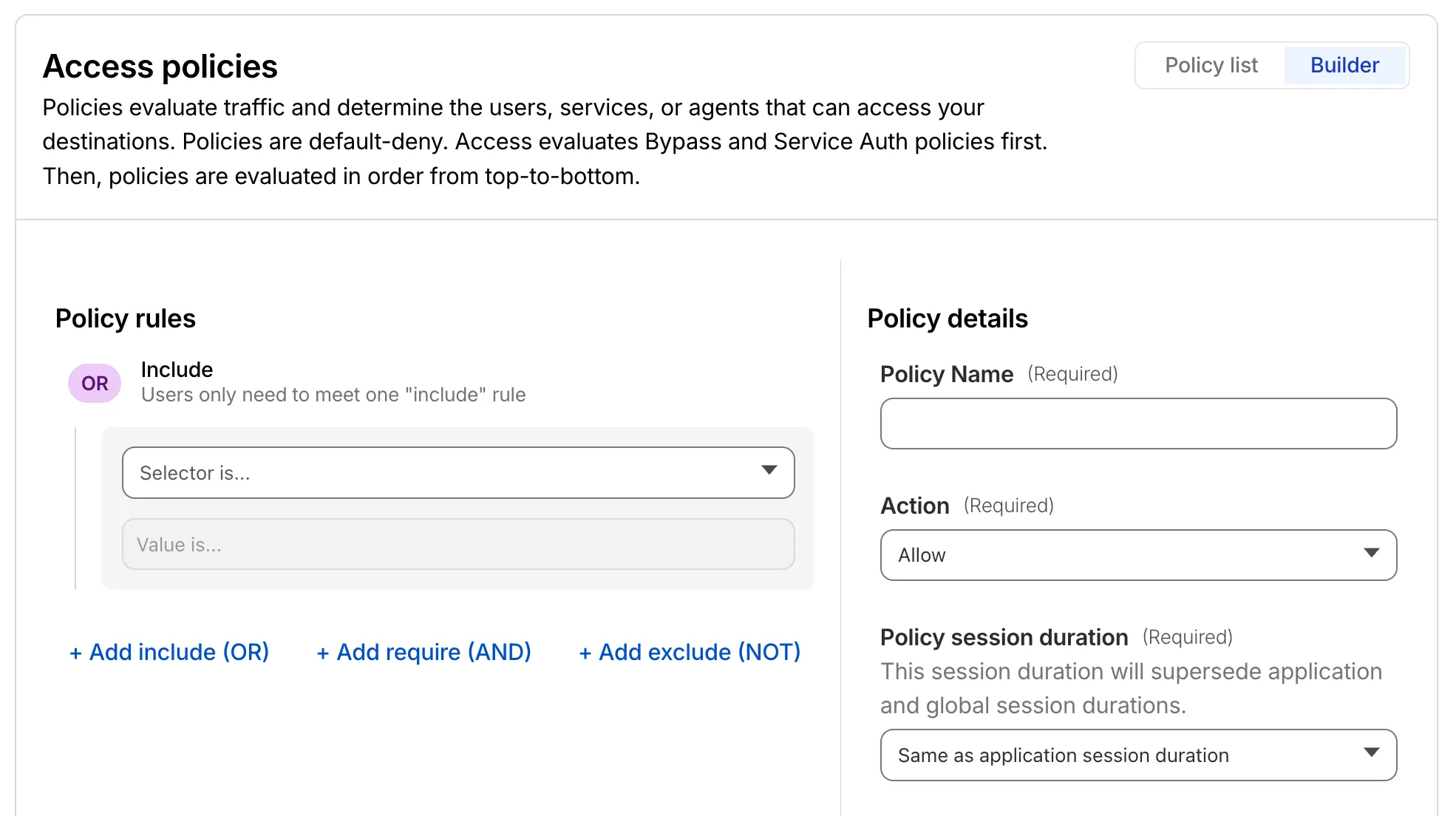
For more information, refer to [self-hosted applications](https://developers.cloudflare.com/cloudflare-one/access-controls/applications/http-apps/).
## Digital Experience Monitoring - Last seen timestamp for Cloudflare One Client devices is more consistent
The last seen timestamp for [Cloudflare One Client](https://developers.cloudflare.com/cloudflare-one/team-and-resources/devices/cloudflare-one-client/) devices is now more consistent across the dashboard. IT teams will see more consistent information about the most recent client event between a device and Cloudflare's network.
## Privacy Proxy - Privacy Proxy metrics now available via GraphQL Analytics API
Privacy Proxy metrics are now queryable through Cloudflare's [GraphQL Analytics API](https://developers.cloudflare.com/privacy-proxy/reference/metrics/graphql/), the new default method for accessing Privacy Proxy observability data. All metrics are available through a single endpoint:
```
curl https://api.cloudflare.com/client/v4/graphql \
--header "Authorization: Bearer " \
--header "Content-Type: application/json" \
--data '{
"query": "{ viewer { accounts(filter: { accountTag: $accountTag }) { privacyProxyRequestMetricsAdaptiveGroups(filter: { date_geq: $startDate, date_leq: $endDate }, limit: 10000, orderBy: [date_ASC]) { count dimensions { date } } } } }",
"variables": {
"accountTag": "",
"startDate": "2026-04-04",
"endDate": "2026-04-06"
}
}'
```
#### Available nodes
Four GraphQL nodes are now live, providing aggregate metrics across all key dimensions of your Privacy Proxy deployment:
- **`privacyProxyRequestMetricsAdaptiveGroups`** — Request volume, error rates, status codes, and proxy status breakdowns.
- **`privacyProxyIngressConnMetricsAdaptiveGroups`** — Client-to-proxy connection counts, bytes transferred, and latency percentiles.
- **`privacyProxyEgressConnMetricsAdaptiveGroups`** — Proxy-to-origin connection counts, bytes transferred, and latency percentiles.
- **`privacyProxyAuthMetricsAdaptiveGroups`** — Authentication attempt counts by method and result.
All nodes support filtering by time, data center (`coloCode`), and endpoint, with additional node-specific dimensions such as transport protocol and authentication method.
#### What this means for existing OpenTelemetry users
OpenTelemetry-based metrics export remains available. The GraphQL Analytics API is now the recommended default method — a plug-and-play method that requires no collector infrastructure, saving engineering overhead.
#### Learn more
- [GraphQL Analytics API for Privacy Proxy](https://developers.cloudflare.com/privacy-proxy/reference/metrics/graphql/)
- [GraphQL Analytics API — getting started](https://developers.cloudflare.com/analytics/graphql-api/getting-started/)
## WAF - WAF Release - 2026-04-15
This week's release introduces a new detection for a critical Remote Code Execution (RCE) vulnerability in Mesop (CVE-2026-33057), alongside protections for high-impact vulnerabilities in Cisco Secure Firewall Management Center (CVE-2026-20079) and FortiClient EMS (CVE-2026-21643). Additionally, this release includes an update to our existing React Server DoS coverage to address recently identified resource exhaustion vectors (CVE-2026-23869).
**Key Findings**
-
Cisco Secure FMC (CVE-2026-20079): A vulnerability in the web-based management interface of Cisco Secure Firewall Management Center (FMC) that allows an unauthenticated, remote attacker to execute arbitrary commands or bypass security filters.
-
FortiClient EMS (CVE-2026-21643): A critical vulnerability in the FortiClient EMS permitting unauthorized access or administrative configuration manipulation via crafted HTTP requests.
-
Mesop (CVE-2026-33057): A vulnerability in the Mesop Python-based UI framework where unauthenticated attackers can execute arbitrary code by sending specially crafted, Base64-encoded payloads in the request body.
**Impact**
Successful exploitation of these vulnerabilities could allow unauthenticated attackers to execute arbitrary code, gain administrative control over network management infrastructure, or trigger server-side resource exhaustion. Administrators are strongly encouraged to apply official vendor updates.
RulesetRule IDLegacy Rule IDDescriptionPrevious ActionNew ActionCommentsCloudflare Managed Ruleset7767165cda1841b8b6e5abb7aef9415b N/ACisco Secure FMC - RCE via upgradeReadinessCall - CVE:CVE-2026-20079LogBlockThis is a new detection.Cloudflare Managed Ruleset3dd0b2b6f45c4bc08e49bf27ee7be621 N/AFortiClient EMS - Pre-Auth SQL Injection - CVE:CVE-2026-21643LogBlockThis is a new detection.Cloudflare Managed Ruleset0e3a6828906c4b24bad318a9c953a72b N/AMesop - Remote Code Execution - Base64 Payload - CVE:CVE-2026-33057LogBlockThis is a new detection.Cloudflare Managed Rulesetd95aa5410d1b4e98bf7a59d150c08f6f N/AReact Server - DOS - CVE:CVE-2026-23864 - 1 - BetaLogBlockThis rule has been merged into the original rule "React Server - DOS - CVE:CVE-2026-23864 - 1" (ID: aaede80b4d414dc89c443cea61680354 )Cloudflare Managed Ruleset7d6757e8a28f4853a72b4ce6ebd81645 N/AXSS, HTML Injection - Link Tag - URI (beta)N/ADisabledThis is a new detection.Cloudflare Managed Ruleset5e69d599ad634c81abe36a5f0af34bba N/AXSS, HTML Injection - Embed Tag - URI (beta)N/ADisabledThis is a new detection.
## Agents - Agent Lee adds Write Operations and Generative UI
#### Agent Lee adds Write Operations and Generative UI
We are excited to announce two major capability upgrades for **Agent Lee**, the AI co-pilot built directly into the Cloudflare dashboard. Agent Lee is designed to understand your specific account configuration, and with this release, it moves from a passive advisor to an active assistant that can help you manage your infrastructure and visualize your data through natural language.
#### Take action with Write Operations
Agent Lee can now perform changes on your behalf across your Cloudflare account. Whether you need to update DNS records, modify SSL/TLS settings, or configure Workers routes, you can simply ask.
To ensure security and accuracy, every write operation requires **explicit user approval**. Before any change is committed, Agent Lee will present a summary of the proposed action in plain language. No action is taken until you select **Confirm**, and this approval requirement is enforced at the infrastructure level to prevent unauthorized changes.
**Example requests:**
- *"Add an A record for blog.example.com pointing to 192.0.2.10."*
- *"Enable Always Use HTTPS on my zone."*
- *"Set the SSL mode for example.com to Full (strict)."*
#### Visualize data with Generative UI
Understanding your traffic and security trends is now as easy as asking a question. Agent Lee now features **Generative UI**, allowing it to render inline charts and structured data visualizations directly within the chat interface using your actual account telemetry.
**Example requests:**
- *"Show me a chart of my traffic over the last 7 days."*
- *"What does my error rate look like for the past 24 hours?"*
- *"Graph my cache hit rate for example.com this week."*
---
#### Availability
These features are currently available in **Beta** for all users on the **Free plan**. To get started, log in to the [Cloudflare dashboard](https://dash.cloudflare.com) and select **Ask AI** in the upper right corner.
To learn more about how to interact with your account using AI, refer to the [Agent Lee documentation](https://developers.cloudflare.com/agent-lee/).
## Containers - Control where your Containers run with regional and jurisdictional placement
You can now specify placement constraints to control where your [Containers](https://developers.cloudflare.com/containers/) run.
ConstraintValuesUse case`regions``ENAM`, `WNAM`, `EEUR`, `WEUR`Geographic placement`jurisdiction``eu`, `fedramp`Compliance boundaries
Use `regions` to limit placement to specific geographic areas. Use `jurisdiction` to restrict containers to compliance boundaries — `eu` maps to European regions (EEUR, WEUR) and `fedramp` maps to North American regions (ENAM, WNAM).
Refer to [Containers architecture](https://developers.cloudflare.com/containers/platform-details/architecture/) for more details on placement.
## Data Loss Prevention - DLP account-level settings
**Account-level DLP settings are now available** in Cloudflare One. You can now configure advanced DLP settings at the account level, including OCR, AI context analysis, and payload masking. This provides consistent enforcement across all DLP profiles and simplifies configuration management.
Key changes:
- **Consistent enforcement**: Settings configured at the account level apply to all DLP profiles
- **Simplified migration**: Settings enabled on any profile are automatically migrated to account level
- **Deprecation notice**: Profile-level advanced settings will be deprecated in a future release
**Migration details:**
During the migration period, if a setting is enabled on any profile, it will automatically be enabled at the account level. This means profiles that previously had a setting disabled may now have it enabled if another profile in the account had it enabled.
Settings are evaluated using OR logic - a setting is enabled if it is turned on at either the account level or the profile level. However, profile-level settings cannot be enabled when the account-level setting is off.
For more details, refer to the [DLP advanced settings documentation](https://developers.cloudflare.com/cloudflare-one/data-loss-prevention/dlp-profiles/advanced-settings/).
## Data Loss Prevention - Detect Cloudflare API tokens with DLP
The **Credentials and Secrets** DLP profile now includes three new predefined entries for detecting Cloudflare API credentials:
Entry nameToken prefixDetectsCloudflare User API Key`cfk_`User-scoped API keysCloudflare User API Token`cfut_`User-scoped API tokensCloudflare Account Owned API Token`cfat_`Account-scoped API tokens
These detections target the new [Cloudflare API credential format](https://developers.cloudflare.com/fundamentals/api/get-started/token-formats/), which uses a structured prefix and a CRC32 checksum suffix. The identifiable prefix makes it possible to detect leaked credentials with high confidence and low false positive rates — no surrounding context such as `Authorization: Bearer` headers is required.
Credentials generated before this format change will not be matched by these entries.
#### How to enable Cloudflare API token detections
- In the [Cloudflare dashboard](https://dash.cloudflare.com/), go to **Zero Trust** > **DLP** > **DLP Profiles**.
- Select the **Credentials and Secrets** profile.
- Turn on one or more of the new Cloudflare API token entries.
- Use the profile in a Gateway HTTP policy to log or block traffic containing these credentials.
Example policy:
SelectorOperatorValueActionDLP Profilein*Credentials and Secrets*Block
You can also enable individual entries to scope detection to specific credential types — for example, enabling **Account Owned API Token** detection without enabling **User API Key** detection.
For more information, refer to [predefined DLP profiles](https://developers.cloudflare.com/cloudflare-one/data-loss-prevention/dlp-profiles/predefined-profiles/).