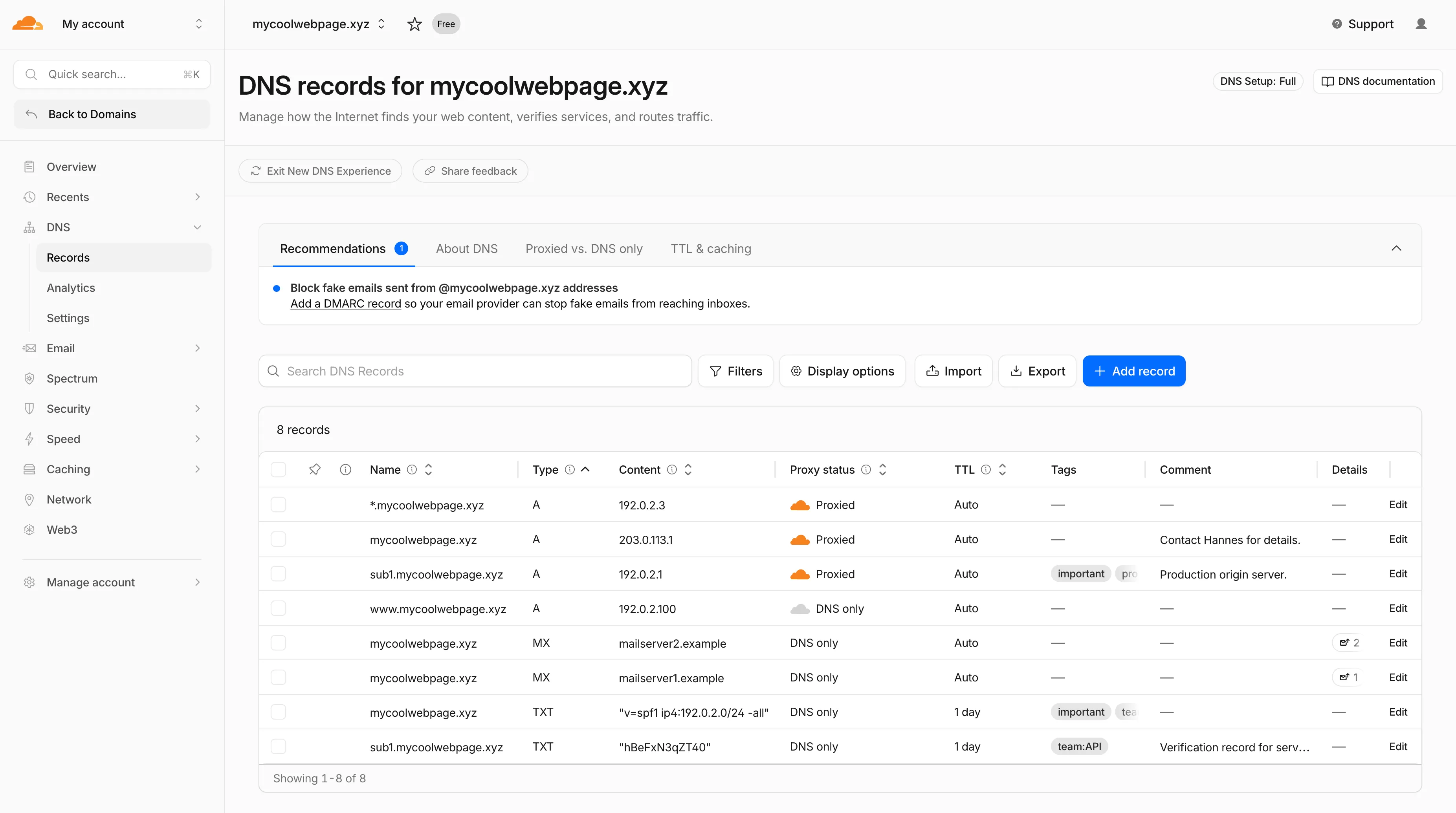

{"id":"prod_BMN6dJIvkYpD6fJhmpXrp","name":"Application Performance","slug":"application-performance","orgId":"org_fW6EY8PY8Cr42ifo1IUAm","url":null,"description":null,"category":"infrastructure","kind":"platform","avatarUrl":null,"createdAt":"2026-06-19T21:03:31.885Z","embeddedAt":"2026-06-19T21:03:34.316Z","deletedAt":null,"sources":[{"id":"src_qKL2i-lRM1l_QNMpdS1vU","slug":"cloudflare-application-performance","name":"Application Performance Changelog","type":"feed","url":"https://developers.cloudflare.com/changelog/?area=application-performance","metadata":"{\"feedUrl\":\"https://developers.cloudflare.com/changelog/rss/application-performance.xml\",\"feedType\":\"unknown\",\"feedDiscoveredAt\":\"2026-06-19T21:04:40.976Z\",\"noFeedFound\":false,\"feedContentDepth\":\"full\",\"feedEtag\":\"\\\"8ca77cd51578b665eeb0e50a54b360ae\\\"\",\"feedContentLength\":\"141868\",\"enrichment\":{\"consecutiveFailures\":1}}","kind":null}],"tags":[],"aliases":[],"notice":null,"releases":[{"id":"rel_yN7vOfAKOB4834zYWl_yk","version":null,"type":"feature","title":"Speed - Cloudflare Fonts error handling and security improvements","summary":"Cloudflare Fonts now forwards `/cf-fonts` requests to your origin server when it encounters invalid paths or unexpected runtime errors, instead of ret...","titleGenerated":null,"titleShort":null,"content":"Cloudflare Fonts now forwards `/cf-fonts` requests to your origin server when it encounters invalid paths or unexpected runtime errors, instead of returning 4xx or 5xx responses directly. This update also adds additional input validation to enhance security.","publishedAt":"2026-06-18T00:00:00.000Z","url":"https://developers.cloudflare.com/changelog/post/2026-06-18-cloudflare-fonts-error-handling-security/","media":[],"prerelease":false,"source":{"slug":"cloudflare-application-performance","name":"Application Performance Changelog","type":"feed"},"product":{"slug":"application-performance","name":"Application Performance"},"groupSlug":"application-performance","groupName":"Application Performance","coverageCount":0,"contentChars":258,"contentTokens":49,"composition":null},{"id":"rel_aIa5Drvz7BGK1gS1B6r7X","version":null,"type":"feature","title":"DNS - Account-level DNS records quota","summary":"Cloudflare now enforces DNS records quotas at the account level for Enterprise accounts. Instead of a per-zone limit, these accounts have a quota on t...","titleGenerated":null,"titleShort":null,"content":"Cloudflare now enforces DNS records quotas at the account level for Enterprise accounts. Instead of a per-zone limit, these accounts have a quota on the total number of records across all of their zones, letting you distribute records across your zones however you like — regardless of each zone's plan. Public and internal zones are counted separately, each with a default quota of 1,000,000 records.\n\nAccounts without an account-level quota are unaffected: existing per-zone quotas behave exactly as before.\n\nFor more details, refer to [DNS records quota](https://developers.cloudflare.com/dns/manage-dns-records/#dns-records-quota).","publishedAt":"2026-06-10T00:00:00.000Z","url":"https://developers.cloudflare.com/changelog/post/2026-06-10-account-level-record-quota/","media":[],"prerelease":false,"source":{"slug":"cloudflare-application-performance","name":"Application Performance Changelog","type":"feed"},"product":{"slug":"application-performance","name":"Application Performance"},"groupSlug":"application-performance","groupName":"Application Performance","coverageCount":0,"contentChars":635,"contentTokens":128,"composition":null},{"id":"rel_KyGZsTgPv9SLWKE9rHfYc","version":null,"type":"feature","title":"Cache - BYPASS status now returned for uncacheable responses","summary":"Cloudflare now returns a `BYPASS` [cache status](https://developers.cloudflare.com/cache/concepts/cache-responses/) whenever a response is not cacheab...","titleGenerated":null,"titleShort":null,"content":"Cloudflare now returns a `BYPASS` [cache status](https://developers.cloudflare.com/cache/concepts/cache-responses/) whenever a response is not cacheable, instead of the previous mix of `BYPASS` and `MISS` that depended on why Cloudflare chose not to cache the response.\n\nThere are multiple reasons Cloudflare may refuse to cache a response — for example, the response exceeds the [maximum cacheable file size](https://developers.cloudflare.com/cache/concepts/default-cache-behavior/#cacheable-size-limits) for your plan, the origin sends `Cache-Control: no-cache`, `private`, or `max-age=0`, the response includes a `Set-Cookie` header, or the request includes an `Authorization` header.\n\nPreviously, only some of these conditions returned `BYPASS`. Others — such as responses exceeding the maximum cacheable file size — returned `MISS` on every request, regardless of whether [Origin Cache Control](https://developers.cloudflare.com/cache/concepts/cache-control/#origin-cache-control-behavior) was on or off. Because the response could never be cached, every subsequent request also returned `MISS`, which looked indistinguishable from a broken cache and made it hard to tell whether Cloudflare was trying and failing to cache the asset or had deliberately chosen not to cache it.\n\n`BYPASS` now consistently signals that Cloudflare refused to cache the response, regardless of the reason. `MISS` is reserved for cacheable responses that simply were not in the local cache at request time.\n\n#### What to expect in your analytics\n\nAfter this change rolls out, you should see:\n\n- **MISS rate decreases**: Uncacheable responses no longer count as cache misses.\n- **BYPASS rate increases**: These same responses are now reported as bypasses.\n- **Cache hit ratio increases**: Hit ratio calculations no longer include uncacheable traffic that could never have been cached, giving you a more accurate view of cache effectiveness.\n\nYour total request volume and origin traffic are unchanged — only the cache status label is different.\n\n#### Browser cache TTL behavior is preserved\n\nThe cache status label is the only thing changing — browser cache TTL handling for any given response is identical to what it was before:\n\n- Responses that historically returned `MISS` because Cloudflare refused to cache them (for example, responses over the maximum cacheable file size) now return `BYPASS`, but continue to have browser cache TTL applied — exactly as they did when they were labeled `MISS`.\n- Responses that historically returned `BYPASS` and skipped browser cache TTL continue to skip browser cache TTL.\n\nIn both cases, the decision to apply browser cache TTL depends on the underlying reason Cloudflare did not cache the response, not on the new `BYPASS` label.","publishedAt":"2026-05-26T00:00:00.000Z","url":"https://developers.cloudflare.com/changelog/post/2026-05-26-bypass-status-for-uncacheable-responses/","media":[],"prerelease":false,"source":{"slug":"cloudflare-application-performance","name":"Application Performance Changelog","type":"feed"},"product":{"slug":"application-performance","name":"Application Performance"},"groupSlug":"application-performance","groupName":"Application Performance","coverageCount":0,"contentChars":2755,"contentTokens":564,"composition":null},{"id":"rel_qcj94iG6ONk9bQz1ez0ph","version":null,"type":"feature","title":"DNS - New DNS records UX is rolling out","summary":"Starting today, everyone can opt in to a refreshed DNS records page in the Cloudflare dashboard. Over the coming weeks, the new experience will become...","titleGenerated":null,"titleShort":null,"content":"Starting today, everyone can opt in to a refreshed DNS records page in the Cloudflare dashboard. Over the coming weeks, the new experience will become the default for Free plan users first, followed by paid plans.\n\n![New DNS records UX](https://developers.cloudflare.com/_astro/new-dns-ux.Bfs_yXPa_VJoah.webp)\n\n#### What is new\n\n- **Better table experience**: resizable and hideable columns, row pinning, advanced filters with logical operators (AND/OR), configurable pagination, and expanded input fields so long values are no longer cut off.\n- **First-class mobile experience**: responsive layout with a touch-friendly, card-based UI and compact controls for small screens.\n- **DNS quick reference**: bite-sized explainers for DNS, proxy status, and TTL, available directly in the product to help users configure records without leaving the page.\n- **Modern frontend**: a refactor onto Cloudflare's new UI framework that improves performance and lays the foundation for future improvements.\n\n![New DNS records UX](https://developers.cloudflare.com/_astro/new-dns-ux.DV6gCbme_2cImvu.webp)\n\n#### Rollout plan\n\nDates are subject to change based on feedback received during the rollout.\n\n- **20 May - 05 June**: ramped rollout to Free, then Pro and Business plans.\n- **08 June - 03 July**: ramped rollout to Enterprise plans.\n\n#### Share your feedback\n\nOnce the new experience is turned on for your account, look for the feedback link at the top of the DNS records page in the Cloudflare dashboard and let us know what you think. Your input helps us prioritize the next round of improvements.","publishedAt":"2026-05-20T00:00:00.000Z","url":"https://developers.cloudflare.com/changelog/post/2026-05-20-new-dns-records-ux/","media":[{"type":"image","url":"https://developers.cloudflare.com/_astro/new-dns-ux.Bfs_yXPa_VJoah.webp","alt":"New DNS records UX","r2Key":"releases/dfdacac2222145c8763b19e8ba45109bf020c11192dea75183670fdc0ff4c37e.webp","r2Url":"https://media.releases.sh/releases/dfdacac2222145c8763b19e8ba45109bf020c11192dea75183670fdc0ff4c37e.webp"},{"type":"image","url":"https://developers.cloudflare.com/_astro/new-dns-ux.DV6gCbme_2cImvu.webp","alt":"New DNS records UX","r2Key":"releases/353d0e9e378003cbf6259e97ebf83c03fe9675099f0ce7183fd447d54a62a159.webp","r2Url":"https://media.releases.sh/releases/353d0e9e378003cbf6259e97ebf83c03fe9675099f0ce7183fd447d54a62a159.webp"}],"prerelease":false,"source":{"slug":"cloudflare-application-performance","name":"Application Performance Changelog","type":"feed"},"product":{"slug":"application-performance","name":"Application Performance"},"groupSlug":"application-performance","groupName":"Application Performance","coverageCount":0,"contentChars":1590,"contentTokens":340,"composition":null},{"id":"rel_gnikx8zgH-CMorwJpTw3C","version":null,"type":"feature","title":"Cloudflare Web Analytics - /cdn-cgi/rum endpoint now returns 405 for non-POST requests","summary":"The `/cdn-cgi/rum` beacon endpoint now returns `405 Method Not Allowed` for non-POST requests instead of `404 Not Found`. The response includes an `Al...","titleGenerated":null,"titleShort":null,"content":"The `/cdn-cgi/rum` beacon endpoint now returns `405 Method Not Allowed` for non-POST requests instead of `404 Not Found`. The response includes an `Allow: POST, OPTIONS` header per [RFC 9110 §15.5.6](https://www.rfc-editor.org/rfc/rfc9110#section-15.5.6).\n\nPreviously, sending a `GET` or other non-POST request to this endpoint returned a `404`, which was misleading because it suggested the endpoint did not exist. The new `405` response clearly indicates that the endpoint exists but only accepts `POST` requests.\n\nThe Web Analytics beacon (`beacon.min.js`) already uses `POST` for all metric submissions, so this change does not affect normal beacon operation. `OPTIONS` requests for CORS preflight continue to work as before.\n\nFor more information, refer to the [Web Analytics FAQ](https://developers.cloudflare.com/web-analytics/faq/#why-am-i-getting-a-405-method-not-allowed-error-from-cdn-cgirum).","publishedAt":"2026-05-13T00:00:00.000Z","url":"https://developers.cloudflare.com/changelog/post/2026-05-13-rum-405-method-not-allowed/","media":[],"prerelease":false,"source":{"slug":"cloudflare-application-performance","name":"Application Performance Changelog","type":"feed"},"product":{"slug":"application-performance","name":"Application Performance"},"groupSlug":"application-performance","groupName":"Application Performance","coverageCount":0,"contentChars":904,"contentTokens":215,"composition":null},{"id":"rel_DDAazrdlQKgUOjXtIUMjB","version":null,"type":"feature","title":"Cache - Pingora now powers Cloudflare's cache","summary":"Cloudflare's cache now runs on a new proxy built on [Pingora](https://github.com/cloudflare/pingora), the Rust-based framework that already serves a s...","titleGenerated":null,"titleShort":null,"content":"Cloudflare's cache now runs on a new proxy built on [Pingora](https://github.com/cloudflare/pingora), the Rust-based framework that already serves a significant portion of Cloudflare's network traffic. The new proxy is faster, more memory-safe, and designed to evolve our cache architecture. It delivers immediate performance improvements and enables new caching capabilities.\n\n#### What this brings\n\n- **Lower latency**: The new proxy reduces per-request overhead through improved connection reuse.\n- **Reduced cache MISSes**: Enhanced cache retention improves origin offload.\n- **Better RFC compliance**: Caching behavior more closely follows HTTP caching standards.\n- **Foundation for future features**: The new architecture enables upcoming improvements to cache functionality and efficiency.\n\n#### New features\n\n- **Asynchronous `stale-while-revalidate`**: Every request returns stale content immediately while revalidation happens in the background, instead of the first request after expiry blocking on the origin. Refer to the [asynchronous `stale-while-revalidate` changelog](https://developers.cloudflare.com/changelog/post/2026-02-26-async-stale-while-revalidate/) for details.\n- **Unbuffered bypass by default**: Responses that bypass cache are streamed directly to the client without buffering, reducing time-to-first-byte for uncacheable content.\n\n#### Behavioral changes\n\nThe new architecture introduces the following behavioral changes to improve RFC compliance and correctness:\n\n- **`Vary: *` results in cache bypass**: According to [RFC 9110 Section 12.5.5](https://httpwg.org/specs/rfc9110.html#field.vary), a `Vary` header value of `*` indicates the response varies on factors beyond request headers and must not be served from cache. Cloudflare now bypasses cache for these responses instead of storing them.\n- **`Set-Cookie` stripped on MISS and EXPIRED**: For cacheable assets, `Set-Cookie` is now stripped on MISS and EXPIRED responses, not only on HITs.\n- **Floating-point TTL values**: Floating-point time-to-live values (for example, `max-age=1.5`) are rounded down to the nearest integer instead of being rejected as invalid.\n\n#### What's next\n\nA deeper look at the new cache proxy is coming soon to the [Cloudflare blog](https://blog.cloudflare.com/). For background on the underlying framework, read:\n\n- [Open sourcing Pingora: our Rust framework for building programmable network services](https://blog.cloudflare.com/pingora-open-source/)\n- [How we built Pingora, the proxy that connects Cloudflare to the Internet](https://blog.cloudflare.com/how-we-built-pingora-the-proxy-that-connects-cloudflare-to-the-internet/)","publishedAt":"2026-05-04T00:00:00.000Z","url":"https://developers.cloudflare.com/changelog/post/2026-05-04-pingora-powers-cache/","media":[],"prerelease":false,"source":{"slug":"cloudflare-application-performance","name":"Application Performance Changelog","type":"feed"},"product":{"slug":"application-performance","name":"Application Performance"},"groupSlug":"application-performance","groupName":"Application Performance","coverageCount":0,"contentChars":2649,"contentTokens":559,"composition":null},{"id":"rel_LoTAtXHnByYvQUZo11BfQ","version":null,"type":"feature","title":"Speed - Shared dictionaries passthrough now in open beta","summary":"[Shared dictionaries](https://developers.cloudflare.com/speed/optimization/content/shared-dictionaries/) ([RFC 9842](https://www.rfc-editor.org/rfc/rf...","titleGenerated":null,"titleShort":null,"content":"[Shared dictionaries](https://developers.cloudflare.com/speed/optimization/content/shared-dictionaries/) ([RFC 9842](https://www.rfc-editor.org/rfc/rfc9842.html)) let an origin compress a response against a previous version of the same resource that the browser already has cached, so only the difference between versions travels over the wire. Shared dictionaries passthrough is now in open beta on all plans.\n\n#### What changed\n\nIn passthrough mode, Cloudflare:\n\n- Forwards the `Use-As-Dictionary` and `Available-Dictionary` headers between client and origin without modification.\n- Treats `dcb` (Dictionary-Compressed Brotli) and `dcz` (Dictionary-Compressed Zstandard) as valid `Content-Encoding` values end to end, without recompressing them.\n- Extends the cache key to vary on `Available-Dictionary` and `Accept-Encoding` so each delta-compressed variant is cached correctly.\n\nYour origin manages the dictionary lifecycle: deciding which assets are dictionaries, attaching `Use-As-Dictionary` headers, and producing deltas in response to `Available-Dictionary` requests. Cloudflare handles the transport and the cache.\n\nIn internal testing on a 272 KB JavaScript bundle, the asset shrinks from 92.1 KB with Gzip to 2.6 KB with delta Zstandard against the previous version — a 97% reduction over standard compression — with download times improving by 81–89% versus Gzip.\n\nShared dictionaries work with browsers that advertise `dcb` or `dcz` in `Accept-Encoding`. Today, this includes Chrome 130 or later and Edge 130 or later.\n\n#### Get started\n\nTurn on passthrough for your zone with a single API call:\n\n```bash\n<div><div><span>curl</span><span> </span><span>\"https://api.cloudflare.com/client/v4/zones/</span><span>$ZONE_ID</span><span>/settings/shared_dictionary_mode\"</span><span> </span><span>\\</span></div></div><div><div><span>  </span><span>--request</span><span> </span><span>PATCH</span><span> </span><span>\\</span></div></div><div><div><span>  </span><span>--header</span><span> </span><span>\"Authorization: Bearer </span><span>$CLOUDFLARE_API_TOKEN</span><span>\"</span><span> </span><span>\\</span></div></div><div><div><span>  </span><span>--json</span><span> </span><span>'{</span></div></div><div><div><span><span>    </span></span><span>\"value\": \"passthrough\"</span></div></div><div><div><span><span>  </span></span><span>}'</span></div></div>\n```\n\nYou can also turn it on under **Speed** > **Settings** > **Content Optimization** in the [Cloudflare dashboard](https://dash.cloudflare.com/?to=/:account/:zone/speed/optimization). For full origin setup instructions and a working test recipe, refer to [Shared dictionaries](https://developers.cloudflare.com/speed/optimization/content/shared-dictionaries/), or try the live demo at [canicompress.com](https://canicompress.com/).","publishedAt":"2026-04-30T00:00:00.000Z","url":"https://developers.cloudflare.com/changelog/post/2026-04-30-shared-dictionaries-passthrough-beta/","media":[],"prerelease":false,"source":{"slug":"cloudflare-application-performance","name":"Application Performance Changelog","type":"feed"},"product":{"slug":"application-performance","name":"Application Performance"},"groupSlug":"application-performance","groupName":"Application Performance","coverageCount":0,"contentChars":2798,"contentTokens":702,"composition":null},{"id":"rel_FN3nAnBJ6gp5tdkcwltAX","version":null,"type":"feature","title":"Cloudflare Web Analytics - Web Analytics adds Navigation Type filtering and reporting","summary":"Cloudflare Web Analytics now supports **Navigation Type** reporting and filtering.\n\nThis update allows developers and performance analysts to see how ...","titleGenerated":null,"titleShort":null,"content":"Cloudflare Web Analytics now supports **Navigation Type** reporting and filtering.\n\nThis update allows developers and performance analysts to see how users are navigating between pages — whether through a link click or form submission, a page reload, or using the browser's back/forward buttons — and whether a browser cache hit occurred for these behaviors.\n\nUnderstanding navigation types is critical for optimizing user experience. For example, if a high volume of your traffic consists of \"Back-forward\" navigations versus \"Back-forward Cache\", those visitors are not benefiting from the Back/Forward Cache (bfcache) and therefore are experiencing higher load times due to potentially unnecessary network requests.\n\nThe same applies for regular \"Navigate\" entries — where \"Navigate Cache\", \"Navigate Prefetch Cache\" and \"Prerender\" would provide instant document retrieval — and \"Reload\", where \"Reload cache\" would be more optimal.\n\nA high volume of \"Reload\" entries can also indicate a potential stability problem with your website.\n\nBy identifying these patterns, you can tune your browser caching strategies to ensure HTML documents are served instantaneously from local caches rather than requiring a roundtrip to the network.\n\nFor more information, refer to [Navigation Types](https://developers.cloudflare.com/web-analytics/data-metrics/dimensions/#navigation-types).\n\n#### Key benefits\n\n- **Monitor Cache Effectiveness:** See how often your site is served from the HTTP cache or bfcache.\n- **Identify Performance Bottlenecks:** Filter by the different types to understand performance opportunity of improving browser cache hit ratio.\n\n#### Analyze navigation types in the Cloudflare dashboard\n\nYou can now find the **Navigation Type** dimension in the Web Analytics dashboard. You can filter to include/exclude one or more specific types using \"equals\", \"does not equal\", \"in\", or \"not in\" matchers.\n\n![Navigation Type filter](https://developers.cloudflare.com/_astro/dash-web_analytics-navigation-type-filter.Cculflhp_Xm5Gz.webp)\n\nTo check the list of popular navigation types, select **Page views** on the Web Analytics sidebar and scroll down to the bottom:\n\n![Navigation Types list in Page Views tab](https://developers.cloudflare.com/_astro/dash-web_analytics-navigation-types-list.CWaiEQzO_Z1jlU23.webp)","publishedAt":"2026-04-30T00:00:00.000Z","url":"https://developers.cloudflare.com/changelog/post/2026-04-30-rum-navigation-types/","media":[{"type":"image","url":"https://developers.cloudflare.com/_astro/dash-web_analytics-navigation-type-filter.Cculflhp_Xm5Gz.webp","alt":"Navigation Type filter","r2Key":"releases/b3fcd22c3c6b7e8d887dcad8e73695e5898a78720aa52c83cd357bfc4685a32a.webp","r2Url":"https://media.releases.sh/releases/b3fcd22c3c6b7e8d887dcad8e73695e5898a78720aa52c83cd357bfc4685a32a.webp"},{"type":"image","url":"https://developers.cloudflare.com/_astro/dash-web_analytics-navigation-types-list.CWaiEQzO_Z1jlU23.webp","alt":"Navigation Types list in Page Views tab","r2Key":"releases/d61fd79b0003ef863cff9a2268dec5fcc25b2cceb9ae09614074202059facbc9.webp","r2Url":"https://media.releases.sh/releases/d61fd79b0003ef863cff9a2268dec5fcc25b2cceb9ae09614074202059facbc9.webp"}],"prerelease":false,"source":{"slug":"cloudflare-application-performance","name":"Application Performance Changelog","type":"feed"},"product":{"slug":"application-performance","name":"Application Performance"},"groupSlug":"application-performance","groupName":"Application Performance","coverageCount":0,"contentChars":2321,"contentTokens":461,"composition":null},{"id":"rel_Y9tqN76OWk8-eirRgvgNM","version":null,"type":"feature","title":"DNS - Account-level enforce DNS-only","summary":"You can now disable Cloudflare's reverse proxy across all zones in your account simultaneously using the new `enforce_dns_only` setting. When enabled,...","titleGenerated":null,"titleShort":null,"content":"You can now disable Cloudflare's reverse proxy across all zones in your account simultaneously using the new `enforce_dns_only` setting. When enabled, Cloudflare responds to DNS queries for all proxied records with your origin IP addresses instead of Cloudflare's anycast IPs. This account-level kill switch is designed for incident response scenarios where you need to quickly route traffic directly to your origin servers.\n\nWarning\n\nEnabling this setting exposes your origin IP addresses and removes all Cloudflare protections — including DDoS mitigation, WAF, caching, and all other proxy-based features — for every zone in your account. Use with extreme caution and only after proper [preparations](https://developers.cloudflare.com/dns/proxy-status/enforce-dns-only/#preparation).\n\n#### Key characteristics\n\n- **Account-level** — Affects all zones in the account simultaneously with a single API call.\n- **Non-destructive** — Does not modify your DNS records. Disabling the setting restores normal proxy behavior.\n- **API-only** — Available through the API only, not in the Cloudflare dashboard.\n\n#### What's affected\n\n**Included:** Standard proxied A, AAAA, and CNAME records, Load Balancing records, and records matching Worker routes.\n\n**Excluded:** Spectrum applications, Cloudflare Tunnel CNAMEs, R2 custom domains, Web3 gateways, and Workers custom domains continue to operate normally.\n\n#### Before you enable\n\n- Verify your origin servers can handle direct traffic without Cloudflare's caching and filtering.\n- Review which origin IPs will become publicly visible through DNS queries.\n- Test the API in a staging account before relying on it for incident response.\n\n#### Availability\n\nAvailable via API to all Cloudflare customers.\n\nFor information on how to use it, refer to [Enforce DNS-only developer documentation](https://developers.cloudflare.com/dns/proxy-status/enforce-dns-only/) .","publishedAt":"2026-04-28T00:00:00.000Z","url":"https://developers.cloudflare.com/changelog/post/2026-04-28-enforce-dns-only/","media":[],"prerelease":false,"source":{"slug":"cloudflare-application-performance","name":"Application Performance Changelog","type":"feed"},"product":{"slug":"application-performance","name":"Application Performance"},"groupSlug":"application-performance","groupName":"Application Performance","coverageCount":0,"contentChars":1903,"contentTokens":383,"composition":null},{"id":"rel_AKF5mOIvbdbjeYQRX5VLE","version":null,"type":"feature","title":"Cache - Cache Response Rules now support zone versioning","summary":"Cache Response Rules now work with [Version Management](https://developers.cloudflare.com/version-management/). You can version response-phase cache s...","titleGenerated":null,"titleShort":null,"content":"Cache Response Rules now work with [Version Management](https://developers.cloudflare.com/version-management/). You can version response-phase cache settings and promote them through environments, just like Cache Rules and other supported configurations.\n\n#### What changed\n\nPreviously, Cache Response Rules were excluded from zone versioning. Any response-phase rule you created applied globally across all environments with no way to test changes in staging first. Cache Rules already supported versioning, but the response phase, where you modify `Cache-Control` directives, manage cache tags, and strip headers, did not.\n\nCache Response Rules are now fully integrated with Version Management. You can create or modify response-phase rules within a version, and those changes stay scoped to that version until promoted.\n\n#### Benefits\n\n- **Safe rollout of cache behavior changes**: Test response-phase rules in a staging environment before promoting to production. Catch unintended caching side effects early.\n- **Parity with Cache Rules**: Cache Response Rules now follow the same versioning workflow as Cache Rules, so you can manage all cache configuration through a single promotion pipeline.\n- **Independent environment control**: Run different response-phase cache settings per environment. For example, strip `Set-Cookie` headers in staging to validate cacheability without affecting production traffic.\n\n#### Get started\n\nConfigure Cache Response Rules in the [Cloudflare dashboard](https://dash.cloudflare.com/?to=/:account/:zone/caching/cache-rules) under **Caching** > **Cache Rules**, or via the [Rulesets API](https://developers.cloudflare.com/ruleset-engine/rulesets-api/). For more details, refer to the [Cache Response Rules documentation](https://developers.cloudflare.com/cache/how-to/cache-response-rules/) and the [Version Management documentation](https://developers.cloudflare.com/version-management/).","publishedAt":"2026-04-27T00:00:00.000Z","url":"https://developers.cloudflare.com/changelog/post/2026-04-27-cache-response-rules-zone-versioning/","media":[],"prerelease":false,"source":{"slug":"cloudflare-application-performance","name":"Application Performance Changelog","type":"feed"},"product":{"slug":"application-performance","name":"Application Performance"},"groupSlug":"application-performance","groupName":"Application Performance","coverageCount":0,"contentChars":1927,"contentTokens":353,"composition":null},{"id":"rel_YpaPyC8wZTyLU4qj-9DUu","version":null,"type":"feature","title":"Cache - Smart Tiered Cache optimizes public cloud origins","summary":"You can now achieve higher cache HIT rates and reduce origin load for origins hosted on public cloud providers with [Smart Tiered Cache](https://devel...","titleGenerated":null,"titleShort":null,"content":"You can now achieve higher cache HIT rates and reduce origin load for origins hosted on public cloud providers with [Smart Tiered Cache](https://developers.cloudflare.com/cache/how-to/tiered-cache/#smart-tiered-cache). By setting a cloud region hint for your origin, Cloudflare selects the optimal upper-tier data center for that cloud region, funneling all cache MISSes through a single location close to your origin.\n\nPreviously, Smart Tiered Cache could not reliably select an optimal upper tier for origins behind anycast or regional unicast networks commonly used by cloud providers. Origins on AWS, GCP, Azure, and Oracle Cloud would fall back to a multi-upper-tier topology, resulting in lower cache HIT rates and more requests reaching your origin.\n\n#### How it works\n\nSet a cloud region hint (for example, `aws/us-east-1` or `gcp/europe-west1`) for your origin IP or hostname. Smart Tiered Cache uses this hint along with real-time latency data to select a primary upper tier close to your cloud region, plus a fallback in a different location for resilience.\n\n- **Supported providers**: AWS, GCP, Azure, and Oracle Cloud.\n- **All plans**: Available on Free, Pro, Business, and Enterprise plans at no additional cost.\n- **Dashboard and API**: Configure from **Caching** > **Tiered Cache** > **Origin Configuration**, or use the API and Terraform.\n\n#### Get started\n\nTo get started, enable [Smart Tiered Cache](https://developers.cloudflare.com/cache/how-to/tiered-cache/) and set a cloud region hint for your origin in the [Tiered Cache settings](https://developers.cloudflare.com/cache/how-to/tiered-cache/#public-cloud-origins).","publishedAt":"2026-04-17T00:00:00.000Z","url":"https://developers.cloudflare.com/changelog/post/2026-04-17-smart-tiered-cache-for-public-cloud/","media":[],"prerelease":false,"source":{"slug":"cloudflare-application-performance","name":"Application Performance Changelog","type":"feed"},"product":{"slug":"application-performance","name":"Application Performance"},"groupSlug":"application-performance","groupName":"Application Performance","coverageCount":0,"contentChars":1639,"contentTokens":352,"composition":null},{"id":"rel_DF9wf5usqJTYpjyUpQTH9","version":null,"type":"feature","title":"SSL/TLS - Manage mTLS and BYO CA certificates from the Cloudflare dashboard","summary":"You can now manage mutual TLS (mTLS) and Bring Your Own Certificate Authority (BYO CA) configurations directly from the Cloudflare dashboard — no API ...","titleGenerated":null,"titleShort":null,"content":"You can now manage mutual TLS (mTLS) and Bring Your Own Certificate Authority (BYO CA) configurations directly from the Cloudflare dashboard — no API required.\n\nPreviously, these advanced workflows required the Cloudflare API. The following are now available in the dashboard:\n\n- **AOP certificate management** — Upload and manage your own certificate authorities for [Authenticated Origin Pulls (AOP)](https://developers.cloudflare.com/ssl/origin-configuration/authenticated-origin-pull/) directly from the dashboard.\n- **BYO Client mTLS certificate management** — Upload and manage your own CA certificates for [client mTLS enforcement](https://developers.cloudflare.com/ssl/client-certificates/byo-ca/) without needing API access.\n- **CDN hostname to client mTLS certificate mapping** — Associate client mTLS certificates with specific hostnames directly from the dashboard.","publishedAt":"2026-04-07T00:00:00.000Z","url":"https://developers.cloudflare.com/changelog/post/2026-04-07-mtls-byoca-dashboard/","media":[],"prerelease":false,"source":{"slug":"cloudflare-application-performance","name":"Application Performance Changelog","type":"feed"},"product":{"slug":"application-performance","name":"Application Performance"},"groupSlug":"application-performance","groupName":"Application Performance","coverageCount":0,"contentChars":877,"contentTokens":172,"composition":null},{"id":"rel_vXdQbk3r9qZugP8JlF2tg","version":null,"type":"feature","title":"DNS - Internal DNS - now in open beta","summary":"Internal DNS is now in open beta.\n\n#### Who can use it?\n\nInternal DNS is bundled as a part of Cloudflare Gateway and is now available to every Enterpr...","titleGenerated":null,"titleShort":null,"content":"Internal DNS is now in open beta.\n\n#### Who can use it?\n\nInternal DNS is bundled as a part of Cloudflare Gateway and is now available to every Enterprise customer with one of the following subscriptions:\n\n- Cloudflare Zero Trust Enterprise\n- Cloudflare Gateway Enterprise\n\nTo learn more and get started, refer to the [Internal DNS documentation](https://developers.cloudflare.com/dns/internal-dns/).","publishedAt":"2026-03-31T00:00:00.000Z","url":"https://developers.cloudflare.com/changelog/post/2026-03-31-internal-dns-open-beta/","media":[],"prerelease":false,"source":{"slug":"cloudflare-application-performance","name":"Application Performance Changelog","type":"feed"},"product":{"slug":"application-performance","name":"Application Performance"},"groupSlug":"application-performance","groupName":"Application Performance","coverageCount":0,"contentChars":399,"contentTokens":80,"composition":null},{"id":"rel_jMd0cFPIt1jrZpJ1NmGCC","version":null,"type":"feature","title":"Cache - Cache Response Rules","summary":"You can now control how Cloudflare handles origin responses without changing your origin. Cache Response Rules let you modify `Cache-Control` directiv...","titleGenerated":null,"titleShort":null,"content":"You can now control how Cloudflare handles origin responses without changing your origin. Cache Response Rules let you modify `Cache-Control` directives, manage cache tags, and strip headers like `Set-Cookie` from origin responses *before* they reach Cloudflare's cache. Whether traffic is cached or passed through dynamically, these rules give you control over origin response behavior that was previously out of reach.\n\n#### What changed\n\nCache Rules previously only operated on request attributes. Cache Response Rules introduce a new response phase that evaluates origin responses and lets you act on them before caching. You can now:\n\n- **Modify `Cache-Control` directives**: Set or remove individual directives like `no-store`, `no-cache`, `max-age`, `s-maxage`, `stale-while-revalidate`, `immutable`, and more. For example, remove a `no-cache` directive your origin sends so Cloudflare can cache the asset, or set an `s-maxage` to control how long Cloudflare stores it.\n- **Set a different browser `Cache-Control`**: Send a different `Cache-Control` header downstream to browsers and other clients than what Cloudflare uses internally, giving you independent control over edge and browser caching strategies.\n- **Manage cache tags**: Add, set, or remove cache tags on responses, including converting tags from another CDN's header format into Cloudflare's `Cache-Tag` header. This is especially useful if you are migrating from a CDN that uses a different tag header or delimiter.\n- **Strip headers that block caching**: Remove `Set-Cookie`, `ETag`, or `Last-Modified` headers from origin responses before caching, so responses that would otherwise be treated as uncacheable can be stored and served from cache.\n\n#### Benefits\n\n- **No origin changes required**: Fix caching behavior entirely from Cloudflare, even when your origin configuration is locked down or managed by a different team.\n- **Simpler CDN migration**: Match caching behavior from other CDN providers without rewriting your origin. Translate cache tag formats and override directives that do not align with Cloudflare's defaults.\n- **Native support, fewer workarounds**: Functionality that previously required workarounds is now built into Cache Rules with full Tiered Cache compatibility.\n- **Fine-grained control**: Use expressions to match on request and response attributes, then apply precise cache settings per rule. Rules are stackable and composable with existing Cache Rules.\n\n#### Get started\n\nConfigure Cache Response Rules in the [Cloudflare dashboard](https://dash.cloudflare.com/?to=/:account/:zone/caching/cache-rules) under **Caching** > **Cache Rules**, or via the [Rulesets API](https://developers.cloudflare.com/ruleset-engine/rulesets-api/). For more details, refer to the [Cache Rules documentation](https://developers.cloudflare.com/cache/how-to/cache-response-rules/).","publishedAt":"2026-03-24T00:00:00.000Z","url":"https://developers.cloudflare.com/changelog/post/2026-03-24-cache-response-rules/","media":[],"prerelease":false,"source":{"slug":"cloudflare-application-performance","name":"Application Performance Changelog","type":"feed"},"product":{"slug":"application-performance","name":"Application Performance"},"groupSlug":"application-performance","groupName":"Application Performance","coverageCount":0,"contentChars":2866,"contentTokens":578,"composition":null},{"id":"rel_UHtaeXEWf7SSo7A7hBVQu","version":null,"type":"feature","title":"DNS - DNS Analytics for Customer Metadata Boundary set to EU region","summary":"DNS Analytics is now available for customers with [Customer Metadata Boundary](https://developers.cloudflare.com/data-localization/metadata-boundary/)...","titleGenerated":null,"titleShort":null,"content":"DNS Analytics is now available for customers with [Customer Metadata Boundary](https://developers.cloudflare.com/data-localization/metadata-boundary/) (CMB) set to EU. Query your DNS analytics data while keeping metadata stored in the EU region.\n\nThis update includes:\n\n- **DNS Analytics** — Access the same DNS analytics experience for zones in CMB=EU accounts.\n- **EU data residency** — Analytics data is stored and queried from the EU region, meeting data localization requirements.\n- **DNS Firewall Analytics** — DNS Firewall analytics is now supported for CMB=EU customers.\n\n#### Availability\n\nAvailable to customers with the [Data Localization Suite](https://developers.cloudflare.com/data-localization/) who have Customer Metadata Boundary configured for the EU region.\n\n#### Where to find it\n\n- **Authoritative DNS:** In the Cloudflare dashboard, select your zone and go to the **Analytics** page.\n    \n    [Go to **Analytics**](https://dash.cloudflare.com/?to=/:account/:zone/dns/analytics)\n- **DNS Firewall:** In the Cloudflare dashboard, go to the **DNS Firewall Analytics** page.\n    \n    [Go to **Analytics**](https://dash.cloudflare.com/?to=/:account/dns-firewall/analytics)\n\nFor more information, refer to [DNS Analytics](https://developers.cloudflare.com/dns/additional-options/analytics/) and [DNS Firewall Analytics](https://developers.cloudflare.com/dns/dns-firewall/analytics/).","publishedAt":"2026-03-20T00:00:00.000Z","url":"https://developers.cloudflare.com/changelog/post/2026-03-20-dns-analytics-cmb-eu/","media":[],"prerelease":false,"source":{"slug":"cloudflare-application-performance","name":"Application Performance Changelog","type":"feed"},"product":{"slug":"application-performance","name":"Application Performance"},"groupSlug":"application-performance","groupName":"Application Performance","coverageCount":0,"contentChars":1398,"contentTokens":296,"composition":null},{"id":"rel_YDPXzO4Ptu3orZnI9-OJY","version":null,"type":"feature","title":"Cache - Asynchronous stale-while-revalidate","summary":"Cloudflare's [`stale-while-revalidate`](https://developers.cloudflare.com/cache/concepts/cache-control/#revalidation) support is now fully asynchronou...","titleGenerated":null,"titleShort":null,"content":"Cloudflare's [`stale-while-revalidate`](https://developers.cloudflare.com/cache/concepts/cache-control/#revalidation) support is now fully asynchronous. Previously, the first request for a stale (expired) asset in cache had to wait for an origin response, after which that visitor received a REVALIDATED or EXPIRED status. Now, the first request after the asset expires triggers revalidation in the background and immediately receives stale content with an UPDATING status. All following requests also receive stale content with an `UPDATING` status until the origin responds, after which subsequent requests receive fresh content with a `HIT` status.\n\n`stale-while-revalidate` is a `Cache-Control` directive set by your origin server that allows Cloudflare to serve an expired cached asset while a fresh copy is fetched from the origin.\n\nAsynchronous revalidation brings:\n\n- **Lower latency**: No visitor is waiting for the origin when the asset is already in cache. Every request is served from cache during revalidation.\n- **Consistent experience**: All visitors receive the same cached response during revalidation.\n- **Reduced error exposure**: The first request is no longer vulnerable to origin timeouts or errors. All visitors receive a cached response while revalidation happens in the background.\n\n#### Availability\n\nThis change is live for all Free, Pro, and Business zones. Approximately 75% of Enterprise zones have been migrated, with the remaining zones rolling out throughout the quarter.\n\n#### Get started\n\nTo use this feature, make sure your origin includes the `stale-while-revalidate` directive in the `Cache-Control` header. Refer to the [Cache-Control documentation](https://developers.cloudflare.com/cache/concepts/cache-control/#revalidation) for details.","publishedAt":"2026-02-26T00:00:00.000Z","url":"https://developers.cloudflare.com/changelog/post/2026-02-26-async-stale-while-revalidate/","media":[],"prerelease":false,"source":{"slug":"cloudflare-application-performance","name":"Application Performance Changelog","type":"feed"},"product":{"slug":"application-performance","name":"Application Performance"},"groupSlug":"application-performance","groupName":"Application Performance","coverageCount":0,"contentChars":1779,"contentTokens":352,"composition":null},{"id":"rel_MkGqcEEkTWng7M7S1H5IE","version":null,"type":"feature","title":"Cache - Audit Logs for Cache Purge Events","summary":"You can now review detailed audit logs for cache purge events, giving you visibility into what purge requests were sent, what they contained, and by w...","titleGenerated":null,"titleShort":null,"content":"You can now review detailed audit logs for cache purge events, giving you visibility into what purge requests were sent, what they contained, and by whom. Audit your purge requests via the Dashboard or API for all purge methods:\n\n- Purge everything\n- List of prefixes\n- List of tags\n- List of hosts\n- List of files\n\n#### Example\n\nThe detailed audit payload is visible within the Cloudflare Dashboard (under **Manage Account** > **Audit Logs**) and via the API. Below is an example of the Audit Logs v2 payload structure:\n\n```json\n<div><div><span>{</span></div></div><div><div><span>  </span><span>\"</span><span>action</span><span>\"</span><span>:</span><span> </span><span>{</span></div></div><div><div><span>    </span><span>\"</span><span>result</span><span>\"</span><span>:</span><span> </span><span>\"success\"</span><span>,</span></div></div><div><div><span>    </span><span>\"</span><span>type</span><span>\"</span><span>:</span><span> </span><span>\"create\"</span></div></div><div><div><span>  </span><span>},</span></div></div><div><div><span>  </span><span>\"</span><span>actor</span><span>\"</span><span>:</span><span> </span><span>{</span></div></div><div><div><span>    </span><span>\"</span><span>id</span><span>\"</span><span>:</span><span> </span><span>\"1234567890abcdef\"</span><span>,</span></div></div><div><div><span>    </span><span>\"</span><span>email</span><span>\"</span><span>:</span><span> </span><span>\"user@example.com\"</span><span>,</span></div></div><div><div><span>    </span><span>\"</span><span>type</span><span>\"</span><span>:</span><span> </span><span>\"user\"</span></div></div><div><div><span>  </span><span>},</span></div></div><div><div><span>  </span><span>\"</span><span>resource</span><span>\"</span><span>:</span><span> </span><span>{</span></div></div><div><div><span>    </span><span>\"</span><span>product</span><span>\"</span><span>:</span><span> </span><span>\"purge_cache\"</span><span>,</span></div></div><div><div><span>    </span><span>\"</span><span>request</span><span>\"</span><span>:</span><span> </span><span>{</span></div></div><div><div><span>      </span><span>\"</span><span>files</span><span>\"</span><span>:</span><span> </span><span>[</span></div></div><div><div><span>        </span><span>\"https://example.com/images/logo.png\"</span><span>,</span></div></div><div><div><span>        </span><span>\"https://example.com/css/styles.css\"</span></div></div><div><div><span>      </span><span>]</span></div></div><div><div><span>    </span><span>}</span></div></div><div><div><span>  </span><span>},</span></div></div><div><div><span>  </span><span>\"</span><span>zone</span><span>\"</span><span>:</span><span> </span><span>{</span></div></div><div><div><span>    </span><span>\"</span><span>id</span><span>\"</span><span>:</span><span> </span><span>\"023e105f4ecef8ad9ca31a8372d0c353\"</span><span>,</span></div></div><div><div><span>    </span><span>\"</span><span>name</span><span>\"</span><span>:</span><span> </span><span>\"example.com\"</span></div></div><div><div><span>  </span><span>}</span></div></div><div><div><span>}</span></div></div>\n```\n\n#### Get started\n\nTo get started, refer to the [Audit Logs documentation](https://developers.cloudflare.com/fundamentals/account/account-security/audit-logs/).","publishedAt":"2025-11-25T00:00:00.000Z","url":"https://developers.cloudflare.com/changelog/post/2025-11-25-audit-logs-for-cache-purge-events/","media":[],"prerelease":false,"source":{"slug":"cloudflare-application-performance","name":"Application Performance Changelog","type":"feed"},"product":{"slug":"application-performance","name":"Application Performance"},"groupSlug":"application-performance","groupName":"Application Performance","coverageCount":0,"contentChars":3233,"contentTokens":1017,"composition":null},{"id":"rel_QBKHMqLcAi1Hq_jThoMSP","version":null,"type":"feature","title":"Cache - Inspect Cache Keys with Cloudflare Trace","summary":"You can now see the exact cache key generated for any request directly in Cloudflare Trace. This visibility helps you troubleshoot cache hits and miss...","titleGenerated":null,"titleShort":null,"content":"You can now see the exact cache key generated for any request directly in Cloudflare Trace. This visibility helps you troubleshoot cache hits and misses, and verify that your Custom Cache Keys — configured via Cache Rules or Page Rules — are working as intended.\n\nPreviously, diagnosing caching behavior required inferring the key from configuration settings. Now, you can confirm that your custom logic for headers, query strings, and device types is correctly applied.\n\nAccess Trace via the [dashboard](https://developers.cloudflare.com/rules/trace-request/how-to/#use-trace-in-the-dashboard) or [API](https://developers.cloudflare.com/api/resources/request_tracer/methods/trace/), either manually for ad-hoc debugging or automated as part of your quality-of-service monitoring.\n\n#### Example scenario\n\nIf you have a Cache Rule that segments content based on a specific cookie (for example, `user_region`), run a Trace with that cookie present to confirm the `user_region` value appears in the resulting cache key.\n\nThe Trace response includes the cache key in the `cache` object:\n\n```json\n<div><div><span>{</span></div></div><div><div><span>  </span><span>\"</span><span>step_name</span><span>\"</span><span>:</span><span> </span><span>\"request\"</span><span>,</span></div></div><div><div><span>  </span><span>\"</span><span>type</span><span>\"</span><span>:</span><span> </span><span>\"cache\"</span><span>,</span></div></div><div><div><span>  </span><span>\"</span><span>matched</span><span>\"</span><span>:</span><span> </span><span>true</span><span>,</span></div></div><div><div><span>  </span><span>\"</span><span>public_name</span><span>\"</span><span>:</span><span> </span><span>\"Cache Parameters\"</span><span>,</span></div></div><div><div><span>  </span><span>\"</span><span>cache</span><span>\"</span><span>:</span><span> </span><span>{</span></div></div><div><div><span>    </span><span>\"</span><span>key</span><span>\"</span><span>:</span><span> </span><span>{</span></div></div><div><div><span>      </span><span>\"</span><span>zone_id</span><span>\"</span><span>:</span><span> </span><span>\"023e105f4ecef8ad9ca31a8372d0c353\"</span><span>,</span></div></div><div><div><span>      </span><span>\"</span><span>scheme</span><span>\"</span><span>:</span><span> </span><span>\"https\"</span><span>,</span></div></div><div><div><span>      </span><span>\"</span><span>host</span><span>\"</span><span>:</span><span> </span><span>\"example.com\"</span><span>,</span></div></div><div><div><span>      </span><span>\"</span><span>uri</span><span>\"</span><span>:</span><span> </span><span>\"/images/hero.jpg\"</span></div></div><div><div><span>    </span><span>},</span></div></div><div><div><span>    </span><span>\"</span><span>key_string</span><span>\"</span><span>:</span><span> </span><span>\"023e105f4ecef8ad9ca31a8372d0c353::::https://example.com/images/hero.jpg:::::\"</span></div></div><div><div><span>  </span><span>}</span></div></div><div><div><span>}</span></div></div>\n```\n\n#### Get started\n\nTo learn more, refer to the [Trace documentation](https://developers.cloudflare.com/rules/trace-request/) and our guide on [Custom Cache Keys](https://developers.cloudflare.com/cache/how-to/cache-keys/).","publishedAt":"2025-11-07T00:00:00.000Z","url":"https://developers.cloudflare.com/changelog/post/2025-11-07-cache-keys-for-cloudflare-trace/","media":[],"prerelease":false,"source":{"slug":"cloudflare-application-performance","name":"Application Performance Changelog","type":"feed"},"product":{"slug":"application-performance","name":"Application Performance"},"groupSlug":"application-performance","groupName":"Application Performance","coverageCount":0,"contentChars":3182,"contentTokens":905,"composition":null},{"id":"rel_joQ8AZoeMPTzO6E1VfbOc","version":null,"type":"feature","title":"Load Balancing - Monitor Groups for Advanced Health Checking With Load Balancing","summary":"Cloudflare Load Balancing now supports Monitor Groups, a powerful new way to combine multiple health monitors into a single, logical group. This allow...","titleGenerated":null,"titleShort":null,"content":"Cloudflare Load Balancing now supports Monitor Groups, a powerful new way to combine multiple health monitors into a single, logical group. This allows you to create sophisticated health checks that more accurately reflect the true availability of your applications by assessing multiple services at once.\n\nWith Monitor Groups, you can ensure that all critical components of an application are healthy before sending traffic to an origin pool, enabling smarter failover decisions and greater resilience. This feature is now available via the API for customers with an Enterprise Load Balancing subscription.\n\n#### What you can do:\n\n- **Combine Multiple Monitors**: Group different health monitors (for example, HTTP, TCP) that check various application components, like a primary API gateway and a specific `/login` service.\n- **Isolate Monitors for Observation**: Mark a monitor as \"monitoring only\" to receive alerts and data without it affecting a pool's health status or traffic steering. This is perfect for testing new checks or observing non-critical dependencies.\n- **Improve Steering Intelligence**: Latency for Dynamic Steering is automatically averaged across all active monitors in a group, providing a more holistic view of an origin's performance.\n\nThis enhancement is ideal for complex, multi-service applications where the health of one component depends on another. By aggregating health signals, Monitor Groups provide a more accurate and comprehensive assessment of your application's true status.\n\nFor detailed information and API configuration guides, please visit our [developer documentation](https://developers.cloudflare.com/load-balancing/monitors/monitor-groups) for Monitor Groups.","publishedAt":"2025-10-16T00:00:00.000Z","url":"https://developers.cloudflare.com/changelog/post/2025-08-15-monitor-groups-for-load-balancing/","media":[],"prerelease":false,"source":{"slug":"cloudflare-application-performance","name":"Application Performance Changelog","type":"feed"},"product":{"slug":"application-performance","name":"Application Performance"},"groupSlug":"application-performance","groupName":"Application Performance","coverageCount":0,"contentChars":1709,"contentTokens":305,"composition":null},{"id":"rel_5b8nnkXADQBpRc846wy45","version":null,"type":"feature","title":"DNS - DNS Firewall Analytics — now in the Cloudflare dashboard","summary":"#### What's New\n\nAccess [GraphQL-powered DNS Firewall analytics](https://developers.cloudflare.com/dns/dns-firewall/analytics/) directly in the Cloudf...","titleGenerated":null,"titleShort":null,"content":"#### What's New\n\nAccess [GraphQL-powered DNS Firewall analytics](https://developers.cloudflare.com/dns/dns-firewall/analytics/) directly in the Cloudflare dashboard.\n\n![DNS Firewall Analytics UI](https://developers.cloudflare.com/_astro/DNSFW_Analytics_UI.CgjmZFOO_Z1tNsEz.webp)\n\n#### Explore Four Interactive Panels\n\n- **Query summary**: Describes trends over time, segmented by dimensions.\n- **Query statistics**: Describes totals, cached/uncached queries, and processing/response times.\n- **DNS queries by data center**: Describes global view and the top 10 data centers.\n- **Top query statistics**: Shows a breakdown by key dimensions, with search and expand options (up to top 100 items).\n\nAdditional features:\n\n- Apply filters and time ranges once. Changes reflect across all panels.\n- Filter by dimensions like query name, query type, cluster, data center, protocol (UDP/TCP), IP version, response code/reason, and more.\n- Access up to 62 days of historical data with flexible intervals.\n\n#### Availability\n\nAvailable to all DNS Firewall customers as part of their existing subscription.\n\n#### Where to Find It\n\n- In the Cloudflare dashboard, go to the **DNS Firewall** page.\n    \n    [Go to **Analytics**](https://dash.cloudflare.com/?to=/:account/dns-firewall/analytics)\n- Refer to the [DNS Firewall Analytics](https://developers.cloudflare.com/dns/dns-firewall/analytics/) to learn more.","publishedAt":"2025-09-16T00:00:00.000Z","url":"https://developers.cloudflare.com/changelog/post/2025-09-16-dnsfw-analytics-ui/","media":[{"type":"image","url":"https://developers.cloudflare.com/_astro/DNSFW_Analytics_UI.CgjmZFOO_Z1tNsEz.webp","alt":"DNS Firewall Analytics UI","r2Key":"releases/b728531891220fd8c19793243ca0e3d2295397593a54d3fb38493e0b34be7ba3.webp","r2Url":"https://media.releases.sh/releases/b728531891220fd8c19793243ca0e3d2295397593a54d3fb38493e0b34be7ba3.webp"}],"prerelease":false,"source":{"slug":"cloudflare-application-performance","name":"Application Performance Changelog","type":"feed"},"product":{"slug":"application-performance","name":"Application Performance"},"groupSlug":"application-performance","groupName":"Application Performance","coverageCount":0,"contentChars":1397,"contentTokens":310,"composition":null}],"pagination":{"nextCursor":"2025-09-16T00:00:00.000Z|2026-06-19T21:06:55.280Z|rel_5b8nnkXADQBpRc846wy45","limit":20}}